Archive for the ‘Scripting’ Category
Posted by jpluimers on 2021/12/31
A few notes:
- WinBox configuration files are under
%APPDATA%\Mikrotik\Winbox
- The subdirectory
sessions contains binary *.viw files that seem to represent “view” configurations (the positions, dimensions and other properties of the open Windows in a Winbox session) where the * of the name seems to be an IPv4 address of a machine.
- Directories named like
6.40.3-2932358209 and 6.43.13-695307561 contain configuration files that seem to determine what WinBox features a certain RouterOS version should reveal; files in those directories seem to always be these:
advtool.crc / advtool.jg
dhcp.crc / dhcp.jg
hotspot.crc / hotspot.jg
icons.crc / icons.png
mpls.crc / mpls.jg
ppp.crc / ppp.jg
roteros.crc / roteros.jg
roting4.crc / roting4.jg
secure.crc / secure.jg
wlan6.crc / wlan6.jg
- There are binary files
Addresses.cdb and settings.cfg.viw
- A text file named
sessionpath contains the expanded path %APPDATA%\Mikrotik\Winbox\sessions
The *.crc files contain a CRC code, presumably on the contents of the correspoding *.jg file. The *.jg files seem to contain some kind of JSON.
Some links I found:
–jeroen
Posted in Development, Internet, MikroTik, Power User, RouterOS, routers, Scripting, Software Development | Leave a Comment »
Posted by jpluimers on 2021/12/30
Quite a while ago I found [Wayback] windows 7 – How can I eject a CD via the cmd? – Super User, but forgot to document that in the batch-files I created from it.
It shows both this one-liner:
powershell "(new-object -COM Shell.Application).NameSpace(17).ParseName('D:').InvokeVerb('Eject')"
The hardcoded const 17 is for the ssfDRIVES element in the ShellSpecialFolderConstants, which is documented at [Wayback] ShellSpecialFolderConstants (shldisp.h) – Win32 apps | Microsoft Docs.
There is no PowerShell equivalent of that element, hence the hardcoded value 17.
The script invokes the verb Eject, which works on any kind of removable media (not just optical drives). If you want to limit it to only certain drive types, then you would need to compare the Type of the ParseName() result. However, that result has a Type property returns a string for which the possible values are not documented.
Here are some links I tried to find out what is returned:
In addition to the Shell.Application, there also is Scripting.FileSystemObject, which allows enumerating the drives and filter on DriveType. This is the relevant documentation:
The second example in the above mentioned answer shows how to use this to filter for optical drives.
It also shows a cool technique to have a hybrid batch-file/JScript script:
@if (@CodeSection == @Batch) @then
@echo off
setlocal
cscript /nologo /e:JScript "%~f0"
goto :EOF
@end // end batch / begin JScript hybrid chimera
// DriveType=4 means CD drive for a WScript FSO object.
// See http://msdn.microsoft.com/en-us/library/ys4ctaz0%28v=vs.84%29.aspx
// NameSpace(17) = ssfDRIVES, or My Computer.
// See http://msdn.microsoft.com/en-us/library/windows/desktop/bb774096%28v=vs.85%29.aspx
var oSH = new ActiveXObject('Shell.Application'),
FSO = new ActiveXObject('Scripting.FileSystemObject'),
CDdriveType = 4,
ssfDRIVES = 17,
drives = new Enumerator(FSO.Drives);
while (!drives.atEnd()) {
var x = drives.item();
if (x.DriveType == CDdriveType) {
oSH.NameSpace(ssfDRIVES).ParseName(x.DriveLetter + ':').InvokeVerb('Eject');
while (x.IsReady)
WSH.Sleep(50);
}
drives.moveNext();
}
–jeroen
Posted in Batch-Files, Development, JScript, PowerShell, Scripting, Software Development | Leave a Comment »
Posted by jpluimers on 2021/12/28

MSTSC.exe helptext
I created this small batch file:
:: start last RDP session (or new one with command-line parameters) full-screen
:: see https://interworks.com/blog/ijahanshahi/2012/01/02/mstsc-commands-and-creating-custom-remote-desktop-shortcut/
mstsc /f %*
It is based on [Wayback] MSTSC Commands and Creating a Custom Remote Desktop Shortcut | InterWorks, which has the helptext for MSTSC.exe (which stands for MicroSoft Terminal Services).
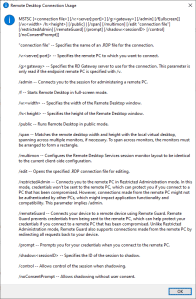
Later I found out a way easier method to get that helptext is to run MSTSC.exe /?, which shows a nice dialog:
[Window Title]
Remote Desktop Connection Usage
[Content]
MSTSC [] [/v:<server[:port]>] [/g:] [/admin] [/f[ullscreen]] [/w: /h:] [/public] | [/span] [/multimon] [/edit "connection file"] [/restrictedAdmin] [/remoteGuard] [/prompt] [/shadow: [/control] [/noConsentPrompt]]
"connection file" -- Specifies the name of an .RDP file for the connection.
/v:<server[:port]> -- Specifies the remote PC to which you want to connect.
/g: -- Specifies the RD Gateway server to use for the connection. This parameter is only read if the endpoint remote PC is specified with /v.
/admin -- Connects you to the session for administering a remote PC.
/f -- Starts Remote Desktop in full-screen mode.
/w: -- Specifies the width of the Remote Desktop window.
/h: -- Specifies the height of the Remote Desktop window.
/public -- Runs Remote Desktop in public mode.
/span -- Matches the remote desktop width and height with the local virtual desktop, spanning across multiple monitors, if necessary. To span across monitors, the monitors must be arranged to form a rectangle.
/multimon -- Configures the Remote Desktop Services session monitor layout to be identical to the current client-side configuration.
/edit -- Opens the specified .RDP connection file for editing.
/restrictedAdmin -- Connects you to the remote PC in Restricted Administration mode. In this mode, credentials won't be sent to the remote PC, which can protect you if you connect to a PC that has been compromised. However, connections made from the remote PC might not be authenticated by other PCs, which might impact application functionality and compatibility. This parameter implies /admin.
/remoteGuard -- Connects your device to a remote device using Remote Guard. Remote Guard prevents credentials from being sent to the remote PC, which can help protect your credentials if you connect to a remote PC that has been compromised. Unlike Restricted Administration mode, Remote Guard also supports connections made from the remote PC by redirecting all requests back to your device.
/prompt -- Prompts you for your credentials when you connect to the remote PC.
/shadow: -- Specifies the ID of the session to shadow.
/control -- Allows control of the session when shadowing.
/noConsentPrompt -- Allows shadowing without user consent.
[OK]
–jeroen
Posted in Batch-Files, Development, Power User, Remote Desktop Protocol/MSTSC/Terminal Services, Scripting, Software Development, Windows | Leave a Comment »
Posted by jpluimers on 2021/12/28
It still seems that WMIC is the quickest way to get CPU information on the console:
T510-PSO C:\bin\rdp> wmic cpu get name,CurrentClockSpeed,MaxClockSpeed
CurrentClockSpeed MaxClockSpeed Name
2667 2667 Intel(R) Core(TM) i5 CPU M 560 @ 2.67GHz
T510-PSO C:\bin\rdp> wmic path win32_Processor get Name,NumberOfCores,NumberOfLogicalProcessors
Name NumberOfCores NumberOfLogicalProcessors
Intel(R) Core(TM) i5 CPU M 560 @ 2.67GHz 2 4
Actually, wmic cpu is shorthand for wmic path win32_Processor, so this works fine:
T510-PSO C:\bin\rdp> wmic cpu get name,CurrentClockSpeed,MaxClockSpeed,NumberOfCores,NumberOfLogicalProcessors
CurrentClockSpeed MaxClockSpeed Name NumberOfCores NumberOfLogicalProcessors
2667 2667 Intel(R) Core(TM) i5 CPU M 560 @ 2.67GHz 2 4
The reason is that cpu is an alias:
T510-PSO C:\bin\rdp> wmic alias cpu list brief
FriendlyName PWhere Target
CPU Where DeviceID='#' Select * from WIN32_PROCESSOR
Via:
–jeroen
Posted in Batch-Files, Console (command prompt window), Development, Power User, Scripting, Software Development, T510, ThinkPad, Windows | Leave a Comment »
Posted by jpluimers on 2021/12/22

Classic browsers
Going back to in time old web-pages using old web-browsers is fun!
[Archive.is] wayback_exe (@wayback_exe) | Twitter automatically does it for you.
A short introduction is at [Wayback] muffinlabs – @wayback_exe.
There is a playground at [Archive.is] oldweb.today where you can choose which classic browser to use for viewing and what page to view with it.
You can fiddle around with the node.js based code that is available on GitHub: [Wayback/Archive.is] muffinista/wayback_exe: code for twitter bot @wayback_exe
Some screenshots:


–jeroen
Read the rest of this entry »
Posted in Development, Fun, JavaScript/ECMAScript, Node.js, Power User, Scripting, Software Development, Web Browsers | Leave a Comment »
Posted by jpluimers on 2021/12/21
This works fine on “BusyBox v1.29.3 (2019-05-21 15:22:06 PDT) multi-call binary.” that is included with VMware ESXi 6.5 update 3:
[Wayback] bash – Hexadecimal To Decimal in Shell Script – Stack Overflow
Dealing with a very lightweight embedded version of busybox on Linux means many of the traditional commands are not available (bc, printf, dc, perl, python)
echo $((0x2f))
47
hexNum=2f
echo $((0x${hexNum}))
47
Credit to [Wayback] Peter Leung for this solution.
–jeroen
Posted in *nix, *nix-tools, ash/dash, ash/dash development, Development, Power User, Scripting, Software Development | Leave a Comment »
Posted by jpluimers on 2021/12/13
The below answer works on my Linux and OS X systems (each having multiple network adapters configured):
[WayBack] bash – How to get the primary IP address of the local machine on Linux and OS X? – Stack Overflow
ip route get 1 | awk '{print $NF;exit}'
For Linux, I have this bash function:
# note the ";exit" lists the first default route interface, as there can be multiple
function nmap-fingerprint_network_of_default_interface() {
default_if=$(ip route list | awk '/^default/ {print $5;exit}')
default_if_cidr=$(ip -o -f inet addr show $default_if | awk '{print $4}')
nmap -sP $default_if_cidr
}
And for OS X this one:
# requires ipcalc
function nmap-fingerprint_network_of_default_interface() {
default_if=$(route -q -n get default | awk '/interface:/ {print $2;exit}')
default_if_address=$(ifconfig $default_if | awk '/inet / {print $2;exit}')
default_if_netmask_hex=$(ifconfig $default_if | awk '/inet / {print $4;exit}')
default_if_network_bit_count=$(ipcalc --nocolor --class $default_if_address $default_if_netmask_hex)
default_if_cidr=$(echo "$default_if_address/$default_if_network_bit_count")
nmap -sP $default_if_cidr
}
These are the variables used:
default_if: network interface of the default route
default_if_cidr: IPv4 CIDR of the network interface of the default route (see Classless Inter-Domain Routing: CIDR notation – Wikipedia)
default_if_address: IPv4 address of network interface of the default route
default_if_netmask_hex: hexadecimal IPv4 network mask of network interface of the default route
default_if_network_bit_count: number of set bits in the IPv4 network mask of the network interface of the default route
Links used to get the above functions:
I might have gotten away with a pure bash solution (see [WayBack] Bash script for calculating network and broadcast addresses from ip and netmask or CIDR Notation · GitHub or my post Getting your local IPv4 addresses, netmasks and CIDRs), but the above works and is way shorter, and easier to maintain.
In stead of ipcalc, subnetcalc can do the same calculations and also supports IPv6, so that is something for a future try:
–jeroen
Posted in *nix, *nix-tools, Apple, bash, Color (software development), Development, Mac, Mac OS X / OS X / MacOS, Power User, Scripting, Software Development | Leave a Comment »
Posted by jpluimers on 2021/12/01
Wanting a simple way on the console to convert a .pcap file to a .wav file, I searched for [Wayback] console convert pcap to wav – Google Search.
The reason is that [Wayback] fritzcap (written in Python) sometimes crashes while doing the conversion of a phone recording, so then only the .pcap file is available. I still want to figure this out, but given my health situation, I might not be able to in time.
Read the rest of this entry »
Posted in *nix, *nix-tools, Audio, Development, ffmpeg, Fritz!, Fritz!Box, fritzcap, Hardware, Media, Network-and-equipment, Power User, Python, Scripting, Software Development, Wireshark | Leave a Comment »
Posted by jpluimers on 2021/12/01
Some notes, as I’m looking to a stable, simple to maintain email forwarding system that is also secure and – yes – can cost money.
I need to leave IT-infrastructure behind that is easy to maintain for my heirs.
Some links:
- [Archive.is] mausdompteur 💉 on Twitter: “Email! Yes, Email. Need to Set Email for a domain, basically forward only. Has anyone ever heard of https://t.co/v29TbMXrrl? Is it good? Any alternatives I should consider?”
- [Wayback] The Best Free Email Forwarding Service for Custom Domains | Forward Email
The best open-source and free email forwarding service for custom domains. We do not keep logs nor store emails. We don’t track you. Unlimited aliases, catch-alls, wildcards, API access, and disposable addresses. Built-in support for DKIM, SRS, SPF, ARC, DMARC, and more. No credit card required.
- [Wayback] FAQ | Forward Email has a truckload of information, but the main points for me are these:
What is the max email size limit
We default to a 50MB size limit, which includes content, headers, and attachments. Note that services such as Gmail and Outlook allow only 25MB size limit, and if you exceed the limit when sending to addresses at those providers you will receive an error message.
An error with the proper response code is returned if the file size limit is exceeded.
…
What is the difference between Free and Enhanced Protection
The Free plan requires you to use public DNS records to store your forwarding configuration. Anyone with a computer can lookup your forwarding configuration in a terminal if you are on the Free plan. Unlike the Free plan, the Enhanced Protection plan uses a cryptographically generated random string to store your forwarding configuration privately.
| Free Plan |
Enhanced Protection Plan |
forward-email=user@gmail.com |
forward-email-site-verification=m8d7o8K4Il |
- [Wayback] About | Forward Email with this very important point for me:
Privacy
We have a “zero tolerance policy” privacy policy, which states that we don’t store logs nor emails, and we don’t track users. Our statement clearly states that we do not collect nor store forwarded emails, metadata, server-side nor client-side logs, IP addresses, or browser information.
Only an email address is required to create and configure the Enhanced Protection Plan, which hides DNS email alias information on the free plan through a managed and hosted service.
User’s accounts, domains, and all related information can be permanently deleted at any time by the user.
- [Wayback] Pricing | Forward Email (levels: free / enhanced protection / team / enterprise)
Free email forwarding for domains with features including Custom Domain Email Forwarding, Disposable Addresses, Multiple Recipients, Wildcards, and more!
- It’s open source too (written in JavaScript using Node.js), but running it requires you to keep up with versions and security: [Wayback/Archive.is] forwardemail/free-email-forwarding: The best free email forwarding for custom domains. Visit our website to get started (SMTP server)
–jeroen
Read the rest of this entry »
Posted in Development, eMail, JavaScript/ECMAScript, Node.js, Power User, Scripting, SocialMedia, Software Development, Web Development | Leave a Comment »
Posted by jpluimers on 2021/11/30
On my list of things to try, as it allows me to have an ISO at hand in case I ever need to quickly re-install a machine to the current patch level (for instance when the USB boot stick breaks down: these things happen in reality): [Wayback] VFrontDe/ESXi-Customizer-PS: PowerCLI script that greatly simplifies and automates the process of creating fully patched and customized VMware ESXi installation images
ESXi-Customizer-PS is a Powershell script that greatly simplifies and automates the process of creating fully patched and customized ESXi 5.x and 6.x installation ISOs using the VMware PowerCLI ImageBuilder module/snapin.
…
Requirements
- A Windows computer (XP or newer) with Powershell 2.0 or newer
- VMware PowerCLI version 5.1 or newer
…
You can get the code from [Wayback] ESXi-Customizer-PS/ESXi-Customizer-PS.ps1 at master · VFrontDe/ESXi-Customizer-PS.
The old site (which still has most of the documentation) can be reached at two places:
A video showing how to use it is below the signature.
The above links via [Wayback] Custom ESXi ISO with ne1000 driver for install on Intel NUC Frost Canyon – seanwalsh.dev.
Oh: you can check if you have a PXE, USB or HDD installation of ESXi via the steps here: Determining the ESXi installation type (2014558) | VMware KB.
More on a failing USB stick later…
–jeroen
Read the rest of this entry »
Posted in CommandLine, Development, ESXi6, ESXi6.5, ESXi6.7, ESXi7, Power User, PowerCLI, PowerShell, PowerShell, Software Development, Virtualization, VMware, VMware ESXi | Leave a Comment »