The Wiert Corner – irregular stream of stuff

Jeroen W. Pluimers on .NET, C#, Delphi, databases, and personal interests

  • My badges

  • Twitter Updates

  • Pages

  • All categories

  • Enter your email address to subscribe to this blog and receive notifications of new posts by email.

    Join 1,839 other subscribers

Archive for the ‘Web Development’ Category

Reminder to self: pointers to recovering “The Great Suspender” suspended URLs (after in 2021 Google booted it from Chrome for being malware)

Posted by jpluimers on 2023/12/14

I was a long term user of “The Great Suspender”. It was a cool little Chrome Extension that would auto-suspend Chrome tabs that had not been used for a while and resume them when the tab did get accessed again thereby greatly reducing the horrible Chrome CPU and memory footprints.

During my year+ long treatment against metastasised rectum cancer I had suspended or hibernated most of my physical and virtual machines. So there was not just the surprised during the recovery of those that The Great Suspender had been kicked of the Chrome extensions, but also the problem of getting all the suspended tabs back of machines that eventually would be awoken out of sleep: I keep tabs open on stuff that I was working on or investigating for future blog posts, so these somehow could be important.

For now, I am not using anything as a replacement just to experience how well Chrome has evolved to suspend inactive tabs itself.

Now Chrome seems to do this well, as this post is based on an old VM that I have now unsuspended which had [Wayback/Archive] “the great suspender” “malware” – Google Search and the below links open in a mid-February 2021 state but not all archived in the Wayback Machine or Archive.is (some I did archived in February-May 2021).

The links are about why it got removed, how to recover lost suspended tabs and a possible alternative in case current Chrome suspend behaviour is not good enough.

Read the rest of this entry »

Posted in Bookmarklet, Chrome, Development, Google, HTML, JavaScript/ECMAScript, Power User, Scripting, Software Development, Web Development | Leave a Comment »

Need to find a better way to log the essentials of a browser side HTML element using JavaScript object

Posted by jpluimers on 2023/12/04

The basic options for logging an HTML Element using JavaScript are for instance described in [Wayback/Archive] google chrome – How can I log an HTML element as a JavaScript object? – Stack Overflow (thanks [Wayback/Archive] Ben Flynn for asking and [Wayback/Archive] Mathias Bynens for answering)):

Use console.dir:
var element = document.documentElement; // or any other element
console.log(element); // logs the expandable <html>…</html>
console.dir(element); // logs the element’s properties and values

Both log all html or all properties even though often these are enough (most via [Wayback/Archive] Element – Web APIs | MDN):

Read the rest of this entry »

Posted in Development, HTML, HTML5, JavaScript/ECMAScript, Scripting, Software Development, Web Development | Leave a Comment »

javascript – Chrome debugging – break on next click event – Stack Overflow

Posted by jpluimers on 2023/11/23

I wish I had known this ages ago: [Wayback/Archive] javascript – Chrome debugging – break on next click event – Stack Overflow (thanks [Wayback/Archive] D.R. for asking and [Wayback/Archive] Konrad Dzwinel for answering):

What you are looking for are [Wayback/Archive] ‘Event Listener Breakpoints‘ on the Sources tab. These breakpoints are triggered whenever any event listener, that listens for chosen event, is fired. You will find them in the Sources tab. In your case, expand ‘Mouse’ category and choose ‘Click’.

Read the rest of this entry »

Posted in Chrome, Chrome, Development, Google, HTML, HTML5, JavaScript/ECMAScript, Power User, Scripting, Software Development, Web Browsers, Web Development | Leave a Comment »

So what is clients6.google.com?

Posted by jpluimers on 2023/11/16

[Wayback/Archive] $7.5k Google services mix-up – Ezequiel Pereira

Luckily [Wayback/Archive] what is clients6.google.com – Google Search got me to [Wayback/Archive] $7.5k Google services mix-up – Ezequiel Pereira, which explains:

Read the rest of this entry »

Posted in Development, Software Development, Web Development | Leave a Comment »

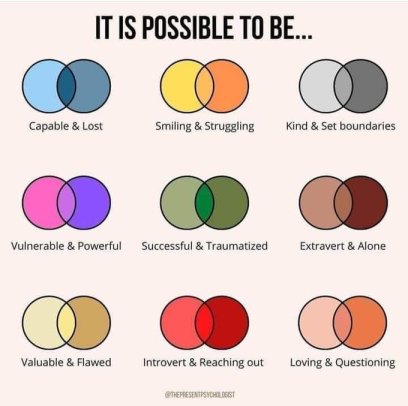
Trying to do my best to be “and” instead if “either, or” (plus some links to convert Instagram media id to/from shortcode)

Posted by jpluimers on 2023/11/15

[Wayback/Archive] Danielle Braun dr. on Twitter: “En en in plaats van of of.”

The image is by @thepresentpsychologist on Instagram (figured that out via Google Lens finding [Wayback/Archive] Psychological Safety Newsletter #39: Diversity and Ethical Behaviour | Psychological Safety), but and it took some effort to find the original post back as Instagram does not allow anonymous browsing.

Read the rest of this entry »

Posted in About, Autistic Spectrum/Autism, Development, Instagram, JavaScript/ECMAScript, Node.js, Personal, Scripting, SocialMedia, Software Development, Web Development | Leave a Comment »

Figured out why on fresh Chrome installs, iframe with embedded Google Calendar won’t work and show `(blocked:other)` in the Network Tab of Chrome Developer Tools

Posted by jpluimers on 2023/11/09

Wow, what a long title!

What happened is that I have a few dashboards for people that include various embedded Google Calendar widgets in <iframe>s.

These won’t show on fresh installs of Google Chrome that have the particular user signed on in the Chrome Settings so that settings will be synchronised, right?

Right?!

Wrong!!

Not all Chrome settings will be synchronised by Chrome. Things like [Wayback/Archive] “On startup” (with the pages shown after Chrome startup) and wich installed extensions are synchronised including the visibility of their icons. But the settings of the extensions themselves will not.

This means that odd things happen, for instance extensions like [Wayback/Archive] Privacy Badger and [Wayback/Archive] uBlock Origin being installed, but both reverting to their default settings.

That in turn leads to hard to see problems, in this case the embedded Google Calendar <iframe>s failing.

Read the rest of this entry »

Posted in Chrome, Development, Google, GoogleCalendar, Power User, Privacy, Software Development, Web Development | Leave a Comment »

0x48piraj/fadblock: Friendly Adblock for YouTube: A fast, lightweight, and undetectable YouTube Ads Blocker for Chrome, Opera and Firefox.

Posted by jpluimers on 2023/10/31

[Wayback/Archive] 0x48piraj/fadblock: Friendly Adblock for YouTube: A fast, lightweight, and undetectable YouTube Ads Blocker for Chrome, Opera and Firefox.

At the time of writing, it was available in these web-browser extension/addon stores:

A 404 was returned at [Wayback/Archive] https://addons.opera.com/en-gb/extensions/details/fadblock/ which I reported in [Wayback/Archive] Extension vanished from the Opera Addons page · Issue #15 · 0x48piraj/fadblock.

Via:

–jeroen

Posted in Chrome, CSS, Development, Firefox, JavaScript/ECMAScript, Opera, Power User, Scripting, SocialMedia, Software Development, Web Browsers, Web Development, YouTube | Leave a Comment »

In the WordPress classic editor, avoid the SyntaxHighlighter Code Block

Posted by jpluimers on 2023/10/25

When you use the WordPress classic editor (which for me still works far better than the Gutenberg one), avoid at all cost the use of the [Wayback/Archive] SyntaxHighlighter Code Block – Page 2 – WordPress.com Support.

Each time you switch between from Text View back to Visual, some characters are html-encoded, like:

  • & becomes &amp;
  • > becomes &gt;

Switching twice makes & into &amp;&gt.

Switching three times makes & into &amp;&amp;&amp;gt.

I already explained why to avoid the Gutenberg editor in Bookmarklet to force WordPress classic-editor.

Via:

–jeroen

Posted in Classic editor, Development, Gutenberg editor, SocialMedia, Software Development, Web Development, WordPress, WordPress | Leave a Comment »

Chrome (likely also Firefox/Edge/Safari): no non-global way to workaround Bookmarklets failing on GitHub raw code with “Blocked script execution…”

Posted by jpluimers on 2023/10/18

Last year, I answered [Wayback/Archive] javascript – Bookmarklet to append a string to a URL – Stack Overflow (asked by [Wayback/Archive] Karlo Guidoni Martins, thanks!).

It is about not being able to run bookmarklets on pages hosted by for instance:

  • gist.githubusercontent.com
  • raw.githubusercontent.com

GitHub is an exception, as RAW files from these services do work fine:

At first sight, when running a Bookmarklet on those RAW GitHub served pages, you do not see an error: it just looks like the Bookmarklet does not work at all. The last part is right, but in the Chrome console you can actually see the error.

That error lead me to my answer:

Read the rest of this entry »

Posted in Bookmarklet, Chrome, Development, Firefox, JavaScript/ECMAScript, Power User, Scripting, Software Development, Web Browsers, Web Development | Leave a Comment »

Javascript – Copy string to clipboard as text/html – Stack Overflow

Posted by jpluimers on 2023/09/27

For my link archive is the below answer that should help me a lot with unfinished bits from Some JavaScript bookmarklets for WordPress published pages centered around navigation and IDs.

Goal of that post was to have some grounding and eventually find a means to build an HTML page in a new tab using a bookmarklet that I then later could post to my blog.

Assembling to HTML and putting it on the clipboard might be a lot easier and better fitting in my workflow.

So, via [Wayback/Archivejavascript copy html to clipboard – Google Search, for my link archive: [Wayback/Archive] Javascript – Copy string to clipboard as text/html – Stack Overflow (thanks [Wayback/Archive] Loilo for answering and [Wayback/Archive] kofifus for asking):

Below is a function that will do exactly that. I tested it with your required browsers, it works in all of them. However, IE 11 will ask for confirmation on that action.

Explanation how this works can be found below, you may interactively test the function out in this jsFiddle.

Read the rest of this entry »

Posted in Chrome, Development, Firefox, HTML, HTML5, Internet Explorer, JavaScript/ECMAScript, JSFiddle, Power User, Scripting, Software Development, Web Browsers, Web Development | Leave a Comment »