The Wiert Corner – irregular stream of stuff

Jeroen W. Pluimers on .NET, C#, Delphi, databases, and personal interests

  • My badges

  • Twitter Updates

  • My Flickr Stream

  • Pages

  • All categories

  • Enter your email address to subscribe to this blog and receive notifications of new posts by email.

    Join 1,839 other subscribers

Archive for the ‘Web Development’ Category

HTML table border styles

Posted by jpluimers on 2021/01/20

I always get confused when I see this kind of HTML:

<td style="border: 1px black; border-style: none solid solid;">

This raises questions like:

  • When less than 4 borders are mentioned, which borders are solid, and which borders are none?
  • What is the order of 0…4 borders?

Luckily these links helped me:

  1. [WayBack] w3schools: CSS border-style property
  2. [WayBack] w3schools: CSS Borders
  3. [WayBack] border-style – CSS: Cascading Style Sheets | MDNThe border-style CSS property is a shorthand property that sets the line style for all four sides of an element’s border.

The first two made me find the last one, which is best as it has a CSS demo button (that also works on the WayBack link), a list of examples, and even better, answers the above questions with the “border-style” list below.

I rephrased their list into a table emphasising the clock-wise order:

The number of values determine the sides affected; thinking clock-wise is easiest to get it:

# values affected sides example top right bottom left
1 all: top, right, bottom, left solid solid solid solid solid
2 top & bottom, right & left none solid none solid none solid
3 top, right & left, bttom dotted none solid dotted none solid none
4 top, right, bottom, left double dotted solid none double dotted solid none

Their list:

The border-style property may be specified using one, two, three, or four values.

  • When one value is specified, it applies the same style to all four sides.
  • When two values are specified, the first style applies to the top and bottom, the second to the left and right.
  • When three values are specified, the first style applies to the top, the second to the left and right, the third to the bottom.
  • When four values are specified, the styles apply to the toprightbottom, and left in that order (clockwise).

Each value is a keyword chosen from the list below.

then it continues with a table showing the outcome of the various line style values you can put in:

<line-style>
Describes the style of the border. It can have the following values:

none
Like the hidden keyword, displays no border. Unless a background-image is set, the calculated value of border-top-width will be 0, even if the specified value is something else. In the case of table cell and border collapsing, the none value has the lowest priority: if any other conflicting border is set, it will be displayed.
hidden
Like the none keyword, displays no border. Unless a background-image is set, the calculated value of border-top-width will be 0, even if the specified value is something else. In the case of table cell and border collapsing, the hidden value has the highestpriority: if any other conflicting border is set, it won’t be displayed.
dotted
Displays a series of rounded dots. The spacing of the dots is not defined by the specification and is implementation-specific. The radius of the dots is half the calculated border-top-width.
dashed
Displays a series of short square-ended dashes or line segments. The exact size and length of the segments are not defined by the specification and are implementation-specific.
solid
Displays a single, straight, solid line.
double
Displays two straight lines that add up to the pixel size defined by border-width or border-top-width.
groove
Displays a border with a carved appearance. It is the opposite of ridge.
ridge
Displays a border with an extruded appearance. It is the opposite of groove.
inset
Displays a border that makes the element appear embedded. It is the opposite of outset. When applied to a table cell with border-collapse set to collapsed, this value behaves like groove.
outset
Displays a border that makes the element appear embossed. It is the opposite of inset. When applied to a table cell with border-collapse set to collapsed, this value behaves like ridge.

–jeroen

Posted in CSS, Development, HTML, HTML5, Software Development, Web Development | Leave a Comment »

TODO: if weerslag hasn’t supported https yet, dig deeper into ProxyPass / ProxyPassReverse

Posted by jpluimers on 2021/01/12

I’ve this page for my brother: https://martijn.pluimers.com/agenda-month-weather.html.

It serves his agenda plus a few weather widgets.

The weerslag widget fails to load as it’s in an iframe pointing to http but the page is https. That’s not allowed as shown in this nice table at [WayBackssl – Insecure content in iframe on secure page – Stack Overflow by amol-ghotankar and richard:

page  - iframe - status
----- - -----  - -----------
http  - http   - allowed
http  - https  - allowed
https - http   - not allowed
https - https  - allowed

So I put it behind a simple Apache reverse proxy: https://www.pluimers.com/maps.weerslag.nl/GratisRadar/1201/864/verwacht?zoom=10:


<Location /maps.weerslag.nl>
ProxyPass http://maps.weerslag.nl
ProxyPassReverse http://maps.weerslag.nl
Require all granted
</Location>

If they still haven’t fixed their https access, I need to dig deeper into this.

When writing this [Arhive.ishttps://maps.weerslag.nl/GratisRadar/1201/864/verwacht?zoom=10 gave a 404 and http://maps.weerslag.nl/GratisRadar/1201/864/verwacht?zoom=10 misbehaved behind the proxy:

–jeroen

Posted in *nix, Apache2, Development, Power User, Web Development | Leave a Comment »

Stofradar – RevSpace

Posted by jpluimers on 2020/12/10

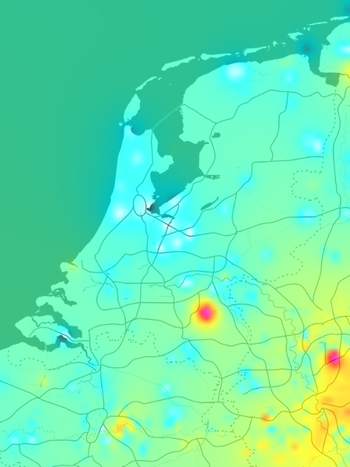
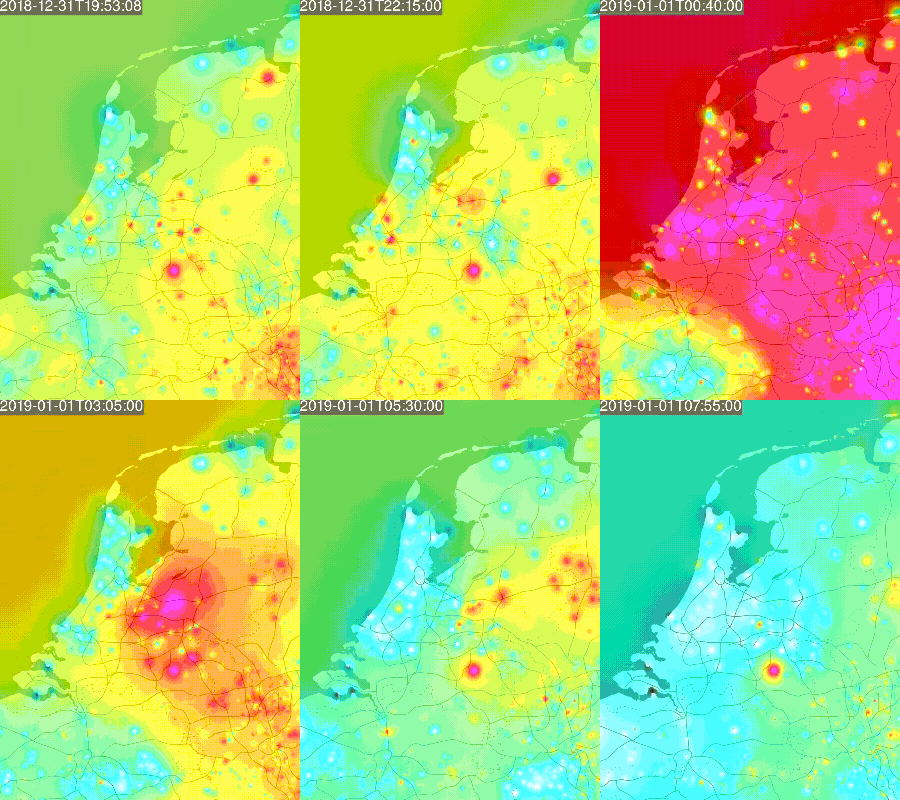
On my list to play around with: [WayBack] Stofradar – RevSpace.

It gets data from [WayBack] luftdaten.info – Feinstaub selber messen – Open Data und Citizen Science aus Stuttgart , then visualises it.

Via: [WayBack] Helga van Leur on Twitter: “Deze animatie van de uitstoot fijnstof tijdens jaarwisseling is ook treffend… Opvallend is hotspot Veghel e.o. en op Veluwe. Bron: …”

jeroen

Read the rest of this entry »

Posted in Development, Software Development, Web Development | Leave a Comment »

GitHub – DevExpress/testcafe: A Node.js tool to automate end-to-end web testing.

Posted by jpluimers on 2020/12/09

In my list of things to play with: [WayBack] GitHub – DevExpress/testcafe: A Node.js tool to automate end-to-end web testing.:

A Node.js tool to automate end-to-end web testing.
Write tests in JS or TypeScript, run them and view results.

https://devexpress.github.io/testcafe


  • Works on all popular environments: TestCafe runs on Windows, MacOS, and Linux. It supports desktop, mobile, remote and cloud browsers (UI or headless).
  • 1 minute to set up: You do not need WebDriver or any other testing software. Install TestCafe with one command, and you are ready to test: npm install -g testcafe
  • Free and open source: TestCafe is free to use under the MIT licensePlugins provide custom reports, integration with other tools, launching tests from IDE, etc. You can use the plugins made by the GitHub community or make your own.

Related:

  • [WayBack] A node.js tool to automate end-to-end web testing | TestCafe:

    Use TestCafe to write tests in JS or TypeScript, run them and view results. TestCafe runs on Windows, MacOS, and Linux and takes 1 minute to set up.

  • [WayBack] TestCafe: Web Testing Framework | DevExpress

    100% web-based functional testing framework with integrated visual test recorder, remote device testing, and natural JavaScript API

    • From download to recording your first test in less than 5 minutes — installer automatically configures your environment.
    • With TestCafe, you can run tests in any browser that supports HTML5 (including IE9+, Chrome, Firefox, Safari, Opera).
    • TestCafe is operating system agnostic so you can run tests on Windows, Mac or Linux machines.
    • Run tests on remote computers and mobile devices.
    • Run tests in multiple browsers and on multiple machines in parallel.
    • Run tests in the background on any machine.
    • TestCafe allows you to test web pages that require Basic and Windows HTTP Authentication.

Via:

Screen materials below the fold.

–jeroen

Read the rest of this entry »

Posted in Development, JavaScript/ECMAScript, LifeHacker, Power User, Scripting, Software Development, Testing, Web Development | Leave a Comment »

Tables with two headers • Tables • WAI Web Accessibility Tutorials

Posted by jpluimers on 2020/12/08

Since I always forget that you can have any cell marked as th to make it a header: [WayBack] Tables with two headers • Tables • WAI Web Accessibility Tutorials.

This is not just limited to top rows, you can use it any where:

  • in the left column
  • in any other row
  • in any other column
  • in individual cells

In addition, a table can also have a caption, which is not just useful for screen-readers: it benefits general readability.

Quoting the page:

For such tables, use the <th> element to identify the header cells and the scope attribute to declare the direction of each header. The scopeattribute can be set to row or col to denote that a header applies to the entire row or column, respectively.

Additionally, you can use the <caption> element to identify the table in a document. This is particularly useful for screen-reader users browsing the web page in “table mode” where they can navigate from table to table.

Examples on that page:

–jeroen

Posted in Development, HTML, HTML5, Software Development, Web Development | Leave a Comment »

Making it dead simple to implement @haveibeenpwnd in your applications, including strength warning if found in @troyhunt’s password collection.

Posted by jpluimers on 2020/12/02

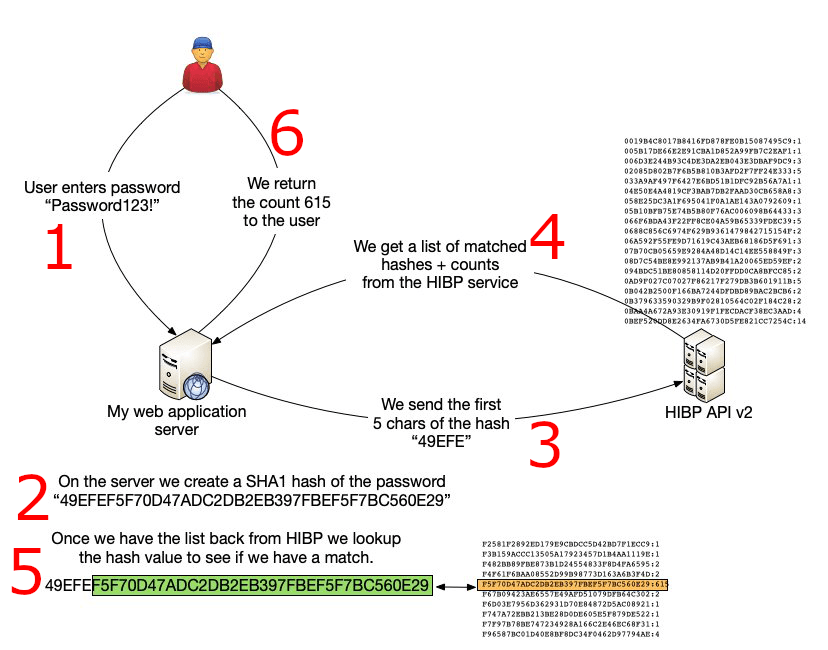
I wasn’t aware that Troy Hunt created an API [WayBack] for [WayBack] Have I Been Pwned: Check if your email has been compromised in a data breach.

He did, as I noticed through [WayBack] Michelangelo van Dam on Twitter: “Making it dead simple to implement @haveibeenpwnd in my applications, including strength warning if found in @troyhunt’s password collection. Check out to try it out yourself. #ImproveSecurity #haveibeenpwnd”.

There are in fact plenty of other packages, web-sites and apps using the API as seen on [WayBack] Have I Been Pwned: API consumers.

Many people ask “if it is safe” (often assuming passwords are sent in clear, or hashes are sent in full; my fear is that those people implement security somewhere).

It is safe:

PHP source is at [WayBack] GitHub – DragonBe/hibp: A composer package to verify if a password was previously used in a breach using Have I Been Pwned API.

There is also a [WayBack] composer package at [WayBack] dragonbe/hibp – Packagist.

A really cool thing on it is this:

This project was also the subject of my talk [WayBack] Mutation Testing with Infection where the code base was not only covered by unit tests, but also was subjected to Mutation Testing using [WayBack] Infection to ensure no coding mistakes could slip into the codebase.

Apart from the tests, the most important source is at [WayBack] hibp/Hibp.php at master · DragonBe/hibp · GitHub

Related:

–jeroen

Posted in Development, Mobile Development, PHP, Python, Scripting, Software Development, Web Development | Leave a Comment »

960 Grid System

Posted by jpluimers on 2020/11/19

Would this be the reason that so many web-sites still use less than half of my screen width?

The 960 Grid System is an effort to streamline web development workflow.

Source: [WayBack] 960 Grid System

Via: [WayBack] windows – What minimum screen size should I assume? – Stack Overflow (where in 2010 for some types of software you had to go for 640×480, many things were still 800×600, but 1024×768 for desktop users was the norm; on the one hand times have changed, but on the other hand not a lot).

Code: [WayBack] GitHub – nathansmith/960-Grid-System: The 960 Grid System is an effort to streamline web development workflow.

Related:

–jeroen

Posted in Development, Software Development, Usability, User Experience (ux), Web Development | Leave a Comment »

html – Is it possible to specify a starting number for an ordered list? – Stack Overflow

Posted by jpluimers on 2020/11/03

Since I keep forgetting this has been possible since the introduction of html 5: [WayBack] html – Is it possible to specify a starting number for an ordered list? – Stack Overflow:

If you need the functionality to start an ordered list (OL) at a specific point, you’ll have to specify your doctype as HTML 5; which is:

<!doctype html>

With that doctype, it is valid to set a start attribute on an ordered list. Such as:

<ol start="6">
  <li>Lorem</li>
  <li>Ipsum</li>
  <li>Dolor</li>
</ol>

–jeroen

Posted in Development, HTML, HTML5, Software Development, Web Development | Leave a Comment »

Dimensions – Chrome Web Store

Posted by jpluimers on 2020/10/13

[WayBack/Archive.isDimensions – Chrome Web Store: A tool for designers to measure screen dimensions

This extension measures the dimensions from your mouse pointer up/down and left/right until it hits a border. So if you want to measure distances between elements on a website this is perfect. It doesn’t really work with images because there the colors change a lot pixel to pixel.

# Images & HTML Elements

Measure between the following elements: images, input-fields, buttons, videos, gifs, text, icons. You can measure everything you see in the browser.

# Mockups

Your designer handed you mockups as PNGs or JPEGs? Just drop them into Chrome, activate Dimensions and start measuring.

# Keyboard Shortcut

You can start and stop dimensions with the ALT + D shortcut.

# Area Boundaries

Wanna get the radius of a circle? Is text standing in your way? Press Alt to measure the dimensions of a connected area.

–jeroen

Via:

Posted in Chrome, Chrome, Development, Google, HTML, Power User, Software Development, Web Browsers, Web Development | Leave a Comment »

Great tool: the Toptal Colorblind Web Page Filter

Posted by jpluimers on 2020/08/06

Colorblind Web Page Filter

Colorblind Web Page Filter

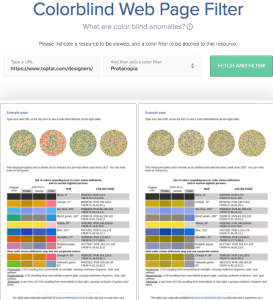
A great tool I found out about a while ago [Archive.is] Toptal Color Blind Filter.

It shows the original web page and the rendering for various types of color blindness:

  • protan -> Protanopia: red/green color blindness; anomalous red cones
  • deutan -> Deutanopia: red/green color blindness; anomalous green cones
  • tritan -> Tritanopia: blue/yellow color blindness; anomalous blue cones
  • grey -> Greyscale/achromatopsia: quick check for all forms of colorblindness

Because of a comment at [WayBack] Forums… https://embarcaderomonitoring.wiert.me/ – JWP – Google+, I used Toptal to notify Uptime robot that their status pages are hard for color blind people: [WayBackJeroen Pluimers on Twitter: “Some color blind people indicated to me that @uptimerobot status pages are hard for them to read. Examples are for @EmbarcaderoTech as they have subdomains being offline often: …”, so lets look at how people with various types of color blindness see embarcaderomonitoring.wiert.me :

Read the rest of this entry »

Posted in *nix, Color (science), Color (software development), Development, Monitoring, Power User, science, Software Development, Uptimerobot, Usability, User Experience (ux), Web Development | Leave a Comment »