The Wiert Corner – irregular stream of stuff

Jeroen W. Pluimers on .NET, C#, Delphi, databases, and personal interests

  • My badges

  • Twitter Updates

  • My Flickr Stream

  • Pages

  • All categories

  • Enter your email address to subscribe to this blog and receive notifications of new posts by email.

    Join 1,861 other subscribers

Archive for the ‘Source Code Management’ Category

PlasticSCM: delete a changeset

Posted by jpluimers on 2021/06/15

Every now and then you really goof up the final changeset in a series of changesets that are in a branch.

I have yet to figure out how to delete that changeset, other than keeping the branch stale and merge from the last good changeset to a new branch.

This seems hard to do given these from [Archive.is] plasticscm delete changeset – Google Search:

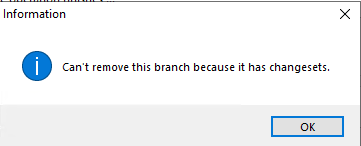
Deleting the branch fails because there is still a changeset on it:

Deleting the changeset fails because the option is greyed out:

It does not happen that often, though there are now about a few % of the branches stale because of this.

–jeroen

Posted in Development, PlasticSCM, Source Code Management | Leave a Comment »

PlasticSCM ignore.conf: globally ignoring certain file types, but allowing them recursively in a subdirectory

Posted by jpluimers on 2021/05/19

I needed this for a project there 3rdParty libraries could have .dcu and .obj files (to either speed up building, or because not all source code was supplied), but those files should not be present nowhere else in the repository.

This is an ignore.conf template for that:

*.obj
*.dcu

!/3rdParty/**/*.dcu
!/3rdParty/**/*.obj

The ! exclamation mark undoes the ignore according to the pattern following it.

Note the starting slashes after the !: they indicate the root directory of the repository and are mandatory.

Based on (warning, the JavaScript on these pages are extremely CPU intensive!):

–jeroen

Posted in Development, PlasticSCM, Software Development, Source Code Management | Leave a Comment »

Plastic SCM: add the current directory recursively

Posted by jpluimers on 2021/05/18

Since I always forget the command (I do not use it often enough) [WayBack] Plastic SCM – Branch per task guide:

cm add -R .

That adds the current directory (.) recursively, taking into account the ignore.conf file.

–jeroen

Posted in Development, PlasticSCM, Software Development, Source Code Management | Leave a Comment »

Chocolatey: installing Oracle SQL Developer and updating the chocolatey package

Posted by jpluimers on 2021/05/13

Sometimes an install is not just as simple as C:\>choco install --yes oracle-sql-developer.

Edit 20210514:

Note that most of the below pain will be moot in the future as per [Archive.is] Jeff Smith 🍻 on Twitter: “we’re working on removing the SSO requirement, it’s already done for @oraclesqlcl – see here … “ referring to [Wayback] SQLcl now under the Oracle Free Use Terms and Conditions license | Oracle Database Insider Blog

SQLcl, the modern command-line interface for the Oracle Database, can now be downloaded directly from the web without any click-through license agreement.

It means the Oracle acount restriction will be lifted, and downloads will be a lot simpler.

I started with the below failing command, tried a lot of things, then finally almost gave up: Oracle stuff does not want to be automated, which means I should try to less of their stuff.

First of all you need an Oracle account (I dislike companies doing that for free product installs; I’m looking at Embarcadero too) by going to profile.oracle.com:

[WayBack] Chocolatey Gallery | Oracle SQL Developer 18.4.0 (also: gist.github.com/search?l=XML&q=oracle-sql-developer)

Notes

  • This version supports both 32bit and 64bit and subsequently does not have a JDK bundled with it. It has a
    dependency on the jdk8 package to meet the application’s JDK requirement.
  • An Oracle account is required to download this package. See the “Package Parameters” section below for
    details on how to provide your Oracle credentials to the installer. If you don’t have an existing account, you can
    create one for free here: https://profile.oracle.com/myprofile/account/create-account.jspx

Package Parameters

The following package parameters are required:

/Username: – Oracle username
/Password: – Oracle password

(e.g. choco install oracle-sql-developer --params "'/Username:MyUsername /Password:MyPassword'")

To have choco remember parameters on upgrade, be sure to set choco feature enable -n=useRememberedArgumentsForUpgrades.

Then the installation failed fail again: ERROR: The response content cannot be parsed because the Internet Explorer engine is not available, or Internet Explorer's first-launch configuration is not complete. Specify the UseBasicParsing parameter and try again.

The trick is to RUN IEXPLORE.EXE AS ADMINISTRATOR ONCE BEFORE INSTALLING FROM CHOCOLATEY. Who would believe that.

The reason is that the package uses Invoke-WebRequest which requires Internet Explorer and PowerShell 3. Chocolatey packages however need to be able to run on just PowerShell 2 without Invoke-WebRequest.

Maybe using cURL can remedy that; adding a dependency to is is possible, as cURL can be installed via chocolatey: [WayBack] How to Install cURL on Windows – I Don’t Know, Read The Manual. Another alternative might be [WayBack] Replace Invoke-RestMethod in PowerShell 2.0 to use [WayBack] WebRequest Class (System.Net) | Microsoft Docs.

Read the rest of this entry »

Posted in CertUtil, Chocolatey, CommandLine, Database Development, Development, DVCS - Distributed Version Control, git, Hashing, OracleDB, Power User, PowerShell, Security, SHA, SHA-1, Software Development, Source Code Management, Windows, XML, XML/XSD | Leave a Comment »

Plastic SCM: show the current changeset abstract (without files) on the commandline

Posted by jpluimers on 2021/04/14

I could not find a syntax for “current changeset”, but since cm log accepts the output of cm status as changeset identifier:

for /F "tokens=*" %l in ('call cm status --nochanges') do (call cm log %l --itemformat )

Or in batch file form:

for /F "tokens=*" %%l in ('call cm status --nochanges') do (call cm log %%l --itemformat )

Two important parts of the trick that ensure each command only outputs what is needed:

  1. The empty --itemformat specification for cm log indicates that no details about files should be logged.Without it, cm log will list both the changeset information and information about each item in the changeset.
  2. The other trick is --nochanges for cm status: it only shows the status line, and no other changes.Without it, cm status will emit one line per changed file.

–jeroen

Read the rest of this entry »

Posted in Development, Encoding, PlasticSCM, Software Development, Source Code Management | Leave a Comment »

How to Convert a Mercurial Repository to Git on Windows

Posted by jpluimers on 2021/03/30

For my link archive: [WayBack] How to Convert a Mercurial Repository to Git on Windows.

Let’s see how this maps to MacOS or Linux…

It is based on hg-git:

Other solutions are based on  [WayBack]fast-export or [WayBack] gitifyhg.

If I am going to do this beyond a one-off conversion, I need to figure out their differences.

Related:


–jeroen

Posted in Development, DVCS - Distributed Version Control, git, Mercurial/Hg, Software Development, Source Code Management | Leave a Comment »

Thread by @mathdroid: “I now have the most swagger @github profile, EVER Sorry, your browser doesn’t support embedded videos @github Method: Download and install G […]”

Posted by jpluimers on 2021/03/24

That was such a cool idea: rickrolling your own git profile. [WayBack] Thread by @mathdroid: “I now have the most swagger @github profile, EVER […]”.

Github profile (which in the mean time changed): [WayBack] mathdroid (Odi) · GitHub.

–jeroen

Read the rest of this entry »

Posted in Development, DVCS - Distributed Version Control, Fun, GitHub, Source Code Management | Leave a Comment »

Undocumented Plastic “cm status –hiddenchanged” to show hidden changes like the Plastic SCM GUI does by default

Posted by jpluimers on 2021/03/16

[WayBack] Undo changes to a hidden changes item from CLI – General – Plastic SCM Community.

Maybe I should start an undocumented Plastic SCM series just like I did for Delphi. (:

As soon as you have entries in your hidden_changes.conf, then entries matching will show up in your Plastic SCM GUI, but not included in the cm status --all command.

Luckily there is an the --hiddenchanged switch (maybe to keep naming inconsistent with the hidden_changes.conf file) which is only documented in cm changed --help, not on-line).

So my new cm-show-status.bat file contains this line:

cm status --all --hiddenchanged %*

Maybe more switches can be deducted from [WayBack] Plastic SCM version control · The Plastic SCM API: GET PENDING CHANGES IN WORKSPACE:

GET PENDING CHANGES IN WORKSPACE

GET /api/v1/wkspaces/:wkname/changes

Parameters

Name Type Description
types string A comma-separated list detailing the desired change types to display in the response. Available types: addedcheckoutchangedcopiedreplaceddeletedlocaldeletedmovedlocalmovedprivateignoredhiddenchangedcontrolledchangedall

Read the rest of this entry »

Posted in Development, Encoding, PlasticSCM, Power User, Software Development, Source Code Management | Leave a Comment »

Applying .patch File From Git – Easyread – Medium

Posted by jpluimers on 2021/03/10

Next time I need to apply a patch file directly from git itself, I need to re-read [WayBack] Applying .patch File From Git – Easyread – Medium.

Without git, just run the patch command as per [WayBack] What is a patch in git version control? – Stack Overflow

The git workflow for the above git scenario is this one:

–jeroen

Posted in Development, DVCS - Distributed Version Control, git, Software Development, Source Code Management | Leave a Comment »

showthedocs

Posted by jpluimers on 2021/02/18

[WayBack] showthedocs

is a documentation browser that finds the relevant docs for your code. It works by parsing the code and connecting parts of it to their explanation in the docs

, and supports these languages:

  • SQL
    • postgresql
    • mysql
  • Configuration
    • nginx
    • gitconfig

You can enter any language text, then click the language, followed by clicking the “SHOW ME THE DOCS!” button, for which an example is further below.

The site has an open architecture, allowing to plug in more languages and documentation:


gitconfig example

So for instance the below ./git/config file leads to this result [WayBack] where you can click on all the coloured areas for easy navigation through the documentation:

Read the rest of this entry »

Posted in *nix, *nix-tools, Database Development, Development, DVCS - Distributed Version Control, git, MySQL, nginx, PostgreSQL, Power User, Software Development | Leave a Comment »