The Wiert Corner – irregular stream of stuff

Jeroen W. Pluimers on .NET, C#, Delphi, databases, and personal interests

  • My badges

  • Twitter Updates

  • My Flickr Stream

  • Pages

  • All categories

  • Enter your email address to subscribe to this blog and receive notifications of new posts by email.

    Join 1,839 other subscribers

Archive for the ‘Apple’ Category

Ports – MemePix

Posted by jpluimers on 2016/12/19

Cool image of many ports found on Macs, PCs, peripherals, audio and video equipment, including:

Optical Audio “Toslink”, USB A 1.0/1.1/2.0, Firewire 4pin iLink, Firewire 400 1394a, Firewire 800/3200 1394b/c, Ethernet 8P8C/RJ-45, Modem/phone RT-11, Apple Desktop Bus – ADB, Mac Serial, PS/2 keyboard/mouse, USB A 3.0, DE-9F, DB-25  Serial/Com Port, DE-9 Serial RS-232, e-SATA, Centronics, Parallel 36pin, Centronics SCSI 50pin, AT Keyboard, 50 pin SCSI 2, Surround sound, stereo/headphones, line-in, Mic, Digital Audio RCA, AAUI, Composite Audio/Video, S-Video, Component Video, F-Connector RF/COAX, 25-pin Parallel Port/SCI 1/DB-25F, Mac Video/MIDI/gameport/AUI/DA-15, Mini DisplayPort, Mini-DVI, Mini-VGA, Apple Hi-Density Video HDI-45, Apple Display Connector – ADC, LFH60 (dual DVI-D), DMS59 (dual DVI-D), HDMI, Micro-DVI, DisplayPort, DVI Video, DE-15/HD-15/VGA/SVGA.

There are many many more (like micro HDMI, USB-C, various USB 3 forms), but these are the most common ones.

Source: [WayBackPorts – MemePix via See the different types of ports.

Read the rest of this entry »

Posted in Apple, Power User | Leave a Comment »

Shared Google Calendars not showing up on iPhone, iPad, and Mac? Here’s the fix! | iMore

Posted by jpluimers on 2016/12/16

If shared Google Calendars do not show on your iPad, iPod, iPhone or Mac, then go to https://www.google.com/calendar/syncselect (sometimes called https://www.google.com/calendar/iphoneselect) and set a tick mark in front of each calendar you want to appear there. Finally, refresh the calendar list on your iOS device and you are set.

–jeroen

Source: Shared Google Calendars not showing up on iPhone, iPad, and Mac? Here’s the fix! | iMore

Posted in Apple, GMail, Google, GoogleCalendar, iOS, iPad, iPhone, iPod, iPod touch, Power User | Leave a Comment »

“the user name or password for imap.gmail is incorrect” – iPad, iPod or iPhone with iOS < 7

Posted by jpluimers on 2016/12/13

If you ever get a “the user name or password for imap.gmail is incorrect” on an iPad, iPod or iPhone with iOS version less than 7, then don’t waste time about entering captchas or fiddling with URLs: it took me 2 hours to find this is caused by GMail enforcing OAuth2 and blocking less secure apps mid 2014 after announcing it in April 2014.

Note that besides iOS < 7, these are also considered unsafe: the Mail-app on Windows Phone-version less than 8.1, some versions of desktop e-mail clients like (tadaaaaa!) Microsoft Outlook and Mozilla Thunderbird.

Almost all searches for the error message lead you into trying to opening Safari on your iOS device visiting http://www.google.com/accounts/DisplayUnlockCaptcha or switching your servers from gmail.com to googlemail.com (or back), but these tricks don’t help.

What does help is (if you really insist on using a less secure app) to enable these less secure apps in your google account: https://www.google.com/settings/security/lesssecureapps. Note this does not work when you have 2-step verification enabled.

I came across this when donating my old iPad 1 devices and the people could not use it for GMail. Since the GMail app in iTunes doesn’t support iOS 5.1.1 any more basically the devices are now glorious photo frames.

–jeroen

Posted in Apple, GMail, Google, GoogleCalendar, iOS, iPad, iPhone, iPod touch, Power User | Leave a Comment »

You cannot create an iTunes Store, App Store, or iBooks Store account without a credit card. You  – Apple Support

Posted by jpluimers on 2016/12/09

So I gave my mom an iPad. But she doesn’t have a credit card. As having one is not usual for Dutch people, especially for elderly Dutch people. Why would you need one if you can pay anything you require online with your Bank Card?

Well: from an iPad, you cannot sign in to iTunes without first adding a credit card. There is no other way. No bank account (which is very common in Europe). No iTunes voucher. No nothing. This is what you have to do:

If you’ve already created your Apple ID, you’ll need to add a payment method when you first use it to sign in to the iTunes Store, App Store, or iBooks Store. But you can optionally remove the payment method after you sign in to the store. You won’t be asked for a payment method again until you make your first purchase.

I haven’t even checked iTunes for on her PC, as iTunes is so utterly user unfriendly (for instance you cannot drag-drop music to your iPad from a folder. You need iTunes and I’d need to explain here about all sorts of clouds other than where rain comes from) that I won’t even try to teach her how to use it.

What I finally did is add my own credit card (apparently they don’t do name or address checks), then remove it.

–jeroen

Source: Create an iTunes Store, App Store, or iBooks Store account without a credit card or other payment method – Apple Support

Posted in Apple, iOS, iPad, iTunes, Mac OS X / OS X / MacOS, Power User | Leave a Comment »

Recursion

Posted by jpluimers on 2016/11/23

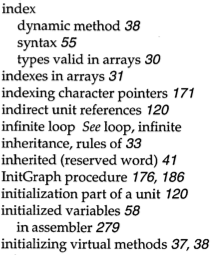
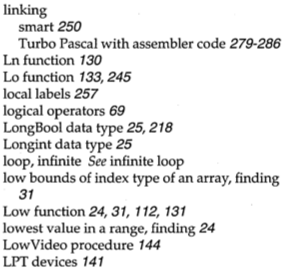
Apple fanboys all know about 1 Infinite Loop. Turbo Pascal adepts about the index entries “infinite loop See loop, infinite” and “loop, infinite See infinite loop”.

Google as a more direct approach: www.google.com/search?q=recursion

Read the rest of this entry »

Posted in Algorithms, Apple, Borland Pascal, Design Patterns, Development, Google, Pascal, Power User, Software Development, Turbo Pascal | Leave a Comment »

Inspecting/unpacking a Linux rpm file on Mac OS X

Posted by jpluimers on 2016/11/18

You need this statement to unpack an rpm file on Mac OS X without having rpm installed:

rpm2cpio ##filename.rpm## | cpio -idmv

This will make rpm2cpio unpack the rpm file in the current directory using these cpio options:

  • i – use the rpm2cpoio as unput
  • d – created directories when needed
  • m – set modification timestamps from the archive
  • v – verbose filenames to stderr

cpio is already part of the Mac OS X system.

You can get rpm2cpio through homebrew by typing brew install rpm2cpio which will likely also download he xz dependency.

–jeroen

via: rhel – Open a RPM on a Mac? – Unix & Linux Stack Exchange

Posted in *nix, *nix-tools, Apple, iMac, Linux, Mac, Mac OS X / OS X / MacOS, MacBook, MacBook Retina, MacBook-Air, MacBook-Pro, MacMini, OS X 10.10 Yosemite, OS X 10.11 El Capitan, OS X 10.9 Mavericks, Power User, rpm | Leave a Comment »

`xcode-select –install` required for OS X 10.9 Xcode command-line tools (like `zlib-devel`)

Posted by jpluimers on 2016/11/16

Hopefully this was a one time oversight from Apple, but on OS X 10.9 (Mavericks) the Xcode command-line tools cannot be installed from the Xcode Preferences pane.

You have to install them from the command-line:

xcode-select --install

There is one catch though: it might fail as you first have to start Xcode once and accept the license agreement.

You need them for instance when playing with zlib-devel (for instance when creating your own openssl builds).

–jeroen

Posted in Apple, Development, Mac OS X / OS X / MacOS, OS X 10.9 Mavericks, Power User, Software Development, xCode/Mac/iPad/iPhone/iOS/cocoa | Leave a Comment »

How to use curl command with http/2 on MacOS X

Posted by jpluimers on 2016/11/04

Skip the built-in curl and directly go to the homebrew one:

$ brew update
$ brew upgrade
$ brew install curl --with-nghttp2

Source: How to use curl command with http/2 on MacOS X [WayBack]

via: Using cURL with HTTP/2 on Mac OS X #sysadmin #unix #apple #macos – Joe C. Hecht – Google+ [WayBack]

–jeroen

Posted in Apple, Home brew / homebrew, Mac, Mac OS X / OS X / MacOS, MacBook, MacBook Retina, MacBook-Air, MacBook-Pro, MacMini, macOS 10.12 Sierra, OS X 10.9 Mavericks, Power User | Leave a Comment »

display – How can I move spaces between external monitors in Mavericks? – Ask Different

Posted by jpluimers on 2016/10/21

display – How can I move spaces between external monitors in Mavericks? – Ask Different [WayBack]

You can only move spaces which are non-active.

For example, lets say you have spaces 1 and 2. If space 1 is active, you can not move it. You first have to select space 2 then you can move space 1 to a different monitor.

This helped me work around version 8.35 of Microsoft Remote Desktop for OS X breaks second monitor usage [WayBack]:

  1. Double click a connection so it goes to a new space on the primary display
  2. Make the normal space active (by three finger swiping on the primary display)
  3. Go to mission control
  4. Move the non-active RDP space to the secondary monitor

Sometimes the primary monitor doesn’t have a non-active space any more so you have to create a new one in the top right of Mission Control [WayBack].

–jeroen

Posted in Apple, Mac, Mac OS X / OS X / MacOS, MacBook, MacBook Retina, MacBook-Pro, OS X 10.9 Mavericks, Power User, Remote Desktop Protocol/MSTSC/Terminal Services, Windows | Leave a Comment »

Some notes on modifying NIB files on Mac OS X to add/change shortcuts

Posted by jpluimers on 2016/10/19

One of the nitpicks in VMware Fusion is that it has no keyboard shortcut for Resume or Suspend. I was trying to add Command-R and Command-S for those but that didn’t work out.

Since the links below seem to work for some other applications, I’ve kept them:

–jeroen

Posted in Apple, Development, Keyboards and Keyboard Shortcuts, Mac, Mac OS X / OS X / MacOS, MacBook, MacBook Retina, MacBook-Air, MacBook-Pro, MacMini, OS X 10.10 Yosemite, OS X 10.11 El Capitan, OS X 10.9 Mavericks, Power User, Software Development | Leave a Comment »