Archive for the ‘Google’ Category
Posted by jpluimers on 2019/02/28
Interesting approach: saying good bye isn’t that hard if you do not share a lot things with other people through it.
[WayBack] Bye, Bye, Google · Bogdan Popa:
I spent this past weekend de-Google-ifying my life and, despite my expectations, it wasn’t too hard to do. I started by moving all of my websites off of Google App Engine and onto a dedicated box that I had already owned. That was straightforward enough. Next, I removed any Google Analytics snippets from each of them and replaced those with my own analytics server that I had built a while back (it doesn’t store any PII, only aggregate information (and very little of that, too)).
…
Via:
This might be a viable mail alternative: [WayBack] Reliable Email Provider, Inbox Email & Resource Center | inbox.com
Simplify your online communication with one login to secure email communication, organize conversations, and fine-tune archive searches.
Via: [WayBack] Thank you for following us! It’s been our pleasure to build a community with all of you. In the coming weeks, we’ll be closing this page. Please find us… – Google – Google+
–jeroen
Posted in G+: GooglePlus, Google, LifeHacker, Power User, SocialMedia | Leave a Comment »
Posted by jpluimers on 2019/02/08
After March 7, 2019, notifications for Google web products will no longer be accessible from the navigation bar.
[WayBack] Manage your notifications – Google Account Help has more details, but it does not look good.
More Google stuff is dying, almost every month now. For a list of dying products see: [WayBack] didgoogleshutdown.com
Given more is dying, and the increased lack of confidence many people have in Google, more people are abandoning Google. More on that in a future post.
For now: [WayBack] “Manage your Notifications”: After March 7, 2019, notifications for Google web products will no longer be accessible from the navigation bar. If you’d l… – Edward Morbius – Google+
“Manage your Notifications”: After March 7, 2019, notifications for Google web products will no longer be accessible from the navigation bar. If you’d like to receive similar notifications in the future, you can update the notification settings for your individual Google products.
As usual, it’s not clear whether or not this will affect the notifications widget on G+ itself. Google’s standards for clarity in exposition remain uncorrupted. Which is to say: entirely inadequate.
Otherwise, the article addresses Google Photos, Hangouts Chat, and Google+ (G Suite users).
Update: Further close reading suggests that Consumer Google+ will lose Notifications on March 7:
Note: Google+ notifications are available for G Suite users only.
https://support.google.com/accounts/answer/9231049
Via: [WayBack] “Manage your Notifications”: After March 7, 2019, … – Lars Fosdal – Google+
–jeroen
Posted in G+: GooglePlus, Google, Google Photos, GoogleHangouts, Power User, SocialMedia | Leave a Comment »
Posted by jpluimers on 2019/02/01
Reminder to self: Local Guides Nederland moved their [WayBack] G+ community over to [WayBack] Local Guides Connect – Help Desk – Local Guides Connect which is part of [WayBack] Local Guides Connect and powered by [WayBack] Powered by Lithium | Lithium.
Since that is not part of any other social media platform I subscribe to, I will likely only see new stuff when I actively go to that place: hopefully that is more than once a year.
–jeroen
Posted in G+: GooglePlus, Google, GoogleMaps, LifeHacker, Local Guides, Power User | Leave a Comment »
Posted by jpluimers on 2019/01/30
Hopefully by now the Google Assistant and Google Home have made their way into the Dutch language. If so, then it’s time for me
[WayBack] Quick Intro Into Actions on Google | Grokking Android: Find out which options exist to develop apps for the Google Assistant with Actions on Google and to bring the Assistant to devices with the Assistant SDK.
–jeroen
Posted in Android, Android Devices, Development, Google, Google AI, Google Assistant, GoogleHome, Mobile Development, Software Development | Leave a Comment »
Posted by jpluimers on 2019/01/25
This week, Google introduced the [WayBack] Phishing Quiz, a series of questions to see how good you spot phishing emails.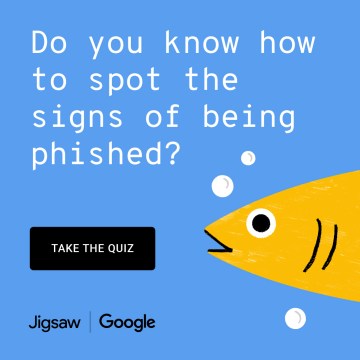
It is a perfect example on why Google AMP is a bad idea: it makes it easier to write phishing mail targeting Google users.
One of the questions is about a password change email seemingly from Google with a link by Google.
The link is really deceptive, as it:
- uses Google AMP (Accelerated Mobile Pages) which are hosted directly through a root path on the Google main domain: the URL starts with https://google.com/amp
- Especially on mobile, Google accelerates a lot of things through Google AMP, so a link on mobile that looks like this might be legit
This will deceive a lot of people as they are trained to look at the main domain to assess authenticity: google.com
That combined with an email domain that also looks being from Google (with so many real word top-level domains, many would not be surprised getting email from no-reply@google.support)
Just look at the below screenshot to see how deceptively this trick is.
Solution
Read the rest of this entry »
Posted in Google, LifeHacker, Power User, Security | Leave a Comment »
Posted by jpluimers on 2019/01/15
Though the Google Calendar UI does not support EXRULE and EXDATE to exclude certain slots (via dates or rules) from recurring events.
The API supports them: [WayBack] Google Calendar API, RRULE and EXDATE – Stack Overflow
–jeroen
Posted in Communications Development, Development, Google, GoogleCalendar, HTTP, Internet protocol suite, Power User, REST, TCP | Leave a Comment »
Posted by jpluimers on 2019/01/11
For a long time, sites have been able to add themselves to the search engine list in Google Chrome.
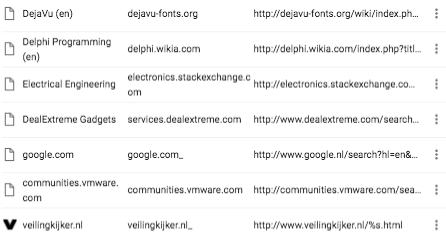

The last one is my own, but hundreds of them are not.
I never noticed this until I needed to add some custom search engine strings to the list and found the UI is obnoxiously slow when there are hundreds of entries in that list.
It’s like the cookies editor: the editing speed decreases exponentially with the number of entries in that list.
The feature is called Tab to Search, apparently is intentional, based on the OpenSearch standard and well documented:
Many people dislike it though:
There are various ways around it documented in the last link.
This is the one I liked best: [WayBack] Don’t add custom search engines – Chrome Web Store.
Via: [WayBack] Google Chrome: Remove all ‘Other Search Engines’ – Super User who also pointed me to the script below the signature ([WayBack] Remove chrome “other search engines” · GitHub), which likely needs this change:
–jeroen
Read the rest of this entry »
Posted in Chrome, Google, GoogleSearch, Power User | Leave a Comment »
Posted by jpluimers on 2019/01/10
 Using OpenSuSE Tumbleweed E20 on Raspberry Pi 3: accessing the enlightenment desktop over VNC after automatic logon I wanted to buy an on-line read-only diary to help my mentally retarded brother see what his next few days are going to be like.
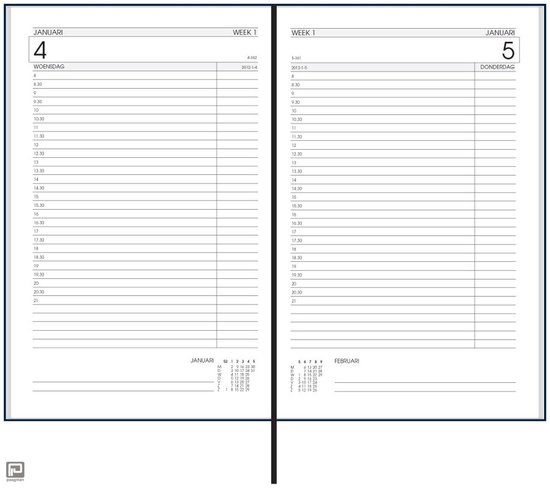
He increasingly has difficulty handling a paper agenda and has an agenda with 30 minute blocks like [Archive.is] bol.com | Bureau Agenda 2017 – 1 dag per Pagina | 0041560163422 | Boeken (and the [Archive.is] picture on the right), but actually he needs 15 minute blocks during some portions of the day.
We call that kind “bureau agenda” which I think translates well into “desk diary”.
They were quite different from the agendas I used to have at school (:
[WayBack] [Zonder titel] Rijam agenda 1983/84 verzamelen? Stripcatalogus op Catawiki
For most school mates, they were more like this:
Had je een O’Neill of ging je voor De Familie Doorzon? De oude agenda’s uit je middelbare schooltijd zijn de verpersoonlijking van je eigen puber-ik. Afgelopen weekend startte in het Nationaal Onderwijsmuseum in Dordrecht de toffe tentoonstelling Grow Up over die vuistdikke, volgeplakte agenda’s.
[WayBack] Schoolagenda vol sentiment | Go with the Vlo
Anyway, some ideas I initially had are below.
This is what I actually did:
Two things for the future:
- The Agenda view does not show end-times for events. Other views do. The printable output does. I want them in the Agenda view as well. I’m not alone (:
- I might make the page responsive and have multiple iframe instances with different views on the calendar. For that, these will likely help:
Initial thoughts
Raspberry based:
Chromecast based:
–jeroen
Read the rest of this entry »
Posted in Development, Google, GoogleCalendar, Hardware Development, JavaScript/ECMAScript, JSFiddle, LifeHacker, Power User, Raspberry Pi, Scripting, Software Development | 2 Comments »
Posted by jpluimers on 2019/01/07
A while ago, I write about Locally Administered Addresses: a few series of MAC addresses you can use on your local network: MAC address ranges safe for testing purposes (Locally Administered Address).
A while ago, I found ones in my network and ones in my WiFi SSID survey starting with FA:8F:CA. They did not show up in the Wireshark · OUI Lookup Tool nor their manufacturer database.
But with bit 7 turned off they start with F8:8F:CA which does show up as “F8:8F:CA Google, Inc.”
They appear to be Google devices, in my case Google ChromeCast ones, though they can also be Google Home ones.
Google does “magic” with networks, just look at a few of the links here:
–jeroen
Posted in Ethernet, Google, Internet, Network-and-equipment, Power User, Ubiquiti, WiFi | Leave a Comment »


 The Wiert Corner - irregular stream of stuff
penguin020 commented on Dec 22, 2017 •