The Wiert Corner – irregular stream of stuff

Jeroen W. Pluimers on .NET, C#, Delphi, databases, and personal interests

  • My badges

  • Twitter Updates

  • Pages

  • All categories

  • Enter your email address to subscribe to this blog and receive notifications of new posts by email.

    Join 1,854 other subscribers

Archive for the ‘Google’ Category

Reminder to self – did “Clear App Data” get me any Google Opinion Rewards surveys?

Posted by jpluimers on 2017/01/20

Somehow I didn’t get Google Opinion Rewards surveys for more than half a year. As per below post, I’ve cleared the app data a week ago.

This is a reminder to myself to check if I got any surveys since…

(Yes, I’ve location on, battery saving off and the app runs).

–jeroen

via: [WayBack] Ik ga nu bijna denken dat Google weet wat ik op Google+ post…En: €0.19 ct voor het beantwoorden van deze vraag. Daar kan ik dus net geen sigaret van… – Roderick Gadellaa – Google+


Posted in Google, Power User | Leave a Comment »

Wifi Analyzer – helped me analyse why an original Chromecast failed to see a Buffalo WLAE-AG300N

Posted by jpluimers on 2017/01/06

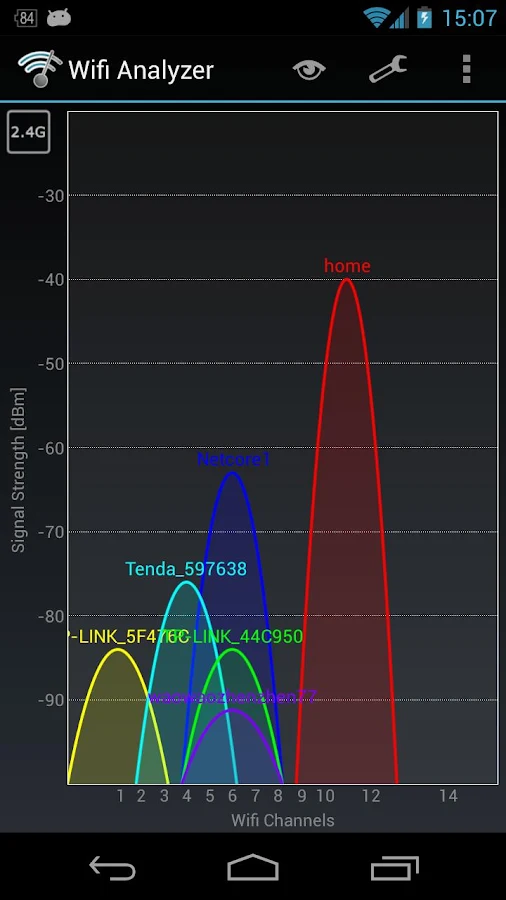
Brilliant! Helped me to track down why an original 1st generation Chromecast didn’t want to connect to a Buffalo WLAE-AG300N.

The problem there is that the original Chromecast does only 2.4Ghz WiFi and the WLAE-AG300N favours 5Ghz WiFi over 2.4Ghz when set to auto.

The solution is in the last picture: basically force the WLAE-AG300N to use 11n/g/b only which limits it to 2.4Ghz (it cannot use both frequencies at the same time).

Yes, I know the Microwaves drawback, but as the original Chromecast only does 2.4Ghz. I’d rather get the Chromecast Ethernet adapter but Google refuses to ship these outside the USA.

Source: Wifi Analyzer – Android Apps on Google Play


Force the WLAE-AG300N to use only 2.4Ghz

Force the WLAE-AG300N to use only 2.4Ghz

Posted in Chromecast, Google, Power User, WiFi | Leave a Comment »

Shared Google Calendars not showing up on iPhone, iPad, and Mac? Here’s the fix! | iMore

Posted by jpluimers on 2016/12/16

If shared Google Calendars do not show on your iPad, iPod, iPhone or Mac, then go to https://www.google.com/calendar/syncselect (sometimes called https://www.google.com/calendar/iphoneselect) and set a tick mark in front of each calendar you want to appear there. Finally, refresh the calendar list on your iOS device and you are set.

–jeroen

Source: Shared Google Calendars not showing up on iPhone, iPad, and Mac? Here’s the fix! | iMore

Posted in Apple, GMail, Google, GoogleCalendar, iOS, iPad, iPhone, iPod, iPod touch, Power User | Leave a Comment »

“the user name or password for imap.gmail is incorrect” – iPad, iPod or iPhone with iOS < 7

Posted by jpluimers on 2016/12/13

If you ever get a “the user name or password for imap.gmail is incorrect” on an iPad, iPod or iPhone with iOS version less than 7, then don’t waste time about entering captchas or fiddling with URLs: it took me 2 hours to find this is caused by GMail enforcing OAuth2 and blocking less secure apps mid 2014 after announcing it in April 2014.

Note that besides iOS < 7, these are also considered unsafe: the Mail-app on Windows Phone-version less than 8.1, some versions of desktop e-mail clients like (tadaaaaa!) Microsoft Outlook and Mozilla Thunderbird.

Almost all searches for the error message lead you into trying to opening Safari on your iOS device visiting http://www.google.com/accounts/DisplayUnlockCaptcha or switching your servers from gmail.com to googlemail.com (or back), but these tricks don’t help.

What does help is (if you really insist on using a less secure app) to enable these less secure apps in your google account: https://www.google.com/settings/security/lesssecureapps. Note this does not work when you have 2-step verification enabled.

I came across this when donating my old iPad 1 devices and the people could not use it for GMail. Since the GMail app in iTunes doesn’t support iOS 5.1.1 any more basically the devices are now glorious photo frames.

–jeroen

Posted in Apple, GMail, Google, GoogleCalendar, iOS, iPad, iPhone, iPod touch, Power User | Leave a Comment »

Google drawing AI – My first “Quick, Draw!” attempt – Jeroen Wiert Pluimers – Google+

Posted by jpluimers on 2016/11/28

Not your grandma’s QuickDraw, but a one of the new Google AI experiments by their AI research team:

Can a neural network learn to recognize doodles? See how well it does with your drawings and help teach it, just by playing.

Source: Quick, Draw!

On the right is my first “Quick, Draw!” attempt.
Too bad the canoe didn’t work out; parrot and firetruck are pretty hard with either a mouse or a trackpad.

Source: [WayBackMy first Quick Draw attempt – Jeroen Wiert Pluimers – Google+

Other A.I. Experiments (g.co/aiexperiments):

–jeroen

Via:

Posted in Draw!, Google, Google AI, LifeHacker, Power User, Quick | Leave a Comment »

Recursion

Posted by jpluimers on 2016/11/23

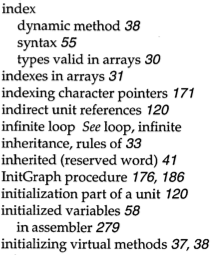
Apple fanboys all know about 1 Infinite Loop. Turbo Pascal adepts about the index entries “infinite loop See loop, infinite” and “loop, infinite See infinite loop”.

Google as a more direct approach: www.google.com/search?q=recursion

Read the rest of this entry »

Posted in Algorithms, Apple, Borland Pascal, Design Patterns, Development, Google, Pascal, Power User, Software Development, Turbo Pascal | Leave a Comment »

RMAing a Google Nexus 5X, dying in Account hell… – via +Kristian Köhntopp

Posted by jpluimers on 2016/11/22

Google does react:

Google Nederland

Noted. Contacting the right teams. And now trying to find Kim :)
Thanks for the writeup +Kristian Köhntopp

Source: RMAing a Google Nexus 5X, dying in Account hell …

Full story (comments in the above thread):

Kristian Köhntopp

RMAing a Google Nexus 5X, dying in Account hell

I purchased my Google Nexus 5X on November 11, 2015, almost exactly one year ago. The device died on November 15, 2016 during the morning commute, when it froze. Right now, when I try to power it on, I get a single red LED blink from the lower grille.

When I bought that device, I have been living in Berlin, Germany. I am living now in a village close to Amsterdam, Netherlands. I am a GPMAA subscriber with a family subscription, and I am managing the play family setup for my family from my account.

I called the Netherlands support number, and got an agent almost immediately. She’s speaking excellent English.

We are going through the device validation routine and establish that the device is indeed broken. Then she’s trying to find my Google account, but me having the name I have, I have to spell it about five times.

She’s ready to RMA, but wants to validate my address. That’s the old Berlin address.

Easy to fix. New Tab. Go find your face in the upper right, click on it, click on “My Account” and… Nope. That’s a link to myaccount.google.com, and you can’t find or set your address there.

Ok, new attempt. Go to play.google.com, and hit Account. That’s “Account” in the left hand menu of Play, not “Account” on the top bar where your face is. It’s showing Payment methods, which has nothing to do at all with addresses. Edit payment methods.

That links to payments.google.com, which has nothing to do with account at all, and is also different from security.google.com, which has all the other account details, but has nothing to do with payments or addresses. Anyway, I disgress, in payments.google.com, there’s an address.

It has no country. Country is two lines higher. And while there is a pen next to my address so I could edit it, I can’t edit my country, because… Well, at least there is an info bubble.

It says:

»You can’t change your country because of the following reasons:
– One or more Google services you’re using does not allow you to change your country
– You manage a Google family account«

I read that as “Because you are giving us money we won’t allow you to update your data so that in the future you can continue to give us money.” Well.

“Can we detach the current payments from you account, so I can migrate it to the Netherlands?” “No, you can’t, that will break the Family setup, disable all my Sonos boxes which are running on this account, and will kill several software subscriptions attached to my account. Also, there is money on it, because I am participating in the Survey program, and there is about 400 local guides points attached to it as well.”

Kim, the support specialist handling my case, has been on the phone with me at this point for 40 minutes now. She’s put me on hold half a dozen times and consulted with as many payment, account and security specialists. She’s awesome. She’s kicking ass. She’s not giving up.

“Ok, are you in front of a laptop of desktop machine running a Chrome browser” “Indeed, I am, Kim.” “Ok, please open an incognito tab, I am going to walk you through the process of creating a new Gmail account, and if you have a Netherlands payment method, adding that to it.” “Thanks, Kim, I know how to do this. Let me quickly do this, and get back to you.” I put the phone away and make me another Gmail, add NL and my address to it in Payment methods, and she’s now handling the RMA through that.

Yeah, so if all goes well I am getting a replacement phone this week, and am sending back my broken phone to Google.

But, Google, it’s not actually just the phone that is broken. Your maze of security, payments, play and so on, it does not just suck. It borders on the insane.

And the way you are totally not handling country-as-a-living-addess vs country-for-RIAA-and-MPAA-suckage as two different things, it’s really, really hurting you.

Also, not handling the EU as one country, that’s only going to hurt more in the future as well.

So, if you are reading this and are in a position to change this mess. Do so. I don’t care if it is hard, or what the actual factual reasons for ending up with mess are. It’s broken. Fix it. Now. That would actually almost be too late.

My call started at 09:19 and took 54 minutes and 26 seconds to resolve. And just for the record, Kim is awesome and should be given a pay rise. It the tools and processes she has to work with that suck.

–jeroen

Posted in Google, LifeHacker, Power User | Leave a Comment »

When your browser extensions go rouge…

Posted by jpluimers on 2016/11/21

A while ago I suspected at least one of my Chrome extensions to do funny things.

In the end it appeared that “Live HTTP Headers 1.0.8” went rogue a while ago and has by now been removed from the store as this link is gone: https://chrome.google.com/webstore/detail/iaiioopjkcekapmldfgbebdclcnpgnlo ()

It was part of a much larger set of extensions that went away and isn’t limited to Chrome: other browsers with extension mechanisms suffer from this too. More links about this at the bottom of this post.

Which means that by now you should be really careful which extensions you have installed and enabled.

So, browse through these and ensure you’ve disabled everything you don’t need permanently:

On my system, I removed these:

When you go from Chrome to these URLs through the extensions page, it usually appends an UTM tracker like utm_source to the URL.

So I dug into that as well and found these links explaining them:

References:

Read the rest of this entry »

Posted in Chrome, Chrome, Firefox, Google, Internet Explorer, Opera, Power User, Safari, Web Browsers | 3 Comments »

How To Chromecast MKV, MP4, DVI Videos from Chrome (on a Mac, Windows or Linux machine)

Posted by jpluimers on 2016/11/18

There is a Chrome App called Videostream for Google Chromecast that lets you play your own local videos on your Chromecast from your PC with subtitles supported. Not like those Chrome Extensions, it’s a Chrome App that you can launch directly from your desktop through Chrome Launch.

Just launch the app, choose a video, select a Chromecast, and enjoy. Easy as 123.

via: [WayBackHow To Chromecast MKV, MP4, DVI Videos from Windows Computer | Next of Windows

Posted in Chrome, Chromecast, Google, Power User | Leave a Comment »

Old Google Charting API: tools for still using them

Posted by jpluimers on 2016/11/10

While mocking the ScaleMM documentation, I bumped into a chart that I thought was an image, but is in fact generated by the (now deprecated) Image Charts API from Google.

In fact it is generated on the fly from a URL: http://chart.apis.google.com/chart?chxr=0,0,16|1,0,14682…&nonsense=something_that_ends_with.png

Compare the two below. They are identical (:

Static ScaleMM1 comparison chart

Static ScaleMM1 comparison chart

URL based ScaleMM1 comparison chart

URL based ScaleMM1 comparison chart

Even though the API is deprecated Google has no plans to turn it of, so it still works and is the easiest way to get charts into a Markdown or reStructuredText document.

In practice, it doesn’t matter if you use the chart.apis.google.com or chart.googleapis.com domain: they give the same results the same.

As I wanted to convert the results.txt to a chart, I dissected the above URL, looked up the definitions of the URL parameters (the trickiest: cds for lxy graphs and the combination of chds and chxr, easier: chls) and created a new URL for the chart below.

Read the rest of this entry »

Posted in Delphi, Development, Google, Power User, Software Development | Leave a Comment »