The Wiert Corner – irregular stream of stuff

Jeroen W. Pluimers on .NET, C#, Delphi, databases, and personal interests

  • My badges

  • Twitter Updates

  • My Flickr Stream

  • Pages

  • All categories

  • Enter your email address to subscribe to this blog and receive notifications of new posts by email.

    Join 1,835 other subscribers

Archive for the ‘Keyboards and Keyboard Shortcuts’ Category

SwitchResX helped me switch my Mac machine to 1360×768 and 1888×1062

Posted by jpluimers on 2010/12/24

A while ago, I got involved in Mac programming again after more than a decade of absence.
It felt like a warm reunion.

A Mac Mini Server serves as a development machine: it is about the same price as a regular Mac Mini, but packs 2 HDDs which for me is more useful than one HDD and a DVD player.

However, living in the Windows world for a long time long, and having had RSI in the DOS era almost two decades ago, I had a few wishes for using it.

The first was keyboard wise. The second is custom resolutions. Read the rest of this entry »

Posted in Apple, Development, Keyboards and Keyboard Shortcuts, Power User, RSI, Software Development, UltraNav keyboards, xCode/Mac/iPad/iPhone/iOS/cocoa | 10 Comments »

VMware ESXi 4.0 / ESXi 4.1: enable SSH login for non-root users (and only them)

Posted by jpluimers on 2010/09/28

VMware ESXi has SSH disabled by default.

In ESX / ESXi 3 and 3.5, it took a while for people to recognize the ‘unsupported’ trick and enable SSH.
In ESXi 4.0, /sbin/services.sh was fixed, so SSH was easier to enable (note: only delete the # in front of the first ssh).
Since ESXi version 4.1, SSH is called “Remote Tech Support (SSH)”, and it very easy to enable from the console.
Thomas Maurer described how easy it is to activate SSH in ESXi 4.1. He provides clear screen shots, whereas the VMware knowledge base article just lists the textual steps.

But contrary to ESX/ESXi 3.5 and lower, and *nix habits, enabling SSH on ESXi 4.x will enable this for the root user.
This has to do with the switch between ESX/ESXi 3.5 and 4.0 from to the dropbear ssh daemon (in the /sbin/dropbearmulti binary).
Dropbear is a very lightweight implementation of the SSH 2 protocol; ideal for ESXi which – as a hypervisor – needs to have a really low footprint.

In addition to the dropbear change, SSH is disabled for non-root users (which has nothing to do with dropbear, see below).

This post is about how to fix not only the SSH (as above) but also how to allow specific users to use SSH. Read the rest of this entry »

Posted in ESXi4, Keyboards and Keyboard Shortcuts, Power User, VMware | 9 Comments »

Quick Access Extension (Visual Studio equivalent of RAD Studio IDE Insight)

Posted by jpluimers on 2010/08/10

It is good to see the cross breeding effect works:

Last week, the Visual Studio 2010 Productivity Power Tools added Quick Access Extension, which is the Visual Studio equivalent of the Delphi RAD Studio IDE Insight.

It is a keyboard shortcut (Delphi: F6 or Ctrl-.; Visual Studio: Ctrl+3) to search and execute things defined by the environment:

  • menu options
  • configuration options
  • templates

Delphi has a few options that Visual Studio hasn’t and vice versa, but it comes really close.

–jeroen

Posted in .NET, Delphi, Development, Keyboards and Keyboard Shortcuts, Power User, Software Development, Visual Studio and tools | 2 Comments »

Nick Hodges | The End of the Chow Line

Posted by jpluimers on 2010/07/30

From the comments on Nick’s excellent post (that instantly made me feel hungry <g>):

If you find your developers bringing in their own equipment to work then you know there is a problem.

That reminds me of this story: Read the rest of this entry »

Posted in About, Keyboards and Keyboard Shortcuts, Opinions, Personal, Power User, RSI, ThinkPad, UltraNav keyboards | Leave a Comment »

Solution: Can’t paste on a web-site with Ctrl-V

Posted by jpluimers on 2010/07/16

Quite a few web sites have fields where you cannot paste with Ctrl-V.
I don’t know why: pasting text input is a great way to speed up your work.

A solution for most of them: Read the rest of this entry »

Posted in Chrome, Firefox, Hardware, IBM SAA CUA, Internet Explorer, Keyboards and Keyboard Shortcuts, KVM keyboard/video/mouse, Power User, Web Browsers, Windows | 1 Comment »

7 screens; 3 computers; 1 keyboard/mouse to direct them all: Input Director

Posted by jpluimers on 2010/07/12

At home, I have 7 screens on 3 computers on the same desk.

That sounds like a clutter, but all these keyboards and mice hooked up to them add even more clutter.

Until I found out about [Wayback] Input Director a while ago: a (virtual)  Software KVM to Control Multiple Computers.
It took only a few minutes to setup, and works like a breeze.

I have played around with it for about 2 months now, and it is great: I did not have to change any settings since the initial – and easy – setup.

Now I just use the keyboard/mouse that are most convenient to my situation: all keyboard/mice can control all computers and monitors.

A breeze indeed!

–jeroen

Posted in Keyboards and Keyboard Shortcuts, Power User | Leave a Comment »

Windows 7 shortcuts in Vista or XP

Posted by jpluimers on 2010/07/09

A while ago, I posted about Windows 7: new shortcut keys (windows hotkeys and more).

When you are in Vista or XP, you can feel a bit ‘lost’ missing those new keyboard shortcuts.

I just learned there is a tool that supplies the new Windows 7 keyboard shortcuts in Vista and XP :-)

–jeroen

Posted in Keyboards and Keyboard Shortcuts, Power User | Leave a Comment »

ThinkPads beep during certain key combinations – found the cause

Posted by jpluimers on 2010/05/18

I’ve had an annoying beep on my thinkpad whenever I tried to write CD quickly.

It particularly shows when you press these three keys at the same time:

Shift+CD

Recently, I googled for the symptom to find out the cause.
Below are a few links I found, but this is the actual cause (thanks Kriston!): Read the rest of this entry »

Posted in Keyboards and Keyboard Shortcuts, Power User | Leave a Comment »

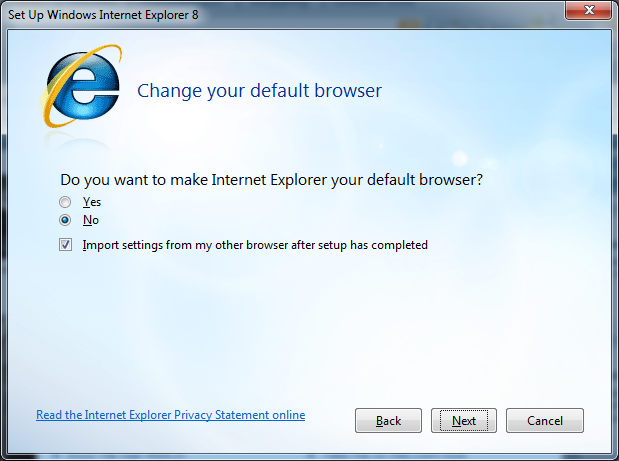
Duplicate Shortcuts IE8 configuration dialog – Alt-N binds to “No” and “Next”. Are UI designers ever going to learn to be nice to keyboard users?

Posted by jpluimers on 2010/05/17

Duplicate Alt-N shortcut: No / NextFor every (re)install, IE8 is usually part of the installation.
So, for the upteenth time, I came across the dialog on the right.
This time Alt-N is bound to both the “No” choice as well as the “Next” button.

–jeroen; wishing UI designers would learn to pay more attention to keyboard users…

Via: 20100516-UI-Duplicate-Shortcuts-IE8 on Flickr – Photo Sharing!.

Posted in Development, Keyboards and Keyboard Shortcuts, Power User, Software Development, UI Design | Leave a Comment »

Windows 7: new shortcut keys (windows hotkeys and more)

Posted by jpluimers on 2010/05/06

In the past there were already a lot of shortcuts, including a few including the windows key.

SEO Consultants has a good overview of both lists.

Microsoft has the classic list.

Windows 7 introduced quite a few more, which I’ll list below.
Read the rest of this entry »

Posted in Conference Topics, Conferences, Event, Keyboards and Keyboard Shortcuts, Power User | 5 Comments »