


A while ago, I got a second hand Supermicro workstation and wondered why the IPMI KVM would not show anything.
The video card in it worked fine, so I used it as a desktop machine setup for a while, happily running VMS.
I finally decided to move into a closet, so I removed the video card, and rebooted.
Then it beeped 5 times, which was odd: I expected it to switch from the video card to the internal video. It didn’t.
Older BIOS codes: [WayBack] AMI BIOS Beep Codes – Thomas-Krenn-Wiki
From PDF [WayBack] BIOS POST Codes for C7/X9/X10/X11/B9/B10/B1/A1 Motherboards
PEI Beep Codes
# of Beeps Description 1 Memory not Installed 1 Memory was installed twice (InstallPeiMemory routine in PEI Core called twice) 2 Recovery started 3 DXEIPL was not found 3 DXE Core Firmware Volume was not found 4 Recovery failed 4 S3 Resume failed 7 Reset PPI is not available DXE Beep Codes
# of Beeps Description 1 Invalid password 4 Some of the Architectural Protocols are not available 5 No Console Output Devices are found 5 No Console Input Devices are found 6 Flash update is failed 7 Reset protocol is not available 8 Platform PCI resource requirements cannot be met
So I did a bit of reading in the manual, then found about a jumper which had happily been living out of view, under the video card:
VGA Enable (JPG1)
JPG1 allows you to enable or disable the onboard VGA connector. The default position is on pins 1 and 2 to enable VGA.
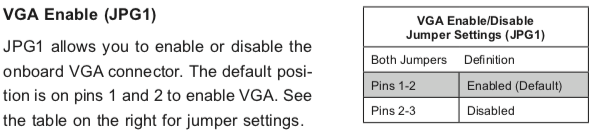
Setting the jumper to pins 1&2 made internal VGA available again, it happily booted and showed in the IPMI KVM.
Later I understood why the jumper was set to VGA disabled: when having two video cards, by default Windows will extend your desktop to an invisible monitor.
The easiest workaround for that is just to disable VGA. However, you can also change Windows
Older versus newer boards
It appears that most older SuperMicro systems have a hardware switch, but for newer chipsets supporting Intel Quick Sync Video a there is a BIOS setting: [WayBack] Enable internal graphics in SUPERMICRO servers | Any IT here? Help Me!
Windows 10 fixing video cards and ACPI_BIOS_ERROR
The reboot did not work fine: Windows 10 would not initialise properly, but hung when detecting video cards.





 The Wiert Corner - irregular stream of stuff