Archive for the ‘Network-and-equipment’ Category
Posted by jpluimers on 2022/10/19
Posted in Development , FortiGate/FortiClient , Hardware , Network-and-equipment , Power User , Security , Software Development , VPN , Windows , Windows 10 , Windows 7 , Windows 8 , Windows 8.1 , Windows 9 , Windows Development , Windows Server 2000 , Windows Server 2003 , Windows Server 2003 R2 , Windows Server 2008 , Windows Server 2008 R2 , Windows Server 2012 , Windows Server 2012 R2 , Windows Server 2016 , Windows Vista , Windows XP | Leave a Comment »
Posted by jpluimers on 2022/08/26
Last winter, I discovered that the OpenVPN version on Chocolatey was really old: it had not been updated since 2019.
Most Chocolatey maintainers are volunteers and sometimes the burden can become too large. Back then the maintainer was [Wayback /Archive ] Chocolatey Software | wget , but luckily [Wayback /Archive ] Chocolatey Software | dgalbraith has stepped in and in March 2022 bumped the version from [Wayback /Archive ] Chocolatey Software | OpenVPN 2.4.7 to [Wayback /Archive ] Chocolatey Software | OpenVPN – Open Source SSL VPN Solution 2.5.4 and kept maintaining (currently there is [Wayback /Archive ] Chocolatey Software | OpenVPN – Open Source SSL VPN Solution 2.5.7 ).
Read the rest of this entry »
Posted in *nix , *nix-tools , Chocolatey , Hardware , Network-and-equipment , OpenVPN , Power User , ssh/sshd , VPN , Windows | Leave a Comment »
Posted by jpluimers on 2022/08/12
Not sure why WordPress.com failed to post this on 20140525, so I put it in the scheduler again. In the end I got a Fritz!Box 7490 and though the
In 2013, [Wayback ] Fritz!Box replaced the 7390 top model with the 7490 and I [Wayback ] might get get soon when ADSL (which still has a Fritz!Box 7240 attached) is upgraded to fiber.
So here are some differences partially from the English FRITZ!Box and German FRITZ!Box Wikipedia page between the [Wayback ] Fritz!Box 7390 and [Wayback ] Fritz!Box 7490 , partially from the below video:
About cooling: according to the video both run the same temperature, either because the air cooling of the 7490 is better. I’m wondering if that is the same when running inside a closet.
[Wayback /Archive.is ] HardwareInfo.nl has a Fritz!Box 7490 review that indicates 802.11ac and USB3 might not be as fast as you’d hope.
Reading the [Wayback /Archive.is ] Amazon.de 7490 reviews , I might just ask xs4all to get me a 7390, not a 7490.
–jeroen
via: Vergleich AVM FRITZ!Box 7490 und FRITZ!Box 7390 – YouTube .
PS: I need to research [Wayback ] USB over LAN in more detail, especially the [Wayback ] open source project USB IP .
VIDEO
Posted in Fritz! , Fritz!Box , Hardware , Network-and-equipment , Power User | Leave a Comment »
Posted by jpluimers on 2022/08/12
From [Wayback Archive.is blog — Why has the URL “archive-li” changed to… :
Why has the URL “archive-li” changed to “archive-ph”, and will this affect saved bookmarks at any time in the future?
This is temporary and only for some countries. All 7 domains work, so you do not need to change the bookmarks.
In The Netherlands all Archive Today domains redirect to archive.ph using a HTTP 302 redirect .
This caused trouble at my home location, but not at my brother, so I searched for local issues.
In the end, it was because I have dual WAN network load balancing at home.
TL;DR
Modifying the routing table so traffic for 54.37.18.234 goes to WAN1 was my solution.
Finding the destination address
Read the rest of this entry »
Posted in .NET , Development , Hardware , Network-and-equipment , Power User , PowerShell , routers , Scripting , Software Development | Leave a Comment »
Posted by jpluimers on 2022/08/08
Somehow WordPress.com failed to post it on the scheduled date 20150331, not sure why.
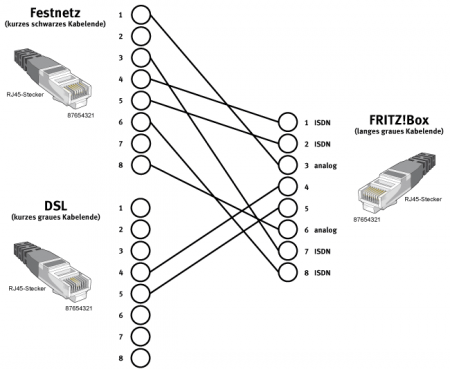
Though ISDN has been phased out in The Netherlands as and almost phased out in Germany , you can still use end user Terminal Equipment on the internal S-bus .
Since scheduling the post for 2015, the same information as the original diagram below appeared in text form on Wikipedia and there it also adds TAE connector information: Fritz!Box: Belegung der kombinierten DSL-Telefon-Buchse – Wikipedia
Die Anschlussbelegung der Kombibuchse ist wie folgt:[44]
Pin 1: ISDN 1a
Pin 2: ISDN 1b
Pin 3: analog La
Pin 4: DSL
Pin 5: DSL
Pin 6: analog Lb
Pin 7: ISDN 2a
Pin 8: ISDN 2b
Der RJ-45-Stecker am grauen DSL-Zweig des Y-Kombikabels zeigt folgende Belegung:[44]
Die übrigen Pins sind unbenutzt.
Am schwarzen Telefonzweig ist der RJ-45-Stecker folgendermaßen belegt:
Pin 1: analog La
Pin 2: frei
Pin 3: ISDN 2a
Pin 4: ISDN 1a
Pin 5: ISDN 1b
Pin 6: ISDN 2b
Pin 7: frei
Pin 8: analog Lb
Somit ist ein direkter Anschluss an ISDN möglich, für analoge Anschlüsse liegt für Deutschland ein Adapter auf TAE bei:
Pin 1 RJ-Buchse auf Pin 1 TAE
Pin 8 RJ-Buchse auf Pin 2 TAE
Ein normales Kabel mit TAE-Stecker und sechspoligem RJ-Stecker, wie es für den Anschluss analoger Telefone an eine TAE-Dose verwendet wird, funktioniert nicht.
Bei entbündelten Anschlüssen (ohne analoges oder ISDN-Telefon) kann ein direktes Kabel verwendet werden.
Das Kabel für deutsche Anschlüsse:
Pin 4 RJ-Stecker auf Pin 1 TAE
Pin 5 RJ-Stecker auf Pin 2 TAE
Original article
Some links:
–jeroen
Posted in DECT , Fritz! , Fritz!Box , Hardware , ISDN , Network-and-equipment , Power User , PSTN , Telephony | Leave a Comment »
Posted by jpluimers on 2022/08/05
I tried the solution in [Wayback /Archive.is ] Fritz!box 7590 interface extremely slow : fritzbox (remove the some 30-40 unused machines from the network overview), but it didn’t matter: since Fritz!OS 7.x, the Fritz!Box 7490 UI is just very very slow: each page takes 10+ seconds to load.
Hopefully I can get rid of these and move to pfSense based hardware eventually.
–jeroen
Posted in Fritz! , Fritz!Box , Hardware , Network-and-equipment , pfSense , Power User , routers | Leave a Comment »
Posted by jpluimers on 2022/07/06
Early june, I blogged about Wake-on-LAN from a Windows machine .
My plan was to adopt [Wayback /Archive.is ] Wake.ps1 Wake-on-LAN.ps1 (as naming is important).
One of the goals was to support multiple hardware MAC address formats, especially as Wake.ps1 had the below comment, but did support the AA-BB-CC-DD-EE-FF, though not the AA:BB:CC:DD:EE:FF hardware MAC address format:
<#
...
.NOTES
Make sure the MAC addresses supplied don't contain "-" or ".".
#>
A colon separated hardware MAC address would result in this error inside the call to the [Wayback /Archive.is ] PhysicalAddress.Parse Method (System.Net.NetworkInformation) | Microsoft Docs :
Send-Packet : Exception calling "Parse" with "1" argument(s): "An invalid physical address was specified."
So I did some digging, starting inside the above mentioned blog post, and adding more:
Wake.ps1 uses the [Wayback /Archive.is ] Parse Wayback /Archive.is ] PhysicalAddress.cs source code in C# .NET , which contains code like this:
            //has dashes?
            if (address.IndexOf('-') >= 0 ){
                hasDashes = true;
                buffer = new byte[(address.Length+1)/3];
            }
The Perl script at [Wayback /Archive.is ] wakeonlan/wakeonlan at master · jpoliv/wakeonlan that started my first blog post in this series which mentions:
xx:xx:xx:xx:xx:xx (canonical)xx-xx-xx-xx-xx-xx (Windows)xxxxxx-xxxxxx (Hewlett-Packard switches)xxxxxxxxxxxx (Intel Landesk)
I should rename the first one IEEE 802 , as per this:
The MAC address: Notational conventions – Wikipedia The standard (IEEE 802 ) format for printing EUI-48 addresses in human-friendly form is six groups of two hexadecimal digits, separated by hyphens (- 01-23-45-67-89-AB 01-23-45-67-89-AB-CD-EF [2] 01:23:45:67:89:AB 0123.4567.89AB [30]
The latter is used by Cisco (see for instance [Wayback /Archive.is ] Cisco DCNM Security Configuration Guide, Release 4.0 – Configuring MAC ACLs [Support] – Cisco and [Wayback /Archive.is ] Cisco IOS LAN Switching Command Reference – mac address-group through revision [Support] – Cisco ), so another format to add:
[Wayback /Archive.is ] PhysicalAddress.Parse Method (System.Net.NetworkInformation) | Microsoft Docs remarks:The address parameter must contain a string that can only consist of numbers and letters as hexadecimal digits. Some examples of string formats that are acceptable are as follows:
00112233445500-11-22-33-44-550011.2233.445500:11:22:33:44:55F0-E1-D2-C3-B4-A5f0-e1-d2-c3-b4-a5
Use the GetAddressBytes method to retrieve the address from an existing PhysicalAddress instance.
After a bit more digging via [Wayback /Archive.is ] “three groups of four hexadecimal digits separated by dots” – Google Search , I found that even more hardware MAC address formats are in use as per [Wayback /Archive.is ] What are the various standard and industry practice ways to express a 48-bit MAC address? – Network Engineering Stack Exchange .I really do not have all the sources for the various representations for 48-bit MAC addresses, but I have seen them variously used:
AA-BB-CC-DD-EE-FF
AA.BB.CC.DD.EE.FF
AA:BB:CC:DD:EE:FF
AAA-BBB-CCC-DDD
AAA.BBB.CCC.DDD
AAA:BBB:CCC:DDD
AAAA-BBBB-CCCC
AAAA.BBBB.CCCC
AAAA:BBBB:CCCC
AAAAAA-BBBBBB
AAAAAA.BBBBBB
AAAAAA:BBBBBB
From the last list, which is far more complete than the others, I recognise quite a few from tools I used in the past, but too forgot the actual sources, so I took the full list from there and tried to name them in parenthesis after the links I found above and what I remembered:
AABBCCDDEEFF (Bare / Landesk)AA-BB-CC-DD-EE-FF (IEEE 802 / Windows)AA.BB.CC.DD.EE.FF (???)AA:BB:CC:DD:EE:FF (Linux / BSD / MacOS)AAA-BBB-CCC-DDD (???)AAA.BBB.CCC.DDD (Cisco?)AAA:BBB:CCC:DDD (???)AAAA-BBBB-CCCC (???)AAAA.BBBB.CCCC (Cisco / Brocade)AAAA:BBBB:CCCC (???)AAAAAA-BBBBBB (Hewlett-Packard networking)AAAAAA.BBBBBB (???)AAAAAA:BBBBBB (???)
Some additional links in addition to the ones above:
–jeroen
Posted in .NET , CommandLine , Development , Encoding , HEX encoding , Network-and-equipment , Power User , PowerShell , PowerShell , Scripting , Software Development | Leave a Comment »
Posted by jpluimers on 2022/05/10
Posted in Compute Module , Development , Ethernet , Hardware , Hardware Development , KVM keyboard/video/mouse , Network-and-equipment , PiKVM / Pi-KVM , PoE - Power over Ethernet , Power User , Raspberry Pi , Wake-on-LAN (WoL) | Leave a Comment »


 Anonymous


 The Wiert Corner - irregular stream of stuff