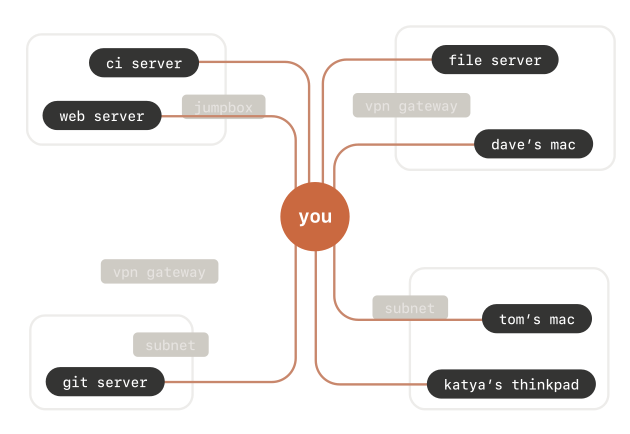
Reminder to self to play around with [Wayback/Archive] Tailscale SSH · Tailscale
Tailscale SSH allows Tailscale to manage the authentication and authorization of SSH connections on your tailnet.
Posted by jpluimers on 2024/07/12
Reminder to self to play around with [Wayback/Archive] Tailscale SSH · Tailscale
Tailscale SSH allows Tailscale to manage the authentication and authorization of SSH connections on your tailnet.
Posted in *nix, *nix-tools, Hardware, Network-and-equipment, Power User, ssh/sshd, Tailscale, VPN, Wireguard | Leave a Comment »
Posted by jpluimers on 2023/04/07
A while after I got a new smartphone, I noticed that when my MacBook was connected over Wi-Fi to the mobile hotspot of my Android phone, the Tunnelblick connections over OpenVPN to my family members would not work. A telnet from the Android phone to the OpenVPN TCP port 1194 woud succeed, but not from the MacBook. Connecting from the phone using JuiceSSH to the OpenSSH endpoints at those family members would work too, so I was a bit flabbergasted.
In the end this seems to be a set of coincidences that fails in this particular setup, but I am not totally aware why.
The solution was to both re-configure the APN (Access Point Name) the smartphone uses to connect to the internet from ipv4/ipv6 to ipv4, and to reboot the phone.
For Dutch provider KPN Mobile, the APN is named internet and apparently changed default to ipv4/ipv6 without properly supporting ipv4. Note the configuration parameters are all lowercase, although they should be written IPv4 and IPv6.
Here are a few posts that got me on the right track (all via [Wayback/Archive] openvpn fails over android hotspot – Google Search):
Solved me, I had to change APN setting from IPv6 to IPv4.
Probleem gevonden…. APN van KPN staat op ipv4/ipv6Ik krijg dus alleen een ipv6 ip nummer, dat verbindt geen ipv4 vpn server.APN van KPN veranderd in ipv4 en hij doet het weer
Dit is eenvoud op te lossen door je Android in te stellen op IPv4 only. Standaard staat dit op IPv4/IPv6 en kiest je telefoon automatisch IPv6.
Note that sometimes the MTU can cause similar failures:
For posterity, would like to post that the error was on account of incorrect MTU size setting on the TCP packet in the router. The size was set to 1452 bytes instead of 1492 bytes. Because of that the SSL/TLS packet was fragmented and the server ACK was not received. On changing the MTU size, everything works perfectly!
Note too: some links to check for OpenVPN responding are below.
Various sites with (often different) APNs that KPN mobile supports:
advancedinternet APN without mentioning the firewall you need)There are quite a few APNs, some with firewall and/or proxy and/or compression, some with external IP address (which means your smartphone really needs a firewall).
–jeroen
Posted in Android Devices, Hardware, Network-and-equipment, OpenVPN, Power User, VPN | Leave a Comment »
Posted by jpluimers on 2023/04/04
Wow, I wrote about Tailscale a few times before, and it is still on my research list, but this is a very compelling reason to use it. [Archive] Dave Anderson on Twitter: “Cool minor @Tailscale moment: I’m recommissioning a server that got moved from a different network, so all its network config was wrong, and generally I couldn’t get at it over the network, only IPKVM console. But then my ping over Tailscale started working?!” / Twitter
I archived the thread so it becomes easier to read: [Wayback/Archive] A readable Thread by @dave_universetf Says Cool minor @Tailscale moment: I’ – UnrollThread.com.
The core are these three tweets:
Turns out, IPv6 autoconfiguration is what happened. Sure, v4 configuration was entirely wrong (it was trying to connect to wifi, via a wifi dongle that was no longer installed, and wanted to talk to a DNS server that doesn’t exist any more), but eno1 had a cable plugged in!The server noticed IPv6 router advertisements, went “I’ll have some of that”, and got global IPv6 connectivity automagically. IPv4 and DNS were still down though, so all it had at this point is the ability to send/receive IPv6 packets.So, how did Tailscale get from there to a working setup? It still needs to contact https://t.co/hEs4S8qvTw to get a network map, and still needs to talk to DERP servers to get p2p tunnels working outside the LAN. Enter bootstrap DNS!
It means I have to re-read Source: Some links on Tailscale / Wiregard, especially the [Wayback] How Tailscale works · Tailscale bit, then decide how I want to organise my infrastructure to run parts under Tailscale (I have the impression it is a peer based set-up, not router based).
Then I have to read [Wayback/Archive] IPv4, IPv6, and a sudden change in attitude – apenwarr of which the conclusion is this:
IP mobility is what we do, in a small way, with Tailscale’s WireGuard connections. We try all your Internet links, IPv4 and IPv6, UDP and TCP, relayed and peer-to-peer. We made mobile IP a real thing, if only on your private network for now. And what do you know, the math works. Tailscale’s use of WireGuard with two networks is more reliable than with one network.
Finally I need to not just read it, but understand all it (:
Or maybe I should ask Kris, as I got here through:
I saved Kris’ message thread here at [Wayback/Archive] Thread by @isotopp on Thread Reader App – Thread Reader App.
An OK translation is at [Wayback/Archive] Thread by @isotopp on Thread Reader App – Thread Reader App.
–jeroen
Posted in Hardware, Network-and-equipment, Power User, Scoop, Tailscale, VPN, Windows, Wireguard | 1 Comment »
Posted by jpluimers on 2022/10/19
I’ve had some issues with Windows ATOM tables filling up, but nothing like this security bypass:
A new Windows code injection technique, atombombing, which bypasses current security solutions.
Source: AtomBombing: Brand New Code Injection for Windows – Breaking Malware [WayBack] with source code at BreakingMalwareResearch/atom-bombing: Brand New Code Injection for Windows
Note that since writing the first draft, the above AtomBombing article moved via Wayback: blog.ensilo.com to [Wayback/Archive.is] AtomBombing – A Brand New Code Injection Technique for Windows | FortiGuard Labs.
Posted in Development, FortiGate/FortiClient, Hardware, Network-and-equipment, Power User, Security, Software Development, VPN, Windows, Windows 10, Windows 7, Windows 8, Windows 8.1, Windows 9, Windows Development, Windows Server 2000, Windows Server 2003, Windows Server 2003 R2, Windows Server 2008, Windows Server 2008 R2, Windows Server 2012, Windows Server 2012 R2, Windows Server 2016, Windows Vista, Windows XP | Leave a Comment »
Posted by jpluimers on 2022/08/26
Last winter, I discovered that the OpenVPN version on Chocolatey was really old: it had not been updated since 2019.
Most Chocolatey maintainers are volunteers and sometimes the burden can become too large. Back then the maintainer was [Wayback/Archive] Chocolatey Software | wget, but luckily [Wayback/Archive] Chocolatey Software | dgalbraith has stepped in and in March 2022 bumped the version from [Wayback/Archive] Chocolatey Software | OpenVPN 2.4.7 to [Wayback/Archive] Chocolatey Software | OpenVPN – Open Source SSL VPN Solution 2.5.4 and kept maintaining (currently there is [Wayback/Archive] Chocolatey Software | OpenVPN – Open Source SSL VPN Solution 2.5.7).
Posted in *nix, *nix-tools, Chocolatey, Hardware, Network-and-equipment, OpenVPN, Power User, ssh/sshd, VPN, Windows | Leave a Comment »
Posted by jpluimers on 2022/03/30
For my link archive: [Wayback] Perkeep
Via [Wayback] bradfitz – Joining Tailscale: Simplifying Networking, Authentication, and Authorization (which has many interesting linkis, including [Archive.is] bradfitz/homelab: Brad’s homelab setup)
Perkeep (previously Camlistore, Content-Addressable Multi-Layer Indexed Storage) is a set of open-source formats, protocols, and software for modeling, storing, searching, sharing, and synchronizing data.
–jeroen
Posted in Cloud, Hardware, Infrastructure, Network-and-equipment, Perkeep, Power User, Storage, Tailscale, VPN, Wireguard | Leave a Comment »
Posted by jpluimers on 2022/03/29
For my link archive:
Tailscale is a zero config VPN for building secure networks. Install on any device in minutes. Remote access from any network or physical location.
Related: [Wayback] Using Tailscale on Windows to network more easily with WSL2 and Visual Studio Code – Scott Hanselman’s Blog
–jeroen
Posted in Hardware, Network-and-equipment, Power User, Tailscale, VPN, Wireguard | Leave a Comment »
Posted by jpluimers on 2022/03/23
“Using Tailscale on Windows to network more easily with WSL2 and Visual Studio Code”
Points to [Wayback] Using Tailscale on Windows to network more easily with WSL2 and Visual Studio Code – Scott Hanselman’s Blog
Related:
–jeroen
Posted in Hardware, Network-and-equipment, Power User, Tailscale, VPN, Wireguard | Leave a Comment »
Posted by jpluimers on 2022/03/22
Hey macOS desktop in the basement, thanks for going to sleep while I was in the middle of typing at you via SSH.
Maybe that should be a signal not to sleep, eh?
$ sudo wakeonlan ac:87:a3:19:7e:81
Sending magic packet to 255.255.255.255:9 withWell, at least that works.
Related:
–jeroen
Posted in Hardware, Network-and-equipment, Power User, Tailscale, VPN, Wireguard | Leave a Comment »
Posted by jpluimers on 2021/11/12
Wireguard seems more light-weignt and secure than OpenVPN and IPsec. So I’m anxious to know how it is supposed to work for road warriors that often depend on receiving DHCP addresses into the network of the VPN server.
Some links that hopefully get me started to install a Wireguard VPN server and provide services to road warrior clients.
First the Twitter thread that got me investigating:
Then some links I found:
–jeroen
Posted in Hardware, Network-and-equipment, Power User, Tailscale, VPN, Wireguard | Leave a Comment »