These are only needed the first time to setup the Apple TV 2nd or 3rd generation:
HDMI Cable
Remote
Note that the Apple TV 4th generation or Apple TV 4K devices won’t work: they lack a TOSLINK interface.
You can work around this by using an HDMI audio extractor [Wayback/Archive.is]. Some can provide S/PDIF / TOSLINK output, others can directly do line out (so you do not need the above TOSLINK D/A converter):
mSATA, or miniSATA, is a smaller, thinner version of the full-size SATA SSD. The current mSATA works using SATA III, so it also reaches speeds of up to 6Gb/s. mSATA is essentially the same as the SATA SSD, except the outer shell is removed in order for it to be used in thin-profile devices. Many devices rely on mSATA, so although newly designed applications may opt to use M.2 SATA, mSATA still plays a central role in industrial storage.
In het kader van “kunnen dingen bij ons nooit eens normaal gaan?” het korte antwoord: nee.
Voorbeeld:
Voor de migratie van XS4ALL naar KPN hadden diverse telefoondoorschakelingen in gebruik (met name vertraagd doorschakelen: individuele nummers in ons huishouden gingen vertraagd door naar de bijbehorende mobiele nummers).
Na de migratie waren die allemaal weg. Het duurde even voor we daarachter waren omdat sinds de corona-periode vrijwel altijd iemand thuis is.
Kort en goed: we kamen er dus achter toen er niemand thuis was en we een opmerking kregen onbereikbaar te zijn (door iemand die ons mobiele nummer niet had).
Herstellen was ingewikkelder dan bedacht, want als je deze voor de hand liggende stappen van XS4ALL en KPN volgt kom je met een kluitje in het riet terecht:
7490 specs indicate it uses at least 1 WATT more power than the 7390
About cooling: according to the video both run the same temperature, either because the air cooling of the 7490 is better. I’m wondering if that is the same when running inside a closet.
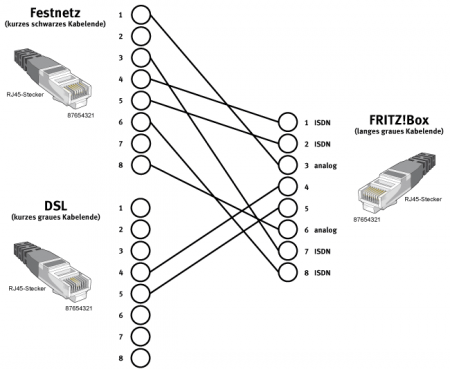
Ein normales Kabel mit TAE-Stecker und sechspoligem RJ-Stecker, wie es für den Anschluss analoger Telefone an eine TAE-Dose verwendet wird, funktioniert nicht.
Bei entbündelten Anschlüssen (ohne analoges oder ISDN-Telefon) kann ein direktes Kabel verwendet werden.
At home, I have 7 screens on 3 computers on the same desk. That sounds like a clutter, but all these keyboards and mice hooked up to them add even more clutter. Until I found out about Input Direct…
In the mean time, I’ve mainly used a Mac with MacOS as a front-end to virtually logon to remote machines using both the internal display and one or two external monitors.
Especially when doing video (think Covid-19 and especially on-line meetings!) in addition to software development work, this is far from ideal.
So here are some things on my list of potential enhancements to this situation:
Windows, Mac and Linux try [Wayback/Archive.is] Synergy, which requires one computer to act as host (Only host can control mouse/kb across multiple devices).


 Anonymous


 The Wiert Corner - irregular stream of stuff