The Wiert Corner – irregular stream of stuff

Jeroen W. Pluimers on .NET, C#, Delphi, databases, and personal interests

  • My badges

  • Twitter Updates

  • My Flickr Stream

  • Pages

  • All categories

  • Enter your email address to subscribe to this blog and receive notifications of new posts by email.

    Join 1,854 other subscribers

Archive for the ‘Hardware’ Category

Mikrotik UDP port 5678 usage is for MikroTik Neighbor Discovery Protocol (MNDP)

Posted by jpluimers on 2017/08/14

Just in case you see UDP port 5678 in the firewall log of your MikroTik device: it’s usage of the MikroTik Neighbor Discovery Protocol (MNDP) [WayBack] protocol.

You can either block Neighbour Discovery [WayBack] in the firewall or turn it off on the MikroTik Services [WayBack] or inspect any of these protocols:

Proto/Port Description
20/tcp FTP data connection
21/tcp FTP control connection
22/tcp Secure Shell (SSH) remote Login protocol
23/tcp Telnet protocol
53/tcp
53/udp
DNS
67/udp Bootstrap protocol or DHCP Server
68/udp Bootstrap protocol or DHCP Client
80/tcp World Wide Web HTTP
123/udp Network Time Protocol ( NTP)
161/udp Simple Network Management Protocol (SNMP)
179/tcp Border Gateway Protocol ( BGP)
443/tcp Secure Socket Layer (SSL) encrypted HTTP
500/udp Internet Key Exchange (IKE) protocol
520/udp
521/udp
RIP routing protocol
646/tcp LDP transport session
646/udp LDP hello protocol
1080/tcp SOCKS proxy protocol
1698/udp 1699/udp RSVP TE Tunnels
1701/udp Layer 2 Tunnel Protocol ( L2TP)
1723/tcp Point-To-Point Tunneling Protocol ( PPTP)
1900/udp
2828/tcp
Universal Plug and Play ( uPnP)
1966/udp MME originator message traffic
1966/tcp MME gateway protocol
2000/tcp Bandwidth test server
5246,5247/udp CAPsMan
5678/udp Mikrotik Neighbor Discovery Protocol
6343/tcp Default OpenFlow port
8080/tcp HTTP Web Proxy
8291/tcp Winbox
8728/tcp API
8729/tcp API-SSL
20561/udp MAC winbox
/1 ICMP
/2 Multicast | IGMP
/4 IPIP encapsulation
/41 IPv6 (encapsulation)
/46 RSVP TE tunnels
/47 General Routing Encapsulation (GRE) – used for PPTP and EoIP tunnels
/50 Encapsulating Security Payload for IPv4 (ESP)
/51 Authentication Header for IPv4 (AH)
/89 OSPF routing protocol
/103 Multicast | PIM
/112 VRRP

–jeroen

Posted in Internet, MikroTik, Power User, routers | Leave a Comment »

DELL 9200 blinking orange power button LED

Posted by jpluimers on 2017/08/09

I had distributed my DELL 9200 machines over some family and friends.

After 10+ years, one of them was showing the [Wayback/Archive.is] “blinking orange” power button LED. Usually this means a power supply issue and in this case [Wayback] these are tower machines compatible with a regular ATX power supply.

So the fix was a basic power supply exchange like mentioned here:

Note: if you have steady orange power button LED blinking, then you need to check the main-board capacitors as this video below shows.

–jeroen

Read the rest of this entry »

Posted in DELL-9200, Hardware, Power User | Leave a Comment »

ssl/ssh multiplexer

Posted by jpluimers on 2017/08/07

sslh accepts connections on specified ports, and forwards them further based on tests performed on the first data packet sent by the remote client.

Probes for HTTP, SSL, SSH, OpenVPN, tinc, XMPP are implemented, and any other protocol that can be tested using a regular expression, can be recognised. A typical use case is to allow serving several services on port 443 (e.g. to connect to ssh from inside a corporate firewall, which almost never block port 443) while still serving HTTPS on that port.

Hence sslh acts as a protocol demultiplexer, or a switchboard. Its name comes from its original function to serve SSH and HTTPS on the same port.

sslh supports IPv6, privilege dropping, transparent proxying, and more.

Interesting…

–jeroen

Posted in *nix, https, Linux, OpenSSL, OpenVPN, Power User, Security | Leave a Comment »

T568A and T568B termination – TIA/EIA-568 – Wikipedia

Posted by jpluimers on 2017/08/04

Note to self: looking at the various patch cables, it looks like most manufacturers prefer T568B over T568A. Not sure why. I adopted T568B to avoid any confusion.

As I always forget the images on FTP/STP/UTP wiring in both connectors and outlets and forget which standard is T568A and T568B: T568A and T568B termination – TIA/EIA-568 – Wikipedia:

Pin T568A Pair T568B Pair 10BASE-T 100BASE-TX 1000BASE-T Signal ID Wire T568A Color T568B Color Pins on plug face (socket is reversed)
1 3 2 TX+ DA+ tip Pair 3 Tip
white/green stripe
Pair 2 Tip
white/orange stripe
Rj45plug-8p8c.png
2 3 2 TX- DA- ring Pair 3 Ring
green solid
Pair 2 Ring
orange solid
3 2 3 RX+ DB+ tip Pair 2 Tip
white/orange stripe
Pair 3 Tip
white/green stripe
4 1 1 DC+ ring Pair 1 Ring
blue solid
Pair 1 Ring
blue solid
5 1 1 DC- tip Pair 1 Tip
white/blue stripe
Pair 1 Tip
white/blue stripe
6 2 3 RX- DB- ring Pair 2 Ring
orange solid
Pair 3 Ring
green solid
7 4 4 DD+ tip Pair 4 Tip
white/brown stripe
Pair 4 Tip
white/brown stripe
8 4 4 DD- ring Pair 4 Ring
brown solid
Pair 4 Ring
brown solid

Note that the only difference between T568A and T568B is that pairs 2 and 3 (orange and green) are swapped.

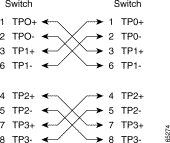
For cross-over cables (used less and less because of Auto MDI-X which is standard in 10000BASE-T) this is slightly different Appendix B: Ethernet Crossover Cables – Configuring and Troubleshooting Ethernet 10/100/1000Mb Half/Full Duplex Auto-Negotiation – Cisco [WayBack]:

Four Twisted-Pair Crossover Cable Schematics for 10/100/1000 and 1000BASE-T GBIC Module Ports

3a.gif

3c.gif

There are some nice colour coded wiring diagrams at Tech Stuff – LAN Wiring and Pinouts [WayBack] for both straight wiring [WayBack] and crossed wiring [WayBack]:

All work fine for CAT5, CAT5E and CAT6.

–jeroen

Posted in Ethernet, Network-and-equipment, Power User | Leave a Comment »

Fix Apple TV No Sound Issue – AppleTV2

Posted by jpluimers on 2017/08/04

The first method I try for any Apple TV issue is to reset the device (Hold the Play & Menu button simultaneously on the remote for 6 seconds)

Source: [Wayback] Fix Apple TV No Sound Issue – AppleTV2

This usually works for me too and is easier/faster than fiddling with the solutions mentioned at Wayback: Apple TV: HDMI audio stops working – Apple Support (which now has moved to [WaybackGet help with audio, video, or power on Apple TV – Apple Support).

After releasing Play&Menu buttons, wait for the Apple TV to reboot itself and listen if your remote-buttons will give you audio-feedback from the Apple TV. If that works, then audio on multi-media works fine too.

This is way cheaper than putting additional hardware in the HDMI chain as described in [WaybackThe fix for AppleTV HDMI audio and video woes and HDMI problem solving | The Poor Audiophile

In my setup the [WaybackApple TV 3rd generation is hooked up to a [WaybackHarman Kardon BDS 580 receiver/blue-ray-player.

–jeroen

Posted in Apple, Apple TV, Audio, BDS580, Hardware, Harman Kardon, Home Audio/Video, iOS, Media, Power User | Leave a Comment »

SMS sending with Mikrotik RouterOS and a capabable USB device

Posted by jpluimers on 2017/07/27

Some links that were useful getting the SMS sending stuff to work.

The documentation is clear on what to do to send/receive SMS:

But it is unclear what USB hardware does work, so here are some links:

You can also do it the other way around:

–jeroen

Posted in Development, Internet, MikroTik, Power User, RouterOS, routers, Scripting, Software Development | Leave a Comment »

Increasing the WinBox font size on OS X

Posted by jpluimers on 2017/07/26

Though the Mikrotik people seem reluctant to make the font size in Winbox configurable, if you run it through WineBottler on OS X, you can scale the individual app. It’s not very pretty but makes it easier to use.

The trick is based on the Windows DPI font settings explained for instance at DPI Display Size Settings – Change – Windows 7 Help Forums and Large Fonts in Registry: Where Exactly? | PC Review but then in Wine.

For Windows, this is a system wide setting, but on a WineBottler application there is one “Windows environment” per application, so it’s application specific and should work for other applications than WinBox as well.

It makes it much easier to do script editing now.

Steps I performed:

  1. Quit all WinBox instances
  2. Open a Terminal
  3. Open this file /Applications/Winbox4Mac.app/Contents/Resources/system.reg
  4. Find this key and name=value:
    • key
      • [System\\CurrentControlSet\\Hardware Profiles\\Current\\Software\\Fonts] 1460991918
    • name=value
      • "LogPixels"=dword:00000060
  5. Change the name=value to be like this (scales to 133.3333333%)
    • "LogPixels"=dword:00000080
  6. Save the file
  7. Start WinBox

The value increases the DPI from 0x60 (96 DPI) to 0x80 (128 DPI) , but the WinBox software isn’t smart enough to scale a lot of other UI properties based on it (like controls dialogs, grid cell sizes and script editors).

So it takes a bit of experimenting what works well (on my system, dword:00000090 – or 144 DPI) which scales to 150% cuts off too much of the descenders).

Values I tried:

  • dword:00000060
  • dword:00000078
  • dword:00000080
  • dword:00000084
  • dword:00000090

I got at this trick through [Wine] Screen font size then wading my way to find where system.reg was stored on my system.

TODO: dive into Fixing Windows font scaling without restarting | Marc Durdin’s Blog and see if other registry settings need to be applied as well.

–jeroen

Posted in Development, Internet, MikroTik, Power User, RouterOS, routers, Scripting, Software Development | Leave a Comment »

The strange case of some applications not being able to copy/paste on the Mac OS X clipboard

Posted by jpluimers on 2017/07/19

I’ve not tracked down the cause yet, but these seem to be related:

  1. The Mac OS X build of Atom IO
  2. WinBox v 3.4 WineBottle version from Winbox for Mac in an embedded Wine environment – Joshaven.com
  3. pbcopy / pbpaste that allow command-line copy/pasting
  4. none of these being able to copy/paste any more and return error level 1 like terminal – pbcopy exits code 1, no error message – Ask Different but not even running tmux or screen which means this solution does not apply: ChrisJohnsen/tmux-MacOSX-pasteboard: Notes and workarounds for accessing the Mac OS X pasteboard in tmux sessions.
  5. I didn’t have Mouse Keys turned on
  6. Other applications (Chrome, FireFox, TextEdit, Finder, etc) still being able to copy/paste between each other

I’ve “fixed” 4. by doing this as recommended at osx – Copy and Cut sometimes don’t work – Ask Different:

launchctl list | grep com.apple.pboard

If the pboard daemon is running, then stop and start it. If it’s not running, start it:

launchctl stop com.apple.pboard
launchctl start com.apple.pboard

Now 4. works again if I restart each application, 6. still works, but these applications still cannot copy/paste to 1. 2. and 3.

What does work is a full reboot, but that takes a while (especially Chrome re-loading lots of Windows: I need to get more organised here).

It might be that I need to restart each application in 6.

Grrr…..

–jeroen

Posted in *nix, *nix-tools, Apple, atom editor, Hardware, iMac, Internet, Mac, Mac OS X / OS X / MacOS, MacBook, MacBook Retina, MacBook-Air, MacBook-Pro, MikroTik, Network-and-equipment, OS X 10.10 Yosemite, OS X 10.11 El Capitan, OS X 10.9 Mavericks, Power User, routers, Text Editors, tmux | 4 Comments »

Mikrotik RouterOS scripting: for loops are a bit of getting used to

Posted by jpluimers on 2017/07/18

Earlier, I wrote “:for loops are a strange beast so I will elaborate on those in a separate post.” so now is the time to do that.

The :for loop documentation is very dense:

Command Syntax Description
for :for <var> from=<int> to=<int> step=<int> do={ <commands> } execute commands over a given number of iterations

So a for loop has these elements:

  • from=
  • to=
  • step=
  • do=

Luckily, the old RouterOS 2.7 documentation on loops (which they’ve revamped after Router OS 2.7 removing many useful examples) has this:

:for – It has one unnamed argument, the name of the loop variable. from argument is the starting value for the loop counter, tovalue is the final value. This command counts loop variable up or down starting at from and ending with to, inclusive, and for each value it executes the do statement. It is possible to change the increment from the default 1 (or -1), by specifying the stepargument.

[admin@MikroTik] > :for i from=1 to=100 step=37  do={:put ($i . " - " . 1000/$i)}
1 - 1000
38 - 26
75 - 13
[admin@MikroTik] >

You might think that from= the start value, to= the finish value and the loop won’t execute when step= a positive value and from= larger than to=. Or that without a step= the loop will always iterate in ascending order.

Wrong! And wrong!

So it’s time for some…

:for loop examples

Read the rest of this entry »

Posted in Development, Internet, MikroTik, Power User, RouterOS, routers, Scripting, Software Development | Leave a Comment »

Brand New Model F Keyboards – The Model M Predecessor: Mechanical Capacitive Buckling Spring Keyboards with NKRO

Posted by jpluimers on 2017/07/17

If it had function keys, I might have ordered it, but in case anyone is still interested: order before the end of July as they will likely not do a re-run of this unique project: [Archive.isBrand New Model F Keyboards – The Model M Predecessor: Mechanical Capacitive Buckling Spring Keyboards with NKRO.

Model F quality is much better than Model M, which is way better than anything manufactured after that. Just compare the spring mechanisms below.

via: [WayBackKeyboardfanaat gaat getrouwe reproducties IBM Model F leveren – Computer – .Geeks – Tweakers

What is the Difference between IBM Model M and Model F Key-Switches?

[WayBackWhat is the Difference between IBM Model M and Model F Key-Switches?


–jeroen

Read the rest of this entry »

Posted in Keyboards and Keyboard Shortcuts, Power User | Leave a Comment »