The Wiert Corner – irregular stream of stuff

Jeroen W. Pluimers on .NET, C#, Delphi, databases, and personal interests

  • My badges

  • Twitter Updates

  • My Flickr Stream

  • Pages

  • All categories

  • Enter your email address to subscribe to this blog and receive notifications of new posts by email.

    Join 1,861 other subscribers

Archive for the ‘Internet’ Category

Some LCID links and notes

Posted by jpluimers on 2021/02/10

Document locations changed, so here are some links to newer and older documentation on LCID related things:

More Delphi related links:


–jeroen

Posted in Development, Internet, link rot, Power User, Software Development, Windows Development, WWW - the World Wide Web of information | Leave a Comment »

56 Linux Networking commands and scripts

Posted by jpluimers on 2021/01/25

Back in 2019, there were 56 commands and scripts covered. I wonder how many there are now.

An ongoing list of Linux Networking Commands and Scripts. These commands and scripts can be used to configure or troubleshoot your Linux network.

Source: [WayBack55 Linux Networking commands and scripts

List back then (which goes beyond just built-in commands: many commands from optional packages are here as well):

  1. arpwatch – Ethernet Activity Monitor.
  2. bmon – bandwidth monitor and rate estimator.
  3. bwm-ng – live network bandwidth monitor.
  4. curl – transferring data with URLs. (or try httpie)
  5. darkstat – captures network traffic, usage statistics.
  6. dhclient – Dynamic Host Configuration Protocol Client
  7. dig – query DNS servers for information.
  8. dstat – replacement for vmstat, iostat, mpstat, netstat and ifstat.
  9. ethtool – utility for controlling network drivers and hardware.
  10. gated – gateway routing daemon.
  11. host – DNS lookup utility.
  12. hping – TCP/IP packet assembler/analyzer.
  13. ibmonitor – shows bandwidth and total data transferred.
  14. ifstat –  report network interfaces bandwidth.
  15. iftop – display bandwidth usage.
  16. ip (PDF file) – a command with more features that ifconfig (net-tools).
  17. iperf3 – network bandwidth measurement tool. (above screenshot Stacklinux VPS)
  18. iproute2 – collection of utilities for controlling TCP/IP.
  19. iptables – take control of network traffic.
  20. IPTraf – An IP Network Monitor.
  21. iputils – set of small useful utilities for Linux networking.
  22. jwhois (whois) – client for the whois service.
  23. “lsof -i” – reveal information about your network sockets.
  24. mtr – network diagnostic tool.
  25. net-tools – utilities include: arp, hostname, ifconfig, netstat, rarp, route, plipconfig, slattach, mii-tool, iptunnel and ipmaddr.
  26. ncat – improved re-implementation of the venerable netcat.
  27. netcat – networking utility for reading/writing network connections.
  28. nethogs – a small ‘net top’ tool.
  29. Netperf – Network bandwidth Testing.
  30. netsniff-ng – Swiss army knife for daily Linux network plumbing.
  31. netstat – Print network connections, routing tables, statistics, etc.
  32. netwatch – monitoring Network Connections.
  33. ngrep – grep applied to the network layer.
  34. nload – display network usage.
  35. nmap – network discovery and security auditing.
  36. nslookup – query Internet name servers interactively.
  37. ping – send icmp echo_request to network hosts.
  38. route – show / manipulate the IP routing table.
  39. slurm – network load monitor.
  40. snort – Network Intrusion Detection and Prevention System.
  41. smokeping –  keeps track of your network latency.
  42. socat – establishes two bidirectional byte streams and transfers data between them.
  43. speedometer – Measure and display the rate of data across a network.
  44. speedtest-cli – test internet bandwidth using speedtest.net
  45. ss – utility to investigate sockets.
  46. ssh –  secure system administration and file transfers over insecure networks.
  47. tcpdump – command-line packet analyzer.
  48. tcptrack – Displays information about tcp connections on a network interface.
  49. telnet – user interface to the TELNET protocol.
  50. tracepath – very similar function to traceroute.
  51. traceroute – print the route packets trace to network host.
  52. vnStat – network traffic monitor.
  53. wget –  retrieving files using HTTP, HTTPS, FTP and FTPS.
  54. Wireless Tools for Linux – includes iwconfig, iwlist, iwspy, iwpriv and ifrename.
  55. Wireshark – network protocol analyzer.

Via:

–jeroen

Posted in *nix, *nix-tools, cURL, dig, Internet, nmap, Power User, SpeedTest, ssh/sshd, tcpdump, Wireshark | Leave a Comment »

Mike Cardwell’s Tech Blog: Twitter to RSS with Google Cloud Function – Grepular

Posted by jpluimers on 2020/12/03

Cool, on my list of things to tinker with: [WayBack] Twitter to RSS with Google Cloud Function – Grepular at Mike Cardwell’s Tech Blog

Source at [WayBack] Mike Cardwell / funcTwitter · GitLab, of which these are the most important bits:

Via [WayBack] Mike Cardwell on Twitter: “Twitter to RSS with Google Cloud Function”

–jeroen

Posted in Cloud Apps, Cloud Development, Development, Google, Google Cloud Function, Internet, Power User, RSS, SocialMedia, Software Development, Twitter | Leave a Comment »

Archiving Google Product Forums URLs

Posted by jpluimers on 2020/11/13

Archiving Google Product Forum URLs is a pain in the butt for a couple of reasons:

So the trick for saving is:

  1. Get from the /forum/#!topic/ based URL to the /d/topic/ based one
  2. Put it after the archive.is/?run=1&url=, then save

--jeroen


Posted in Conference Topics, Conferences, Event, Internet, InternetArchive, Power User, WayBack machine | Leave a Comment »

Mikrotik Remote Access via Multiple WAN Links | Syed Jahanzaib Personal Blog to Share Knowledge !

Posted by jpluimers on 2020/11/04

Multi-WAN routing always involves marking incoming connections to the replies go out on the same connection: [WayBack] Mikrotik Remote Access via Multiple WAN Links | Syed Jahanzaib Personal Blog to Share Knowledge !

# Mirkotik IP Firewall Mangle Section
/ ip firewall mangle
# Mark traffic coming via WAN-1 link
add chain=input in-interface=WAN1 action=mark-connection new-connection-mark=WAN1_incoming_conn
# Mark traffic coming via WAN-2 link
add chain=input in-interface=WAN2 action=mark-connection new-connection-mark=WAN2_incoming_conn
# Mark traffic routing mark for above marked connection for WAN-1 , so that mikrotik will return traffic via same interface it came in
add chain=output connection-mark=WAN1_incoming_conn action=mark-routing new-routing-mark=to_WAN1
# Mark traffic routing mark for above marked connection for WAN-2, so that mikrotik will return traffic via same interface it came in
add chain=output connection-mark=WAN2_incoming_conn action=mark-routing new-routing-mark=to_WAN2
# Finally Add appropriate routes in ROUTE section
/ ip route
add dst-address=0.0.0.0/0 gateway=1.1.1.2 routing-mark=to_WAN1 check-gateway=ping
add dst-address=0.0.0.0/0 gateway=2.2.2.2 routing-mark=to_WAN2 check-gateway=ping

Related:

–jeroen

Posted in Development, Internet, MikroTik, Power User, RouterOS, routers, Scripting, Software Development | Leave a Comment »

WordPress blog URLs using post-ID: Using Permalinks « WordPress Codex

Posted by jpluimers on 2020/10/23

[WayBack] Using Permalinks « WordPress Codex:

http://example.com/?p=N

So for instance https://wiert.me/?p=35558 points to Delphi version info table: C# Builder, Delphi 8 through 10.3 Rio and Appbuilder despite the actual URL not fully matching the title (because I do not like link rot): https://wiert.me/2016/09/06/delphi-version-info-table-need-help-with-these-projectversion-for-c-builder-delphi-2005-and-2006-dllsuffix-for-c-builder-appbuilder-1-13-codename/

–jeroen

Posted in link rot, Power User, SocialMedia, WordPress, WWW - the World Wide Web of information | Leave a Comment »

Some postfix notes

Posted by jpluimers on 2020/10/15

Postfix has documentation on primary MX and secondary MX, but not on tertiary MX.

If the primary MX is down, you have a series of secondary MX and tertiary MX that configured the same way, MX DNS priority for primary, the series of secondary MX and tertiary MX have increasing numbers, and the primary MX goes down, then senders can get “too many hops” as secondary and tertiary MX are looping.

I had a hard time finding a good and easy solution as these queries do not return many meaningful results:

Here are some links that helped getting this solved:

  • [WayBack] Postfix Frequently Asked Questions: What does “Error: too many hops” mean?

    Short answer: this message means that mail is probably looping. If you see this after you turned on Postfix content filtering, then you have made a mistake that causes mail to be filtered repeatedly. This is cured by appropriate use of content_filter=header_checks=, and body_checks=.

    Long answer: the message has too many Received: message headers. A received header is added whenever Postfix (or any MTA) receives a message. A large number of Received: message headers is an indication that mail is looping around.

    Side comment: email uses the opposite of the technique that is used to avoid IP forwarding loops. With IP, the sender sets a TTL (time to live) field in the IP header. The field is decremented by each router. When the TTL reaches zero the packet is discarded and an ICMP error message is returned to the sender.

  • [WayBack] Error: too many hops (in reply to end of DATA command) · Issue #713 · mail-in-a-box/mailinabox · GitHub

    In case you or anyone else was/is wondering about the mydestination = localhost thing, the reason it has to be set to just localhost is because MIAB uses Postfix’s “virtual domain hosting” (http://www.postfix.org/VIRTUAL_README.html) support. Per the documentation for mydestination at http://www.postfix.org/postconf.5.html#mydestination:

    Do not specify the names of virtual domains – those domains are specified elsewhere. See VIRTUAL_README for more information.

    (in the context of MIAB every domain is a virtual domain).

In my case a series of these:

Received: from mwgp.xs4all.nl (mwgp.xs4all.nl [80.101.239.92])
    by fiber24315337242.heldenvannu.net (Postfix) with ESMTP id 26395200FE
    for <jeroen@pluimers.com>; Fri, 29 Jun 2018 11:01:02 +0200 (CEST)
Received: from fiber24315337242.heldenvannu.net (unknown [37.153.243.246])
    by mwgp.xs4all.nl (Postfix) with ESMTP id 077A5E937
    for <jeroen@pluimers.com>; Fri, 29 Jun 2018 11:01:02 +0200 (CEST)

Specifying the transport will likely help me solve this problem:

This all came down to editing /etc/postfix/transport adding lines for each relayed domain like this one:

example.org    smtp:[mx-a-record.example.org]

Lines like it direct to use the smtp transport and use a specific host (normally, the relay transport is being used).

After this:

# postmap /etc/postfix/transport
# rcpostfix reload

I choose not to configure [WayBack] Postfix Configuration Parameters: relay_recipient_maps, but might if I had an automated way of replicating lists of valid (and invalid) users.

Another option was confirmed at [WayBack] Software-update: Postfix 3.4.0 / 3.3.3 / 3.2.8 / 3.1.11 / 3.0.15 – Computer – Downloads – Tweakers by [WayBack] menocchio. Thanks!

Dat is volgens mij eenvoudig op te lossen met relay_transport of transport_maps. Zie ook: Postfix transport table format.

Daarmee dwing je de secondary servers de mail altijd af te willen leveren bij de primary server (en dus niet bij een andere secondary). En als de primary niet online is, dan wacht ie netjes tot dat wel het geval is :-)

Bijvoorbeeld:
relay_transport = smtp:[primarymx.domain.tld]

Likely relevant: [WayBack] The Book of Postfix

Maybe relevant in the future:

Found on my hunt for the above:

Try not to make typo’s: [WayBack] postfix appears not finding MX records or host names from DNS

Interesting thought, but not sure how smart SPAM bots are now: [Archive.is] Spam relaying through secondary MX… – Google Groups

To archive this:

  1. Rename from
  2. To
  3. Then save in Archive.is

–jeroen

Posted in *nix, Communications Development, Development, DevOps, DNS, etckeeper, Infrastructure, Internet, Internet protocol suite, Linux, Power User, SMTP | Leave a Comment »

pfSense OpenVPN server configuration steps

Posted by jpluimers on 2020/09/28

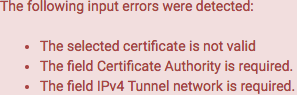
Saving an initial configuration without changing anything gives these errors:

Self signed certificate

If you are OK with self-signed certificates, then the first is solved by using this as the Server certificate:

Certificate authority

The second needs an additional step: you have to select or create a certificate authority first at hostname/system_camanager.php?act=new where hostname is the hostname or IP address of your pfSense configuration.

This order is actually explained in [WayBack] OpenVPN – The Open Source VPN: HOWTO and [WayBack] OpenVPN Configuration (pfSense) – ELITS, but I like stronger security.

For the Internal Certificate Authority (CA), use at least these settings:

  • “Key length (bits)” at least 2048 bits, but I prefer 3072 bits (to be safe after about 2030) as per
  • “Digest Algorithm” at least sha256, but I prefer sha512 as it will be safe for a longer period of time.
  • “Lifetime” by default is 3650 (10 years); can you keep your VM safe for that long? If longer, you can increase the lifetime, but also have to ensure you take large enough values for the Key length and Digest Algorithm.

You can view the possible settings in [WayBack] pfsense/system_camanager.php at master · pfsense/pfsense · GitHub.

Straightforward parameters

Further encryption hardening

  • DH Parameter Length
    • One problem here is that pfSense ships with pre-generated Diffie Helman (DH) parameters:

      This means they can potentially be re-used as an attack-vector, so you need to manually re-generate them as per [WayBack] DH Parameters – pfSense Documentation by using /usr/bin/openssl dhparam

      In order to speed that up, you have to either manually add a lot of entropy, or ensure your VM uses the host entropy by installing the open-vm-tools and rebooting.

      This can take quite some time as it depends on /dev/random as a pure random number source, which will wait if there is not enough initial entropy available yet (see [WayBack] prng – differences between random and urandom – Stack Overflow).

      In order to speed that up, you have to either manually add a lot of entropy, or ensure your VM uses the host entropy by installing the open-vm-tools and rebooting.

      On a single-coreIntel(R) Xeon(R) CPU E5-2630L v4 @ 1.80GHz, the timings of these

      /usr/bin/openssl dhparam -out /etc/dh-parameters.1024 1024
      /usr/bin/openssl dhparam -out /etc/dh-parameters.2048 2048
      /usr/bin/openssl dhparam -out /etc/dh-parameters.4096 4096

      using the [WayBack] FreeBSD Manual Pages: time command are (each measured twice):

      • ~4.5 seconds for 1024 bits:

      • ~23 seconds for 2048 bits:

      • ~150 seconds for 4096 bits:

      • You see that even within the same length, the duration varies highly.
    • Given you already burned those CPU cycles, choose the largest one: 4096
  • Encryption Algorithm
  • Enable NCP(Negotiable Cryptographic Parameters)
    • I enabled this, because I consider the ones below safe enough. If you just want to go for one algorithm, then disable this.
  • NCP Algorithms
    • See the previous one; only list the algorithm-length-mode combinations that you want to allow.. Since I am on AES, prefer GCM, and all key sizes are considered safe, my list is the one on the right:

      This is in decreasing order of secureness:

      • AES-256-GCM
      • AES-192-GCM
      • AES-128-GCM
  • Auth digest algorithm
  • Certificate depth
    • For now it is 1 (as it is self-signed)
    • In the future I will experiment with proper (hopefully Let’s Encrypt) signed certificates. I am not yet sure if that might need a larger depth.

Other settings

All networks are in CIDR notation, like 192.168.3.0/24.

  • IPv4 Tunnel network
  • IPv6 Tunnel network
    • I still need to implement IPv6 in full, so that is empty for now.
  • IPv4 Local networks
    • These are my local networks. Still need to test how well routing works, but given the default gateway knows about them too, I do not suspect problems.
  • IPv4 Remote networks
    • Empty as I do not use site-to-site VPN yet.
  • IPv4 Remote networks
    • I still need to implement IPv6 in full, so that is empty for now.
  • Concurrent connections
    • Still need to measure performance, so empty for now.
  • Compression
    • I kept the default “Omit Preference (Use OpenVPN Default)”.
    • I might choose compression lz4 or compression lz4-v2 in the future.
  • Push compression
    • Kept to unchecked: I dislike other VPN connections to push settings to me, so I do not want to push settings to others.
  • Type-of-Service
    • Kept to unchecked, although I might opt for checked later on: need to do some testing first.
  • Inter-client communication
    • Kept to unchecked: I do not want clients to talk to each other in this particular network, though I might for some specific OpenVPN setup
  • Duplicate Connection
    • Kept to unchecked
  • Dynamic IP
    • I have enabled this as I expect clients to switch IP addresses because of switching between networks
  • [WayBack] Topology: choose subnet (use net30 only for old 2.0.9 client compatibility on Windows; use p2p if you only have non-Windows clients)
  • Advanced client options
    • All defaults, as currently I do not run an internal DNS, but those will probably change in the future:
      • DNS Default Domain
      • DNS Server enable
      • DNS Server 1..4
      • Force DNS Cache Update
  • Custom options
    • None, but I will need to do some deeper reading on the possibilities here
  • UDP Fast I/O
    • Disabled as experimental
  • Send/Receive Buffer
    • Default, although I might increase this if speed is too slow.
  • Gateway creation
    • I choose the default Both
  • Verbosity level
    • Default


Enabling AES

Even if the underlying Intel/AMD processor supports AES, it is not enabled by default in pfSense as per web UI home page:

Intel(R) Xeon(R) CPU E5-2630L v4 @ 1.80GHz
AES-NI CPU Crypto: Yes (inactive)

I was quite surprised, but then remembered that enabling RDRAND in the OpenVPN settings was also non-default and dug a bit deeper into ….

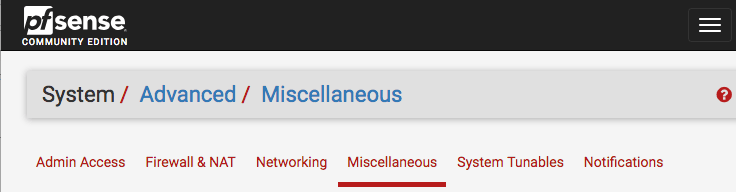
There I found you have to go to the System menu, choose Advanced, then the Miscellaneous tab:

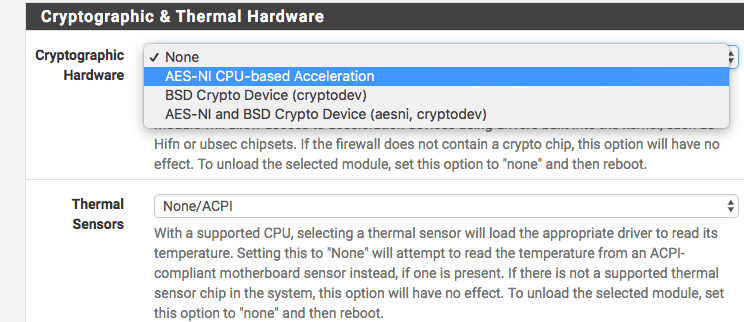
From there, browse down (or search for Hardware) to “Cryptographic & Thermal Hardware”, then enable the CPU based accelleration:

After pressing the Save button at the bottom, you are done:

AES-NI CPU Crypto: Yes (active)

I got this via [WayBack] AES-IN Inactive?, which also mentions this:

  • AES-NI loads aesni.ko
  • BSD Crypto loads cryptodev.ko
  • AES-NI and BSD Crypto loads both

Note that AES – as of FreeBSD-10 – AES-NI and other hardware implementations are only indirectly incorporated into /dev/random. The Linux kernel already did this in an indirect way. I think that is a good idea as when multiple entropy sources are merged together, it makes it much harder to influence to total entropy. FreeBSD implemented this using the Yarrow algorithm – Wikipedia and now has moved to a successor, the Fortuna (PRNG) – Wikipedia.

More background information:

padlock ACE support

Note there is a message about ACE support on the console and in the boot log that is related to AES:

padlock0: No ACE support.
aesni0: <AES-CBC, AES-XTS, AES-GCM, AES-ICM> on motherboard

The cause is that in the past, VIA PadLock Advanced Cryptography Engine (ACE) in the mid 2000s introduced encryption acceleration (see [WayBack] VIA PadLock support for Linux) a few years before AES-NI, so ACE is incompatible with AES-NI. AES-NI is now much more widespread than ACE, even the wikipedia VIA page padlock information has been removed.

An odd thing: unlike AES-NI which needs to be specifically enabled, VIA Padlock is always enabled, see

OpenVPN Client Export Package

Ensure you install the (optional, but highly recommended) [WayBack] OpenVPN Client Export Package:

Allows a pre-configured OpenVPN Windows Client or Mac OS X’s Viscosity configuration bundle to be exported directly from pfSense.

These config files work with Tunnelblick as well, which is a great free and open source OpenVPN tool on Mac OS X / MacOS:

Creating and exporting users

I have yet to cover these two; for now read [WayBack] How to setup OpenVPN on pFSense? | IT Blog and [WayBack] OpenVPN Remote Access Server – pfSense Documentation.

Further reading

I like this overview a lot:

–jeroen

Read the rest of this entry »

Posted in Internet, pfSense, routers | Leave a Comment »

During pfSense boot: syslogd “operation not supported by device” messages

Posted by jpluimers on 2020/09/25

If during a pfSense reboot you get one or more messages from syslog about “operation not supported by device” on various log files, then they are likely corrupt.

I had this when a pfSense 2.4.x RELEASE version VM was accidentally power-cycled during initial setup.

A side effect was that no logs showed in the web UI either, nor would clog on any file in the /var/log directory.

The solution was to choose option 8 (Shell), then in the /var/log directory, remove all files with extension .log, then reboot.

Now the messages were gone and the web UI showed logs. clog /var/log/system.log showed content as well.

Solution based on these posts:

–jeroen

Posted in Internet, pfSense, Power User, routers | Leave a Comment »

Some more interesting OpenWrt capable routers/ATAs

Posted by jpluimers on 2020/08/24

Interesting devices running OpenWrt:

–jeroen

Posted in Internet, Power User, routers | Leave a Comment »