Archive for the ‘Internet’ Category
Posted by jpluimers on 2019/07/19
Via [WayBack] Knowledge Base | AVM International:
3 Setting the maximum transmitter power
- Click “Wireless” (“WLAN”) in the FRITZ!Box user interface.
- Click “Radio Channel” in the “Wireless” (“WLAN”) menu.
- If the option “Set radio channel settings automatically (recommended)” is enabled, proceed with the following section.
- If the option “Adjust radio channel settings” is enabled:
- Click “Additional settings”.
- Select “100%” from the drop-down list “Maximum transmitter power”.
- Click “Apply” to save the settings.
For me, having minimal power was important since every now I needed to be able to connect to it, but only when I was in close proximity.
Hence the settings below: 6% Maximum transmit power is the lowest I could set.
For devices that cannot adjust their antenna output power which have RP-SMA connectors, I bought these to effectively throttle them:
Read the rest of this entry »
Posted in Fritz!, Fritz!Box, Internet, Power User | Leave a Comment »
Posted by jpluimers on 2019/05/27
When you get the response “web.archive.org unexpectedly closed the connection” without even returning an HTTP code, but:
- it works in anonymous mode
- it works with all extensions turned off
then likely there are too many cookies for archive.org or/and web.archive.org: in my case, I had 90 cookies.
Cleaning these cookies out resolved the problem (I used [WayBack] Awesome Cookie Manager for this).
Edit 20231230: Awesome Cookie Manager source repository at [Wayback/Archive] Phatsuo/awesome-cookie-manager: Awesome Cookie Manager.

--jeroen
Posted in Chrome, Google, Internet, InternetArchive, Power User, WayBack machine | Leave a Comment »
Posted by jpluimers on 2019/04/18
I still have to do this every few weeks on all my desktop machines: [WayBack] When +Google Nederland maps only fills none or part of the map tiles… – Jeroen Wiert Pluimers – Google+
When +Google Nederland maps only fills none or part of the map tiles at https://maps.google.nl, but https://maps.google.com works fine, then remove any gsScrollPos cookies from www.google.nl.
I need to do this every couple of days to keep maps.google.nl working.
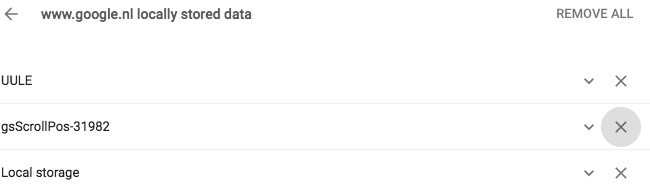
Later I also found it can happen for YouTube, then did more digging for gsScrollPos and found a better workaround: [WayBack] Awesome Cookie Manager where you can just delete the gsScrollPos cookies from all sites in one go.
Even later I found out that this can be one of the causes for the WayBack machine giving an error 400 when archiving. A more common reason however is that many archived web-pages try to create cookies in the web.archive.com subdomain resulting in the same problem.
The cause seems to be the Great Suspender plugin which should be fixed by now, but might not automatically update to the latest version. See:
Pending a new Great Suspender release, below is a quick way to manually remove them if you are into SQL scripting for sqlite. It basically comes down to executing the below statement when Chrome is closed:
delete from cookies where name like 'gsScrollPos-%'
Edit 20231230: Awesome Cookie Manager source repository at [Wayback/Archive] Phatsuo/awesome-cookie-manager: Awesome Cookie Manager.
--jeroen
Posted in Chrome, Google, GoogleMaps, Internet, InternetArchive, Power User, WayBack machine | Leave a Comment »
Posted by jpluimers on 2019/04/12
Every now and then I hear about providers that refuse to hand over the VoIP SIP credentials.
If you do have access to your modem, you can Wireshark the WAN side, then reset the modem and capture traffic until it has obtained the VoIP information:
[WayBack] Telfort SIP (getest met Glasvezel) | Het leven van Teus & Simone:
Veel mensen op het forum van Telfort vragen zich af of ze de SIP gegevens kunnen krijgen voor telefonie zodat men de ExperiaBox niet hoeven te gebruiken. Gezien dat de Telfort Support deze gegevens…
Via:
–jeroen
Posted in *nix, *nix-tools, Internet, Power User, Wireshark | Leave a Comment »
Posted by jpluimers on 2019/04/08
When one of the machine isn’t active for a while it seems to disappear. Even when it’s active some of the machines have intermittent errors pinging it as like every 10-30 seconds one of these ping results appear:
92 bytes from tl-er5120 (192.168.71.1): Redirect Host(New addr: 192.168.71.193)
Vr HL TOS  Len   ID Flg  off TTL Pro  cks      Src      Dst
 4  5  00 0054 05de   0 0000  40  01 644d 192.168.71.108  192.168.71.193
Sometimes even a simple
Request timeout for icmp_seq 6900
So I need to dig into ICMP “Redirect Host” .
It might be a simple ARP thing like mac mini – Why the different results for ping? Or why is the Time Capsule getting involved? – Ask Different [WayBack] but like usual stuff I bump into is of a more complex kind so I’ve archived at least these:
–jeroen
Posted in Internet, MikroTik, Power User, routers | Leave a Comment »
Posted by jpluimers on 2019/03/18
Soon this is a thing of the past, but for just a few more days, you can help: Archiving Google+.
Either run this project: [WayBack] GitHub – ArchiveTeam/googleplus-grab: Archiving Google+.
Or even better: run the appliance, and help the WayBack machine with any archiving projects setup by the virtual appliance: the [WayBack] ArchiveTeam Warrior – Archiveteam.
See some of their other pages for more background information:
You can donate both to the archive team, and the internet archive:
How is G+ archiving doing?
The tracker is well under way: [WayBack] Googleplus tracker Dashboard. History: archive.is 1; archive.is 2
Read the rest of this entry »
Posted in ArchiveTeamWarrior, Development, G+: GooglePlus, Google, Internet, InternetArchive, Power User, Python, Scripting, SocialMedia, Software Development, WayBack machine | Leave a Comment »
Posted by jpluimers on 2019/01/21
I have a bunch of [WayBack] FRITZ!WLAN Repeater 1750E | Overview | AVM International devices; this is the quickest way to install them as LAN -> WiFi bridge (connect ethernet to your LAN; use the WiFi as a bridge).
- Connect the FRITZ!WLAN to your LAN
- Connect the FRITZ!WLAN to power
- Connect your laptop to the WiFi SSID
FRITZ!WLAN Repeater 1750E with password 00000000 (that eight times a zero)
- Set your laptop with a fixed IP address
192.168.178.127 with netmask 255.255.255.0 and gateway 192.168.178.2 for WiFi.
- Connect to your FRITZ!WLAN at http://192.168.178.2
- Setup your FRITZ!WLAN for the first time (password, country) and have it reboot
- Logon to the FRITZ!WLAN
- Change the WiFI password and the SSID for 2.4 Ghz and 5.0 Ghz channels (I use a different SSID for both as many Fritz!Box devices have both bad 2.4Ghz performance and a hard time to automatically switch from 2.4Ghz to 5.0Ghz on the same SSID automagically).
- Change your laptop to use DHCP on WiFi
- Reconnect to the Fritz!Box with the new SSID and password
–jeroen
Posted in Fritz!, Fritz!WLAN, Internet, Power User | Leave a Comment »
Posted by jpluimers on 2019/01/11
Interesting post which links to an on-line overview of the current latencies:
Does anybody know about similar information about other big cloud providers like Amazon and Azure?
–jeroen
Posted in Cloud, GCP Google Cloud Platform, Infrastructure, Internet, Power User, SpeedTest | Leave a Comment »
Posted by jpluimers on 2019/01/07
A while ago, I write about Locally Administered Addresses: a few series of MAC addresses you can use on your local network: MAC address ranges safe for testing purposes (Locally Administered Address).
A while ago, I found ones in my network and ones in my WiFi SSID survey starting with FA:8F:CA. They did not show up in the Wireshark · OUI Lookup Tool nor their manufacturer database.
But with bit 7 turned off they start with F8:8F:CA which does show up as “F8:8F:CA Google, Inc.”
They appear to be Google devices, in my case Google ChromeCast ones, though they can also be Google Home ones.
Google does “magic” with networks, just look at a few of the links here:
–jeroen
Posted in Ethernet, Google, Internet, Network-and-equipment, Power User, Ubiquiti, WiFi | Leave a Comment »


 The Wiert Corner - irregular stream of stuff