Archive for the ‘Internet’ Category
Posted by jpluimers on 2015/08/21
Interesting Dutch thread about a major ISP having DNS issues because of DDos attacks. Many messages to set your DNS servers manually on various operating systems, and a list of good DNS server alternatives. Recommended reading:
Ziggo kampt weer met storing – update – IT Pro – Nieuws – Tweakers.
–jeroen
Posted in Internet, Power User, routers | Leave a Comment »
Posted by jpluimers on 2015/05/16
Interesting:
There is no extra charge for use of BitTorrent with Amazon S3. Data transfer via the BitTorrent protocol is metered at the same rate as client/server delivery. To be precise, whenever a downloading BitTorrent client requests a “piece” of an object from the…
Note
You can get torrent only for objects that are less than 5 GB in size.
via Using BitTorrent with Amazon S3 – Amazon Simple Storage Service.
–jeroen
via Oh wow. Apparently all S3 buckets are also BitTorrent trackers..
Posted in Amazon S3, Cloud Apps, Cloud Development, Development, Internet, Power User | Leave a Comment »
Posted by jpluimers on 2015/04/27
Edit 20210727:
- A lot of the links below have died due to link rot (sometimes even the domains have gone), but most of the WayBack machine links marked [Wayback] still work.
- The same stop [Wayback] stop
0x0000007B can happen when converting a physical machine to VMware (I will schedule a separate post about this):
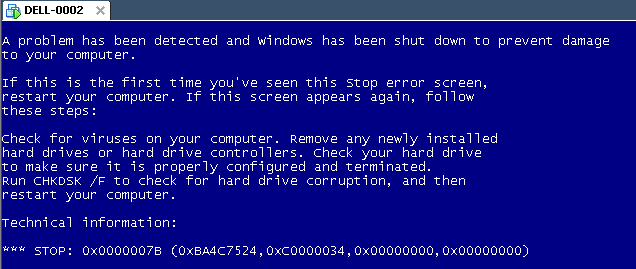
Windows XP Virtual Machine failing with stop 0x0000007B
Steps:
- Put the SATA disk of the XP machine in a different one.
- Disk2Vhd on the new machine to create a VHDX of the XP hard disk.
- Install Hyper-V on the target Windows 8.1 machine (you need at least Pro for that).
- Setup the base VM directory.
- Setup a virtual network switch (decide if you want it to be internal, external or private, then bind it to a network adapter if needed).
- Add a new VM.
- Assign a new directory to it.
- Assign memory to it.
- Assign the virtual network switch to it.
- Save it.
- Edit the settings, then bind the DVD drive on the IDE controller 1 to C:\Windows\System32\vmguest.iso.
- Connect to the VM.
- Start it.
- If you get a stop
0x0000007B (usually because of SATA/AHCI/IDE or other MassStorage controller driver issues), then read [Wayback] Jon’s Project Blog » disk2vhd using [Wayback] UBCD for Windows to solve the issue as there is no BIOS screen in Hyper-V that allows you to switch from AHCI to SATA and back.
- Note: you cannot perform UBCD4Win when you access the Hyper-V host through Microsoft Remote Desktop (the mouse will not work at all, and most keyboard shortcuts will not work either; [Wayback] Virtual Machine Connection Key Combinations with Hyper-V – Ben Armstrong – Site Home – MSDN Blogs does not apply).
- Boot.
- Register Windows (you might need to do extra work to go from OEM to Retail here).
- Remove hidden devices that are not used any more and their drivers.
- Setup a backup schedule.
Some links that helped me get at these steps:
–jeroen
Posted in BIOS, Boot, Hyper-V, Internet, link rot, Power User, Virtualization, Windows, Windows 8, Windows 8.1, Windows XP, WWW - the World Wide Web of information | Leave a Comment »
Posted by jpluimers on 2015/04/03
Interesting:
To remove the language barrier, we have written a detailed step-by-step procedure to get the 36 TB free cloud storage from Qihoo 360 Cloud Drive.
For all those MSDN and TechNet ISOs that aren’t available on-line any more (:
–jeroen
via: How To Get 36 TB Free Cloud Storage From Qihoo 360 Yunpan (Cloud Drive)?.
Posted in Cloud Apps, Internet, Power User | Leave a Comment »
Posted by jpluimers on 2014/08/20
In the the irregular series of ASUS RT-N66U and TomatoUSB posts:
Execute this script from the Tomato USB interface, or a ssh/telnet shell:
cat /dev/mtd0ro | grep bl_version
nvram get os_version
nvram get clkfreq
wl -i eth1 phy_tempsense | awk '{print $1/2+20;}'
wl -i eth2 phy_tempsense | awk '{print $1/2+20;}'
- Line 1 gets the CFE bootloader version
(1.0.2 and lower boot with 32K of NVRAM, 1.0.3 and up with 64K of RAM; some Firmwares work around the 32k limitation)
- Line 2 gets the Firmware model and version
- Line 3 gets the CPU speed
- Line 4 and 5 get the temperature for eth1 (2.4 Ghz) and eth2 (5 Ghz) in Celsius
It is based on the RMerlinDev (firmware developer) information on temperatures: These are for each radio. Take the returned value, divide by 2, then add 20. Results are in Celcius.
Next to that knowledge, it uses a few tricks on awk calculation, and first parameter in awk (the second parameter would be the hex value of the temperature code in parenthesis) which is easier than shell calculations.
Based on those, I found a few very useful scripts:
–jeroen
Posted in ASUS RT-N66U, Awk, bash, Development, Internet, Network-and-equipment, Power User, Scripting, Software Development, TomatoUSB | Leave a Comment »
Posted by jpluimers on 2014/04/22
Wow: Microsoft OneDrive for Business modifies files as it syncs | Myce.com.
For now Microsoft Cloud Storage is not the place for my data to be.
(Note: OneDrive used to be called SkyDrive)
The only cloud storage that worked for me without too much trouble is Copy.com. My referral there: https://copy.com?r=3NGul6.
–jeroen
Posted in Cloud Apps, Internet, Power User | Leave a Comment »
Posted by jpluimers on 2014/04/11
In layman’s terms/pictures: xkcd: Heartbleed Explanation.
If you still don’t get it: anyone with any HTTPS connection to a once vulnerable system could copy data out of that system. There is no guarantee that data did not contain your identity (username, password, public key, credit card check-digits, etc) or server identity (private and public key).
Since often you cannot prove a system was using OpenSSL, there is no way to prove your data didn’t get copied.
–jeroen (who just discovered this is post #2000 on my blog; ain’t this cool? <g>)
Read the rest of this entry »
Posted in Internet, OpenSSL, Power User, Security | 8 Comments »
Posted by jpluimers on 2014/03/27
RouterOS runs on many kinds of hardware. Of course on the MikroTik hardware itself (which always comes with a license), but also on x86 hardware, even virtualized systems.
In that respect, it looks a bit like pfSense, or Endian, but on steroids and closed source.
Here are some links focused on MikroTik on ESXi (which is great for experimental purposes):
WOL (Wake ON LAN)
–jeroen
via: Routers.
Posted in ESXi4, ESXi5, ESXi5.1, ESXi5.5, Ethernet, Internet, Network-and-equipment, Power User, routers, Virtualization, VMware, VMware ESXi, Wake-on-LAN (WoL) | Tagged: MikroTik, RouterOS | Leave a Comment »
Posted by jpluimers on 2014/03/24
Interesting: Peplink multi-WAN routers and VPN solutions.
Lets see how this compares to MikroTik stuff (:
–jeroen
Posted in Internet, Power User, routers | Leave a Comment »


 The Wiert Corner - irregular stream of stuff