


[WayBack] Chris Bensen: Sync a Shared Google Calendar with Calendar in iOS or macOS
Cool: configure a shared Google Calendar to show up in the Calendar in iOS or macOS
https://calendar.google.com/calendar/syncselect
–jeroen
Posted by jpluimers on 2018/04/06
[WayBack] Chris Bensen: Sync a Shared Google Calendar with Calendar in iOS or macOS
Cool: configure a shared Google Calendar to show up in the Calendar in iOS or macOS
https://calendar.google.com/calendar/syncselect
–jeroen

Posted in Apple, Google, GoogleCalendar, iOS, iPad, iPhone, iPod touch, Power User | Leave a Comment »
Posted by jpluimers on 2017/02/16
Interesting: Starting with Xcode 7, Apple made it possible to sideload apps on the iPhone, iPad, and Apple TV using a free Apple ID. Although a paid developer account is still required to deploy apps to the App…: How-To: Create a free Apple developer account for sideloading apps | 9to5Mac
Posted in Apple TV, Development, iOS, iOS Development, iPad, iPhone, iPod touch, Mobile Development, Power User, Software Development, xCode/Mac/iPad/iPhone/iOS/cocoa | Leave a Comment »
Posted by jpluimers on 2016/12/16
If shared Google Calendars do not show on your iPad, iPod, iPhone or Mac, then go to https://www.google.com/calendar/syncselect (sometimes called https://www.google.com/calendar/iphoneselect) and set a tick mark in front of each calendar you want to appear there. Finally, refresh the calendar list on your iOS device and you are set.
–jeroen
Source: Shared Google Calendars not showing up on iPhone, iPad, and Mac? Here’s the fix! | iMore
Posted in Apple, GMail, Google, GoogleCalendar, iOS, iPad, iPhone, iPod, iPod touch, Power User | Leave a Comment »
Posted by jpluimers on 2016/12/13
If you ever get a “the user name or password for imap.gmail is incorrect” on an iPad, iPod or iPhone with iOS version less than 7, then don’t waste time about entering captchas or fiddling with URLs: it took me 2 hours to find this is caused by GMail enforcing OAuth2 and blocking less secure apps mid 2014 after announcing it in April 2014.
Note that besides iOS < 7, these are also considered unsafe: the Mail-app on Windows Phone-version less than 8.1, some versions of desktop e-mail clients like (tadaaaaa!) Microsoft Outlook and Mozilla Thunderbird.
Almost all searches for the error message lead you into trying to opening Safari on your iOS device visiting http://www.google.com/accounts/DisplayUnlockCaptcha or switching your servers from gmail.com to googlemail.com (or back), but these tricks don’t help.
What does help is (if you really insist on using a less secure app) to enable these less secure apps in your google account: https://www.google.com/settings/security/lesssecureapps. Note this does not work when you have 2-step verification enabled.
I came across this when donating my old iPad 1 devices and the people could not use it for GMail. Since the GMail app in iTunes doesn’t support iOS 5.1.1 any more basically the devices are now glorious photo frames.
–jeroen
Posted in Apple, GMail, Google, GoogleCalendar, iOS, iPad, iPhone, iPod touch, Power User | Leave a Comment »
Posted by jpluimers on 2014/06/24
While Watching the CodeRage Mobile conference last week, I noticed Bruno Fierens showing his iPad on a PC.
I also thought about the other way around: show your PC or Mac on your iPad or using your iPad as a second (third?) monitor to your regular machine.
So here are some links to tools I want to look into further:
I’ve not done comparisons yet. These sites have compared some of the products though:
–jeroen
Posted in Apple, Hardware, iOS, iPad, iPhone, iPod touch, Mac, Mac OS X / OS X / MacOS, Mac OS X 10.7 Lion, MacBook, MacBook Retina, MacBook-Air, MacBook-Pro, OS X 10.8 Mountain Lion, Power User, Windows, Windows 7, Windows 8, Windows Vista, Windows XP | Leave a Comment »
Posted by jpluimers on 2014/05/02
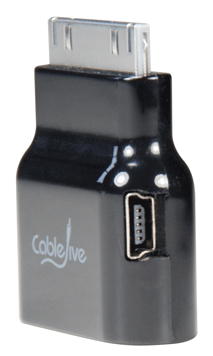
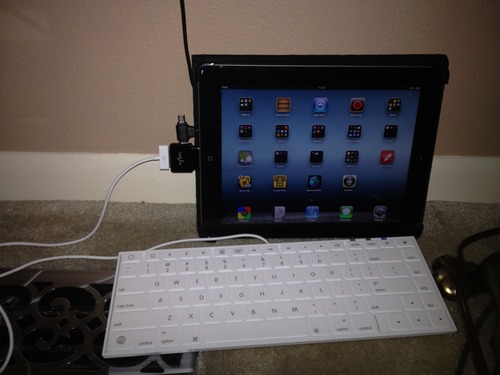
Interesting device I want to try out (probably from Amazon.com: CableJive dockStubz+).
It is a 30-pin Pass-Through adapter for iPod/iPhone/iPad (lets call them iDevice).
Reasons to get one (or more depending on the number of devices/chargers you use regularly):
A few pictures showing their use are below.
Basically, there are two verions of charging circuitry: USB based and FireWire based.
I will make sure to get the + version, as it combines these two:
dockStubz+ model includes charge conversion circuitry for those older docks and accessories that don’t charge while they are connected. Safely connect your mobile device to any dock and get the charging you need.
–jeroen
via: dockStubz Charge Converter and 30-pin Pass-Through Adapter.

Posted in Apple, iOS, iPad, iPhone, iPod, iPod touch, Power User | Leave a Comment »
Posted by jpluimers on 2014/02/24
Last week, Apple fixed the so called #gotofail bug for iOS devices. Other devices (Macs with OS X 10.9 Mavericks, maybe earlier versions and I also suspect Apple TV to be vulnerable) will follow soon.
I thought that Old iOS devices would be in the dark as the updates are for iOS 6.x and 7.x only. So any device that can only run on iOS 5 or lower might not be supported.
So I thought these devices would be unsupported, but found out an iPad 1st generation would pass the gotofail.com test.
So if you have any of these, please let me know if they fail or pass:
- iPhone 3 or earlier,
- iPod Touch 3rd generation or earlier,
- iPad 1st generation: passes.
Please watch any security announcements carefully with using Apple equipment, as the bug can highly facilitate a man-in-the-middle attack.
Some other site with background information (it hit the news wildly): Read the rest of this entry »

Posted in Apple, Development, iOS, iPad, iPhone, iPod, iPod touch, Mac, Mac OS X / OS X / MacOS, MacBook, MacBook Retina, MacBook-Air, MacBook-Pro, OS X 10.9 Mavericks, Power User, Software Development | 1 Comment »
Posted by jpluimers on 2013/12/26
Where last year it would still work on iOS 5 and 6, this year Apple has upped the requirements to iOS 7 leaving many users in the dark: iOS 7 only works on very recent iOS devices.
Too bad:
Incompatible with my 4th Gen IPOD Touch
by Valorian Nova
I spent quite awhile trying to figure out why this won\’t install on my Ipod and when I finally look it up it\’s because my IPOD is capped at IOS 6.1.5 and this needs IOS 7. Really puts a damper on this app for me.
via 12 Days of Gifts on the App Store on iTunes.
Posted in iOS, iPad, iPhone, iPod touch, Power User | Leave a Comment »
Posted by jpluimers on 2013/02/19
I wrote before on How to solve stuck iPad keeping asking for Exchange password: reset your iPad (or iPod/iPhone if it happens with those).
Actually, you should first verify if your Outlook Web Access still works with the same password, and if it does, then try to restart your iPad/iPod/iPhone, and if that fails, reset it:
Restarting your device
Press and hold the Sleep/Wake button for a few seconds until the red “slide to power off” slider appears, and then slide the slider.
Press and hold the Sleep/Wake button until the Apple logo appears.
Note: Reset your device only if you are unable to restart it.
Resetting your device
Press and hold the Sleep/Wake button and the Home button together for at least ten seconds, until the Apple logo appears.
–jeroen
via iPhone, iPad, iPod touch: Turning off and on (restarting) and resetting.
Posted in Apple, iOS, iPad, iPhone, iPod touch, Power User | Leave a Comment »
Posted by jpluimers on 2013/01/29
The iOS 6.1 Software Update is available. Whereas the 6.0.2 didn’t install on an iPod Touch 4th generation, this one does and seems to promise better battery life.
6.0 and 6.0.1 seemed to have shorter battery life, so I’m looking forward to see how much better 6.1 is.
–jeroen
Posted in Apple, iOS, iPod, iPod touch, Power User | Leave a Comment »

 The Wiert Corner - irregular stream of stuff