The Wiert Corner – irregular stream of stuff

Jeroen W. Pluimers on .NET, C#, Delphi, databases, and personal interests

  • My badges

  • Twitter Updates

  • Pages

  • All categories

  • Enter your email address to subscribe to this blog and receive notifications of new posts by email.

    Join 1,839 other subscribers

Archive for the ‘LifeHacker’ Category

Arrived in San Jose, CA, USA for the DelphiLive tutorial and conference (DelphiLive people get internet free!)

Posted by jpluimers on 2011/09/11

I had a pretty OK direct KLM flight from AMS to SFO.

Apart from some people behind me that seemed to have sufficient motoric coordination issues that they had to grab my chair each time they got up, or put their traytable up.  Some – even Dutch! – seem to think that using force is the only way to get things done. So thank you people in seats 28H, J and K for ruining my sleep.
The advantage of being in seat 27H in a Boeing 747-400 is that you get food really fast, and have direct access to drinks from the galley :)

Frank Stepan – one of the DelphiLive organizers – picked me up at the airport, and got me to the conference hotel in Downtown San Jose.

Check in went smooth.

Connecting to the Internet too: it is a breeze, compared to the Swisscom experience at the NH Hotel in Köln last week.

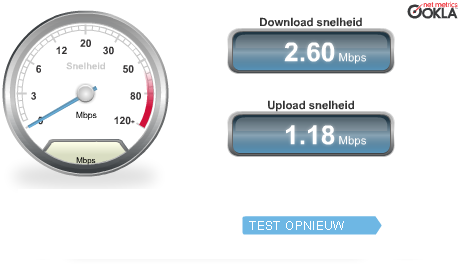
Not as fast as the KOMED internet on saturday, but you have two choices:

FreeDowntownWifi, which is – err – free. And has reasonable speed.
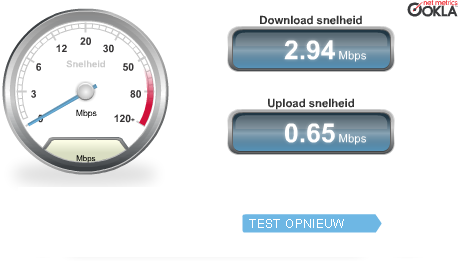
iBAHN internet, which is – err – free for DelphiLive attendees ans speakers. And also has reasonable speed.
So I upgraded my iPad firmware, downloaded the new TomTom USA Map, and synced my gadgets to the cloud.

Time to do some final preparations on my tutorial and sessions, and then get something to eat.

–jeroen

Posted in About, Delphi, Development, LifeHacker, Opinions, Personal, Power User, Software Development, Travel | 1 Comment »

Companies that ship to the USA, but require USA credit-card or PayPal

Posted by jpluimers on 2011/09/11

Sometimes it is convenient to order something to be delivered in the USA, but from a non-USA credit-card. For instance when visting the USA or when sending a gift to a friend.

Many companies don’t allow that.

These companies are of no use when you live outside the USA, but want to have something delivered within the USA:

  • IBM.com
  • Overstock.com
  • CostCentral.com

Those companies do work though:

This list will be updated over time…

–jeroen

Posted in LifeHacker, Power User | 2 Comments »

#Huawei “Mobile Partner” Software #fail it doesn’t work in Windows 7 x64 and breaks the ThinkPad Fn keys

Posted by jpluimers on 2011/09/10

In order to get non-roaming UMTS internet in Germany, I borrowed a Huawei USB device.

Though I had bad experiences with those kinds of devices 5 years ago under XP (where the Huawei software would add a new virtual COM port for each install, finally blocking at COM32, and also blocking the recognition of any new USB device) I hoped for a better experience this time.

Not so: The new software is called “Mobile Partner”, but I’d like them to strip the name “Partner” of their software.

  1. the software was German only (I can read German, but I’d like English on my English system)
  2. after installing the software, my Fn key combinations on my ThinkPad keyboard would not not work any more
  3. after installing the software, removing the device, rebooting, their software would not recognize the device when I plugged it in
No more Huawei USB devices for me.

–jeroen

Via:  Huawei E220 – Wikipedia, the free encyclopedia.

Posted in LifeHacker, Power User | 2 Comments »

How to disable the annoying Windows #Skype 5.5 Home Screen auto pop-up #fail

Posted by jpluimers on 2011/09/09

Well, it looks like the acquisition of Skype by Microsoft is showing results: Skype 5.5 introduces an annoying “Skype Home” popup page.

Luckily Disable Skype 5.5 Home Screen auto pop-up explains how to get rid of this (it is open source).

Probably time to move on from Skype to something else…

–jeroen

Posted in LifeHacker, Opinions, Power User | 1 Comment »

Cool site of the day: Download Online Videos Save Direct Easily – Savevid.com (not only for YouTube)

Posted by jpluimers on 2011/09/09

Cool site of the day :)

Download Online Videos Save Direct Easily – Savevid.com.

–jeroen

Posted in LifeHacker, Power User | Leave a Comment »

Unbelievable: Dutch Government made Microsoft agree to keep Microsoft customers vulnerable to fake digital certificates from DigiNotar by postponing Windows Updates for Dutch users. #fail

Posted by jpluimers on 2011/09/06

English translation of the link title below: Dutch Government forces Microsoft to delay Windows Update.

Google Translate of the linked article.

Why? Because it will give the Dutch Government more time to install certificates of which fake copies can exist because of the DigiNotar hack back in July 2011 and the resulting issuance of fraudulent certificates.

This is a big #fail for the Dutch Government.

What the Dutch Government should have done:

Allow people and companies some slack filling in their electronic correspondence with the government (i.e. Tac Forms, filing of legal documents, etc) until the Dutch Government has installed their new (and now hopefully secure) certificates.
By postponing due dates, they can ensure safe  communication, now they can’t.

(Edit: since posting the above, I learned that Agentschap NL has given their customers a week more time to supply digital documents).

What users of Microsoft software should do:

For at least a week, don’t use the (embedded) Microsoft Internet Explorer to communicate with the Dutch government, but use an alternative browser and disable the DigiNotar root certificates on your system.

Use the most recent version of Mozilla Firefox, Google Chrome, Opera or Apple Safari *and* disable the DigiNotar root certificates.
This post explains how to disable the DigiNotar certificates on OS X.
This post explains how to disable the DigiNotar certificates on Windows.

Keep an eye on the DigiNotar post by Joshua Long as he updates it frequently.

Note that on Windows there is s truckload of software that embeds Microsoft Internet Explorer, so you should try to block the iexplore.exe process whenever possible.

–jeroen

Via: Overheid dwingt bij Microsoft vertraagde Windows Update af | Pro | Tweakers.net Nieuws.

Posted in LifeHacker, Opinions, Power User | Leave a Comment »

#fail of #Sennheiser CX 250 and CX 150 in-ear #earphones when using while running: over time they sound less and less loud, switching to #DealExtreme

Posted by jpluimers on 2011/09/05

I found out the hard way that Sennheiser CX 250 and Sennheiser CX 150 in-ear earphones are not up to using while running with my 4th generation iPod Shuffle

After about 2-3 months, one or both the earbuds start to sound less and less loud.

My first one (a CX 250) started to develop this only on my right earbud. Being practically monoaural (due to chronically inflammation from age 0 to about 20, my left ear has a loss of about 55-60 dB), I could just use the other earbud. A while later, the other earbud started to degrade as well.

The nice thing about Sennheiser is that they deliver rubber eartips of difference sizes. Because my left ear has a larger ear canal (caused by treatment surgery of the inflammation), that is nice: it keeps the ‘unused’ earbud from dangling around while running.

So I bought a CX 150 just to make sure the problems with the CX 250 were an exception (the initial sound of them is much the same, : after a few months it started having the same trouble, but now on both ears.
They are cheaper too (starting from about EUR 20 in stead of about EUR 30).

No more Sennheiser for me: I spent like EUR 50 for 6 month of usage.

Right now I’m trying a bunch of earphones from Dealextreme. My first one is the SKU 33239. It costs like EUR 2 including shipping, has a great sound, but the cable is a tad long (over 1 meter) for running. My iPod Shuffle is clipped to the neckline of my running shirt, a short cable comes in very handy.

I’ll post more on this when I know how long these last.

–jeroen

Posted in LifeHacker, Power User | 1 Comment »

Importing Facebook friends in …

Posted by jpluimers on 2011/08/19

Somehow, Facebook is very protected about you accessing your friends’ info in an automated way.

For instance, recently Facebook tried to block a Google Chrome extension that exported the info on your friends, and also blocked a Facebook contacts CSV export tool (alredy archived at the WayBack machine).

Luckily, Yahoo! has a Facebook Connect deal with Facebook that enables Yahoo!  to import the Facebook contacts.

So, if you have a Yahoo! account, you can always that as a back-door: import your Facebook! contacts into Yahoo! contacts.

Importing is easy: start at the Yahoo! Address Book Contact Import Landing page, then go from there.
The Yahoo! Mail Transfer Contacts page offers some other import sources too (but no Facebook source yet).

For instance, these are possible:

Other tools can directly import from Facebook, for instance, Skype can, and many mobile phones can too (so you can do the “Facebook, mobile phone, Outlook, export” path too).
–jeroen


Posted in LifeHacker, Power User | 1 Comment »

Nice deal: ANWB – Ledenvoordeel – Yellowbrick – gratis registratie

Posted by jpluimers on 2011/08/15

Handig als je lid bent: ANWB – Ledenvoordeel – Yellowbrick gratis registratie.

–jeroen

Posted in LifeHacker, Power User | Leave a Comment »

@NShispeed: OV Chipkaart en #NS-Businesscard perikelen

Posted by jpluimers on 2011/08/05

Zo maar een greep van de afgelopen weken waarin ik met een NS-Businesscard (een soort OV-Chipkaart voor zakelijke reizigers) die wordt geadverteerd als “Met één kaart voordelig reizen van deur-tot-deur”.

NS-Businesscard als OV Chipkaart

De eerste ervaring was goed: door de zomer dienstregeling, reden er minder treinen van Den Haag Laan van NOI naar Rotterdam Centraal. Dus heb ik de Randstadrail lijn E gepakt: die doet er normaal 5 minuten langer over dan de trein, maar met minder treinen per uur tijdens de NS zomerdienstregeling ben je toch eerder op Rotterdam Centraal daan wachten op de volgende NS trein.

Dit werkte in 1 keer: ik kon de NS-Businesscard moeiteloos gebruiken als OV Chipkaart. Handig!

Onhandig: Activeren van NS-Businesskaart voor in-/uitchecken op NS stations

Je zou denken dat je met een NS-Businesscard meteen vanaf de NS Station kunt in-/uitchecken, maar dat is niet zo. Je moet dit op http://ns.nl/bc activeren.

Daarmee dacht ik dat het meteen werkt: de OV-chipkaart palen van de NS staan on-line in verbinding met de NS, en kunnen zowel lezen als schrijven op de kaart, maar zo simpel is het niet. Je moet eerst op een NS kaartjesautomaat de producten op je NS-Businesscard activeren. Daarna werken de OV-chipkaart palen van de NS.

Onhandige plaatsing van de OV-chipkaart palen op station Schiphol

Op Schiphol staan in tegenstelling tot de stemelautomaten (die staan boven) de de OV-chipkaart palen alleen beneden, vaak verborgen achter wachtende reiziers.

Erg onhandig als je haast hebt en niet precies weet waar ze staan.

Daarom dit eens nagevraagd bij de servicebalie op Schiphol: Schiphol verbiedt de NS om de OV-chipkaart palen op een meer logische plek te zetten. De stempelautomaten mogen wel blijven staan omdat ze daar al sinds het begin staan, maar nieuwe zaken mogen niet.

Handig voor een luchthaven die de efficientie voor reizigers hoog in het vaandel heeft staan!

Standaard NS-reizen met in-/uitchecken op NS stations werkt

Daarna een paar dagen heel makkelijk tussen Rotterdam Centraal en Schiphol: wegens werkzaamheden hoefde je geen Fyra toeslag te betalen, dus maakte het niet uit met welke trein ik ging.

Fyra toeslag op NS-Businesscard kan niet

Een conducteur gaf tijdens een van de reizen aan dat je de Fyra toeslag op een OV-chipkaart kunt laden. Dus dat probeerde ik op Schiphol. Ik had er een minuut of 10 voor uitgetrokken, maar het lukte niet, dus de Fyra gemist en een normale Intercity genomen.

In het weekeinde las ik op de site van de Fyra, dat je de Fyra toeslag wel op een normale OV-chipkaart kunt laden, maar niet op een NS-businesscard (die wel gewoon op de metro werkt). Om met George Orwell te spreken: sommige OV-chipkaarten zijn dus meer gelijk als andere.

Links op de NS-site doen niet wat je denkt dat ze doen

In de loop van de middag gecontroleerd weke trein ik we/niet ging halen. Er is zomerdienstregeling, dus niet alle treinen rijden, en het wil met aankomst/vertrektijden nog wel eens hommeles zijn, dus de vertrektijden van Rotterdam Centraal gecontroleerd. Je denkt dat de link die je op de NS-site kopieert ook echt werkt: http://ns.nl/actuele-vertrektijden/main.action?vertrekstationdetails=rtd

Helaas, je moet hier dus alsnog “rtd” of  “Rotterdam Centraal” intikken om de juiste vertrektijden te zien.

Er zijn verder zat andere links die het op de NS-site niet doen, en die ze nooit gaan terugvinden zoals bijvoorbeeld de eerste link op http://www.ns.nl/zakelijk/producten/voor-reizigers/diensten-met-ns-business-card/de-trein-en-fyra.html die wijst naar een niet bestaande pagina http://www.ns.nl/cms/aanvragen-reizen-op-rekening_1.

Niemand bij de NS gaat die links terugvinden omdat in plaats van HTTP foutcode 404 (not found), er een HTTP successcode 200 (OK) wordt teruggeven.

Product op dezelfde dag bestellen en opladen op de NS-businesscard werkt niet

Toen ik zeker wist welke trein ik ging halen heb ik op de http://www.ns.nl/businesscard site een reis geboekt: 20% korting (want na 09:00), met Fyra toeslag.

Bij station Rotterdam Centraal aangekomen geprobeerd (op 3 verschillende automaten!) om dat product op de NS-Businesscard te laden. Dat werkt dus niet! Alle automaten gaven aan dat er geen producten voor deze NS-Businesscard klaar stonden.

Daarom maar een papieren Fyra-toeslagkaartje gekocht, en met de NS-Businesscard ingechecked op Rotterdam Centraal en later uitgechecked op Schiphol.

Een bestelling waar je niets meer aan hebt verwijderen kan niet

In de trein heb ik daarna gebeld met het 0900-betaalnummer achter op de NS-Business card. Daar in eerste instantie geprobeerd om het product dat ik besteld had te annuleren. Dat was nog lastig, want dit nummer heeft aan de ene kant keuzemenus waar je een nummertje moet intikken, maar op andere plekken moet je met natuurlijke taal inspreken wat je wilt. Daar kom je natuurlijk pas sachter als je een paar minuten en een paar keer de melding dat de computer niet begrepen heeft wat je bedoelt.

Een bestelling verwijderen mag niet als je die op dezelfde dag besteld hebt.

Daarom het nummer nog eens geprobeerd te bellen en een minuut of wat de menus doorgegaan om te kijken of ik een mens aan de lijn kon krijgen, maar dat werkt niet: dit nummer is alleen maar computer-operated.

Service loket op Schiphol weet ook niet precies

Het NS Service loket op Schiphol was heel vriendelijk; ik mocht zelfs op hun kosten de 0900 nummers bellen. Hun eerste reactie was “dat moet u via uw werkgever regelen”, handig: als ZZP-er ben ik dat zelf :)

Ze waren heel verbaasd wat er niet mogelijk was (ook de mensen die per portofoon werden geconsulteerd), en na wat heen en weer gebel bleven de opties “internet” en NS Servicedesk over.

Omdat er inmiddels een redelijke rij achter me stond, heb ik het bel-aanbod vriendelijk afgewezen en dat later zelf gedaan.

De NS servicedesk weet nauwelijks iets van de NS-Businesscard

Om te kijken of ik via een mens verder kon komen daarna via via het 0900-betaalnummer van de NS servicedesk opgezocht.

Dat is ook een computer-operated menu, maar onder sommige entries (niet alle entries die beginnen met “een mens spreken” geven ook een mens aan de lijn) krijg je dus een mens aan de lijn.

Het viel me al op dat in de menu’s nergens “NS-Businesscard” voorkomt, maar omdat dit een OV-Chipkaart is dit en één van de “mens spreken” opties onder “OV-chipkaart” inderdaad een mens aan de lijn gaf, daar gevraagd hoe het zat. En inderdaad: ik kreeg iemand aan de lijn die aangaf  – na de opties “internet en 0900-nummer op de NS-Businesscard” aan te bieden – dat NS-Businesscard iets “aparts” is en dat die een eigen (030!) nummer hebben.

Dat 030 nummer is (handig voor B2B) alleen tijdens kantooruren (08:30 tot 17:00) geopend.

Wordt vervolgd…

–jeroen

Posted in LifeHacker, Power User | 3 Comments »