The Wiert Corner – irregular stream of stuff

Jeroen W. Pluimers on .NET, C#, Delphi, databases, and personal interests

  • My badges

  • Twitter Updates

  • My Flickr Stream

  • Pages

  • All categories

  • Enter your email address to subscribe to this blog and receive notifications of new posts by email.

    Join 1,839 other subscribers

Archive for the ‘LifeHacker’ Category

Migrating KPN ISDN MSNs to XS4ALL VoIP: via https://mijn.xs4all.nl

Posted by jpluimers on 2019/01/24

Migrating KPN ISDN MSNs to XS4ALL VoIP: via https://mijn.xs4all.nl:

Reminder to self to finish this when the final ISDN A/D dependency has been resolved.

–jeroen

Read the rest of this entry »

Posted in ISDN, LifeHacker, Power User, Telephony, VoIP | Leave a Comment »

Google Sheet with forwarding addresses. Please feel free to add yours….

Posted by jpluimers on 2019/01/21

[WayBack] I have created a Google Sheet with forwarding addresses. Please feel free to add yours- only the info you are comfortable with. Please DO NOT add full e… – Di Cleverly – Google+

[Archive.is] Forwarding Addresses – Google Sheets

–jeroen

Posted in G+: GooglePlus, LifeHacker, Power User, SocialMedia | Leave a Comment »

E46: replace battery in car key

Posted by jpluimers on 2019/01/14

Two videos that show how to cut open the E46 diamond shaped car key to replace the battery are below.

Far cheaper than a ~ EUR 200 replacement key: [Archive.iswhat did you pay for your E46 diamond key replacement? – E46Fanatics

Parts needed:

  • Panasonic VL2020 Akku – http://amzn.to/2emKNVN or 2016 (non-rechargeable but should be compatible)
  • 66 12 2 155 753 BMW Schlüssel-Emblem

Tools needed:

  • Vise/Vice (German: Schraubstock)
  • very sharp knife
  • super glue

Related Related: door lock and key problems; FM Antenna problems

–jeroen

Read the rest of this entry »

Posted in cars, E46 320i touring, LifeHacker, Power User | Leave a Comment »

Life after Google+: an export tool that use the G+ API and runs on Google Firebase

Posted by jpluimers on 2019/01/14

Another follow up on Life after Google+ – Lars Fosdal:

[WayBack] GitHub – RomainVialard/Google-Plus-Community-Migrator

This repository presents a way to export posts from a Google+ community (in this case the Google Apps Script community), along with comments & likes (plusones) using the Google+ REST API and import them in a Firebase Database, then use Firebase Hosting to display those posts. To see a live result, simply open this URL: https://apps-script-community-archive.firebaseapp.com/

It depends on the G+ REST API (so it will die earlier than G+ itself) and hosts on Google.

Related:

–jeroen

Posted in G+: GooglePlus, LifeHacker, Power User, SocialMedia | Leave a Comment »

Life after Google+ – Lars Fosdal: Friends+Me Google+ Export tool.

Posted by jpluimers on 2019/01/11

A little while ago, I blogged about Life after Google+ – Lars Fosdal. In the mean time, Lars has made a lot of progress exporting the community [WayBack] Delphi Developers – Google+ (which has moved to en.delphipraxis.net !).

He is a heavy user of the Friends+Me Google+ Export tool, which basically is an actively maintained web scraper with standard output targets:

[WayBack] Google Plus Exporter – Medium: Export your Google+ feeds to WordPress, Blogger, and JSON.

It does not depend on the G+ REST API: “the app is using web scraping and will keep working until the bitter end”.

Quite a bit of that information and the feedback he has is in this thread: [WayBack1/WayBack2] Hi Everyone, We’ve just released Google+ Exporter, an application that helps you to export your Google+ feeds (profile, pages, collections, communities… – Friends+Me – Google+

Of course G+ does not save the whole thread in the WayBack machine, so here it is copy-pasted (unformatted; maybe I will format it later):

Read the rest of this entry »

Posted in Development, G+: GooglePlus, Gutenberg editor, LifeHacker, Power User, SocialMedia, Software Development, Web Development, WordPress, WordPress | Leave a Comment »

Some ideas to show a Google Calendar on a TV using a Raspberry Pi and HDMI output

Posted by jpluimers on 2019/01/10

Using OpenSuSE Tumbleweed E20 on Raspberry Pi 3: accessing the enlightenment desktop over VNC after automatic logon I wanted to buy an on-line read-only diary to help my mentally retarded brother see what his next few days are going to be like.

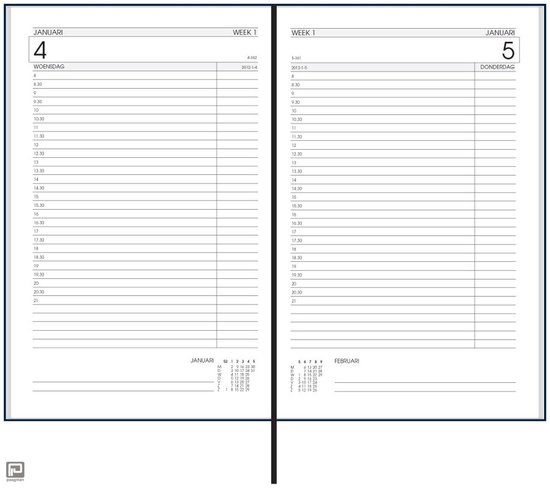
He increasingly has difficulty handling a paper agenda and has an agenda with 30 minute blocks like [Archive.isbol.com | Bureau Agenda 2017 – 1 dag per Pagina | 0041560163422 | Boeken (and the [Archive.is] picture on the right), but actually he needs 15 minute blocks during some portions of the day.

We call that kind “bureau agenda” which I think translates well into “desk diary”.

They were quite different from the agendas I used to have at school (:

[WayBack[Zonder titel] Rijam agenda 1983/84 verzamelen? Stripcatalogus op Catawiki

For most school mates, they were more like this:

Had je een O’Neill of ging je voor De Familie Doorzon? De oude agenda’s uit je middelbare schooltijd zijn de verpersoonlijking van je eigen puber-ik. Afgelopen weekend startte in het Nationaal Onderwijsmuseum in Dordrecht de toffe tentoonstelling Grow Up over die vuistdikke, volgeplakte agenda’s.

[WayBackSchoolagenda vol sentiment | Go with the Vlo

Anyway, some ideas I initially had are below.

This is what I actually did:

Two things for the future:

Initial thoughts

Raspberry based:

Chromecast based:

–jeroen

Read the rest of this entry »

Posted in Development, Google, GoogleCalendar, Hardware Development, JavaScript/ECMAScript, JSFiddle, LifeHacker, Power User, Raspberry Pi, Scripting, Software Development | 2 Comments »

AmazonSmile – Kontaktieren Sie uns

Posted by jpluimers on 2019/01/07

Für mein Archiv: Zur Amazon chat geht via AmazonSmile – Kontaktieren Sie uns.

–jeroen

https://smile.amazon.de/gp/help/contact-us/general-questions.html/

Posted in LifeHacker, Power User | Leave a Comment »

The biggest lie I tell myself is not about new years resolutions.

Posted by jpluimers on 2019/01/01

The biggest lie I tell myself is “I don’t need to write that down, I’ll remember it”

It’s likely older, but the oldest reference I could find was 2012 [WayBack].

So before I forget:

Happy New Year everyone!

With the above quote, it is no coincidence I started my blog even earlier (in 2009): it’s my off-line memory, way better readable than my hand-writing and indexed by various search engines.

Read the rest of this entry »

Posted in About, Conference Topics, Conferences, Event, LifeHacker, Personal, Power User | Leave a Comment »

brew update reminder

Posted by jpluimers on 2019/01/01

Reminder to self:

==> Caveats
==> nss
nss is keg-only, which means it was not symlinked into /usr/local,
because Firefox can pick this up instead of the built-in library, resulting in
random crashes without meaningful explanation.

Please see https://bugzilla.mozilla.org/show_bug.cgi?id=1142646 for details.

If you need to have nss first in your PATH run:
echo ‘export PATH=”/usr/local/opt/nss/bin:$PATH”‘ >> ~/.bash_profile

For compilers to find nss you may need to set:
export LDFLAGS=”-L/usr/local/opt/nss/lib”
export CPPFLAGS=”-I/usr/local/opt/nss/include”

For pkg-config to find nss you may need to set:
export PKG_CONFIG_PATH=”/usr/local/opt/nss/lib/pkgconfig”

==> sphinx-doc
sphinx-doc is keg-only, which means it was not symlinked into /usr/local,
because this formula is mainly used internally by other formulae.
Users are advised to use `pip` to install sphinx-doc.

If you need to have sphinx-doc first in your PATH run:
echo ‘export PATH=”/usr/local/opt/sphinx-doc/bin:$PATH”‘ >> ~/.bash_profile

==> sqlite
sqlite is keg-only, which means it was not symlinked into /usr/local,
because macOS provides an older sqlite3.

If you need to have sqlite first in your PATH run:
echo ‘export PATH=”/usr/local/opt/sqlite/bin:$PATH”‘ >> ~/.bash_profile

For compilers to find sqlite you may need to set:
export LDFLAGS=”-L/usr/local/opt/sqlite/lib”
export CPPFLAGS=”-I/usr/local/opt/sqlite/include”

For pkg-config to find sqlite you may need to set:
export PKG_CONFIG_PATH=”/usr/local/opt/sqlite/lib/pkgconfig”

==> openssl
A CA file has been bootstrapped using certificates from the SystemRoots
keychain. To add additional certificates (e.g. the certificates added in
the System keychain), place .pem files in
/usr/local/etc/openssl/certs

and run
/usr/local/opt/openssl/bin/c_rehash

openssl is keg-only, which means it was not symlinked into /usr/local,
because Apple has deprecated use of OpenSSL in favor of its own TLS and crypto libraries.

If you need to have openssl first in your PATH run:
echo ‘export PATH=”/usr/local/opt/openssl/bin:$PATH”‘ >> ~/.bash_profile

For compilers to find openssl you may need to set:
export LDFLAGS=”-L/usr/local/opt/openssl/lib”
export CPPFLAGS=”-I/usr/local/opt/openssl/include”

For pkg-config to find openssl you may need to set:
export PKG_CONFIG_PATH=”/usr/local/opt/openssl/lib/pkgconfig”

==> openssl@1.1
A CA file has been bootstrapped using certificates from the system
keychain. To add additional certificates, place .pem files in
/usr/local/etc/openssl@1.1/certs

and run
/usr/local/opt/openssl@1.1/bin/c_rehash

openssl@1.1 is keg-only, which means it was not symlinked into /usr/local,
because openssl/libressl is provided by macOS so don’t link an incompatible version.

If you need to have openssl@1.1 first in your PATH run:
echo ‘export PATH=”/usr/local/opt/openssl@1.1/bin:$PATH”‘ >> ~/.bash_profile

For compilers to find openssl@1.1 you may need to set:
export LDFLAGS=”-L/usr/local/opt/openssl@1.1/lib”
export CPPFLAGS=”-I/usr/local/opt/openssl@1.1/include”

For pkg-config to find openssl@1.1 you may need to set:
export PKG_CONFIG_PATH=”/usr/local/opt/openssl@1.1/lib/pkgconfig”

==> icu4c
icu4c is keg-only, which means it was not symlinked into /usr/local,
because macOS provides libicucore.dylib (but nothing else).

If you need to have icu4c first in your PATH run:
echo ‘export PATH=”/usr/local/opt/icu4c/bin:$PATH”‘ >> ~/.bash_profile
echo ‘export PATH=”/usr/local/opt/icu4c/sbin:$PATH”‘ >> ~/.bash_profile

For compilers to find icu4c you may need to set:
export LDFLAGS=”-L/usr/local/opt/icu4c/lib”
export CPPFLAGS=”-I/usr/local/opt/icu4c/include”

For pkg-config to find icu4c you may need to set:
export PKG_CONFIG_PATH=”/usr/local/opt/icu4c/lib/pkgconfig”

==> ruby
By default, binaries installed by gem will be placed into:
/usr/local/lib/ruby/gems/2.6.0/bin

You may want to add this to your PATH.

ruby is keg-only, which means it was not symlinked into /usr/local,
because macOS already provides this software and installing another version in
parallel can cause all kinds of trouble.

If you need to have ruby first in your PATH run:
echo ‘export PATH=”/usr/local/opt/ruby/bin:$PATH”‘ >> ~/.bash_profile

For compilers to find ruby you may need to set:
export LDFLAGS=”-L/usr/local/opt/ruby/lib”
export CPPFLAGS=”-I/usr/local/opt/ruby/include”

For pkg-config to find ruby you may need to set:
export PKG_CONFIG_PATH=”/usr/local/opt/ruby/lib/pkgconfig”

==> qt
We agreed to the Qt open source license for you.
If this is unacceptable you should uninstall.

qt is keg-only, which means it was not symlinked into /usr/local,
because Qt 5 has CMake issues when linked.

If you need to have qt first in your PATH run:
echo ‘export PATH=”/usr/local/opt/qt/bin:$PATH”‘ >> ~/.bash_profile

For compilers to find qt you may need to set:
export LDFLAGS=”-L/usr/local/opt/qt/lib”
export CPPFLAGS=”-I/usr/local/opt/qt/include”

For pkg-config to find qt you may need to set:
export PKG_CONFIG_PATH=”/usr/local/opt/qt/lib/pkgconfig”

==> python
Python has been installed as
/usr/local/bin/python3

Unversioned symlinks `python`, `python-config`, `pip` etc. pointing to
`python3`, `python3-config`, `pip3` etc., respectively, have been installed into
/usr/local/opt/python/libexec/bin

If you need Homebrew’s Python 2.7 run
brew install python@2

You can install Python packages with
pip3 install <package>
They will install into the site-package directory
/usr/local/lib/python3.7/site-packages

See: https://docs.brew.sh/Homebrew-and-Python
==> youtube-dl
Bash completion has been installed to:
/usr/local/etc/bash_completion.d

zsh completions have been installed to:
/usr/local/share/zsh/site-functions
==> cabal-install
Bash completion has been installed to:
/usr/local/etc/bash_completion.d
==> node
Bash completion has been installed to:
/usr/local/etc/bash_completion.d
==> hub
Bash completion has been installed to:
/usr/local/etc/bash_completion.d

zsh completions have been installed to:
/usr/local/share/zsh/site-functions
==> gnupg
Once you run this version of gpg you may find it difficult to return to using
a prior 1.4.x or 2.0.x. Most notably the prior versions will not automatically
know about new secret keys created or imported by this version. We recommend
creating a backup of your `~/.gnupg` prior to first use.

For full details on each change and how it could impact you please see
https://www.gnupg.org/faq/whats-new-in-2.1.html
==> mas
Bash completion has been installed to:
/usr/local/etc/bash_completion.d
==> pandoc
Bash completion has been installed to:
/usr/local/etc/bash_completion.d
==> go
A valid GOPATH is required to use the `go get` command.
If $GOPATH is not specified, $HOME/go will be used by default:
https://golang.org/doc/code.html#GOPATH

You may wish to add the GOROOT-based install location to your PATH:
export PATH=$PATH:/usr/local/opt/go/libexec/bin

–jeroen

Posted in Apple, LifeHacker, Mac, Mac OS X / OS X / MacOS, macOS 10.13 High Sierra, Power User | Leave a Comment »

4G zendmasten in Nederland; 2017

Posted by jpluimers on 2018/12/30

[WayBack] HMD brengt nieuwe versie van Nokia 106-featurephone uit voor 18 dollar – Tablets en telefoons – Nieuws – Tweakers

–jeroen

Posted in LifeHacker, Power User | Leave a Comment »