The Wiert Corner – irregular stream of stuff

Jeroen W. Pluimers on .NET, C#, Delphi, databases, and personal interests

  • My badges

  • Twitter Updates

  • My Flickr Stream

  • Pages

  • All categories

  • Enter your email address to subscribe to this blog and receive notifications of new posts by email.

    Join 1,861 other subscribers

Archive for the ‘*nix-tools’ Category

Hopefully datendomina (@sys_adm_ama) has followed up with some cool vi tips…

Posted by jpluimers on 2021/06/28

I hope that datendomina (@sys_adm_ama) has followed up with some cool vi/vim tips.

Though I can do basic editing (far more than quit-without-saving) and know about he various mode, I still feel not proficient.

[WayBack] Jeroen Pluimers on Twitter: “LOL! Boy was I glad that after finding my way in Ed and sed on SunOS in the 1980s, I discovered vi. Still not proficient in it (and I probably never will). However, knowing some of the basics allowed me to visually edit any file on any Unix like system. That’s still gold to me.…”

It also made me discover [WayBack] ed(1) Conference (@ed1conf) | Twitter.

One important tip:

[WayBack] Kristian Köhntopp on Twitter: “vi movement Kommandos haben System. Erkenne und lerne das System. hjkl + prefix+hjkl, Marken, prefix+jump to mark und so weiter. Und bleibe von den verblödeten Plugins weg. Die braucht kein Mensch und machen vim nur langsam im Start und kompliziert.”

The original thread, which I hoped would get longer: [WayBack] Thread by @sys_adm_ama: “Ich lerne jetzt vi(m). Klingt beknackt, oder?se […]”

Ich lerne jetzt vi(m).

Klingt beknackt, oder? Aber ich hab überlegt: ich möchte effizienter werden, meinen Kram stressfreier bewältigen. Und ich finde, es bietet sich an da an Baustellen anzusetzen, die täglich relevant sind. Und vi(m) nutze ich in der Tat täglich.

1/

Aber auch wenn ich ihn nutze und über den »Hilfe, wie komm ich aus dem Editor wieder raus?!«-Witz nur sehr müde die Augen rolle gehe ich davon aus, dass ich nicht mal einen Bruchteil der Möglichkeiten ausschöpfe, die er bietet (1. Release 1976, älter als ich!). Das ist spannend.
Das ist jetzt meine Mini-Challenge, auf die ich jeden Tag eine Viertelstunde verwenden will: wenn ich eine Funktion brauche mich nicht mehr drum herum zu hacken, sondern recherchieren wie es richtig geht und das dann gefälligst auch verinnerlichen. Mal sehen, ob das so klappt

3/

In dem Zuge will ich auch wieder verstärkt (neo)mutt in Verbindung mit vim nutzen – das wäre ein wunderbares tägliches Training 😎 Mails schreiben muss man irgendwie immer.

neomutt bietet leider auch einen Eimer voll Funktionen, die ich noch nicht ordentlich nutze. Gnah.

4/

An euren Replies erkenne ich, dass das mit dem »sich die Kürzel merken« echt heikel zu sein scheint 🤔 Wie handhabt ihr das im Alltag? Einfach ein paar Basics wie :u und CTRL+r und gut ist? Ich bin neugierig. Oder nutzt ihr alle nano? (Ich glaub, dann muss ich entfolgen) 😂
Nur als kleinen Zwischenstand: nach dem Lesen eurer Antworten schließe ich, dass ich mich mit meinem Kenntnisstand nicht verstecken muss 😂 Da hat mir der virtuelle Schulterblick schon weiter geholfen.

/5
vi(m), weil ich Admin bin und dieses Tool auf jedem System und ohne X-Geraffels üblicherweise vorfinde (wenn auch bei neueren Installationen dieser absurde „visual mode“ der Default ist 😳). Auch unter (Open)Solaris, IRIX, was weiß ich.

/6

Eben hab ich das Buch von @MasteringVim aus der Packstation gezogen (extrem vielversprechend!) – und klar, ich werde berichten 😎 Ich bin sehr gespannt.

/7ed

–jeroen

Read the rest of this entry »

Posted in *nix, *nix-tools, Development, ed, Power User, Scripting, sed, sed script, Software Development, vi/vim | Leave a Comment »

Downloading files with wget on ESXi · random writes

Posted by jpluimers on 2021/05/31

Reminder to self to check if wget on ESXi now finally supports https downloading: [WayBack] Downloading files with wget on ESXi · random writes.

In the mean time, ESXi 6.7 Update 2 and up seems to support this; so the below workaround might only be needed for ESXi 6.7 update 1 and below.

[WayBack] VMware ESXi: help downloading large ISO – Server Fault

I will likely not do this, as by now all my ESXi boxes should have been recent enough.

I will keep the article because of the BusyBox commands section below.

If so, I might finally try and write a Python wrapper for this, as I know that Python 3 on ESXi supports https, but the ESXi BusyBox does not have a built-in cURL.

Some links and notes I might need by then:

BusyBox commands

Another cool thing in the above blog post is that it shows how to dump the BusyBox built in commands.

I ran it for ESXi 6.7 with a slight trick to get the full path (using back-ticks and escaped back-ticks) and content.

Since ESXi is BusyBox based, the commands that are in /bin are not actually binaries, but each command is a symlink to the BusyBox binary. BusyBox then knows the original name of the command, so it can deduct what part to execute. This makes for a very space efficient storage scheme.

The various bits of the tricks to get the location of the BusyBox binary, so the --list parameter can be passed to it:

  • The which wget gives the full path of wget.
  • The ls -l `which wget` shows the full path of wget and the symlink target (but there is no way for ls to only show the symlink target).
  • The readlink -f `which wget` shows the full path of where /bin/wget points to: the BusyBox binary.

The main trick consists of backtick evalution, and knowing that ls cannot get you just the symlink target, but readlink can:

Now the back-tick escapes, because you cannot nest back-ticks:

  • The `readlink -f \`which wget\`` executes the BusyBox binary without arguments.
  • The `readlink -f \`which wget\`` --list executes the BusyBox binary with the --list parameter.

Note I do not like the cat --help (see [WayBack] How do I check busybox version (from busybox)? – Unix & Linux Stack Exchange) way of getting the BusyBox version, as that gets echoed to stderr.

This is the output:

Read the rest of this entry »

Posted in *nix, *nix-tools, cURL, ESXi6, ESXi6.5, ESXi6.7, Power User, Virtualization, VMware ESXi, wget | Leave a Comment »

“FIPS mode initialized” when you ssh out of an ESXi box

Posted by jpluimers on 2021/05/28

The once per console/shell logon output of FIPS mode initialized to stderr when you ssh out of an ESXi box seems to be something new since ESXi 6.7.

Since I hardly do this, it took a while to reproduce and track back the version where it was introduced and to realise why it is on stderr.

stderr in retrospect is logical: if you need to parse stdout of a job running across an ssh channel, you do not want it to get interfered with “side channel” output, hence stderr.

For a longer explanation see, for instance [WayBack] ssh “FIPS mode initialized” message to stderr – Why? – Unix and Linux | DSLReports Forums:

Keep in mind that “ssh” is used to transport a stream, as with “rsync”. What you put on “stdout” becomes part of the stream. That’s why this sort of informational message needs to go to “stderr”.

Parsing is hard, so bugs like [WayBack] Git fetcher fails on machine with FIPS enabled machines · Issue #3664 · inspec/inspec · GitHub got [WayBack] fixed in [WayBack] pull request like [WayBack] not parsing stderr, but checking for exitstatus.

Stock OpenSSH portable does not contain FIPS support

Finding back when and how FIPS support for OpenSSH was introduced provide a bit harder than I hoped for.

It appears that stock [WayBack] OpenSSH: Portable Release does not support FIPS. But there are patches on top of these files:

Many (most?) Linux distributions include a patched version like [WayBack] ssh.c in openssh located at /openssh-5.9p1 (git://pkgs.fedoraproject.org/openssh).

They integrate the patches like [WayBack] File openssh.spec of Package openssh – openSUSE Build Service.

Patches for instance look like [WayBack] openssh/openssh-5.3p1-fips.patch at master · gooselinux/openssh · GitHub which is more than a decade old (see the 2009 message [WayBack] rpms/openssh/devel openssh-5.3p1-fips.patch, NONE, 1.1 openssh-5.3p1-mls.patch, NONE, 1.1 openssh-5.3p1-nss-keys.patch, NONE, 1.1 openssh-5.3p1-selabel.patch, NONE, 1.1 openssh-5.3p1-skip-initial.patch, NONE, 1.1 .cvsignore, 1.24, 1.25 openssh.spec, 1.170, 1.171 sources, 1.24, 1.25 openssh-3.8.1p1-krb5-config.patch, 1.1, NONE openssh-4.7p1-audit.patch, 1.2, NONE openssh-5.1p1-mls.patch, 1.1, NONE openssh-5.1p1-skip-initial.patch, 1.1, NONE openssh-5.2p1-fips.patch, 1.6, NONE openssh-5.2p1-nss-keys.patch, 1.3, NONE openssh-5.2p1-selabel.patch, 1.2, NONE).

The patches seem to originate at the (now defunct) WayBack Index of /export/openssh of http://openssl.com/export/openssh/ .

In the end I found [WayBack] Mailing List Archive: OpenSSH FIPS 140-2 support using OpenSSL FIPS modules? having these quotes:

vanilla OpenSSH doesn’t support running OpenSSL in FIPS-140 mode. Some
downstream providers patch OpenSSH they deliver with their distributions
with changes to enable FIPS-140 mode.

[WayBack] Secure Shell and FIPS 140-2 – Managing Secure Shell Access in Oracle® Solaris 11.4 explains a bit of background of them.

ESXi 6.7

Binary searching for the version where this was introduced could have been a lot shorter if I had done a “FIPS mode initialized” “ESXi” – Google Search, resulting in for instance:

The final two links made me discover XSIBackup

They see be one of the few (only one?!) free backup solutions for the bare ESXi:

In addition, they have a binary for rsync version 3.1.0: [WayBack] 33HOPS | Rsync for VMWare Backup, so lees need to go to Source: ESXi 5.1 and rsync – damiendebin.net

jeroen

Posted in *nix, *nix-tools, ESXi6.5, ESXi6.7, Power User, ssh/sshd, Virtualization, VMware, VMware ESXi | Leave a Comment »

Wondering about the flavours of Tumbleweed ISO images

Posted by jpluimers on 2021/05/28

The Tumbleweed ISO images have many flavours, none yet covered in a comprehensive list.

I found [WayBack] Get openSUSE , which only explains part of the puzzle:

  • Installation: x86_64, i586, aarch64, ppc64le (for DVD/NET)
  • Kubic x86_64 aarch64 (for DVD)
  • Live x86_64 i686 (for )

I do get the processor/architectures:

README files:

These all have the same content:

These ISO files are published automatically once a new snapshot finished.
They haven't seen any kind of testing before publishing, so download on your
own risk and cost.

Most of the time they work, but there are times when they are broken.

So visit (and edit if you reported a bug severe enough)
http://en.opensuse.org/Portal:Tumbleweed

But I could not find a single page explaining the difference between all these (and why some of them are not prefixed with Tumbleweed):

flavour media name architectures: x86 architectures: ARM architectures: PowerPC architectures: Z Systems
openSUSE-Kubic DVD x86_64 aarch64
openSUSE-MicroOS DVD x86_64
openSUSE-Tumbleweed DVD i586, x86_64 aarch64 ppc64, ppc64le s390x
openSUSE-Tumbleweed-GNOME Live i686, x86_64
openSUSE-Tumbleweed-KDE Live i686, x86_64
openSUSE-Tumbleweed NET i586, x86_64 aarch64 ppc64, ppc64le s390x
openSUSE-Tumbleweed-Rescue CD i686, x86_64
openSUSE-Tumbleweed-XFCE Live i686, x86_64

I do not get why:

  • some have a media name (especially not DVD: all of them are iso files, right?)
  • the architecture lists is so different for most of them
  • the rescue image is not i586

I know there are also non-ISO images for instance for Raspberry Pi or pure ARM at

  • [WayBack] Index of /ports/armv6hl/tumbleweed/images/:
    • openSUSE-Tumbleweed-ARM-JeOS-raspberrypi.armv6l-Current.raw.xz
    • openSUSE-Tumbleweed-ARM-JeOS.armv6-rootfs.armv6l-Current.tar.xz
  • [WayBack] Index of /ports/armv7hl/tumbleweed/images/
    • Too long a list to fully categorise right now; limited categorisation:
    • Flavours seem to be E20/GNOME/JeOS/KDE/LXQT/X11/XFCE
    • Architectures seem to be a13olinuxino/a20olinuxinolime/a20olinuxinomicro/arndale/beagle/beaglebone/chromebook/cubieboard/cubietruck/cuboxi/efi/loco/midway/nanopineo/olinuxinolime/olinuxinolime2/panda/paz00/raspberry2/sabrelite/sinovoipbpimplus/socfpgade0nanosoc/udooneo/wga//              all armv7zl flavoured

Then there is

I have questions on these too (:

The JeOS question got answered

When originally writing this in 2019, I could not figure out what JeOS was.

Now I know it is supposed to be pronounced as juice and is meant to have “Just enough Operating System” to get a base system working:

For Raspberry Pi 2, this was the image to use mid 2020 via [Wayback] HCL:Raspberry Pi2 – openSUSE Wiki and [Wayback] http://download.opensuse.org/ports/armv7hl/tumbleweed/images/:

The OpenQA shows the global build state, but not specific to Raspberry Pi models: [Wayback] https://openqa.opensuse.org/group_overview/3

–jeroen

Read the rest of this entry »

Posted in *nix, *nix-tools, Linux, openSuSE, Power User, SuSE Linux, Tumbleweed | Leave a Comment »

How to Copy files between ESXi hosts using SCP Command

Posted by jpluimers on 2021/05/21

Derived the bits below from [WayBack] How to Copy files between ESXi hosts using SCP Command.

Recursive copy from a remote machine to an existing local directory:

scp -rp root@192.168.71.97://vmfs/volumes/EVO860_500GB/VM1/ /vmfs/volumes/EVO860_250GB/VM2/

After this you need to edit the .vmxf files in the VM2 directory to ensure these are not duplicates.

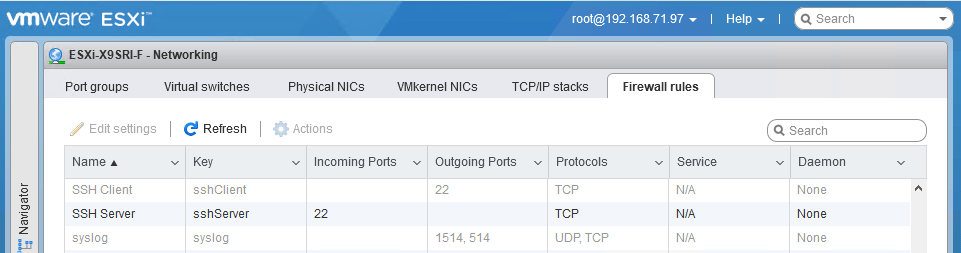
One thing to remember is that you need the current host to allow the SSH client in the firewall, which is disabled by default:

After enabling:

Be really careful with the -3 option to scp; it allows you to transfer from one remote machine to another remote machine, but when using keyboard-interactive, you have a high change to lock-out your accounts: SSH will try to keyboard-interactive to both hosts at the same time.

If you lock-out root, then you have to go through the local DCUI console (use ALT-F2 to go there), then reset the root account failure count using pam_tally2 --user root --reset.

So this can be bad:

scp -3 -rp root@192.168.71.97://vmfs/volumes/EVO860_500GB/VM1/ root@192.168.71.91://vmfs/volumes/EVO860_250GB/VM2/

This works, but assumes the SSH client is enabled from the first host:

scp -rp root@192.168.71.97://vmfs/volumes/EVO860_500GB/VM1/ root@192.168.71.91://vmfs/volumes/EVO860_250GB/VM2/

See these links:


[root@ESXi-X9SRI-F:~] esxcli network firewall get
   Default Action: DROP
   Enabled: true
   Loaded: true
[root@ESXi-X9SRI-F:~] esxcli network firewall ruleset list --ruleset-id sshClient
Name       Enabled
---------  -------
sshClient    false
[root@ESXi-X9SRI-F:~] esxcli network firewall ruleset set --ruleset-id sshClient --enabled true
[root@ESXi-X9SRI-F:~] esxcli network firewall ruleset list --ruleset-id sshClient
Name       Enabled
---------  -------
sshClient     true
[root@ESXi-X9SRI-F:~] esxcli network firewall ruleset set --ruleset-id sshClient --enabled false
[root@ESXi-X9SRI-F:~] esxcli network firewall ruleset list --ruleset-id sshClient
Name       Enabled
---------  -------
sshClient    false

–jeroen

Posted in *nix, *nix-tools, ESXi6, ESXi6.5, ESXi6.7, Power User, ssh/sshd, Virtualization, VMware, VMware ESXi | Leave a Comment »

ESXi: where are my log files actually stored? Actually, most of them are in `/scratch/log` which points to a hidden `.locker` directory in a datastore.

Posted by jpluimers on 2021/05/05

A summary of the full gist at [Wayback/Archive.is] ESXi-where-are-my-log-files-stored.txt:

# ls -al / /var/ /var/log/ /var/run/ /scratch/ /scratch/log/ | grep "/\|log\|-\>"
/:
...
lrwxrwxrwx    1 root     root            57 Apr  4 18:16 scratch -> /vmfs/volumes/5ce2d440-72311161-75c5-0025907d9d5c/.locker
...
/scratch/:
drwxr-xr-x    1 root     root        106496 Apr 10 08:40 log
/scratch/log/:
-rw-------    1 root     root           411 Apr  4 18:20 Xorg.log
...
-rw-------    1 root     root         78835 Apr  4 10:30 syslog.0.gz
-rw-------    1 root     root         61136 Mar 18 15:05 syslog.1.gz
-rw-------    1 root     root         60589 Feb 24 00:30 syslog.2.gz
-rw-------    1 root     root         60373 Feb  1 08:01 syslog.3.gz
-rw-------    1 root     root         60203 Jan  9 15:50 syslog.4.gz
-rw-------    1 root     root         59889 Dec 17 23:20 syslog.5.gz
-rw-------    1 root     root         60398 Nov 25 06:50 syslog.6.gz
-rw-------    1 root     root         60563 Nov  2 14:25 syslog.7.gz
-rw-------    1 root     root        531794 Apr 10 09:35 syslog.log
...
-rw-------    1 root     root        157255 Apr  4 18:17 vvold.log
/var/:
...
drwxr-xr-x    1 root     root           512 Apr  5 19:19 log
...
/var/log/:
-rw-r--r--    1 root     root           416 Apr  4 18:16 .vmsyslogd.err
...
-rw-r--r--    1 root     root         38069 Apr  4 18:20 configRP.log
-rw-r--r--    1 root     root             0 Apr  4 18:16 cryptoloader.log
...
-rw-r--r--    1 root     root            87 Apr  5 21:57 esxcli.log
...
-rw-------    1 root     root          3350 Apr  4 18:16 init.log
-rw-r--r--    1 root     root           966 Apr  4 18:16 iofilter-init.log
...
-rw-r--r--    1 root     root         21769 Apr  4 18:16 jumpstart-esxcli-stdout.log
-rw-r--r--    1 root     root         18857 Apr  4 18:16 jumpstart-native-stdout.log
-rw-r--r--    1 root     root         10837 Apr  4 18:16 jumpstart-stdout.log
-rw-r--r--    1 root     root             0 Apr  4 18:16 kickstart.log
...
-rw-------    1 root     root         10916 Apr  4 18:16 sysboot.log
...
-rw-------    1 root     root            64 Apr 10 09:13 tallylog
...
/var/run/:
lrwxrwxrwx    1 root     root            12 Apr  4 18:16 log -> /scratch/log
  • Almost all log files (most from /var/log and all from /var/run/log) are actually persistently stored in /scratch/log and survive reboots. Just a few are non-persistent.
  • /var/log/syslog is being archived as .gz files (compressed by gzip).
  • syslog is special: the location can be configured, and even be external: [Wayback] Configuring syslog on ESXi (2003322)

    VMware vSphere ESXi 5.0 and higher hosts run a Syslog service (vmsyslogd) that provides a standard mechanism for logging messages from the VMkernel and other system components. By default in ESXi, these logs are placed on a local scratch volume or a ramdisk. To preserve the logs further, ESXi can be configured to place these logs to an alternate storage location on disk and to send the logs across the network to a Syslog server.

  • A summary of some of the above log files is at [Wayback] ESXi Log File Locations

–jeroen

Posted in *nix, *nix-tools, ash/dash, ash/dash development, BusyBox, Development, ESXi6, ESXi6.5, ESXi6.7, ESXi7, gzip, Power User, Scripting, Software Development, Virtualization, VMware, VMware ESXi | Leave a Comment »

Running ArchiveTeam Warrior version 3.2 on ESXi

Posted by jpluimers on 2021/05/05

A while ago I wrote about Helping the WayBack ArchiveTeam team: running their Warrior virtual appliance on ESXi.

Since it was scheduled before my cancer treatment started and got posted when still recovering from it, I missed that version 3.2 of the [Wayback] ArchiveTeam Warrior appliance appeared in the [Wayback] Releases · ArchiveTeam/Ubuntu-Warrior at [Wayback] Release v3.2 · ArchiveTeam/Ubuntu-Warrior. You can download it form these places:

These two sites have not yet been updated, so they contain the older versions:

The source code now has been moved three times:

Read the rest of this entry »

Posted in *nix, *nix-tools, ArchiveTeamWarrior, Cloud, Containers, diff, Docker, ESXi5, ESXi5.1, ESXi5.5, ESXi6, ESXi6.5, ESXi6.7, ESXi7, Infrastructure, Internet, InternetArchive, Kubernetes (k8n), KVM Kernel-based Virtual Machine, patch, Power User, VirtualBox, Virtualization, VMware, VMware ESXi, VMware Workstation, WayBack machine | Leave a Comment »

VMware ESXi console: viewing all VMs, suspending and waking them up: part 5

Posted by jpluimers on 2021/04/30

Yesterday’s post got a bit longer than anticipated as there were most steps than I hoped for to create the listing script vim-cmd-list-all-VMs.sh:

#!/bin/sh
# https://wiert.me/2021/04/29/vmware-esxi-console-viewing-all-vms-suspending-and-waking-them-up-part-4/
vmids=`vim-cmd vmsvc/getallvms | sed -n -E -e "s/^([[:digit:]]+)\s+((\S.+\S)?)\s+(\[\S+\])\s+(.+\.vmx)\s+(\S+)\s+(vmx-[[:digit:]]+)\s*?((\S.+)?)$/\1/p"`
for vmid in ${vmids} ; do
    powerState=`vim-cmd vmsvc/power.getstate ${vmid} | sed '1d'`
    name=`vim-cmd vmsvc/get.config ${vmid} | sed -n -E -e '/\(vim.vm.ConfigInfo\) \{/,/files = \(vim.vm.FileInfo\) \{/ s/^ +name = "(.*)",.*?/\1/p'`
    vmPathName=`vim-cmd vmsvc/get.config ${vmid} | sed -n -E -e '/files = \(vim.vm.FileInfo\) \{/,/tools = \(vim.vm.ToolsConfigInfo\) \{/ s/^ +vmPathName = "(.*)",.*?/\1/p'`
    echo "VM with id ${vmid} has power state ${powerState} (name = ${name}; vmPathName = ${vmPathName})."
done

This means that today there is a new try to cover the rest of these lists I started yesterday with:

Available commands

  • vim-cmd vmsvc/power.getstate vmid
  • vim-cmd vmsvc/power.hibernate vmid
  • vim-cmd vmsvc/power.off vmid
  • vim-cmd vmsvc/power.on vmid
  • vim-cmd vmsvc/power.reboot vmid
  • vim-cmd vmsvc/power.reset vmid
  • vim-cmd vmsvc/power.shutdown vmid
  • vim-cmd vmsvc/power.suspend vmid
  • vim-cmd vmsvc/power.suspendResume vmid

Unavailable commands

  • vim-cmd vmsvc/power.startup vmid
  • vim-cmd vmsvc/power.resume vmid
  • vim-cmd vmsvc/power.wakeup vmid

So here we go:

vim-cmd-hibernate-running-VMs.sh and vim-cmd-suspend-running-VMs.sh

These files are almost the same: the echo and command are different (Hibernating versus Suspending and power.hibernate versus suspend)

#!/bin/sh
# https://wiert.me/2021/04/30/vmware-esxi-console-viewing-all-vms-suspending-and-waking-them-up-part-5/
vmids=`vim-cmd vmsvc/getallvms | sed -n -E -e "s/^([[:digit:]]+)\s+((\S.+\S)?)\s+(\[\S+\])\s+(.+\.vmx)\s+(\S+)\s+(vmx-[[:digit:]]+)\s*?((\S.+)?)$/\1/p"`
for vmid in ${vmids} ; do
    powerState=`vim-cmd vmsvc/power.getstate ${vmid} | sed '1d'`
    name=`vim-cmd vmsvc/get.config ${vmid} | sed -n -E -e '/\(vim.vm.ConfigInfo\) \{/,/files = \(vim.vm.FileInfo\) \{/ s/^ +name = "(.*)",.*?/\1/p'`
    vmPathName=`vim-cmd vmsvc/get.config ${vmid} | sed -n -E -e '/files = \(vim.vm.FileInfo\) \{/,/tools = \(vim.vm.ToolsConfigInfo\) \{/ s/^ +vmPathName = "(.*)",.*?/\1/p'`
    # echo "VM with id ${vmid} has power state ${powerState} (name = ${name}; vmPathName = ${vmPathName})."
    if [ "${powerState}" == "Powered on" ] ; then
        echo "Powered on  VM with id ${vmid} and name: $name"
        echo "Hibernating VM with id ${vmid} and name: $name"
        vim-cmd vmsvc/power.hibernate ${vmid}
    fi
done

This hibernates all VMs with power state Powered on and waits for each VM to complete hibernation.

#!/bin/sh
# https://wiert.me/2021/04/30/vmware-esxi-console-viewing-all-vms-suspending-and-waking-them-up-part-5/
vmids=`vim-cmd vmsvc/getallvms | sed -n -E -e "s/^([[:digit:]]+)\s+((\S.+\S)?)\s+(\[\S+\])\s+(.+\.vmx)\s+(\S+)\s+(vmx-[[:digit:]]+)\s*?((\S.+)?)$/\1/p"`
for vmid in ${vmids} ; do
    powerState=`vim-cmd vmsvc/power.getstate ${vmid} | sed '1d'`
    name=`vim-cmd vmsvc/get.config ${vmid} | sed -n -E -e '/\(vim.vm.ConfigInfo\) \{/,/files = \(vim.vm.FileInfo\) \{/ s/^ +name = "(.*)",.*?/\1/p'`
    vmPathName=`vim-cmd vmsvc/get.config ${vmid} | sed -n -E -e '/files = \(vim.vm.FileInfo\) \{/,/tools = \(vim.vm.ToolsConfigInfo\) \{/ s/^ +vmPathName = "(.*)",.*?/\1/p'`
    # echo "VM with id ${vmid} has power state ${powerState} (name = ${name}; vmPathName = ${vmPathName})."
    if [ "${powerState}" == "Powered on" ] ; then
        echo "Powered on VM with id ${vmid} and name: $name"
        echo "Suspending VM with id ${vmid} and name: $name"
        vim-cmd vmsvc/power.suspend ${vmid}
    fi
done

This suspends all VMs with power state Powered on and waits for each VM to complete suspending.

vim-cmd-resume-suspended-VMs.sh and vim-cmd-wakeup-suspended-VMs.sh

#!/bin/sh
# https://wiert.me/2021/04/30/vmware-esxi-console-viewing-all-vms-suspending-and-waking-them-up-part-5/
vmids=`vim-cmd vmsvc/getallvms | sed -n -E -e "s/^([[:digit:]]+)\s+((\S.+\S)?)\s+(\[\S+\])\s+(.+\.vmx)\s+(\S+)\s+(vmx-[[:digit:]]+)\s*?((\S.+)?)$/\1/p"`
for vmid in ${vmids} ; do
    powerState=`vim-cmd vmsvc/power.getstate ${vmid} | sed '1d'`
    name=`vim-cmd vmsvc/get.config ${vmid} | sed -n -E -e '/\(vim.vm.ConfigInfo\) \{/,/files = \(vim.vm.FileInfo\) \{/ s/^ +name = "(.*)",.*?/\1/p'`
    vmPathName=`vim-cmd vmsvc/get.config ${vmid} | sed -n -E -e '/files = \(vim.vm.FileInfo\) \{/,/tools = \(vim.vm.ToolsConfigInfo\) \{/ s/^ +vmPathName = "(.*)",.*?/\1/p'`
    # echo "VM with id ${vmid} has power state ${powerState} (name = ${name}; vmPathName = ${vmPathName})."
    if [ "${powerState}" == "Suspended" ] ; then
        echo "Suspended VM with id ${vmid} and name: $name"
        echo "Resuming  VM with id ${vmid} and name: $name"
        vim-cmd vmsvc/power.on ${vmid}
    fi
done

This resumes (as there is no vim-cmd vmsvc/power.resume vmid) all VMs with power state Suspended and waits for each VM to complete resume.

vim-cmd-power-off-powered-on-VMs.sh

#!/bin/sh
# https://wiert.me/2021/04/30/vmware-esxi-console-viewing-all-vms-suspending-and-waking-them-up-part-5/
vmids=`vim-cmd vmsvc/getallvms | sed -n -E -e "s/^([[:digit:]]+)\s+((\S.+\S)?)\s+(\[\S+\])\s+(.+\.vmx)\s+(\S+)\s+(vmx-[[:digit:]]+)\s*?((\S.+)?)$/\1/p"`
for vmid in ${vmids} ; do
    powerState=`vim-cmd vmsvc/power.getstate ${vmid} | sed '1d'`
    name=`vim-cmd vmsvc/get.config ${vmid} | sed -n -E -e '/\(vim.vm.ConfigInfo\) \{/,/files = \(vim.vm.FileInfo\) \{/ s/^ +name = "(.*)",.*?/\1/p'`
    vmPathName=`vim-cmd vmsvc/get.config ${vmid} | sed -n -E -e '/files = \(vim.vm.FileInfo\) \{/,/tools = \(vim.vm.ToolsConfigInfo\) \{/ s/^ +vmPathName = "(.*)",.*?/\1/p'`
    # echo "VM with id ${vmid} has power state ${powerState} (name = ${name}; vmPathName = ${vmPathName})."
    if [ "${powerState}" == "Powered on" ] ; then
        echo "Powered on   VM with id ${vmid} and name: $name"
        echo "Powering off VM with id ${vmid} and name: $name"
        vim-cmd vmsvc/power.off ${vmid}
    fi
done

This powers off all VMs with power state Power on and waits for each VM to start powering off (but does not wait for them to complete powering off, so parts run in parallel).

vim-cmd-power-on-powered-off-VMs.shvim-cmd-power-on-shutdown-VMs.sh and vim-cmd-startup-shutdown-VMs.sh

#!/bin/sh
# https://wiert.me/2021/04/30/vmware-esxi-console-viewing-all-vms-suspending-and-waking-them-up-part-5/
vmids=`vim-cmd vmsvc/getallvms | sed -n -E -e "s/^([[:digit:]]+)\s+((\S.+\S)?)\s+(\[\S+\])\s+(.+\.vmx)\s+(\S+)\s+(vmx-[[:digit:]]+)\s*?((\S.+)?)$/\1/p"`
for vmid in ${vmids} ; do
    powerState=`vim-cmd vmsvc/power.getstate ${vmid} | sed '1d'`
    name=`vim-cmd vmsvc/get.config ${vmid} | sed -n -E -e '/\(vim.vm.ConfigInfo\) \{/,/files = \(vim.vm.FileInfo\) \{/ s/^ +name = "(.*)",.*?/\1/p'`
    vmPathName=`vim-cmd vmsvc/get.config ${vmid} | sed -n -E -e '/files = \(vim.vm.FileInfo\) \{/,/tools = \(vim.vm.ToolsConfigInfo\) \{/ s/^ +vmPathName = "(.*)",.*?/\1/p'`
    # echo "VM with id ${vmid} has power state ${powerState} (name = ${name}; vmPathName = ${vmPathName})."
    if [ "${powerState}" == "Powered off" ] ; then
        echo "Powered off VM with id ${vmid} and name: $name"
        echo "Powering on VM with id ${vmid} and name: $name"
        vim-cmd vmsvc/power.on ${vmid}
    fi
done

These powers on all VMs with power state Powered off and waits for each VM to complete power on (but does not wait for them to complete boot, so part runs in parallel!).

These are exactly the same, as you cannot distinguish a VM that has been shutdown by vim-cmd vmsvc/power.off vmid from vim-cmd vmsvc/shutdown vmid.

vim-cmd-reboot-powered-on-VMs.sh

#!/bin/sh
# https://wiert.me/2021/04/30/vmware-esxi-console-viewing-all-vms-suspending-and-waking-them-up-part-5/
vmids=`vim-cmd vmsvc/getallvms | sed -n -E -e "s/^([[:digit:]]+)\s+((\S.+\S)?)\s+(\[\S+\])\s+(.+\.vmx)\s+(\S+)\s+(vmx-[[:digit:]]+)\s*?((\S.+)?)$/\1/p"`
for vmid in ${vmids} ; do
    powerState=`vim-cmd vmsvc/power.getstate ${vmid} | sed '1d'`
    name=`vim-cmd vmsvc/get.config ${vmid} | sed -n -E -e '/\(vim.vm.ConfigInfo\) \{/,/files = \(vim.vm.FileInfo\) \{/ s/^ +name = "(.*)",.*?/\1/p'`
    vmPathName=`vim-cmd vmsvc/get.config ${vmid} | sed -n -E -e '/files = \(vim.vm.FileInfo\) \{/,/tools = \(vim.vm.ToolsConfigInfo\) \{/ s/^ +vmPathName = "(.*)",.*?/\1/p'`
    # echo "VM with id ${vmid} has power state ${powerState} (name = ${name}; vmPathName = ${vmPathName})."
    if [ "${powerState}" == "Powered on" ] ; then
        echo "Powered on VM with id ${vmid} and name: $name"
        echo "Rebooting  VM with id ${vmid} and name: $name"
        vim-cmd vmsvc/power.reboot ${vmid}
    fi
done

This reboots all VMs with power state Power on and waits for each VM to start rebooting (but does not wait for them to complete reboot, so parts run in parallel).

vim-cmd-reset-powered-on-VMs.sh

#!/bin/sh
# https://wiert.me/2021/04/30/vmware-esxi-console-viewing-all-vms-suspending-and-waking-them-up-part-5/
vmids=`vim-cmd vmsvc/getallvms | sed -n -E -e "s/^([[:digit:]]+)\s+((\S.+\S)?)\s+(\[\S+\])\s+(.+\.vmx)\s+(\S+)\s+(vmx-[[:digit:]]+)\s*?((\S.+)?)$/\1/p"`
for vmid in ${vmids} ; do
    powerState=`vim-cmd vmsvc/power.getstate ${vmid} | sed '1d'`
    name=`vim-cmd vmsvc/get.config ${vmid} | sed -n -E -e '/\(vim.vm.ConfigInfo\) \{/,/files = \(vim.vm.FileInfo\) \{/ s/^ +name = "(.*)",.*?/\1/p'`
    vmPathName=`vim-cmd vmsvc/get.config ${vmid} | sed -n -E -e '/files = \(vim.vm.FileInfo\) \{/,/tools = \(vim.vm.ToolsConfigInfo\) \{/ s/^ +vmPathName = "(.*)",.*?/\1/p'`
    # echo "VM with id ${vmid} has power state ${powerState} (name = ${name}; vmPathName = ${vmPathName})."
    if [ "${powerState}" == "Powered on" ] ; then
        echo "Powered on VM with id ${vmid} and name: $name"
        echo "Resetting  VM with id ${vmid} and name: $name"
        vim-cmd vmsvc/power.reset ${vmid}
    fi
done

This resets all VMs with power state Power on and waits for each VM to start rebooting (but does not wait for them to complete reboot, so parts run in parallel).

vim-cmd-suspendResume-powered-on-VMs.sh

#!/bin/sh
# https://wiert.me/2021/04/30/vmware-esxi-console-viewing-all-vms-suspending-and-waking-them-up-part-5/
vmids=`vim-cmd vmsvc/getallvms | sed -n -E -e "s/^([[:digit:]]+)\s+((\S.+\S)?)\s+(\[\S+\])\s+(.+\.vmx)\s+(\S+)\s+(vmx-[[:digit:]]+)\s*?((\S.+)?)$/\1/p"`
for vmid in ${vmids} ; do
    powerState=`vim-cmd vmsvc/power.getstate ${vmid} | sed '1d'`
    name=`vim-cmd vmsvc/get.config ${vmid} | sed -n -E -e '/\(vim.vm.ConfigInfo\) \{/,/files = \(vim.vm.FileInfo\) \{/ s/^ +name = "(.*)",.*?/\1/p'`
    vmPathName=`vim-cmd vmsvc/get.config ${vmid} | sed -n -E -e '/files = \(vim.vm.FileInfo\) \{/,/tools = \(vim.vm.ToolsConfigInfo\) \{/ s/^ +vmPathName = "(.*)",.*?/\1/p'`
    # echo "VM with id ${vmid} has power state ${powerState} (name = ${name}; vmPathName = ${vmPathName})."
    if [ "${powerState}" == "Powered on" ] ; then
        echo "Powered on      VM with id ${vmid} and name: $name"
        echo "SuspendResuming VM with id ${vmid} and name: $name"
        vim-cmd vmsvc/power.suspendResume ${vmid}
    fi
done

This suspends and resumes on all VMs with power state Power on and waits for each VM to start this shirt cycle (but does not wait for them to complete the suspend and resume cycle, so parts run in parallel).

Future episodes

For now, this is OK enough for me, but I might write a new installment trying to run more of these in parallel (as parts already are done on the ESXi side).

–jeroen

Posted in *nix, *nix-tools, ash/dash, ash/dash development, Development, ESXi6, ESXi6.5, ESXi6.7, ESXi7, Power User, Scripting, sed, sed script, Software Development, Virtualization, VMware, VMware ESXi | Leave a Comment »

VMware ESXi console: viewing all VMs, suspending and waking them up: part 4

Posted by jpluimers on 2021/04/29

Yesterday we ended with an overview of available and unavailable vim-cmd vmsvc commands and the promise to try running the various power commands on all relevant VMs.

Let’s start with a summary of the commands, so it will be easier to make a list of scripts to run them on relevant VMs.

Available commands

  • vim-cmd vmsvc/power.getstate vmid
  • vim-cmd vmsvc/power.hibernate vmid
  • vim-cmd vmsvc/power.off vmid
  • vim-cmd vmsvc/power.on vmid
  • vim-cmd vmsvc/power.reboot vmid
  • vim-cmd vmsvc/power.reset vmid
  • vim-cmd vmsvc/power.shutdown vmid
  • vim-cmd vmsvc/power.suspend vmid
  • vim-cmd vmsvc/power.suspendResume vmid

Unavailable commands

  • vim-cmd vmsvc/power.startup vmid
  • vim-cmd vmsvc/power.resume vmid
  • vim-cmd vmsvc/power.wakeup vmid

List the vmid values, power status and name of all VMs

Getting the vmid

Yesterday I showed a small statement that gives the list of vmid values on an ESXi system:

vim-cmd vmsvc/getallvms | sed -n -E -e "s/^([[:digit:]]+)s+((S.+S)?)s+([S+])s+(.+.vmx)s+(S+)s+(vmx-[[:digit:]]+)s*?((S.+)?)$/1/p"

What I ideally want is not just the vmid and name for each VM from vim-cmd vmsvc/getallvms, but also get the power state information from vim-cmd vmsvc/power.getstate vmid.

For that, we need to parse the output of vim-cmd vmsvc/power.getstate vmid, which can be three outputs:

  • Retrieved runtime info
    Powered off
  • Retrieved runtime info
    Powered on
  • Retrieved runtime info
    Suspended

So basically it involves deleting the first line which was covered in part 2 of this installment, for example on my system:

# vim-cmd vmsvc/power.getstate 10 | sed '1d'
Powered on

Getting VM name

Extracting both vmid and name from vim-cmd vmsvc/getallvms at the same time is not easy, heck even impossible, so I decided to go the vim-cmd vmsvc/get.config vmid way.

Getting multiple values out of some output is already very hard in bash, where usually the less difficult way is to use arrays. Since Busybox has an ash shell (see Busybox sh (actually ash derivative dash): checking exit codes), and ash does not do arrays, that route is gone.

To give you an idea how hard this is in bash and how to sort of workaround the lack of array support in ash:

This partial vim-cmd vmsvc/get.config vmid sample output on one of my VMs that shows how to use head -n 31 to get just the first 31 lines of output:

# vim-cmd vmsvc/get.config 10 | head -n 31
Configuration:

(vim.vm.ConfigInfo) {
   changeVersion = "2021-04-07T22:08:30.548274Z", 
   modified = "1970-01-01T00:00:00Z", 
   name = "X9SRI-3F-W10P-EN-MEDIA", 
   guestFullName = "Microsoft Windows 10 (64-bit)", 
   version = "vmx-14", 
   uuid = "564d51ac-f6cf-e40b-b686-2f53a28a4bea", 
   createDate = "2019-05-17T21:37:11.408173Z", 
   instanceUuid = "52403d0e-7ccd-48da-bb21-7e966defccf7", 
   npivNodeWorldWideName = , 
   npivPortWorldWideName = , 
   npivWorldWideNameType = , 
   npivDesiredNodeWwns = , 
   npivDesiredPortWwns = , 
   npivTemporaryDisabled = true, 
   npivOnNonRdmDisks = , 
   locationId = "564d6b18-ecd1-2261-0127-146b3f3bc636", 
   template = false, 
   guestId = "windows9_64Guest", 
   alternateGuestName = "", 
   annotation = "", 
   files = (vim.vm.FileInfo) {
      vmPathName = "[EVO860_500GB] VM/X9SRI-3F-W10P-EN-MEDIA/X9SRI-3F-W10P-EN-MEDIA.vmx", 
      snapshotDirectory = "[EVO860_500GB] VM/X9SRI-3F-W10P-EN-MEDIA", 
      suspendDirectory = "[EVO860_500GB] VM/X9SRI-3F-W10P-EN-MEDIA", 
      logDirectory = "[EVO860_500GB] VM/X9SRI-3F-W10P-EN-MEDIA", 
      ftMetadataDirectory = 
   }, 
   tools = (vim.vm.ToolsConfigInfo) {

The reason to go the vim-cmd vmsvc/get.config vmid way is that it contains all the configuration info in a kind of JSON format (except the first two lines) and should be relatively easy to parse. Or so at least I hoped.

Basically I am interested in the value of name = "X9SRI-3F-W10P-EN-MEDIA", however, there are multiple name fields in the total configuration:

# vim-cmd vmsvc/get.config 10 | sed -n -E '/name =/p'
   name = "X9SRI-3F-W10P-EN-MEDIA", 
         name = "EVO860_500GB",

So what I really want is the value of name = "X9SRI-3F-W10P-EN-MEDIA", in between the (vim.vm.ConfigInfo) { and files = (vim.vm.FileInfo) { parts.

This can be done using sed as it allows to specify a range using a start and end value using addresses:

  • [Wayback] sed: Addresses in sed

    An address is either a decimal number that counts input lines cumulatively across files, a '$' character that addresses the last line of input, or a context address (which consists of a BRE, as described in Regular Expressions in sed , preceded and followed by a delimiter, usually a slash).

    An editing command with no addresses shall select every pattern space.

    An editing command with one address shall select each pattern space that matches the address.

    An editing command with two addresses shall select the inclusive range from the first pattern space that matches the first address through the next pattern space that matches the second. (If the second address is a number less than or equal to the line number first selected, only one line shall be selected.) Starting at the first line following the selected range, sed shall look again for the first address. Thereafter, the process shall be repeated. Omitting either or both of the address components in the following form produces undefined results:

    [address[,address]]
  • Range Addresses (sed, a stream editor)[Wayback] Range Addresses (sed, a stream editor)

    An address range can be specified by specifying two addresses separated by a comma (,). An address range matches lines starting from where the first address matches, and continues until the second address matches (inclusively):

    $ seq 10 | sed -n '4,6p'
    4
    5
    6
    

    If the second address is a regexp, then checking for the ending match will start with the line following the line which matched the first address: a range will always span at least two lines (except of course if the input stream ends).

  • [Wayback] Regexp Addresses (sed, a stream editor)

For example (with some characters escaped because of [Wayback] ERE syntax (sed, a stream editor)):

# vim-cmd vmsvc/get.config 10 | sed -n -E -e '/\(vim.vm.ConfigInfo\) \{/,/files = \(vim.vm.FileInfo\) \{/p'
(vim.vm.ConfigInfo) {
   changeVersion = "2021-04-07T22:08:30.548274Z", 
   modified = "1970-01-01T00:00:00Z", 
   name = "X9SRI-3F-W10P-EN-MEDIA", 
   guestFullName = "Microsoft Windows 10 (64-bit)", 
   version = "vmx-14", 
   uuid = "564d51ac-f6cf-e40b-b686-2f53a28a4bea", 
   createDate = "2019-05-17T21:37:11.408173Z", 
   instanceUuid = "52403d0e-7ccd-48da-bb21-7e966defccf7", 
   npivNodeWorldWideName = , 
   npivPortWorldWideName = , 
   npivWorldWideNameType = , 
   npivDesiredNodeWwns = , 
   npivDesiredPortWwns = , 
   npivTemporaryDisabled = true, 
   npivOnNonRdmDisks = , 
   locationId = "564d6b18-ecd1-2261-0127-146b3f3bc636", 
   template = false, 
   guestId = "windows9_64Guest", 
   alternateGuestName = "", 
   annotation = "", 
   files = (vim.vm.FileInfo) { 

With [Wayback] BRE syntax (sed, a stream editor) the filter part would be easier: vim-cmd vmsvc/get.config 10 | sed -n -e '/(vim.vm.ConfigInfo) {/,/files = (vim.vm.FileInfo) {/p', but the print part would be more difficult:

  • # vim-cmd vmsvc/get.config 10 | sed -n -E -e '/\(vim.vm.ConfigInfo\) \{/,/files = \(vim.vm.FileInfo\) \{/ s/^ +name = "(.*)",.*?/1/p'
    X9SRI-3F-W10P-EN-MEDIA
    
  • # vim-cmd vmsvc/get.config 10 | sed -n -e '/(vim.vm.ConfigInfo) {/,/files = (vim.vm.FileInfo) {/ s/^ +name = "(.*)",.*?/1/p'
    X9SRI-3F-W10P-EN-MEDIA

Since I am used to extended regular expressions (ERE) over basica regular expressions (BRE), I prefer the first solution.

So getting the name in a variable now becomes this:

# name=`vim-cmd vmsvc/get.config 10 | sed -n -e '/(vim.vm.ConfigInfo) {/,/files = (vim.vm.FileInfo) {/ s/^ +name = "(.*)",.*?/1/p'`
# echo ${name}
X9SRI-3F-W10P-EN-MEDIA

List the vmid values, power status and name of all VMs

Back to the listing script vim-cmd-list-all-VMs.sh:

#!/bin/sh
# https://wiert.me/2021/04/29/vmware-esxi-console-viewing-all-vms-suspending-and-waking-them-up-part-4/
vmids=`vim-cmd vmsvc/getallvms | sed -n -E -e "s/^([[:digit:]]+)\s+((\S.+\S)?)\s+(\[\S+\])\s+(.+\.vmx)\s+(\S+)\s+(vmx-[[:digit:]]+)\s*?((\S.+)?)$/\1/p"`
for vmid in ${vmids} ; do
    powerState=`vim-cmd vmsvc/power.getstate ${vmid} | sed '1d'`
    name=`vim-cmd vmsvc/get.config ${vmid} | sed -n -E -e '/\(vim.vm.ConfigInfo\) \{/,/files = \(vim.vm.FileInfo\) \{/ s/^ +name = "(.*)",.*?/\1/p'`
    vmPathName=`vim-cmd vmsvc/get.config ${vmid} | sed -n -E -e '/files = \(vim.vm.FileInfo\) \{/,/tools = \(vim.vm.ToolsConfigInfo\) \{/ s/^ +vmPathName = "(.*)",.*?/\1/p'`
    echo "VM with id ${vmid} has power state ${powerState} (name = ${name}; vmPathName = ${vmPathName})."
done

As a bonus, next to powerState, the script also figures out vmPathName in a similar way to name.

–jeroen

Posted in *nix, *nix-tools, ash/dash, ash/dash development, Development, ESXi6, ESXi6.5, ESXi6.7, ESXi7, head, Power User, Scripting, sed, sed script, Software Development, tee, Virtualization, VMware, VMware ESXi | Leave a Comment »

VMware ESXi console: viewing all VMs, suspending and waking them up: part 3

Posted by jpluimers on 2021/04/28

Yesterday’s installment ended with a list of power related vim-cmd vmsvc commands:

Usage: power.getstate vmid
Usage: power.hibernate vmid
Usage: power.off vmid
Usage: power.on vmid
Usage: power.reboot vmid
Usage: power.reset vmid
Usage: power.shutdown vmid
Usage: power.suspend vmid
Usage: power.suspendResume vmid

Getting vmid values

These all have a vmid parameter, so let’s create a small statement that gives the list of vmid on an ESXi system:

vim-cmd vmsvc/getallvms | sed -n -E -e "s/^([[:digit:]]+)\s+((\S.+\S)?)\s+(\[\S+\])\s+(.+\.vmx)\s+(\S+)\s+(vmx-[[:digit:]]+)\s*?((\S.+)?)$/\1/p"

On my system the relevant VMs it returns are these:

10
5

The various power commands

The outcome of the various power commands are not as simple as one might think as they often do not just depend on the current power state of the VM, but also on either VMware Tools or open-vm-tools to be running.

Basically these tools do the same, but their origin is different: open-vm-tools is often included as part of Linux distributions; VMware Tools is often installed separately, see:

I have made a table for this hoping it makes reading easier, the explanations are by empirical usage, as the documentation in the help dump (see [Wayback] delimited vim-cmd help for each vmsvc command.txt) does not seem to match behaviour.

Command Explanation
vim-cmd vmsvc/power.getstate vmid Gets the power state of the VM, returning a line Retrieved runtime info followed by lines indicating the power state:

  • Powered off
  • Powered on
  • Suspended
vim-cmd vmsvc/power.hibernate vmid When neither VMware Tools or open-vm-tools to be running, you get an error:

(vim.fault.ToolsUnavailable) {
   faultCause = (vmodl.MethodFault) null, 
   faultMessage = 
   msg = "Received SOAP response fault from []: standbyGuest
Cannot complete operation because VMware Tools is not running in this virtual machine."
}

When a hibernate/suspend task is already running, you get an error:

(vim.fault.TaskInProgress) {
   faultCause = (vmodl.MethodFault) null, 
   faultMessage = , 
   task = 'vim.Task:haTask-12-vim.VirtualMachine.suspend-1006072588'
   msg = "Received SOAP response fault from []: standbyGuest
Another task is already in progress."
}

Otherwise, depends on the power state of the VM if vmware tools:

  • Powered off: keeps the power state of the VM as Powered off and shows an error
    (vim.fault.InvalidPowerState) {
       faultCause = (vmodl.MethodFault) null, 
       faultMessage = , 
       requestedState = "poweredOn", 
       existingState = "poweredOff"
       msg = "Received SOAP response fault from []: standbyGuest
    The attempted operation cannot be performed in the current state (Powered off)."
    }
  • Powered on: sets the power state of the VM to Suspended and shows no output, unless neither VMware Tools, nor open-vm-tools can be communicated with, then you get this error:
    (vmodl.fault.SystemError) {
       faultCause = (vmodl.MethodFault) null, 
       faultMessage = , 
       reason = "Invalid fault"
       msg = "Received SOAP response fault from []: standbyGuest
    vim.fault.GenericVmConfigFault"
    }
  • Suspended: keeps the power state of the VM as Suspended and shows an error
    (vim.fault.InvalidPowerState) {
       faultCause = (vmodl.MethodFault) null, 
       faultMessage = , 
       requestedState = "poweredOn", 
       existingState = "suspended"
       msg = "Received SOAP response fault from []: standbyGuest
    The attempted operation cannot be performed in the current state (Suspended)."
    }
vim-cmd vmsvc/power.off vmid Depends on the power state of the VM and either VMware Tools or open-vm-tools to be running:

  • Powered off: keeps the power state of the VM as Powered off and shows two lines
    Powering off VM:
    Power off failed
  • Powered on: powers off the VM (bypasses any VMware Tools or open-vm-tools) and sets power state of the VM to Powered off showing one line
    Powering off VM:
  • Suspended: Hardware powers off the VM (bypasses any VMware Tools or open-vm-tools) and sets power state of the VM to Powered off showing one line
    Powering off VM:
vim-cmd vmsvc/power.on vmid Depends on the power state of the VM:

  • Powered on: keeps power state of the VM as Powered off showing two lines
    Powering on VM:
    Power on failed
  • Powered off: keeps the power state of the VM as Powered off and shows one line
    Powering ofn VM:
  • Suspended: keeps the power state of the VM as Suspended showing two lines
    Powering on VM:
    Power on failed

This also undoes a vim-cmd vmsvc/power.hibernate vmid, vim-cmd vmsvc/power.shutdown vmid or vim-cmd vmsvc/power.suspend vmid.

vim-cmd vmsvc/power.reboot vmid Depends on the power state of the VM and either VMware Tools or open-vm-tools to be running:

  • Powered off: keeps the power state of the VM as Powered off and shows the error
    (vim.fault.InvalidPowerState) {
       faultCause = (vmodl.MethodFault) null, 
       faultMessage = , 
       requestedState = "poweredOn", 
       existingState = "poweredOff"
       msg = "Received SOAP response fault from []: rebootGuest
    The attempted operation cannot be performed in the current state (Powered off)."
    }
  • Powered on and either VMware Tools or open-vm-tools are running: uses VMware Tools or open-vm-tools to reboot the VM: keeps the power state of the VM as Powered on.
  • Powered on, but neither VMware Tools nor open-vm-tools are running: keeps the power state of the VM as Powered on and shows the error
    (vim.fault.ToolsUnavailable) {
       faultCause = (vmodl.MethodFault) null, 
       faultMessage = 
       msg = "Received SOAP response fault from []: rebootGuest
    Cannot complete operation because VMware Tools is not running in this virtual machine."
    }
  • Suspended: keeps the power state of the VM as Suspended and shows the error
    (vim.fault.InvalidPowerState) {
       faultCause = (vmodl.MethodFault) null, 
       faultMessage = , 
       requestedState = "poweredOn", 
       existingState = "suspended"
       msg = "Received SOAP response fault from []: rebootGuest
    The attempted operation cannot be performed in the current state (Suspended)."
    }
vim-cmd vmsvc/power.reset vmid Depends on the power state of the VM:

  • Powered off: keeps the power state of the VM as Powered off and shows two lines
    Reset VM:
    Reset failed
  • Powered on: keeps the power state of the VM as Powered on, bypasses running VMware Tools or open-vm-tools (basically like a hardware reset button) and shows one line
    Reset VM:
  • Suspended: keeps the power state of the VM as Suspended and shows two lines
    Reset VM:
    Reset failed
vim-cmd vmsvc/power.shutdown vmid Depends on the power state of the VM and either VMware Tools or open-vm-tools to be running:

  • Powered off: keeps the power state of the VM as Powered off and shows the error
    (vim.fault.InvalidPowerState) {
       faultCause = (vmodl.MethodFault) null, 
       faultMessage = , 
       requestedState = "poweredOn", 
       existingState = "poweredOff"
       msg = "Received SOAP response fault from []: shutdownGuest
    The attempted operation cannot be performed in the current state (Powered off)."
    }
  • Powered on and either VMware Tools or open-vm-tools are running: uses VMware Tools or open-vm-tools to shutdown the VM and sets the power state of the VM to Powered off without showing any output.
  • Powered on, but neither VMware Tools nor open-vm-tools are running: keeps the power state of the VM as Powered on and shows the error
    (vim.fault.ToolsUnavailable) {
       faultCause = (vmodl.MethodFault) null, 
       faultMessage = 
       msg = "Received SOAP response fault from []: shutdownGuest
    Cannot complete operation because VMware Tools is not running in this virtual machine."
    }
  • Suspended: keeps the power state of the VM as Suspended and shows the error
    (vim.fault.InvalidPowerState) {
       faultCause = (vmodl.MethodFault) null, 
       faultMessage = , 
       requestedState = "poweredOn", 
       existingState = "suspended"
       msg = "Received SOAP response fault from []: shutdownGuest
    The attempted operation cannot be performed in the current state (Suspended)."
    }
vim-cmd vmsvc/power.suspend vmid When neither VMware Tools or open-vm-tools to be running, you get an error:

(vim.fault.ToolsUnavailable) {
   faultCause = (vmodl.MethodFault) null, 
   faultMessage = 
   msg = "Received SOAP response fault from []: standbyGuest
Cannot complete operation because VMware Tools is not running in this virtual machine."
}

When a hibernate/suspend task is already running, you get an error:

(vim.fault.TaskInProgress) {
   faultCause = (vmodl.MethodFault) null, 
   faultMessage = , 
   task = 'vim.Task:haTask-12-vim.VirtualMachine.suspend-1006072588'
   msg = "Received SOAP response fault from []: standbyGuest
Another task is already in progress."
}

Otherwise, depends on the power state of the VM:

  • Powered off: keeps the power state of the VM as Powered off and shows two lines
    Suspending VM:
    Suspend failed
  • Powered on: keeps the power state of the VM as Powered on, and shows one line
    Suspending VM:

    unless neither VMware Tools, nor open-vm-tools can be communicated with, then you get this error:

    (vmodl.fault.SystemError) {
       faultCause = (vmodl.MethodFault) null, 
       faultMessage = , 
       reason = "Invalid fault"
       msg = "Received SOAP response fault from []: standbyGuest
    vim.fault.GenericVmConfigFault"
    }
  • Suspended: keeps the power state of the VM as Suspended and shows two lines
    Suspending VM:
    Suspend failed
vim-cmd vmsvc/power.suspendResume vmid Depends on the power state of the VM:

  • Powered off: keeps the power state of the VM as Powered off and shows two lines
    Suspend/Resuming the VM:
    Suspend/Resume failed
  • Powered on: keeps the power state of the VM as Powered on, and shows one line
    Suspend/Resuming the VM:
  • Suspended: keeps the power state of the VM as Suspended and shows two lines
    Suspend/Resuming the VM:
    Suspend/Resume failed

Note that in the VMware web console, this is shown as “Invoke FSR” which is a Fast Suspend Resume, which I think has to do with vMotion.

Notes:

  • there is no command vim-cmd vmsvc/power.startup vmid (to undo vim-cmd vmsvc/power.shutdown vmid), use vim-cmd vmsvc/power.on vmid in stead.
  • there is no command vim-cmd vmsvc/power.resume vmid (to undo vim-cmd vmsvc/power.suspend vmid), use vim-cmd vmsvc/power.on vmid in stead.
  • there is no command vim-cmd vmsvc/power.wakeup vmid (to undo vim-cmd vmsvc/power.hibernate vmid), use vim-cmd vmsvc/power.on vmid in stead.

Running the various power commands on all relevant VMs

This will be the topic for the next installment.

–jeroen

Posted in *nix, *nix-tools, ash/dash, ash/dash development, Development, ESXi6, ESXi6.5, ESXi6.7, ESXi7, Power User, Scripting, sed, sed script, Software Development, Virtualization, VMware, VMware ESXi | 1 Comment »