The Wiert Corner – irregular stream of stuff

Jeroen W. Pluimers on .NET, C#, Delphi, databases, and personal interests

  • My badges

  • Twitter Updates

  • My Flickr Stream

  • Pages

  • All categories

  • Enter your email address to subscribe to this blog and receive notifications of new posts by email.

    Join 1,860 other subscribers

Archive for the ‘ssh/sshd’ Category

Tribal Knowledge? Getting the public keys from github and gitlab users from their username

Posted by jpluimers on 2025/04/03

Learned a while ago: if you have the username from a GitHub or GitLab user, you can download interesting that sometimes can make life easier (but not necessarily more secure):

  • github.com/username.keys gives you their public SSH keys
  • gitlab.com/username.keys gives you their public SSH keys
  • github.com/username.png gives you their profile image

And that there are tools like gh, glab and age that can make direct use of them.

I love Twitter, so thanks for these for teaching me these little tricks:

Read the rest of this entry »

Posted in *nix, *nix-tools, ArchiveTeamWarrior, Conference Topics, Conferences, Development, Event, GitHub, GitLab, Internet, InternetArchive, OpenSSH, Power User, Software Development, Source Code Management, SSH, ssh/sshd, WayBack machine | Tagged: , | Leave a Comment »

Quit Nested SSH Sessions: use one more ~ for each nesting

Posted by jpluimers on 2024/11/18

Never too old to learn:

  • [Wayback/Archive.is] Quit Nested SSH Sessions

    works with ssh as well but is much simpler: press as many ~ as level of nest before . (by default, ~ is the escape character while . is to terminate ssh).

  • [Wayback/Archive.is] How can I break out of ssh when it locks? – Ask Ubuntu

    Notice that because hitting ~~ causes ssh to send the ~ instead of intercepting it, you can address N nested ssh connections by hitting ~ N times. (This only applies to ~s that directly follow an Enter.) That is to say that Enter~~~~~. terminates an ssh session 5 layers deep and keeps the other 4 intact.

So this is basically an extension of my 2017 blog post OpenSSH Escape Sequences (aka Kill Dead SSH Sessions) – The Lone Sysadmin (:

–jeroen

Posted in *nix, *nix-tools, Power User, ssh/sshd | Leave a Comment »

Tailscale SSH · Tailscale

Posted by jpluimers on 2024/07/12

Reminder to self to play around with [Wayback/Archive] Tailscale SSH · Tailscale

Tailscale SSH allows Tailscale to manage the authentication and authorization of SSH connections on your tailnet.

Read the rest of this entry »

Posted in *nix, *nix-tools, Hardware, Network-and-equipment, Power User, ssh/sshd, Tailscale, VPN, Wireguard | Leave a Comment »

Installing Windows OpenSSH from the command-line on Windows 10 and 11

Posted by jpluimers on 2023/03/28

While writing On my reading list: Windows Console and PTY, I found out that OpenSSH had become available as an optional Windows feature.

It was in [Wayback/Archive.is] Windows Command-Line: Introducing the Windows Pseudo Console (ConPTY) | Windows Command Line:

Thankfully, OpenSSH was recently ported to Windows and added as a Windows 10 optional feature. PowerShell Core has also adopted ssh as one of its supported PowerShell Core Remoting protocols.

Here are a few links:

Read the rest of this entry »

Posted in *nix, *nix-tools, Communications Development, ConPTY, Console (command prompt window), Development, Internet protocol suite, OpenSSH, Power User, SSH, ssh/sshd, TCP, Windows, Windows 10, Windows 11 | Leave a Comment »

Since about 5 months now, there has been a new Chocolatey package maintainer for OpenVPN

Posted by jpluimers on 2022/08/26

Last winter, I discovered that the OpenVPN version on Chocolatey was really old: it had not been updated since 2019.

Most  Chocolatey maintainers are volunteers and sometimes the burden can become too large. Back then the maintainer was [Wayback/Archive] Chocolatey Software | wget, but luckily [Wayback/Archive] Chocolatey Software | dgalbraith has stepped in and in March 2022 bumped the version from [Wayback/Archive] Chocolatey Software | OpenVPN 2.4.7 to [Wayback/Archive] Chocolatey Software | OpenVPN – Open Source SSL VPN Solution 2.5.4 and kept maintaining (currently there is [Wayback/Archive] Chocolatey Software | OpenVPN – Open Source SSL VPN Solution 2.5.7).

Read the rest of this entry »

Posted in *nix, *nix-tools, Chocolatey, Hardware, Network-and-equipment, OpenVPN, Power User, ssh/sshd, VPN, Windows | Leave a Comment »

Cryptosense Discovery

Posted by jpluimers on 2022/03/15

This is cool: [Wayback] Cryptosense Discovery:

Free tool that discovers security configuration errors in SSH and TLS servers and explains how to fix them. Supports STARTTLS and can also scan HTTPS, POP3, IMAP and SMTP servers.

It gives you a list of servers a target domain uses (for purposes like web, email, etc) that can have external encryption enabled, then allows you to test these.

The list by default has only servers within that target domain enabled, but you can optionally include other servers (for instance if a domain uses a third party for their SMTP handling).

Basically it is the web-counterpart of a tool like testssl.sh (which I have written about before).

Found while checking out how to test the MX security of a domain using [Wayback] testssl.sh as I forgot the syntax, which in retrospect is dead easy as per [Wayback] tls – How to use testssl.sh on an SMTP server? – Information Security Stack Exchange (thanks [Wayback] Z.T.!):

testssl.sh --mx <domain name>

works fine.

testssl.sh -t smtp <ip>:25

and

testssl.sh -t smtp <ip>:587

also work fine.

Note that not specifying the port assumes port 443, despite specifying protocol smtp. That doesn’t work.

Also, you might try discovery.cryptosense.com which does the same thing only better

That website is made by the cool people at [Wayback] Cryptosense.

Both are a lot easier than the alternatives described in [Wayback] Blog · How to test SMTP servers using the command-line · Halon MTA: using nslookup and dig for determining the affected hosts, using nc or telnet for testing basic connectivity, using [Wayback/Archive.is] openssl s_client to test TLS, and [Wayback/Archive.is] smtpping for measuring throughput.

In addition to the above tools mentioned in the blog, I’ve also used sendEmail (note case sensitivity), ehlo-size, and swaks.

This is what I tested:

–jeroen

Posted in *nix, *nix-tools, Awk, bash, bash, Communications Development, Development, DNS, Encryption, grep, HTTPS/TLS security, Internet, Internet protocol suite, Power User, Scripting, Security, SMTP, Software Development, SSH, ssh/sshd, TCP, testssl.sh, TLS | Leave a Comment »

Filippo Valsorda on Twitter: “whoami.filippo.io , the SSH server that knows who you are … Try it out! $ ssh http://whoami.filippo.io”

Posted by jpluimers on 2021/10/20

[Archive.is] Filippo Valsorda on Twitter: “whoami.filippo.io , the SSH server that knows who you are, got some newly refreshed intel! Try it out! $ ssh whoami.filippo.io

The server itself has some HTML with information too whoami.filippo.io redirecting to [WayBack] ssh whoami.filippo.io (source code is at [WayBack] GitHub – FiloSottile/whoami.filippo.io: A ssh server that knows who you are. $ ssh whoami.filippo.io).

It’s a cool open source server written in Golang, that gets all your public ssh keys (ssh automatically transmits those) and tries to map them back to a GitHub account.

In addition it shows you some potential vulnerabilities of your ssh client.

Note that in October 2020, it was temporarily down, but it will be up again: [Archive.is] Filippo Valsorda 💉💉 on Twitter: “Yeah I’m planning to but I can’t give you an ETA I’m afraid. A few weeks, maybe?… “

Thread comments

Some interesting comments in the thread:

Related: [WayBack] Auditing GitHub users’ SSH key quality

Stop presenting public keys

[WayBack] GitHub – FiloSottile/whoami.filippo.io: A ssh server that knows who you are. $ ssh whoami.filippo.io: How do I stop passing public keys

How do I stop it?

If this behavior is problematic for you, you can tell ssh not to present your public keys to the server by default.

Add these lines at the end of your ~/.ssh/config (after other “Host” directives)

Host *
    PubkeyAuthentication no
    IdentitiesOnly yes

And then specify what keys should be used for each host

Host example.com
    PubkeyAuthentication yes
    IdentityFile ~/.ssh/id_rsa
    # IdentitiesOnly yes # Enable ssh-agent (PKCS11 etc.) keys

If you want you can use different keys so that they can’t be linked together

Host github.com
    PubkeyAuthentication yes
    IdentityFile ~/.ssh/github_id_rsa

–jeroen

Read the rest of this entry »

Posted in *nix, *nix-tools, Communications Development, Development, Go (golang), Internet protocol suite, Power User, Software Development, SSH, ssh/sshd, TCP | Leave a Comment »

Auto connect SSH without autossh?

Posted by jpluimers on 2021/08/10

Hopefully an example ssh config will follow.

[WayBack] Jeroen Pluimers on Twitter: “Would you mind sharing a trimmed down version of your ~/.ssh/config file? The bits from your posts are a bit fragmented now, so I’ve lost the overview (:”

–jeroen

Read the rest of this entry »

Posted in *nix, Communications Development, Development, Internet protocol suite, Power User, SSH, ssh/sshd, TCP | Leave a Comment »

“FIPS mode initialized” when you ssh out of an ESXi box

Posted by jpluimers on 2021/05/28

The once per console/shell logon output of FIPS mode initialized to stderr when you ssh out of an ESXi box seems to be something new since ESXi 6.7.

Since I hardly do this, it took a while to reproduce and track back the version where it was introduced and to realise why it is on stderr.

stderr in retrospect is logical: if you need to parse stdout of a job running across an ssh channel, you do not want it to get interfered with “side channel” output, hence stderr.

For a longer explanation see, for instance [WayBack] ssh “FIPS mode initialized” message to stderr – Why? – Unix and Linux | DSLReports Forums:

Keep in mind that “ssh” is used to transport a stream, as with “rsync”. What you put on “stdout” becomes part of the stream. That’s why this sort of informational message needs to go to “stderr”.

Parsing is hard, so bugs like [WayBack] Git fetcher fails on machine with FIPS enabled machines · Issue #3664 · inspec/inspec · GitHub got [WayBack] fixed in [WayBack] pull request like [WayBack] not parsing stderr, but checking for exitstatus.

Stock OpenSSH portable does not contain FIPS support

Finding back when and how FIPS support for OpenSSH was introduced provide a bit harder than I hoped for.

It appears that stock [WayBack] OpenSSH: Portable Release does not support FIPS. But there are patches on top of these files:

Many (most?) Linux distributions include a patched version like [WayBack] ssh.c in openssh located at /openssh-5.9p1 (git://pkgs.fedoraproject.org/openssh).

They integrate the patches like [WayBack] File openssh.spec of Package openssh – openSUSE Build Service.

Patches for instance look like [WayBack] openssh/openssh-5.3p1-fips.patch at master · gooselinux/openssh · GitHub which is more than a decade old (see the 2009 message [WayBack] rpms/openssh/devel openssh-5.3p1-fips.patch, NONE, 1.1 openssh-5.3p1-mls.patch, NONE, 1.1 openssh-5.3p1-nss-keys.patch, NONE, 1.1 openssh-5.3p1-selabel.patch, NONE, 1.1 openssh-5.3p1-skip-initial.patch, NONE, 1.1 .cvsignore, 1.24, 1.25 openssh.spec, 1.170, 1.171 sources, 1.24, 1.25 openssh-3.8.1p1-krb5-config.patch, 1.1, NONE openssh-4.7p1-audit.patch, 1.2, NONE openssh-5.1p1-mls.patch, 1.1, NONE openssh-5.1p1-skip-initial.patch, 1.1, NONE openssh-5.2p1-fips.patch, 1.6, NONE openssh-5.2p1-nss-keys.patch, 1.3, NONE openssh-5.2p1-selabel.patch, 1.2, NONE).

The patches seem to originate at the (now defunct) WayBack Index of /export/openssh of http://openssl.com/export/openssh/ .

In the end I found [WayBack] Mailing List Archive: OpenSSH FIPS 140-2 support using OpenSSL FIPS modules? having these quotes:

vanilla OpenSSH doesn’t support running OpenSSL in FIPS-140 mode. Some
downstream providers patch OpenSSH they deliver with their distributions
with changes to enable FIPS-140 mode.

[WayBack] Secure Shell and FIPS 140-2 – Managing Secure Shell Access in Oracle® Solaris 11.4 explains a bit of background of them.

ESXi 6.7

Binary searching for the version where this was introduced could have been a lot shorter if I had done a “FIPS mode initialized” “ESXi” – Google Search, resulting in for instance:

The final two links made me discover XSIBackup

They see be one of the few (only one?!) free backup solutions for the bare ESXi:

In addition, they have a binary for rsync version 3.1.0: [WayBack] 33HOPS | Rsync for VMWare Backup, so lees need to go to Source: ESXi 5.1 and rsync – damiendebin.net

jeroen

Posted in *nix, *nix-tools, ESXi6.5, ESXi6.7, Power User, ssh/sshd, Virtualization, VMware, VMware ESXi | Leave a Comment »

How to Copy files between ESXi hosts using SCP Command

Posted by jpluimers on 2021/05/21

Derived the bits below from [WayBack] How to Copy files between ESXi hosts using SCP Command.

Recursive copy from a remote machine to an existing local directory:

scp -rp root@192.168.71.97://vmfs/volumes/EVO860_500GB/VM1/ /vmfs/volumes/EVO860_250GB/VM2/

After this you need to edit the .vmxf files in the VM2 directory to ensure these are not duplicates.

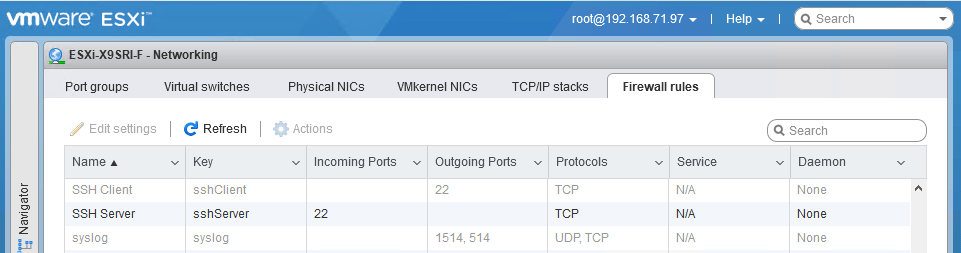
One thing to remember is that you need the current host to allow the SSH client in the firewall, which is disabled by default:

After enabling:

Be really careful with the -3 option to scp; it allows you to transfer from one remote machine to another remote machine, but when using keyboard-interactive, you have a high change to lock-out your accounts: SSH will try to keyboard-interactive to both hosts at the same time.

If you lock-out root, then you have to go through the local DCUI console (use ALT-F2 to go there), then reset the root account failure count using pam_tally2 --user root --reset.

So this can be bad:

scp -3 -rp root@192.168.71.97://vmfs/volumes/EVO860_500GB/VM1/ root@192.168.71.91://vmfs/volumes/EVO860_250GB/VM2/

This works, but assumes the SSH client is enabled from the first host:

scp -rp root@192.168.71.97://vmfs/volumes/EVO860_500GB/VM1/ root@192.168.71.91://vmfs/volumes/EVO860_250GB/VM2/

See these links:


[root@ESXi-X9SRI-F:~] esxcli network firewall get
   Default Action: DROP
   Enabled: true
   Loaded: true
[root@ESXi-X9SRI-F:~] esxcli network firewall ruleset list --ruleset-id sshClient
Name       Enabled
---------  -------
sshClient    false
[root@ESXi-X9SRI-F:~] esxcli network firewall ruleset set --ruleset-id sshClient --enabled true
[root@ESXi-X9SRI-F:~] esxcli network firewall ruleset list --ruleset-id sshClient
Name       Enabled
---------  -------
sshClient     true
[root@ESXi-X9SRI-F:~] esxcli network firewall ruleset set --ruleset-id sshClient --enabled false
[root@ESXi-X9SRI-F:~] esxcli network firewall ruleset list --ruleset-id sshClient
Name       Enabled
---------  -------
sshClient    false

–jeroen

Posted in *nix, *nix-tools, ESXi6, ESXi6.5, ESXi6.7, Power User, ssh/sshd, Virtualization, VMware, VMware ESXi | Leave a Comment »