The Wiert Corner – irregular stream of stuff

Jeroen W. Pluimers on .NET, C#, Delphi, databases, and personal interests

  • My badges

  • Twitter Updates

  • My Flickr Stream

  • Pages

  • All categories

  • Enter your email address to subscribe to this blog and receive notifications of new posts by email.

    Join 1,839 other subscribers

Archive for the ‘*nix’ Category

Remote access to the Embarcadero License Center via SSH tunnel – twm’s blog

Posted by jpluimers on 2020/08/10

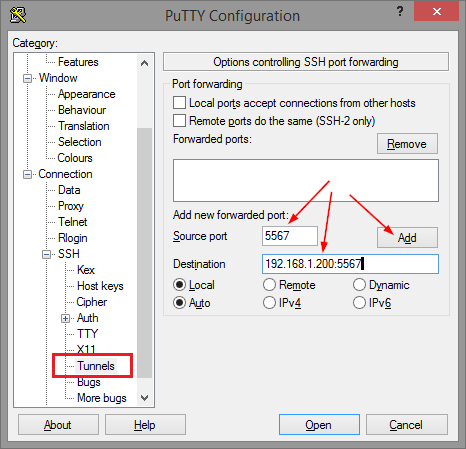
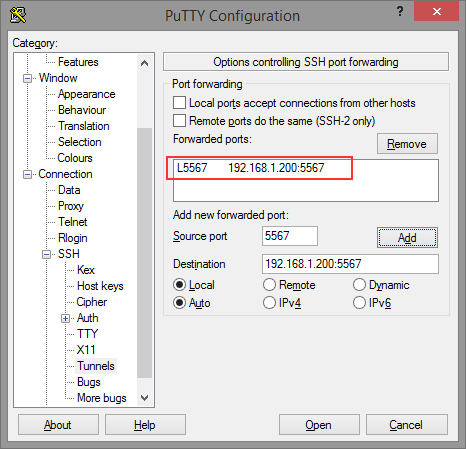
Thomas basically did all the research on the forwarding needed for ELC (formerly Belise/Elise), then showed the PuTTY equivalent to ssh user@remote -L5567:192.168.1.200:5567:

[WayBackRemote access to the Embarcadero License Center via SSH tunnel – twm’s blog

Via: [WayBack] Once you have set up an Embarcadero License Center (ELC) for your company (with network named user or concurrent licenses) you will need network access … – Thomas Mueller (dummzeuch) – Google+

Related: [WayBack] Introducing the Embarcadero License Center – ELC

–jeroen


Posted in *nix, Communications Development, Delphi, Development, Internet protocol suite, Licensing, Power User, Software Development, SSH, ssh/sshd | Leave a Comment »

Great tool: the Toptal Colorblind Web Page Filter

Posted by jpluimers on 2020/08/06

Colorblind Web Page Filter

Colorblind Web Page Filter

A great tool I found out about a while ago [Archive.is] Toptal Color Blind Filter.

It shows the original web page and the rendering for various types of color blindness:

  • protan -> Protanopia: red/green color blindness; anomalous red cones
  • deutan -> Deutanopia: red/green color blindness; anomalous green cones
  • tritan -> Tritanopia: blue/yellow color blindness; anomalous blue cones
  • grey -> Greyscale/achromatopsia: quick check for all forms of colorblindness

Because of a comment at [WayBack] Forums… https://embarcaderomonitoring.wiert.me/ – JWP – Google+, I used Toptal to notify Uptime robot that their status pages are hard for color blind people: [WayBackJeroen Pluimers on Twitter: “Some color blind people indicated to me that @uptimerobot status pages are hard for them to read. Examples are for @EmbarcaderoTech as they have subdomains being offline often: …”, so lets look at how people with various types of color blindness see embarcaderomonitoring.wiert.me :

Read the rest of this entry »

Posted in *nix, Color (science), Color (software development), Development, Monitoring, Power User, science, Software Development, Uptimerobot, Usability, User Experience (ux), Web Development | Leave a Comment »

If your Samba logon script does not get executed – twm’s blog

Posted by jpluimers on 2020/07/31

… even though you can open and read it fine in an editor: You should check its Linux access permissions. If it is not marked as executable, this might be the cause. Change it with chmod like …

Source for my link archive: [WayBackIf your Samba logon script does not get executed – twm’s blog.

Via: [WayBack] … even though you can open and read it fine in an editor: You should check its Linux access permissions. If it is not marked as executable, this might b… – Thomas Mueller (dummzeuch) – Google+

–jeroen

Posted in *nix, *nix-tools, Power User, samba SMB/CIFS/NMB | Leave a Comment »

Duh moment: when 69.162.119.78 is querying your DNS infrastructure and it appears to be uptimerobot

Posted by jpluimers on 2020/07/28

From the hindsight department [WayBack] Nice when someone in Dallas using 69.162.119.78 is querying your DNS infrastructure for many permutations of domains… https://gist.github.com/jpluimer… – Jeroen Wiert Pluimers – Google+.

Wolfgang Rupprecht gave me some hints on the cause, as the IP address 69.162.119.78 Google Search used to be of a gaming server: [WayBack] TwotailsTikat’s Profile – Member List – Minecraft Forum

After a good night sleep,

# nslookup 69.162.119.78
78.119.162.69.in-addr.arpa name = mail.uptimerobot.com

In retrospect: perfectly normal behaviour for monitoring machine “snip”.

Log by https://github.com/gamelinux/passivedns

–jeroen

Read the rest of this entry »

Posted in *nix, DNS, Internet, Monitoring, Power User, Uptimerobot | Leave a Comment »

Chromium/Chrome on opensuse Tumbleweed ARM notes

Posted by jpluimers on 2020/07/27

Somehow Firefox is available on ARM by default, but the crash recovery isn’t that awesome.

On my list of things to try is Chrome or Chromium. These links should help me find out if this is possible at all:

On Firefox crash recovery:

–jeroen

Posted in *nix, Chrome, Google, Linux, openSuSE, Power User, SuSE Linux, Tumbleweed | Leave a Comment »

Verifying large sets of file hashes with md5sum

Posted by jpluimers on 2020/07/24

A few tips:

  1. Recursively getting all md5 sums from a source directory:

    cd /sourceDirectory
    find -type f \( -not -name "md5sum.txt" \) -exec md5sum '{}' \; > md5sum.txt

    .

  2. Checking the sums against a target directory

    cd /targetDirectory
    md5sum -c /sourceDirectory/md5sum.txt

    .

On some systems (this was an ESXi system which can’t run stuff from the console in parallel), you could optimise this using xargs for the generation and GNU parallel for the generation and checking. Both should be very similar:

GNU parallel is written to have the same options as xargs. If you write loops in shell, you will find GNU parallel may be able to replace most of the loops and make them run faster by running several jobs in parallel.

Via:

–jeroen

Posted in *nix, *nix-tools, bash, Power User | Leave a Comment »

Operant Conditioning by Software Bugs – Embedded in Academia

Posted by jpluimers on 2020/07/21

Good to remember both these:

[WayBack] Operant Conditioning by Software Bugs – Embedded in Academia which means when using a system, you subconsciously start behaving around it’s issues. This also happens when you the software you wrote the software for such a system: you hardly test the things that you broke.

The magic SysReq key on Linux systems running on PC-hardware allows you to sync/mount read-only/shutdown a system by keyboard (and many more options – see the Wikipedia list below). Do not forget to enable this as it is disabled by default. And remember that many laptops forego the SysReq key (as do Mac systems).

The order while holding Alt-SysReq down is S,U,B…

Both via [WayBack] Kristian Köhntopp – Google+

–jeroen

Read the rest of this entry »

Posted in *nix, *nix-tools, Development, Keyboards and Keyboard Shortcuts, Power User, Software Development, ThinkPad | Leave a Comment »

🔎Julia Evans🔍 auf Twitter: “an amazing directory: /proc… “

Posted by jpluimers on 2020/07/20

So cool: 🔎Julia Evans🔍 auf Twitter: “an amazing directory: /proc… “:

–jeroen

Posted in *nix, *nix-tools, Power User | Leave a Comment »

Eject USB drives / eject command – Unix & Linux Stack Exchange

Posted by jpluimers on 2020/07/20

I always thought than an umount /dev/sdX# for all partitions on /dev/sdX was enough for USB devices to be ejected, but there are three commands that (on most systems) actually power down USB drives (or USB to SD card adapters):

  • udisks --detach /dev/sdX (requires the udisks package which is obsolete)
  • eject /dev/sdX seems not to be enough on some systems; it is part of the util-linux package
  • udisksctl power-off -b /dev/sdX is equivalent to the udisks command; it is part of the udisks2 package.

These will ensure that the disk is not part of the fdisk --list output any more.

The opposite of these is sg_start, which is from the sg3_utils package.

Source: [WayBack] Eject USB drives / eject command – Unix & Linux Stack Exchange

On MacOS, you can use  diskutil eject /Volumes/<LABEL> (source: answer by efesaid on [WayBack] Eject USB drives / eject command – Unix & Linux Stack Exchange)

–jeroen

Posted in *nix, *nix-tools, Linux, openSuSE, Power User, SuSE Linux, Tumbleweed | Leave a Comment »

linux – ssh_exchange_identification: Connection closed by remote host (not using hosts.deny) – Unix & Linux Stack Exchange

Posted by jpluimers on 2020/07/17

I had this one day connecting to a guest:

debug3: send packet: type 20
debug1: SSH2_MSG_KEXINIT sent
Connection closed by 192.168.71.81 port 22

The cause was indeed a heavily overloaded box that would not respond in time to any actual data sent over network requests, but would accept the initial TCP connection.

Logging on the console also failed, but the memory and CPU usage on the wrapping host was out of the roof.

The only solution was to soft power-cycle the guest.

Very similar to:

You can also have a host who’s memory is so badly fragmented that it can’t allocate a page a contiguous memory to fork the process for hosting an SSH session.

In such a case, you can get either of the messages:

ssh_exchange_identification: read: Connection reset by peer

or:

Connection closed by aaa.bbb.ccc.ddd

depending on how far the host gets before it bails out.

If memory fragmenting is the apparent cause, the solution is to access the server via other means and to restart some of the pertinent services. I have found Apache and MySQL to be the culprit on VM’s since VM’s don’t have a swap partition. Failing that, reboot the host.

Via: [WayBacklinux – ssh_exchange_identification: Connection closed by remote host (not using hosts.deny) – Unix & Linux Stack Exchange

–jeroen

Posted in *nix, *nix-tools, Power User, ssh/sshd | Leave a Comment »