The Wiert Corner – irregular stream of stuff

Jeroen W. Pluimers on .NET, C#, Delphi, databases, and personal interests

  • My badges

  • Twitter Updates

  • My Flickr Stream

  • Pages

  • All categories

  • Enter your email address to subscribe to this blog and receive notifications of new posts by email.

    Join 1,854 other subscribers

Archive for the ‘Power User’ Category

Cryptosense Discovery

Posted by jpluimers on 2022/03/15

This is cool: [Wayback] Cryptosense Discovery:

Free tool that discovers security configuration errors in SSH and TLS servers and explains how to fix them. Supports STARTTLS and can also scan HTTPS, POP3, IMAP and SMTP servers.

It gives you a list of servers a target domain uses (for purposes like web, email, etc) that can have external encryption enabled, then allows you to test these.

The list by default has only servers within that target domain enabled, but you can optionally include other servers (for instance if a domain uses a third party for their SMTP handling).

Basically it is the web-counterpart of a tool like testssl.sh (which I have written about before).

Found while checking out how to test the MX security of a domain using [Wayback] testssl.sh as I forgot the syntax, which in retrospect is dead easy as per [Wayback] tls – How to use testssl.sh on an SMTP server? – Information Security Stack Exchange (thanks [Wayback] Z.T.!):

testssl.sh --mx <domain name>

works fine.

testssl.sh -t smtp <ip>:25

and

testssl.sh -t smtp <ip>:587

also work fine.

Note that not specifying the port assumes port 443, despite specifying protocol smtp. That doesn’t work.

Also, you might try discovery.cryptosense.com which does the same thing only better

That website is made by the cool people at [Wayback] Cryptosense.

Both are a lot easier than the alternatives described in [Wayback] Blog · How to test SMTP servers using the command-line · Halon MTA: using nslookup and dig for determining the affected hosts, using nc or telnet for testing basic connectivity, using [Wayback/Archive.is] openssl s_client to test TLS, and [Wayback/Archive.is] smtpping for measuring throughput.

In addition to the above tools mentioned in the blog, I’ve also used sendEmail (note case sensitivity), ehlo-size, and swaks.

This is what I tested:

–jeroen

Posted in *nix, *nix-tools, Awk, bash, bash, Communications Development, Development, DNS, Encryption, grep, HTTPS/TLS security, Internet, Internet protocol suite, Power User, Scripting, Security, SMTP, Software Development, SSH, ssh/sshd, TCP, testssl.sh, TLS | Leave a Comment »

Boomer screenshots: wondering why Windows still has no keyboard shortcut for saving a screenshot or screen snippet to disk

Posted by jpluimers on 2022/03/14

With the disappearing PrtScn buttons on modern keyboards, boomer screenshots are about the only way to easily persist a screenshot, as these are the only available Windows screenshot shortcuts:

  • PrtScn: copies full screenshot to the clipboard; multiple invocations overwrite the clipboard
  • Windows + PrtScn: saves full screenshot to a file; multiple invocations saves to new files
  • Windows + Shift + S: copies full screen or part of the screen to the clipboard, and allows manual action to start snippet tool to save the clipboard contents; often looses the image when on remote desktop connections or when copying something else to the clipboard; multiple invocations overwrite the clipboard

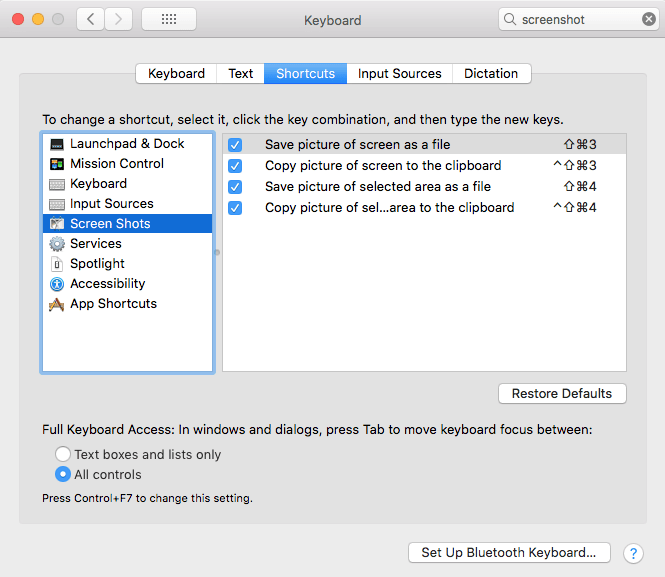
Now look at macOS what a choices, and how less messy than on Windows:

macOS has various shortcuts to save (partial) screenshots to clipboard or file

macOS has various shortcuts to save (partial) screenshots to clipboard or file

For macOS 10.14 Mojave and newer, you can even set the folder (default: Desktop) to save the screenshots to:

I want this ease in Windows as well, and maybe I can in part without installing external tools and modifying existing shortcuts to make things easier:

Written after bumping into [Archive.is] Jeff Atwood on Twitter: “Someone just called a smartphone pic of their monitor a “boomer screenshot” and I literally LOLed 🤣… “

–jeroen

Posted in Apple, LifeHacker, Mac OS X / OS X / MacOS, Power User, PowerToys, Windows, Windows 10 | Leave a Comment »

Doe de couscous geen geweld aan – De keukenwijsheid van Nadia Zerouali: Gebruik wat je voorhanden hebt, maar respecteer het gerecht | De Volkskrant

Posted by jpluimers on 2022/03/14

Over hoe je je couscous gerechten geen geweld aan doet: [Archive.is] De keukenwijsheid van Nadia Zerouali: Gebruik wat je voorhanden hebt, maar respecteer het gerecht | De Volkskrant

Via: [Archive.is] Ionica Smeets on Twitter: “Al die jaren heb ik de couscous zinloos geweld.… “

Al die jaren heb ik de couscous zinloos geweld.

ba dum tss

–jeroen

Read the rest of this entry »

Posted in LifeHacker, Power User | Leave a Comment »

Cleaning the cooling fans of a 15-inch Retina MacBook Pro 2015 model

Posted by jpluimers on 2022/03/14

After years of use, the cooling fans of my 15-inch Retina MacBook Pro 2015 model got quite a bit dirty, causing them to run louder and louder.

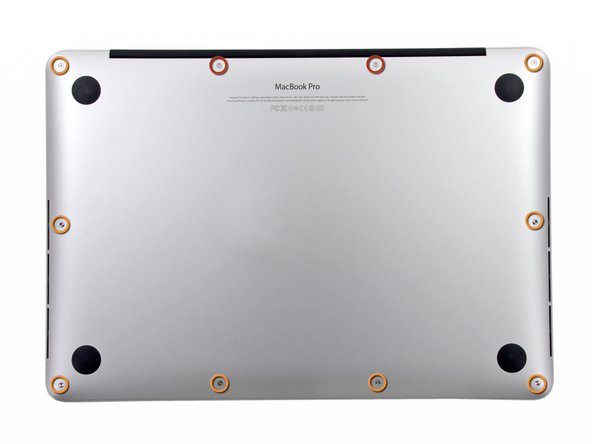
The video below the fold shows how to clean them: 11 screws, some isopropyl alcohol, (dry!) compressed, and caution for the connector-clips connecting the bottom plate.

It helps having a:

  • pentalobe P5 screwdriver
  • plastic spudger so separate the bottom plate (especially be careful with the connector-clips)
  • magnet to stick the screws to, as they are really tiny and it is easy to loose them

I got the pentalobe screwdriver with some spare screws from the German Amazon: [Archive.is] Kricson Ersatzschrauben MacBook Pro – 4 Pack Gummi: Amazon.de: Computer & Zubehör

You can get a similar one from the USA Amazon site: [Archive.is] Amazon.com: 8 Pack Rubber Case Feet + Set of 20pcs Repair Replacement Screw + 1pcs 5 Point Pentalobe Screwdriver for Unibody MacBook Pro Retina A1425 A1502 A1398 13″ 15″ Bottom Case(Retina): Computers & Accessories

Two important tips:

  • After using isopropyl alcohol, let the parts dry
  • Hold the fans when spraying compressed air (to prevent the fan-motors to create over-voltage, and to prevent the fans spinning faster than they are rated for)

The iFixit pictures for replacing the SSD help greatly to see how to remove and re-attach the back-cover, and where the various parts are inside the machines.

Note the screws differ between the 13-inch and 15-inch models!

–jeroen

Read the rest of this entry »

Posted in Apple, Mac, MacBook, MacBook Retina, MacBook-Air, MacBook-Pro, Power User | Leave a Comment »

How to get old versions of macOS – Apple Support

Posted by jpluimers on 2022/03/11

Note just because of a Mac being incompatible, but also because of 32-bit apps being incompatible ruling out Cataline (10.15) or newer.

[Wayback] How to get old versions of macOS – Apple Support

If your Mac isn’t compadmgtible with the latest macOS, you might still be able to upgrade to an earlier macOS, such as macOS Catalina, Mojave, High Sierra, Sierra, or El Capitan.

Download macOS

It takes time to download and install macOS, so make sure that you’re plugged into AC power and have a reliable internet connection.

Safari uses these links to find the old installers in the App Store. After downloading from the App Store, the installer opens automatically.

Safari downloads the following older installers as a disk image named InstallOS.dmg or InstallMacOSX.dmg. Open the disk image, then open the .pkg installer inside the disk image. It installs an app named Install [Version Name]. Open that app from your Applications folder to begin installing the operating system.

links for 10.13 and newer on the Apple site are App-Store only, so you need to download, then save the installer in a safe place.

Alternative download methods and notes on certificate expirations:

–jeroen

Posted in Apple, Mac OS X / OS X / MacOS, macOS 10.12 Sierra, macOS 10.13 High Sierra, OS X 10.10 Yosemite, OS X 10.11 El Capitan, Power User | Leave a Comment »

I could not get this to work: Use a second laptop as an extended monitor with Windows 10 wireless displays – Scott Hanselman’s Blog

Posted by jpluimers on 2022/03/10

I had a vague recollection of this was possible, so I was glad to find it back after having recovered from all cancer treatments at [Wayback] Use a second laptop as an extended monitor with Windows 10 wireless displays – Scott Hanselman’s Blog.

The feature is called “Miracast” and has a built-in Windows 10 implementation for both sending and receiving not just over WiFi, but also over the local fixed ethernet network: [Wayback] Miracast on existing wireless network or LAN – Surface Hub | Microsoft Docs.

With such support, I’d expected an “it works out of the box” experience. It is far from that, so let me show what I bumped into and how I finally did not get it working.

TL;DR

  1. Windows will tell you when it doesn’t work
  2. Windows won’t tell you why it doesn’t work
  3. The tooling to try to find out why it doesn’t work is not sufficient: documentation is scarce and far from complete

When out of luck

I tried two machines with Intel processors having built-in graphics engines.

Thinkpad T510

Read the rest of this entry »

Posted in Power User, T510, ThinkPad, Windows, Windows 10 | Leave a Comment »

How To Fix Missing Hibernation Option On Windows 10

Posted by jpluimers on 2022/03/10

Windows 10 on desktops still defaults to the Sleep option to be available in any Power action while the Hibernation option is unavailable.

This is odd now that most systems have fast and sizable SSD options: from a power loss perspective, Hibernate is much safer than Sleep on desktop machines.

[Wayback] How To Fix Missing Hibernation Option On Windows 10 explains how to restore the Hibernate option.

It is a three step process, partial on the Administrator elevated command-line, part in the UI. I wish all could be done on the commandline

  1. Enable an hibernation file: powercfg.exe /hibernate on
  2. Start the “Power Options” control panel applet: powercfg.cpl
  3. In the UI, under “Choose what the power buttons do”, disable “Sleep” and enable “Hibernate” (you might need to “Change settings that are currently unavailable” first), then press “Save changes”

I have not tried yet, but these Registry Values under [Wayback]HKEY_LOCAL_MACHINE\SOFTWARE\Microsoft\Windows\CurrentVersion\Explorer\FlyoutMenuSettings might just cut it, but I am not sure it is complete:

  • ShowHibernateOption with values 0 and 1
  • ShowSleepOption with values 0 and 1

There is also a value ShowLockOption that defaults to 1.

Two git places where these registry values are mentioned:

–jeroen

Posted in Power User, Windows, Windows 10 | Leave a Comment »

bimmer.work : VIN Decoder for BMW

Posted by jpluimers on 2022/03/09

For my link archive: [Wayback/Archive.is] bimmer.work : VIN Decoder for BMW

–jeroen

Posted in About, cars, E61 530xd touring, LifeHacker, Personal, Power User | Leave a Comment »

Download pfSense Community Edition: pfSense-CE-2.5.1-RELEASE-amd64.iso.gz

Posted by jpluimers on 2022/03/08

Since this is what I use to VPN home:

pfSense is a free and open source firewall and router that also features unified threat management, load balancing, multi WAN, and more

[Wayback] Download pfSense Community Edition: [Wayback] pfSense-CE-2.5.1-RELEASE-amd64.iso.gz

–jeren

Posted in Internet, pfSense, Power User, routers | Leave a Comment »

The Delphi documentation site docwiki.embarcadero.com has been down/up oscillating for 4 days is now down for almost a day.

Posted by jpluimers on 2022/03/08

The [Wayback/Archive] Embarcadero/IDERA Documentation Wiki has been mostly down since March 3rd, 2022 (not the main page, but almost all other pages are).

I modified [Wayback/Archive] Docwiki https – EmbarcaderoMonitoring to show the actual status of a deeper page as the (mostly static) top page is up, so monitoring that is useless as the deeper pages are down.

The deeper pages are dynamic and require a functioning MySQL database connection. That connection is mostly down (the error message is not clear, so this could be a network or a database server problem, or maybe even a loadbalancer gradually entering bit heaven).

Since it had been down for like 6 days in February*, I’d expect Idera to keep an eye on it and prepare for more downtime. Apparently that’s either not a 24×7 thing for them or  they missed the “pre” in preparation as it is dead-silent on .

It also runs on an unsupported version of Mediawiki 1.31** which by itself does not explain the outage, but does indicate that their idea of handling their internal lifetime management is different than what they advocate to clients in their software subscription model, see [Wayback/Archive] Delphi – Embarcadero store, [Wayback/Archive] Update Subscription – Embarcadero and [Wayback/Archive] Special Offers on RAD Studio, Delphi & C++Builder – Embarcadero:

Read the rest of this entry »

Posted in *nix, Bookmarklet, Delphi, Development, JavaScript/ECMAScript, Lightweight markup language, MediaWiki, Monitoring, Power User, Scripting, SocialMedia, Software Development, Twitter, Uptimerobot, Web Browsers | Leave a Comment »