The Wiert Corner – irregular stream of stuff

Jeroen W. Pluimers on .NET, C#, Delphi, databases, and personal interests

  • My badges

  • Twitter Updates

  • My Flickr Stream

  • Pages

  • All categories

  • Enter your email address to subscribe to this blog and receive notifications of new posts by email.

    Join 1,854 other subscribers

Archive for the ‘Power User’ Category

Unicode superscript and subscript alphabetic letters

Posted by jpluimers on 2021/08/04

Not all letters have superscript or subscript counterparts. The counterparts are from different ranges, so might not look nice when next to each other.

I think 20th using Unicode lowercase superscript looks ugly 20ᵗʰ. With uppercase superscript it is somewhat OK: 20ᵀᴴ.

The list is from [WayBack] javascript – How to find the unicode of the subscript alphabet? – Stack Overflow:

Take a look at the wikipedia article Unicode subscripts and superscripts. It looks like these are spread out across different ranges, and not all characters are available.

Consolidated for cut-and-pasting purposes, the Unicode standard defines complete sub- and super-scripts for numbers and common mathematical symbols ( ⁰ ¹ ² ³ ⁴ ⁵ ⁶ ⁷ ⁸ ⁹ ⁺ ⁻ ⁼ ⁽ ⁾ ₀ ₁ ₂ ₃ ₄ ₅ ₆ ₇ ₈ ₉ ₊ ₋ ₌ ₍ ₎ ), a full superscript Latin lowercase alphabet except q ( ᵃ ᵇ ᶜ ᵈ ᵉ ᶠ ᵍ ʰ ⁱ ʲ ᵏ ˡ ᵐ ⁿ ᵒ ᵖ ʳ ˢ ᵗ ᵘ ᵛ ʷ ˣ ʸ ᶻ ), a limited uppercase Latin alphabet ( ᴬ ᴮ ᴰ ᴱ ᴳ ᴴ ᴵ ᴶ ᴷ ᴸ ᴹ ᴺ ᴼ ᴾ ᴿ ᵀ ᵁ ⱽ ᵂ ), a few subscripted lowercase letters ( ₐ ₑ ₕ ᵢ ⱼ ₖ ₗ ₘ ₙ ₒ ₚ ᵣ ₛ ₜ ᵤ ᵥ ₓ ), and some Greek letters ( ᵅ ᵝ ᵞ ᵟ ᵋ ᶿ ᶥ ᶲ ᵠ ᵡ ᵦ ᵧ ᵨ ᵩ ᵪ ). Note that since these glyphs come from different ranges, they may not be of the same size and position, depending on the typeface.

After a nice chat with my nephew EWD, I did some research and found the above via

–jeroen

Posted in Development, Encoding, internatiolanization (i18n) and localization (l10), Power User, Software Development, Unicode | Leave a Comment »

Windows: starting Chrome in full-screen kiosk mode from a batch file

Posted by jpluimers on 2021/08/03

When configuring a web-based kiosk for someone with Alzheimer’s disease, I wanted to start Chrome in full-screen kiosk mode.

Chrome full-screen kiosk mode

The secret for full-screen kiosk mode is to pass the -start-fullscreen command-line option. Thanks [WayBack] User ginomay89 – Super User for answering that in [WayBack] tablet – How to set Google Chrome to automatically open up and in full screen – Super User.

Finding chrome

At first I thought about differentiating on the chrome.exe location that you can find in the registry. This turned out to be depending on how you install Chrome:

  • locally for the current user by a non-local-administrator user (by default the location is under %LocalAppData%)
  • globally for all users by a local-administratator user (by default is under %ProgramFiles(x86)%)

Oddly, there is no way (not even by denying UAC elevation!) for a local administrator to install Chrome for only the current user.

This is odd, as when non-local-administrator denies UAC, the installation is locally to the user.

Then I remembered there are two ways for Windows to find an application

The cool thing is that the start command does the latter, so I came up with this batch file that starts chrome with the -start-fullscreen parameter that will initiate kiosk mode with the default chrome settings:

start "Chrome Kiosk Mode" chrome --start-fullscreen

In case I want to compare the registry settings

Basically sorting out the registry settings would mean parsing the references to chrome.exe (often with extra parameters) in the below registry key/value-name pairs.

One day I might need to do this for different reasons, but currently the start trick suffices.

Read the rest of this entry »

Posted in Batch-Files, Development, Power User, Scripting, Software Development, Windows | Leave a Comment »

Firefox: disable DNS over HTTPS (which they call TTR)

Posted by jpluimers on 2021/08/03

There are many reasons to disable DNS over HTTPS (DoH), of which enough are discussed in the links below.

Disabling DoH always talks about setting TTR (the abbreviation Mozilla uses for it) to 5 (like [WayBack] Thread by @isotopp: “Firefox is about to break DNS by enabling DNS-over-HTTP by default […]”), but hardly ever explains the meaning of 5, or any other potential values.

After some searching, I found [WayBack] Firefox disable trr | Knowledge Base:

  • 0: Off by default
  • 1: Firefox chooses faster
  • 2: TRR default w/DNS fallback
  • 3: TRR only mode
  • 5: Disabled

I imagine the setting we’re all looking for is: user_pref(“network.trr.mode”, 5); (emphasis mine)

It pointed me to [WayBack] Trusted Recursive Resolver – MozillaWiki:

Read the rest of this entry »

Posted in Cloud, Cloudflare, Communications Development, Development, DNS, Firefox, Infrastructure, Internet protocol suite, Power User, TCP, Web Browsers | Leave a Comment »

Factory reset a MikroTik hEX PoE RB960PGS using the reset button

Posted by jpluimers on 2021/08/02

[WayBack] Manual:Reset – MikroTik Wiki:

 unplug the device from power

2) press and hold the button right after applying power

Note: hold the button for 5 seconds (USER LED will start flashing)

3) release the button to clear configuration.

Icon-note.png Note: If you wait until LED stops flashing, and only then release the button – this will instead launch Netinstall mode, to reinstall RouterOS.

Initial configuration

(see also [WayBack] Manual:First time startup – MikroTik Wiki)

  1. Connect your machine to port 1 on the Mikrotik hEX PoE RB960PGS (after the reset, this port will have IPv4 address 192.168.88.2 with netmask 255.255.255.0)
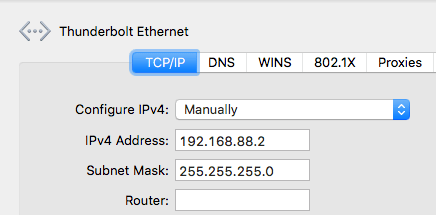
  2. Ensure your local machine to IPv4 address 192.168.88.2 with netmask 255.255.255.0 (otherwise WinBox might not see the router, not even in discovery mode):

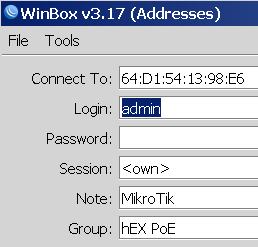
  3. Have WinBox auto discover it:

  4. Connect with user admin and no password:


  5. Configure your Mikrotik hEX PoE RB960PGS as router or switch

For switch, I prefer a setting like this (the bold portions are different from the default configuration):

/interface bridge
add admin-mac=64:D1:54:13:98:E6 auto-mac=no comment=defconf name=bridgeLocal
/interface wireless security-profiles
set [ find default=yes ] supplicant-identity=MikroTik
/ip hotspot profile
set [ find default=yes ] html-directory=flash/hotspot
/interface bridge port
add bridge=bridgeLocal comment=defconf interface=ether1
add bridge=bridgeLocal comment=defconf interface=ether2
add bridge=bridgeLocal comment=defconf interface=ether3
add bridge=bridgeLocal comment=defconf interface=ether4
add bridge=bridgeLocal comment=defconf interface=ether5
add bridge=bridgeLocal comment=defconf interface=sfp1
/ip dhcp-client
add comment=defconf dhcp-options=hostname,clientid disabled=no interface=bridgeLocal
/ip dns static
add address=192.168.88.1 name=router.lan
/system clock
set time-zone-name=Europe/Amsterdam
/system identity
set name="RB960PGS <<location-name>>"
/system ntp client
set enabled=yes server-dns-names=0.pool.ntp.org,1.pool.ntp.org,2.pool.ntp.org,3.pool.ntp.org

–jeroen

Posted in Internet, MikroTik, Power User, routers | Leave a Comment »

Geurthee nr. 5 theebuiltjes – De Pelikaan Zutphen – Koffie/theespecialist sinds 1816

Posted by jpluimers on 2021/08/02

[WayBack] Geurthee nr. 5 theebuiltjes – De Pelikaan Zutphen – Koffie/theespecialist sinds 1816

Een huisgemelangeerde zwarte thee met een gerookt tintje. Perfecte keuze als u van Earl Grey houdt en opzoek bent naar een extra smaaksensatie

Onze Geurthee nr. 5 is een gemelangeerde zwarte thee. Naast dat wij onze Geurthee nr. 2 hiervoor gebruiken, zitten er nog meer theesoorten in verwerkt zoals Lapsang Souchong. Lapsang Souchong is een zwarte theesoort uit China en is erg sterk van smaak. Deze thee wordt in bamboemanden gedroogd boven brandend naald- of cypressenhout. Dit zorgt ervoor dat er zich een sterke rooksmaak ontwikkeld. Ook is de Geurthee nr. 5 sterk gearomatiseerd met Bergamot-olie. Bergamot is een citrusvrucht die wordt gebruikt als smaakmaker in Earl Grey. Door al deze ingrediënten met elkaar te melangeren, ontstaat er een heerlijke Earl Grey met een gerookt tintje

____

Theekopje Pelikaan   ZETADVIES (1 kop): 1 zakje, water opschenken (95°C -100°C), 2-3 minuten laten trekken. Één zakje kan zelfs voor een hele pot gebruikt worden!

____

15 piramide theebuiltjes

Via [WayBack] Frederike op Twitter: “Dan vind jij Geurthee 5 van @pelikaankoffie vast ook lekker.… “

–jeroen

Read the rest of this entry »

Posted in LifeHacker, Power User | Leave a Comment »

Create & use pivot tables – Computer – Docs Editors Help

Posted by jpluimers on 2021/08/02

This was way easier than I thought it would be; it’s just that the meny items are different from Excel: [WayBack] Create & use pivot tables – Computer – Docs Editors Help.

The page has much more, but these are the initial steps:

Add or edit pivot tables

  1. On your computer, open a spreadsheet in Google Sheets.
  2. Select the cells with source data you want to use. Important: Each column needs a header.
  3. In the menu at the top, click Data and then Pivot table. Click the pivot table sheet, if it’s not already open.
  4. In the side panel, next to “Rows” or “Columns,” click Add, then choose a value.
    • Note: Sometimes, you’ll see recommended pivot tables based on the data you choose. To add a pivot table, under “Suggested,” choose a pivot table.
  5. In the side panel, next to “Values,” click Add, then choose the value you want to see over your rows or columns.
  6. You can change how your data is listed, sorted, summarized, or filtered. Next to what you want to change, click the Down Arrow Down Arrow.

–jeroen

Read the rest of this entry »

Posted in Google, GoogleDocs, GoogleSheets, Power User | Leave a Comment »

How to auto start virtual machines in Windows 10 Hyper V – YouTube

Posted by jpluimers on 2021/07/30

One day I will need this: How to auto start virtual machines in Windows 10 Hyper V – YouTube.

Via [WayBack] windows 10 automatically start a vm – Google Search.

Requires Hyper-V to be installed, so these should be useful:

–jeroen

Read the rest of this entry »

Posted in Hyper-V, Power User, Virtualization, Windows, Windows 10 | Leave a Comment »

Some links on getting MacOS network interfaces and DHCP information

Posted by jpluimers on 2021/07/30

One day I’ll put this in a script that shows all DHCP information for all network interfaces.

For now some links I will need when writing that script.

Many of the below commands are also in [WayBack/Archive] Command-Line Tools: The Missing Manpages (Mac OS X for Unix Geeks).

Read the rest of this entry »

Posted in Apple, Mac OS X / OS X / MacOS, macOS 10.13 High Sierra, Power User | Leave a Comment »

Is warshipping still a thing?

Posted by jpluimers on 2021/07/30

Reminder to self to see if warshipping is still a thing, and in which regions.

Related:

Via:

–jeroen

Read the rest of this entry »

Posted in Power User, Security | Leave a Comment »

Listing information on all active interfaces on MacOS part 1: getting the active interface names

Posted by jpluimers on 2021/07/29

Listing Listing information on all active interfaces on MacOS is a process involving multiple pieces, which then can be combined together.

Listing all active interfaces try 1

This involves both the -l (list with optional criteria) and -u parameter (the up criterion) as per excerpts from the [Archive.is] ifconfig(8) [osx man page] / [WayBack] ifconfig Man Page – macOS – SS64.com:

NAME
     ifconfig -- configure network interface parameters

SYNOPSIS
     ...
     ifconfig -l [-d] [-u] [address_family]
     ...

DESCRIPTION
     The ifconfig utility is used to assign an address to a network interface and/or configure network interface parameters.

     The following options are available:

     ...

     address_family
             Specify the address family which affects interpretation of the remaining parameters.  Since an interface can receive transmissions
             in differing protocols with different naming schemes, specifying the address family is recommended.  The address or protocol fami-
             lies currently supported are ``inet'', ``inet6'', and ``link''.  The default is ``inet''.  ``ether'' and ``lladdr'' are synonyms
             for ``link''.

     ...

     The -l flag may be used to list all available interfaces on the system, with no other additional information.  Use of this flag is mutually
     exclusive with all other flags and commands, except for -d (only list interfaces that are down) and -u (only list interfaces that are up).

Example:

ifconfig -l -u

Each interface on one line:

ifconfig -l -u | xargs -n1 echo

The problem is that on my system, it also lists bridges as active, whereas they are not:

# ifconfig -l -u | xargs -n1 echo
lo0
en1
en2
en0
p2p0
awdl0
bridge0
utun0
en10

# ifconfig bridge0
bridge0: flags=8863<UP,BROADCAST,SMART,RUNNING,SIMPLEX,MULTICAST> mtu 1500
    options=63<RXCSUM,TXCSUM,TSO4,TSO6>
    ether 6a:00:02:9a:23:f0 
    Configuration:
        id 0:0:0:0:0:0 priority 0 hellotime 0 fwddelay 0
        maxage 0 holdcnt 0 proto stp maxaddr 100 timeout 1200
        root id 0:0:0:0:0:0 priority 0 ifcost 0 port 0
        ipfilter disabled flags 0x2
    member: en1 flags=3<LEARNING,DISCOVER>
            ifmaxaddr 0 port 5 priority 0 path cost 0
    member: en2 flags=3<LEARNING,DISCOVER>
            ifmaxaddr 0 port 6 priority 0 path cost 0
    Address cache:
    nd6 options=201<PERFORMNUD,DAD>
    media: 
    status: inactive

So this is where the MacOS and BSD documentation is inaccurate.

Interface types

The above interfaces are many more than just ethernet or WiFi interfaces; there is a list at [WayBack] macos – What are en0, en1, p2p, and so on, that are displayed after executing ifconfig? – Stack Overflow by [WayBackmcint:

In arbitrary order of my familarity / widespread relevance:

lo0 is loopback.

en0 at one point “ethernet”, now is WiFi (and I have no idea what extra en1 or en2 are used for).

fw0 is the FireWire network interface.

stf0 is an IPv6 to IPv4 tunnel interface to support the transition from IPv4 to the IPv6 standard.

gif0 is a more generic tunneling interface [46]-to-[46].

awdl0 is Apple Wireless Direct Link

p2p0 is related to AWDL features. Either as an old version, or virtual interface with different semantics than awdl.

many VPNs will add additional devices, often “utun#” or “utap#” following TUN/TAP (L3/L2)virtual networking devices.

More on AWDL at [WayBack] ios – What is AWDL (Apple Wireless Direct Link) and how does it work? – Stack Overflow.

Listing all active interfaces try 2

Read the rest of this entry »

Posted in *nix, *nix-tools, Apple, bash, Development, ifconfig, Mac OS X / OS X / MacOS, Power User, Scripting, Software Development | Leave a Comment »