Archive for the ‘Power User’ Category
Posted by jpluimers on 2020/07/27
 Somehow Firefox is available on ARM by default, but the crash recovery isn’t that awesome.
On my list of things to try is Chrome or Chromium. These links should help me find out if this is possible at all:
On Firefox crash recovery:
–jeroen
Posted in *nix, Chrome, Google, Linux, openSuSE, Power User, SuSE Linux, Tumbleweed | Leave a Comment »
Posted by jpluimers on 2020/07/27
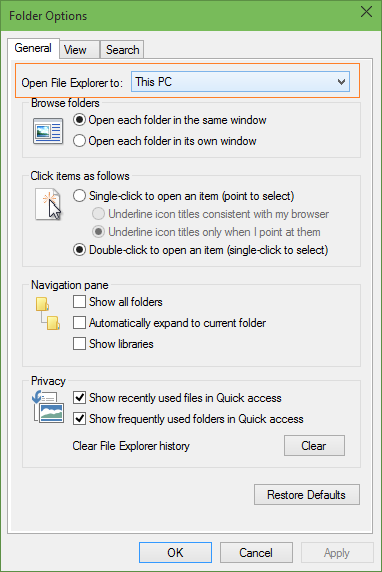 When I first bumped into this around 2017, I found via [WayBack] How to Make File Explorer Open This PC By Default In Windows 10 that it was just a new “Folder Options” choice that by default pointed to “Quick Access” (Dutch “Snelle Toegang”) instead of prior Windows versions opening at “This PC” (Dutch “Deze PC”).
Only recently, I found out that Scott Hanselman already tweeted about this in August 2015:
[WayBack] Scott Hanselman on Twitter: “Windows 10 Tip: You can control where Windows Explorer opens (This PC vs Quick Access). Click View | Options http://t.co/mNi6K6tVIP”

–jeroen
Posted in Power User, Windows, Windows 10 | Leave a Comment »
Posted by jpluimers on 2020/07/24
A few tips:
- Recursively getting all md5 sums from a source directory:
cd /sourceDirectory

find -type f \( -not -name "md5sum.txt" \) -exec md5sum '{}' \; > md5sum.txt
.
- Checking the sums against a target directory
cd /targetDirectory

md5sum -c /sourceDirectory/md5sum.txt
.
On some systems (this was an ESXi system which can’t run stuff from the console in parallel), you could optimise this using xargs for the generation and GNU parallel for the generation and checking. Both should be very similar:
GNU parallel is written to have the same options as xargs. If you write loops in shell, you will find GNU parallel may be able to replace most of the loops and make them run faster by running several jobs in parallel.
Via:
–jeroen
Posted in *nix, *nix-tools, bash, Power User | Leave a Comment »
Posted by jpluimers on 2020/07/24
20+ years old and still relevant: [WayBack] Science Fiction Writer Robert J. Sawyer: WordStar: A Writer’s Word Processor.
Besides doing a very quick and thorough introduction in the what and how of the WordStar keyboard shortcuts, he also explains a lot about the why.
Recommended reading, especially because of a user-experience perspective.
Markdown, Atom and Visual Studio code are not that different from WordStar.
Via:
–jeroen
Read the rest of this entry »
Posted in Development, History, Power User, Software Development | 2 Comments »
Posted by jpluimers on 2020/07/21
Good to remember both these:
[WayBack] Operant Conditioning by Software Bugs – Embedded in Academia which means when using a system, you subconsciously start behaving around it’s issues. This also happens when you the software you wrote the software for such a system: you hardly test the things that you broke.
The magic SysReq key on Linux systems running on PC-hardware allows you to sync/mount read-only/shutdown a system by keyboard (and many more options – see the Wikipedia list below). Do not forget to enable this as it is disabled by default. And remember that many laptops forego the SysReq key (as do Mac systems).
The order while holding Alt-SysReq down is S,U,B…
Both via [WayBack] Kristian Köhntopp – Google+
–jeroen
Read the rest of this entry »
Posted in *nix, *nix-tools, Development, Keyboards and Keyboard Shortcuts, Power User, Software Development, ThinkPad | Leave a Comment »
Posted by jpluimers on 2020/07/20
So I wondered why on some tabs, the bookmark bar would never disappear:
Chrome’s default new tab page (NTP) always shows a bookmark bar, even if you turn it off for other pages. You can however install browser extensions which replace the NTP, and the replacements do not automatically get the bookmarks bar (but can with some extra programming).
So for instance Google’s Earth View extension does not show bookmarks, whereas Pinterest’s now does.
Thanks deltab for answering this at [WayBack] google chrome – How to hide the bookmark bar? – Super User
–jeroen
Posted in Chrome, Google, Power User | Leave a Comment »
Posted by jpluimers on 2020/07/20
I always thought than an umount /dev/sdX# for all partitions on /dev/sdX was enough for USB devices to be ejected, but there are three commands that (on most systems) actually power down USB drives (or USB to SD card adapters):
udisks --detach /dev/sdX (requires the udisks package which is obsolete)eject /dev/sdX seems not to be enough on some systems; it is part of the util-linux packageudisksctl power-off -b /dev/sdX is equivalent to the udisks command; it is part of the udisks2 package.
These will ensure that the disk is not part of the fdisk --list output any more.
The opposite of these is sg_start, which is from the sg3_utils package.
Source: [WayBack] Eject USB drives / eject command – Unix & Linux Stack Exchange
On MacOS, you can use diskutil eject /Volumes/<LABEL> (source: answer by efesaid on [WayBack] Eject USB drives / eject command – Unix & Linux Stack Exchange)
–jeroen
Posted in *nix, *nix-tools, Linux, openSuSE, Power User, SuSE Linux, Tumbleweed | Leave a Comment »


 The Wiert Corner - irregular stream of stuff