Archive for the ‘Power User’ Category
Posted by jpluimers on 2018/09/28
ZNC, an advanced IRC bouncer that is left connected so an IRC client can disconnect/reconnect without losing the chat session. Feel free to update pages which you think are improvable and don’t hesitate to ask for help.
You can find us in #znc on freenode.
Source: [WayBack] ZNC
Background:
–jeroen
Posted in Chat, IRC, Power User, SocialMedia | Leave a Comment »
Posted by jpluimers on 2018/09/28
A while ago, I documented some links for In case I ever need to record calls on my Fritz!Box devices.
By now, I’ve done a bit more investigation: I’ve enabled the call monitor, did some port scans, installed domoticz and got deeper into fritzcap.
Oh and I got packet capturing to work too: Fritz!Box – capture network packets in Wireshark format or ISDN in dtrace format.
A small recap so I don’t forget what I did and what the effects were.
Enabling CallMonitor
[WayBack] Fritzbox – Domoticz showed how to enable the CallMonitor option in your Fritz!Box
- Dial
#96*5* to enable (response “CallMonitor On”)
- Dial
#96*4* to disable (response “CallMonitor Off”)
- It seems not possible to ask for the current state (enabled/disabled)
- After it is enabled, the TCP port 1012 on your Fritz!Box is available for tools like [WayBack] Domoticz and
fritzcap.
Read the rest of this entry »
Posted in *nix, Fritz!, Fritz!Box, Internet, Linux, openSuSE, Power User, SuSE Linux | Leave a Comment »
Posted by jpluimers on 2018/09/27
Right now my sendmail configuration handling my domains have one queue directory /var/spool/mqueue which means that each round of the queue processing handles all the outgoing mail in succession.
This is getting less OK because of the increased mail volume over time both on mail that gets in and needs to be forwarded and mail that needs to be bounced for various reasons like SPAM.
So below are some links helping me to sort out various things including having multiple queues (as then each round can handle each queue in parallel).
The default sendmail configuration is one mail queue and I hope to find out for what reason that is.
Background info:
Read the rest of this entry »
Posted in *nix, *nix-tools, Development, Power User, Scripting, sendmail, Software Development | Leave a Comment »
Posted by jpluimers on 2018/09/25
Bumped into a place where the only external monitor was a [WayBack] Samsung C27F390FHU Zwart – Kenmerken – Tweakers
Dislike because:
- only 1920×1080 at 27 inch
- only HDMI and analog inputs
- cannot adjust height, so as a dual screen with a 15 inch MacBook it is meh
- the curve distorts horizontal lines in a way your eyes will not compensate for
Images from [WayBack] Samsung C27F390 27-Inch Curved LED Monitor – HDMI, VGA: Amazon.co.uk: Computers & Accessories below the fold.
Higher resolutions – not just 4K – have been readily available since before this monitor was introduced march 2016 [WayBack] Samsung unveils new CF591 and CF390 curved monitors
Related:
–jeroen
Read the rest of this entry »
Posted in 4K Monitor, Hardware, Power User | Leave a Comment »
Posted by jpluimers on 2018/09/25
A friend of mine tried to get screen mirror (now called “Smart View”) from a Samsung S7 Edge to a Chromecast 2 working, but the connection would time out each try (but not when casting regular content using the Google Home app): try rebooting your S7 Edge.
Got that reboot tip and renamed functionality thanks to the somewhat related [WayBack] Galaxy S7: How to Screen Mirror to any Samsung Smart TV:
In order to connect (screen mirror) you Galaxy S7 or S7 Edge to your Samsung smart TV you need to swipe down to open your notification area, then on the top right click that little down arrow then select “smart view”. Previous Galaxy phones called it screen mirror, not sure why Samsung changed the name in the S7.
Got the renamed functionality via the video below.
–jeroen
Read the rest of this entry »
Posted in Chromecast, Google, Power User | Leave a Comment »
Posted by jpluimers on 2018/09/25
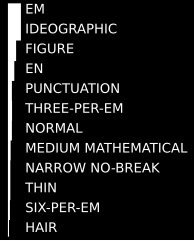 For my link archive:
Via: [WyBack] Are there blank characters in unicode that have the same widths as period, comma and digits? – Lars Fosdal – Google+
Answer: no, though better fonts have period, comma, colon, semicolon and other punctuations the same width as the punctuation space.
The use-case:
I wanted right justified text without having to do custom positioning/drawing – where the decimal zero is white space.
F.x. here 12 instead of 12.0
9.5
11.6
12 <– #$2008 and #$2007
13.4
I.e. PunctuationSpace and FigureSpace
I don’t want to deal with positioning/rendering since it happens inside a third party component.
–jeroen
Posted in Development, Encoding, Font, Power User, Software Development, Unicode | Leave a Comment »
Posted by jpluimers on 2018/09/24
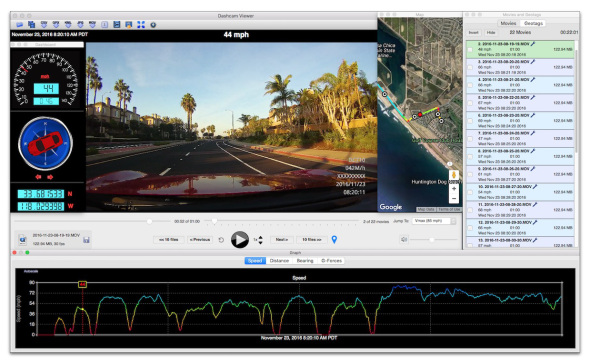
Cool piece of software that allows you to view front and rear cameras in one view: [WayBack] Dashcam Viewer – By Earthshine Software:
| Picture-in-picture front and rear camera displays for 2-channel dashcams |
✔ |
✔ |
| Swappable front and rear camera views for 2-channel dashcams |
✔ |
✔ |
The free version is limited to play 5 files in succession (which is about 15 minutes).
–jeroen
Posted in LifeHacker, Power User | Leave a Comment »
Posted by jpluimers on 2018/09/24
You can capture network packets on a Fritz!Box for any interface by:
- appending `/html/capture.html` to the IP address of your Fritz!Box
- providing your credentials
- for ISDN traces optionally entering any
dtrace parameters in the edit box
- pressing the Start button for the port you want to capture
- pressing the Stop button when you are finished capturing
Example URL: 192.168.178.1/html/capture.html
Note it’s ISDN [WayBack] Dtrace – Fritz!Box, not nx kernel [WayBack] DTrace – Wikipedia
I’ve seen this on these devices:
- Fritz!Box 7360 running FRITZ!OS 06.30
- Fritz!Box 7490 running FRITZ!OS: 06.83
Note there are tons of tools allowing to capture from various scripting languages:
–jeroen
Read the rest of this entry »
Posted in Fritz!, Fritz!Box, Internet, Power User | Leave a Comment »
Posted by jpluimers on 2018/09/22
I was shocked reading [WayBack] An alternative to Session Buddy: “Tabs Backup & Restore” · Issue #742 · deanoemcke/thegreatsuspender · GitHub: the save frequency is about 1 per browser restart. Which is quite odd when you use it to protect against tabs messing up (it happens, right when you do not expect it, after which a “Restore” by chrome fails too).
So after years of using
[Archive.is] Session Buddy – Chrome Web Store: Manage Browser Tabs and Bookmarks with Ease
I have switched away to
[WayBack] Tabs Backup & Restore – Chrome Web Store: With ‘Tabs Backup & Restore’ you will never lose your work again! Backup an entire Chrome session (windows and tabs).
–jeroen
Posted in Chrome, Google, Power User | Leave a Comment »



 The Wiert Corner - irregular stream of stuff