The Wiert Corner – irregular stream of stuff

Jeroen W. Pluimers on .NET, C#, Delphi, databases, and personal interests

  • My badges

  • Twitter Updates

  • My Flickr Stream

  • Pages

  • All categories

  • Enter your email address to subscribe to this blog and receive notifications of new posts by email.

    Join 1,839 other subscribers

Archive for the ‘Power User’ Category

Not cool: openSuse Tumbleweed switched DHCP clientID algorithm on Raspberry Pi 3, so now all devices get a non-static DHCP address

Posted by jpluimers on 2018/09/15

Not sure in which changeset this happened, but here is one example:

  1. old DHCP client ID 1:b8:27:eb:1a:b1:ec
  2. new DHCP client ID ff:eb:78:a9:4:0:1:0:1:22:6:67:49:b8:27:eb:78:a9:4

The first one was marked static in the DHCP server, which means the Raspberry Pi now did get a different IP address.

This messes up a few places that cannot do proper address resolution.

Anyone who knows where this has changed / is configured?

These did not help finding the cause:

Edit

As commented by Leen below, this is about

Wicked changed its defaults to use this DHCPv6 compatible RFC4361 client-id in favour of the older RFC2132 client-id. However, this has caused some issues with older DHCPv4 servers and existing setups where the client-id stored by the server is used to assign a (static) address. It is recommended to fix this server-side, but still, wicked provides several ways of addressing this issue

So here are some links:

–jeroen

Posted in *nix, Hardware Development, Linux, openSuSE, Power User, Raspberry Pi, SuSE Linux, Tumbleweed | 6 Comments »

Google Chrome Web Browser 69 changes

Posted by jpluimers on 2018/09/15

[WayBack] Google Chrome Web Browser 69 changes: most are not talked about (like excess whitespace, address bar search algorithm changes).

–jeroen

Posted in Chrome, Chrome, Google, Power User, Web Browsers | Leave a Comment »

Just in case you are wondering where these “Trending on Google” posts in your stream come from…

Posted by jpluimers on 2018/09/14

[WayBack] Just in case you are wondering where these “Trending on Google” posts in your home stream come from and how to get rid of them: https://plus.google.com/settings… – Thomas Mueller (dummzeuch) – Google+

For my link archive:

https://plus.google.com/settings

–jeroen

Posted in G+: GooglePlus, Google, Power User | Leave a Comment »

XS4ALL Software download site

Posted by jpluimers on 2018/09/14

When you want to download actual known amounts of bytes, then use the [Archive.isXS4ALL Software download site which has plenty of files in both sizes that are powers of 1024 and powers of 1000, so you can use the units that fits you best:

I usually run commands like these:

traceroute download.xs4all.nl & wget -O /dev/null http://download.xs4all.nl/test/2GiB.bin

traceroute download.xs4all.nl & wget -O /dev/null http://download.xs4all.nl/test/10GiB.bin

The first is for speeds up to ~100 megabit/second, the latter for speeds up to ~1 gigabits/second; wget examples based on [WayBacklinux – How do I request a file but not save it with Wget? – Stack Overflow.

From the xs4all shell servers, you have about 1 gigabit speed. At home it is about 80 gigabit.

Since the download is over a longer period of time, you get a better estimate of average speeds than regular speedtest varieties do.

[ ]100MB.bin               2014-05-28 22:18   95M  
[ ]100MiB.bin              2014-05-28 22:18  100M  
[ ]100mb.bin               2014-05-28 22:18   95M  
[ ]10GB.bin                2014-05-28 22:20  9.3G  
[ ]10GiB.bin               2014-05-28 22:20   10G  
[ ]10MB.bin                2014-05-28 22:19  9.5M  
[ ]10MiB.bin               2014-05-28 22:19   10M  
[ ]10gb.bin                2014-05-28 22:20  9.3G  
[ ]10mb.bin                2014-05-28 22:19  9.5M  
[ ]1GB.bin                 2014-05-28 22:20  954M  
[ ]1GiB.bin                2014-05-28 22:20  1.0G  
[ ]1MB.bin                 2014-05-28 22:19  1.0M  
[ ]1MiB.bin                2014-05-28 22:19  1.0M  
[ ]1gb.bin                 2014-05-28 22:20  954M  
[ ]1mb.bin                 2014-05-28 22:19  1.0M  
[ ]200MB.bin               2016-08-03 13:35  191M  
[ ]200MiB.bin              2016-08-03 13:35  200M  
[ ]2GB.bin                 2014-05-28 22:21  1.9G  
[ ]2GiB.bin                2014-05-28 22:21  2.0G  
[ ]2gb.bin                 2014-05-28 22:21  1.9G  
[ ]500MB.bin               2016-08-03 13:36  477M  
[ ]500MiB.bin              2016-08-03 13:35  500M

–jeroen

Posted in Internet, ISP, LifeHacker, Power User, SpeedTest, xs4all | Leave a Comment »

Privacy Badger was blocking fsdn.com CDN domains

Posted by jpluimers on 2018/09/14

Not sure why Privacy Badger blocked both fsdn.com and a.fsdn.com (if someone knows how to find that out: please let me know), but these are CDN domains are used by Slashdot and sf.net, so I have put a.fsdn.com from red to yellow (no cookies).

I have not unblocked s.fsdn.com, which redirects to sourceforge.net over TLS.

Related:

–jeroen

Read the rest of this entry »

Posted in Internet, Power User, Security | Leave a Comment »

Short link to find your Google nickname based profile link

Posted by jpluimers on 2018/09/14

Browse to http://plus.google.com/me and it will get you to your Google Plus nickname URL profile link.

–jeroen

Posted in G+: GooglePlus, Google, Power User, SocialMedia | Leave a Comment »

When Google Search returns one link twice in the results, thinking it was published on two different dates.

Posted by jpluimers on 2018/09/13

I laughed when https://www.google.com/#q=visual%20studio%20code%20indent%20settings%20per%20file%20type got me the first link twice (see below screenshot).

But I was glad that that link to [WayBack] visual studio code – How to set per-filetype tab size? – Stack Overflow.

This one:

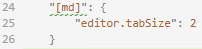
In addition, it taught me how to configure the settings.json with md specific settings, which – despite the IDE indicating the JSON is invalid – just works: markdown indentation is now 2 character positions.

    "[md]": {
      "editor.tabSize": 2
    }

The search result:

Read the rest of this entry »

Posted in .NET, Chrome, Development, Google, GoogleSearch, Power User, Software Development, Visual Studio and tools, vscode Visual Studio Code | Leave a Comment »

Office 365 #fail: … every now and then – without any UI showing high CPU usage …

Posted by jpluimers on 2018/09/11

After each reboot on the admin console after every logon and after every RDP connection:

net stop ClickToRunSvc

Via [WayBack] Office 365 #fail: Not sure yet, but every now and then – without any UI showing – C:\Program Files\Common Files\Microsoft Shared\ClickToRun\OfficeClickT… – Jeroen Wiert Pluimers – Google+

Office 365 #fail: Not sure yet, but every now and then – without any UI showing – C:\Program Files\Common Files\Microsoft Shared\ClickToRun\OfficeClickToRun.exe is using truckloads of CPU while executing an invisible OneDriveSetup.exe both totaling 100% of the full CPU for tens of minutes.

Since it needs to run after each RDP connection, Windows: running a batch file during logon of a single or all users is not enough.

I will need to dig into [WayBack] remote desktop – Run application or script on Windows RDC connection – Super User and [WayBack] SessionChangeDescription Struct (System.ServiceProcess) | Microsoft Docs

–jeroen

Posted in Office, Office 2016, Power User | Leave a Comment »

Spelling with element symbols from the Periodic table

Posted by jpluimers on 2018/09/11

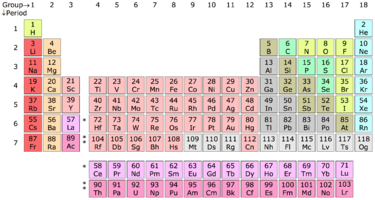
The [WayBackPeriodic table – Wikipedia contains many symbols.

Combing them allows you to spell word. Not all words, but many of them can be spelled.

So I was glad finding the below article that started with the same fascination I had in chemistry class.

[WayBackSpelling with Elemental Symbols

It has a great explanation of the algorithm, references to computer science literature and a nice Python implementation.

via: [WayBack] One of the best programming articles I’ve read in a while – This is why I Code – Google+

–jeroen

Read the rest of this entry »

Posted in Algorithms, Development, Fun, LifeHacker, Power User, Python, science, Scripting, Software Development | Leave a Comment »

DFRobot 7″ HDMI Display with Touchscreen Sells for $69 – for use with Raspberry Pi or Adruino

Posted by jpluimers on 2018/09/10

There are plenty of HDMI displays, but if you want a smaller size it become more complicated although some 7″ HDMI displays are available. However, if you

Source: [Archive.isDFRobot 7″ HDMI Display with Touchscreen Sells for $69

Via: [Archive.is] 7″ HDMI touchscreen display with mounting holes for +Raspberry Pi board. – Jean-Luc Aufranc – Google+

–jeroen

Posted in Development, Hardware Development, Power User, Raspberry Pi | Leave a Comment »