The Wiert Corner – irregular stream of stuff

Jeroen W. Pluimers on .NET, C#, Delphi, databases, and personal interests

  • My badges

  • Twitter Updates

  • My Flickr Stream

  • Pages

  • All categories

  • Enter your email address to subscribe to this blog and receive notifications of new posts by email.

    Join 1,839 other subscribers

Archive for the ‘Power User’ Category

Ian’s Shoelace Site – Shoelace Knots – How To Tie Your Shoes

Posted by jpluimers on 2018/07/13

I never knew there were so many ways of lacing your shoes: [WayBackIan’s Shoelace Site – Shoelace Knots – How To Tie Your Shoes

Finally research has shown how they can get loose soo fast: [WayBackScientists unravel mystery of the loose shoelace | Science | The Guardian

via: [WayBack] Unravelling [yes, pun intended] the mysteries of the unknotting shoelace. – Lars Fosdal – Google+

–jeroen


Interesting app (knots 3d) and comments at https://plus.google.com/+JeroenPluimers/posts/Nv7teC8CUqY

Posted in LifeHacker, Power User | Leave a Comment »

How I made my own VPN server in 15 minutes | TechCrunch

Posted by jpluimers on 2018/07/13

People are (rightfully) freaking out about their privacy as the Senate voted to let internet providers share your private data with advertisers. While it’s important to protect your privacy,…

Interesting: easy setup allows for creating disposable VPN servers.

–jeroen

Posted in *nix, IPSec, Network-and-equipment, Power User, VPN | Leave a Comment »

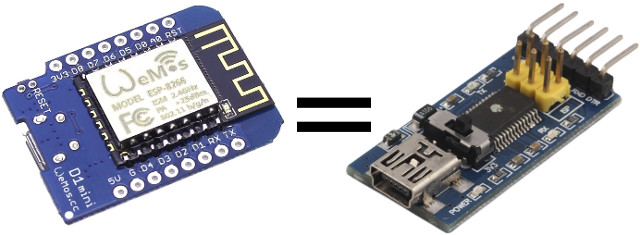
Transform Your ESP8266 Board into a USB to Serial Board Easily with Arduino Serial Bypass Sketch

Posted by jpluimers on 2018/07/11

An interesting re-use: [WayBackTransform Your ESP8266 Board into a USB to Serial Board Easily with Arduino Serial Bypass Sketch

Via: [WayBack] If you don’t have a USB to TTL board around, you can use an +ESP8266 board instead (or any other Arduino compatible boards with USB). – Jean-Luc Aufranc – Google+

–jeroen

Posted in Development, ESP8266, Hardware Development, IoT Internet of Things, Network-and-equipment, Power User | Leave a Comment »

IoT & Smart Location of Things – Google Maps, Google Cloud

Posted by jpluimers on 2018/07/10

#IoT + Google Maps Geocoding API

Convert between addresses & geographic coordinates to determine the location of devices relative to known addresses https://goo.gl/BfwYTF

Edit 202400819: the Googl link above will die, and the link it pointed to (enterprise.google.com/maps/iot) back then pointed to [Wayback/Archive] IoT & Smart Location of Things – Google Maps, Google Cloud.

Source: [WayBackIoT & Smart Location of Things – Google Maps, Google Cloud

Via: [WayBack] Google Maps API – Google+

--jeroen

Posted in Development, IoT Internet of Things, LoRa - Long Range wireless communications network, Network-and-equipment, Power User, Software Development | Leave a Comment »

Skype consumer IP ranges

Posted by jpluimers on 2018/07/09

Since I will likely have to enable Skype in a relatively restricted environment, here are some links that likely will help me getting IP lists to open up:

–jeroen

Posted in Internet, Power User, routers, Skype | Leave a Comment »

btrfs free space. It’s complicated. Still.

Posted by jpluimers on 2018/07/09

Everytime a btrfs based volume runs out of space, I’m reminded of these:

There are a few scripts that help you assess quota usage. If you think they are wrong, then you need to btrfs quota rescan / which tells you that it started, but won’t tell when it’s finished (nor wil journalctl -xe a.k.a. journalctl --catalog --pager-end), but dmesg does:

# dmesg | grep qgroup
[ 316.608122] BTRFS info (device sda2): qgroup scan completed (inconsistency flag cleared)

For now I’ve this quick script to start investigation:

~/Versioned/btrfs-du/btrfs-du && df -h | grep "\/$\|^[^\/]" && btrfs quota rescan -s /

It assumes there is quota on the root (enable with btrfs quota enable /) and is based on my fork github.com/jpluimers/btrfs-du. The df will limit itself to the root (trailing / matched by \/$) or disks not mounted from / (matched by ^[^\/]).

–jeroen

References (not solutions):

Read the rest of this entry »

Posted in *nix, btrfs, File-Systems, Linux, openSuSE, Power User, SuSE Linux | Leave a Comment »

Mac: when “Save time with right-click sharing from your Google Drive folder” fails…

Posted by jpluimers on 2018/07/09

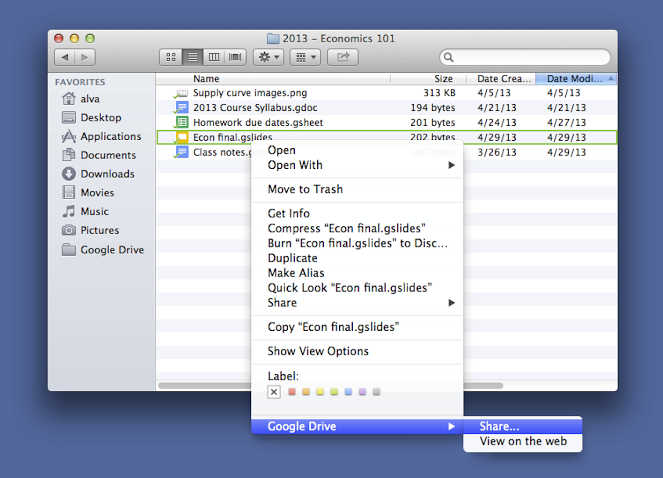
A few years ago, Google Drive introduced this:

For those looking to share files more quickly, listen up. You can now share with others directly from the Google Drive folder on your Mac or PC. To share a file while inside your Google Drive folder, simply right click the file, select “Google Drive” and then click “Share.” This new feature is rolling out over the next few days.

Source: [WayBackSave time with right-click sharing from your Google Drive folder…

However, sometimes it fails. And the menu has changed as well.

By now the menu looks like this:

  • “View with Google Drive”
  • “Share using Google Drive”

If those do not appear, then:

Try to stop, then start Google Drive.

If that fails:

Read the rest of this entry »

Posted in Google, GoogleDrive, LifeHacker, Power User | Leave a Comment »

Tail it: 4 new affordable GPS trackers with global range by Morten Sæthre — Kickstarter

Posted by jpluimers on 2018/07/08

A few more days: [Archive.is] Tail it GPS

Via:

–jeroen

Posted in LifeHacker, Power User | Leave a Comment »

Online markup conversion from markdown to mediawiki: pandoc

Posted by jpluimers on 2018/07/06

Since Mediawiki needs an extension to display Markdown, and many MediaWiki installations do not have that extension, I was looking for an online conversion from markdown to MediaWiki markup.

Luckily the Pandoc try has this conversion: [WayBack] Try pandoc! Markdown(pandoc) -> MediaWiki

These links helped me get there:

–jeroen

Posted in *nix, *nix-tools, Development, Lightweight markup language, MarkDown, MediaWiki, pandoc document converter, Power User, Software Development | Leave a Comment »

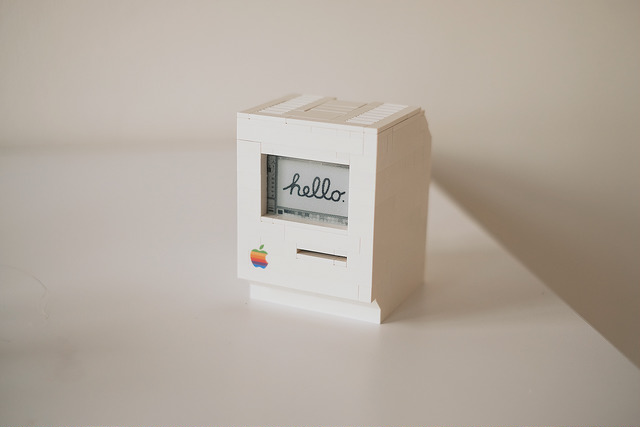
LEGO Macintosh classic with Wi-Fi and e‑paper display running docker

Posted by jpluimers on 2018/07/06

A Wi-Fi enabled 1990 Macintosh Classic built with LEGO, powered by a Raspberry Pi Zero running docker and a 2.7″ e-paper display by EmbeddedArtists.

Cool stuff!

Source: [Archive.isLEGO Macintosh classic with Wi-Fi and e‑paper display running docker

Via: [WayBack] This guy built a (kind of) working Lego Macintosh, and now you can too … | 9to5Mac

This should run well with a Classic Color Macintosh System 7 emulated on Raspberry Pi: [WayBack] On this tutorial I show you how to run Mac II OS color on your Raspberry PI, I have also included a compiled version for Windows. Running Mac OS 7 on Raspberry Pi with Color – Novaspirit

via:

ROM images: [WayBackIndex of /pub/software/ROM/Macintosh 68K

–jeroen

Read the rest of this entry »

Posted in Apple, Classic Macintosh, Development, Hardware Development, History, Macintosh SE/30, Power User, Raspberry Pi | Leave a Comment »