


Thanks +Stefan Glienke for pointing me at [WayBack] xkcd: Is It Worth the Time?
Background information: [WayBack] 1205: Is It Worth the Time? – explain xkcd
–jeroen
via: via: [WayBack] Just installed … and again I have to …
Posted by jpluimers on 2018/06/22
Thanks +Stefan Glienke for pointing me at [WayBack] xkcd: Is It Worth the Time?
Background information: [WayBack] 1205: Is It Worth the Time? – explain xkcd
–jeroen
via: via: [WayBack] Just installed … and again I have to …

Posted in LifeHacker, Power User | Leave a Comment »
Posted by jpluimers on 2018/06/19
I never realised that Amazon Alexa has an open source account on GitHub: https://github.com/alexa
There are full instructions on getting a Java based Alexa Voice Service (AVS) – also used by Amazon Echo – to run on a Raspberri Pi (3 or better recommended, works on 2 as well) with this extra hardware:
Full instructions are at Raspberry Pi · alexa/alexa-avs-sample-app Wiki and a video is below: https://www.youtube.com/watch?v=baec1CbV6A0
I should find some time to try this out (:
–jeroen

Posted in Development, Hardware, Hardware Development, Hardware Interfacing, Software Development | Leave a Comment »
Posted by jpluimers on 2018/06/19
Thanks [WayBack] gbabu for the below PowerShell ide
As PowerShell command:
Get-EventLog System | Where-Object {$_.EventID -eq "1074" -or $_.EventID -eq "6008" -or $_.EventID -eq "1076"} | ft Machinename, TimeWritten, UserName, EventID, Message -AutoSize -Wrap
Based on it and my own experience, thse Event IDs can be interesting:
You can also run this as a batch file, but not you need to escape the pipe | into ^| like this:
PowerShell Get-EventLog System ^| Where-Object {$_.EventID -eq "1074" -or $_.EventID -eq "6008" -or $_.EventID -eq "1076"} ^| ft Machinename, TimeWritten, UserName, EventID, Message -AutoSize -Wrap
If you have PowerShell 3.0 or greater, then you can use the [Archive.is] -In operator:
PowerShell Get-EventLog System ^| Where-Object {$_.EventID -in "41", "109", "1074", "6008", "1076"} ^| ft Machinename, TimeWritten, UserName, EventID, Message -AutoSize -Wrap
–jeroen
Posted in Batch-Files, CommandLine, Development, Power User, PowerShell, PowerShell, Scripting, Software Development, Windows | Leave a Comment »
Posted by jpluimers on 2018/06/18
For my link archive: [WayBack] W5motorolja på Lidl
Ihr Fax vom 21.10.2009
Sehr geehrter Herr Stanusic,
gern bestätigen wir Ihnen, dass entsprechend der folgenden Aufstellung die Produkte identisch sind.
PENNASOL Multigrade Super HD 15W40 = W5 CARCARE Engine Oil 15W40
PENNASOL Super Light 10W40 = W5 Ecotech Engine Oil 10W40
PENNASOL Super Pace 5W40 = W5 Supertech Engine Oil 5W40
Mit freundlichen GrüßenMineralöl-Raffinerie Dollbergen GmbH
i.V. Hartmann i.A. Fricke
On the label:
Posted in cars, E46 320i touring, LifeHacker, Power User | Leave a Comment »
Posted by jpluimers on 2018/06/18
Interesting read:
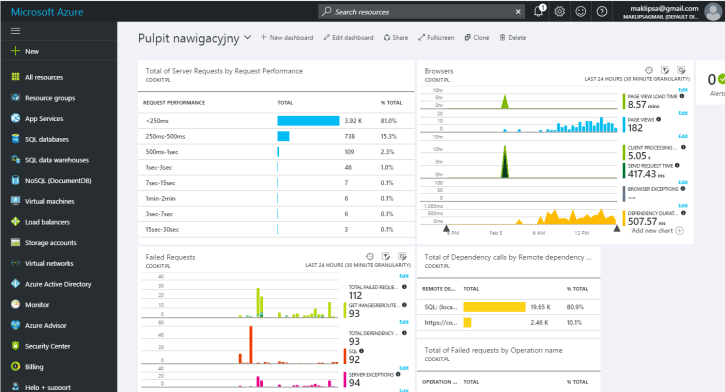
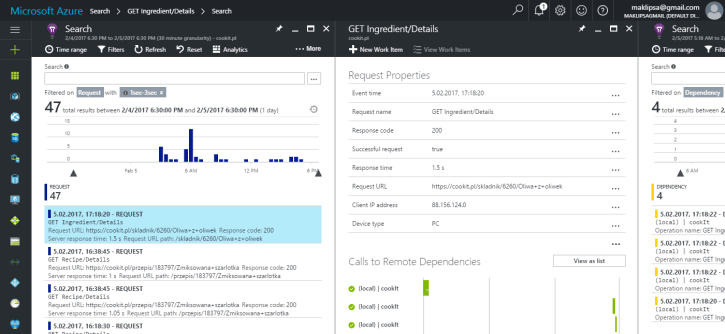
Searching through logs and remoting to a machine to check it’s load is not a fun thing to do. This is why I’ve decided to look for a centralized logging service. And what I’ve chosen.
It looks like Microsoft App Insight is very much worth trying.
–jeroen

Posted in *nix, Development, Monitoring, Power User | Leave a Comment »
Posted by jpluimers on 2018/06/18
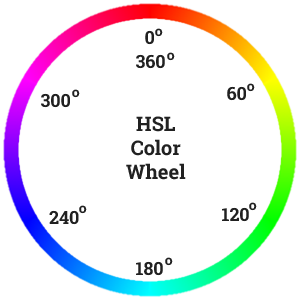 Recommented reading and playing: [Archive.is] Practical Color Theory for People Who Code which is not just about the colour wheel, but also about:
Oh: don’t forge the “Party Mode” (:
–jeroen
PS:

Posted in Color (science), Color (software development), Development, LifeHacker, Power User, science, Software Development, UI Design | Leave a Comment »
Posted by jpluimers on 2018/06/15
From a while back, but intrigued me as I wasn’t aware that bon conduction devices had become so affordable.
[WayBack] These bone-conduction glasses are on sale for $69 Would you wear them? They can be fitted with sunglasses or prescription lenses, and you can use the… – Mike Elgan – Google+
My ~60 dBA Unilateral hearing loss – Wikipedia of my left ear is only through the air: my bone conduction hearing loss – though still significant – is far less.
Since my right ear is very good, a regular hearing aid is of no use: the human brain effectively shuts down the left ear when the quality difference between the two ears is too large.
For listening to music or phone conversations however, conduction based hearing might allow me to get a bit more of a stereo sound.
Time to find out which ones work for me and which don’t, so here are a few links that describe (lists of) potential devices:
Because of this open-ear design, bone conduction headphones make you more aware of your surroundings. You will be able to hear all that’s going on around you while listening to music, and if that’s something you prefer, bone conduction headphones are the best choice.
[WayBack] 9 Best Bone Conduction Headphones In 2018 – AudioReputation.com
–jeroen
Pictures from the Verge and Everyday Hearing

Posted in LifeHacker, Power User | Leave a Comment »
Posted by jpluimers on 2018/06/15

Anyway: at the time of writing it is at https://gsuite.google.com/products/gmail/.
If you send mail to such a domain and the user doesn’t exist, you get a confusing error message like this:
<<< 550 5.1.1 https://support.google.com/mail/?p=NoSuchUser [^] j191si981824wmd.134 - gsmtp
So I wanted to test if a domain is being services by gmail and found this StackExchange question:
Basically you can test it in two ways:
dig as shown here:
dig takeheart.com mx

takeheart.com. 86399 IN MX 20 ALT1.ASPMX.L.GOOGLE.com.

takeheart.com. 86399 IN MX 30 ALT2.ASPMX.L.GOOGLE.com.

takeheart.com. 86399 IN MX 10 ASPMX.L.GOOGLE.com.

takeheart.com. 86399 IN MX 40 ASPMX2.GOOGLEMAIL.com.

takeheart.com. 86399 IN MX 50 ASPMX3.GOOGLEMAIL.com.
–jeroen
Puns:
–jeroen
Posted in Google, Google Apps, Power User | Leave a Comment »
Posted by jpluimers on 2018/06/15
Seems that IFTTT might be able to help me out here: [WayBack] gmail – Way to automatically download or print attachments or URLs from emails with specific labels – Web Applications Stack Exchange
[WayBack] Create a new document in GDrive when you receive a digital receipt in your Gmail. #drive #gmail #rec – IFTTT
–jeroen
Posted in GMail, Google, Power User | Leave a Comment »
Posted by jpluimers on 2018/06/14
On a production system we had this error occurring without warning:
The cause was running out of private bytes or virtual size as they were almost 2 gigabyte which is too much for a 32-bit process:

The not so nice thing is that there were no memory warnings in the Firebird.log file at all.
In the client application the DAC (Data Access Layer) was getting lots of “unable to allocate memory from operating system” errors back from Firebird (and logging them in the client log file), so the client didn’t run out of memory: the server did.
This was with 2.5.2.26540 (at that time the most recent version) and it looks like more people suffer from this:
We put a monitor to watch the fbserver.exe process and warn us if it was reaching 1.5 gigabyte so we could re-start it before running out of memory.
–jeroen

Posted in Database Development, Development, Firebird, Power User | 2 Comments »
 The Wiert Corner - irregular stream of stuff