The Wiert Corner – irregular stream of stuff

Jeroen W. Pluimers on .NET, C#, Delphi, databases, and personal interests

  • My badges

  • Twitter Updates

  • My Flickr Stream

  • Pages

  • All categories

  • Enter your email address to subscribe to this blog and receive notifications of new posts by email.

    Join 1,839 other subscribers

Archive for the ‘Power User’ Category

seo – How to request Google to re-crawl my website? – Stack Overflow

Posted by jpluimers on 2017/12/25

[WayBackseo – How to request Google to re-crawl my website? – Stack Overflow

TL;DR:

Some links that help you create a sitemap.xml file:

–jeroen

Posted in Google, GoogleSearch, Power User | Leave a Comment »

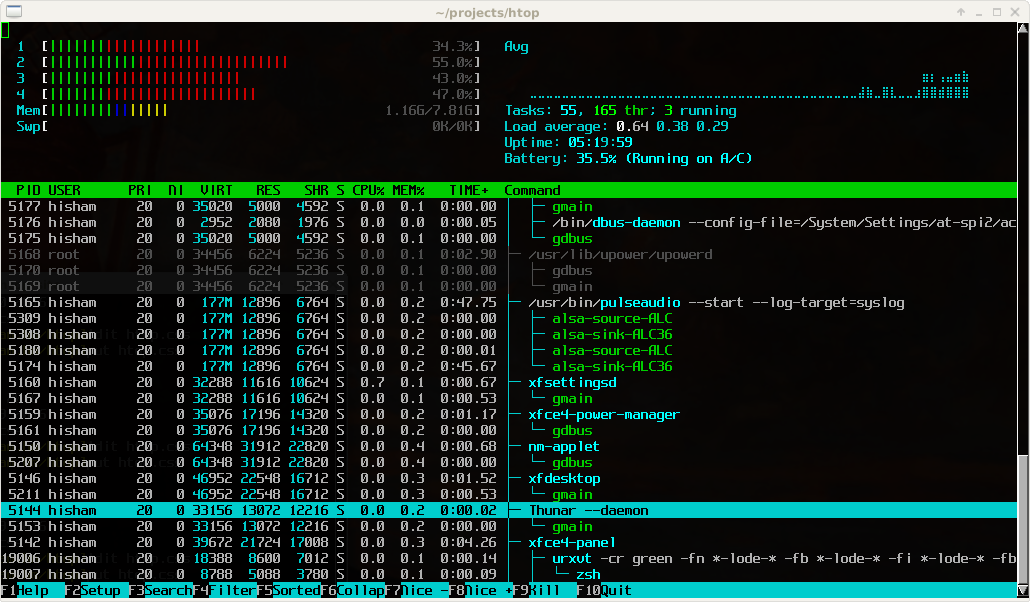
htop – an interactive process viewer for Unix

Posted by jpluimers on 2017/12/25

Great tool: [WayBackhtop – an interactive process viewer for Unix because it’s both interactive and supports a wide range of OSes: Linux, FreeBSD, OpenBSD and Mac OS X.

Thanks to Warren Postma who suggested it in his comment at [WayBack18 Useful Commands to Get Hardware Information on Linux – Linuxslaves.

Note that on OS X you get this warning after brew install htop :

htop requires root privileges to correctly display all running processes,
so you will need to run `sudo htop`.
You should be certain that you trust any software you grant root privileges.

On Linux you don’t get this message as there you have the /proc file system providing enough information as explained at [WayBackosx – Why does htop on Mac OS X require root privileges to see data for all processes, but on Linux it runs without root – Super User.

A workaround (involving the setuid bit) is at [WayBackRunning htop on Mac OS X needs root. Why?! | Blog | JoeNyland.me or by running visudo ensuring you don’t need a password for it at [WayBackosx – htop isn’t returning CPU or memory usage!? – Super User

–jeroen


Posted in *nix, *nix-tools, Apple, BSD, Linux, Mac OS X / OS X / MacOS, macOS 10.12 Sierra, OS X 10.11 El Capitan, OS X 10.9 Mavericks, Power User | Leave a Comment »

hardware rec – When to stop using a hard drive? What rules/software apply? – Super User

Posted by jpluimers on 2017/12/22

A kind of repeat of a 6 year old post, as by now this has much more information: [WayBackhardware rec – When to stop using a hard drive? What rules/software apply? – Super User.

It is a continuation for another drive of my 2011 post hard drive – When to stop using a HDD? What rules/software apply?.

Basically I was unlucky receiving a brand new drive that appeared exceptionally slow and doing some ticking.

So I ran these on it:

–jeroen

Sorry for the “missed schedule”, but WordPress.com is acting up again:

Since I ran this machine on Windows and I didn’t have time to run locally, these are the tools I used:

Read the rest of this entry »

Posted in Hardware, LifeHacker, Missed Schedule, Power User, SocialMedia, WordPress | Leave a Comment »

CPU FAN header is called FANA on SuperMicro X10SRI-F and X10SL7-F – Onboard LSI

Posted by jpluimers on 2017/12/22

The SuperMicro X10SRI-F and X10SL7-F boards are very similar, so I was happy that [WayBackSuperMicro X10SL7-F – Onboard LSI pointed out where the CPU fan was: it’s header FANA which isn’t exactly clear form the X10SRI-F motherboard PDF manual [WayBack]:

FANA is the CPU fan connector

 I never realized that. What is this based on? The manual seemed to be silent about this.

(I connected my CPU fan to the closest fan connector and everything works like a charm, but I’m still curious).

 The manual is indeed pretty much silent, although it does IMPLY that FanA is for the CPU.   It shows “FAN1-FAN4,FANA” and then says “System/CPU fan headers”.   You can read this as 5 fan headers that are the system and CPU fan headers; or as 4 headers and one more that are the system fan headers and the CPU fan header.

–jeroen


Posted in Hardware, Mainboards, Power User | Leave a Comment »

WayBack throwing “Wayback Exception An unknown exception has occurred. Unexpected Error” usually indicates a cookie problem

Posted by jpluimers on 2017/12/22

If saving a web-page on the WayBack machine throws you this error on any site:

Wayback Exception


An unknown exception has occurred. Unexpected Error

Then usually the cause is having too many cookies.

Clean your cookies for web.archive.org, then try again.

–jeroen

Posted in Internet, InternetArchive, Power User, WayBack machine | 2 Comments »

301 & 302 Redirect Generator Tool

Posted by jpluimers on 2017/12/19

[WayBack301 & 302 Redirect Generator Tool is a simple and cool tool:

Generate code to permanently or temporarily redirect your old URL to a new URL using htaccess, PHP, HTML, JavaScript, ASP or ASP.Net

Although using .htaccess files requires Apache to allow AllowOverride All which you might not want to, so here are a few other options and links you might want to check out:

–jeroen

Posted in *nix, Apache2, Development, HTML, HTML5, Power User, Software Development, Web Development | Leave a Comment »

WinHTTP Cipher restrictions to TLSv1.2 does not work on Windows7, Server 2008 R2 and Server 2012…

Posted by jpluimers on 2017/12/18

This will bite me some time for sure, so for my link archive: [WayBack] TRestClient and Cipher restrictions to TLSv1.2 does not work on Windows7 and Server2008R2 … and how it can be solved… – Günther Schoch – Google+

References:

For at least some Windows 7 and Server 2008 R2 systems, that update (KB3140245) doesn’t automatically turns up in the Windows Update list.

To make matters worse, the page cannot be archived in either the WayBack machine or Archive.is (I tried multiple times with empty results).

Luckily, there is a copy at [WayBack] KB3140245 DefaultSecureProtocols – Security.NL.

After installing the update, you have to ensure you set the DefaultSecureProtocols registry value to the bitmap value that indicates with SSL/TLS versions you want to support:

The DefaultSecureProtocols registry entry can be added in the following path:

HKEY_LOCAL_MACHINE\SOFTWARE\Microsoft\Windows\CurrentVersion\Internet Settings\WinHttp

On x64-based computers, DefaultSecureProtocols must also be added to the Wow6432Node path:

HKEY_LOCAL_MACHINE\SOFTWARE\Wow6432Node\Microsoft\Windows\CurrentVersion\Internet Settings\WinHttp

The registry value is a DWORD bitmap. The value to use is determined by adding the values corresponding to the protocols desired.

DefaultSecureProtocols Value Protocol enabled
0x00000008 Enable SSL 2.0 by default
0x00000020 Enable SSL 3.0 by default
0x00000080 Enable TLS 1.0 by default
0x00000200 Enable TLS 1.1 by default
0x00000800 Enable TLS 1.2 by default

For example:

The administrator wants to override the default values for WINHTTP_OPTION_SECURE_PROTOCOLS to specify TLS 1.1 and TLS 1.2.

Take the value for TLS 1.1 (0x00000200) and the value for TLS 1.2 (0x00000800) then add them together in calculator (in programmer mode), the resulting registry value would be 0x00000A00.

–jeroen

Posted in .NET, Delphi, Development, Power User, Software Development, Windows, Windows 7, Windows Server 2008 R2 | 2 Comments »

Search in Google+ – Computer – Google+ Help

Posted by jpluimers on 2017/12/18

I forgot how long it took them and how frustrating searches were without the new search operators, but they finally are there. So you don’t have to click again for the advanced options, I’ve quoted them below.

So earlier this year Google sort of restored the classic search (Remember when G+ search was useful? It again is. « The Wiert Corner – irregular stream of stuff) making it on par with the 2013 [WayBack] Search tips within Google Plus – WebSIGHT Hangouts and now they finally topped it.

Yay!

Details:

Lars Fosdal made a nice concise list of it.

–jeroen

Lars Fostal (with some minor additions from me):

Read the rest of this entry »

Posted in G+: GooglePlus, Google, Power User, SocialMedia | Leave a Comment »

The day that the internet archive was down for a few hours – time to sponsor them.

Posted by jpluimers on 2017/12/17

In an era where we’ve become dependent on 24/7 communications and availability of the internet, but even more so on archives of information that appeared, became fake and then denied, the Internet Archive (including the WayBack machine) was down for a few hours because of a PGE power outage in San Francisco.

(Posted late because, well the WordPress.com “missed schedule” bug is back)

So this is a reminder to sponsor the Internet Acrhive. Because we can.

–jeroen

Read the rest of this entry »

Posted in Internet, InternetArchive, Missed Schedule, Power User, SocialMedia, WayBack machine, WordPress | Leave a Comment »

Helft homepaginas van Nederlandse overheidswebsites gebruikt geen https – IT Pro – Nieuws – Tweakers

Posted by jpluimers on 2017/12/15

Still some work to do for some of my sites:

–jeroen

[WayBackHelft homepaginas van Nederlandse overheidswebsites gebruikt geen https – IT Pro – Nieuws – Tweakers

Posted in Communications Development, Development, Encryption, https, Internet protocol suite, Power User, Security, TLS | Leave a Comment »