


For my link archive:
Microsoft live/passport account Security settings are at https://account.live.com/proofs/Manage
–jeroen
Posted by jpluimers on 2017/11/13
For my link archive:
Microsoft live/passport account Security settings are at https://account.live.com/proofs/Manage
–jeroen

Posted in Cloud, Infrastructure, Microsoft Live, Power User | Leave a Comment »
Posted by jpluimers on 2017/11/10
Savitech has released a new driver package to address the issue. Savitech drivers version 2.8.0.3 or later do not install the root CA certificate.
Users still must remove any previously installed certificate manually.
- SaviAudio root certificate #1
- Validity: Thursday, May 31, 2012 – Tuesday, December 30, 2036
- Serial number: 579885da6f791eb24de819bb2c0eeff0
- Thumbprint: cb34ebad73791c1399cb62bda51c91072ac5b050
- SaviAudio root certificate #2
- Validity: Thursday, December 31, 2015 – Tuesday, December 30, 2036
- Serial number: 972ed9bce72451bb4bd78bfc0d8b343c
- Thumbprint: 23e50cd42214d6252d65052c2a1a591173daace5
Source: [WayBack] Vulnerability Note VU#446847 – Savitech USB audio drivers install a new root CA certificate
Background: [WayBack] Inaudible Subversion – Did your Hi-Fi just subv… | RSA Link: While threat hunting, RSA FirstWatch came across a curious exposure in Windows PCs, involving driver packages provided by a certain manufacture…
Via:
–jeroen
Posted in Power User, Security, Windows | Leave a Comment »
Posted by jpluimers on 2017/11/10
 I’ve had success transferring files for off-line usage on OS X using FileZilla connecting over FTP to my Humax.
Playing with MPlayerX was a bit troublesome as sliding through the resulting media file over commercials is hard.
VLC player has come a long way and plays the files a lot better (the audio gets less out if sync with the video/subtitle).
In addition: VLC on Mac OS X supports DLNA – basically a superset of UPnP – well (at least version 2.2.4 does): start with Universal Plug'n'Play to view any devices, then click on the little triangles in the list to open any new level.
A few tips on streaming:
–jeroen
via:

Posted in DLNA / UPnP, Media Streaming, Power User | Leave a Comment »
Posted by jpluimers on 2017/11/10
On my research list so I can do proper LoT.
–jeroen
Posted in Development, Internet, MikroTik, Power User, RouterOS, routers, Scripting, Software Development | Leave a Comment »
Posted by jpluimers on 2017/11/09
Need to do some more research on this to ensure I didn’t goof up:
–jeroen
Posted in *nix, *nix-tools, Communications Development, Development, Internet protocol suite, postfix, Power User, Security, sendmail, SMTP | Leave a Comment »
Posted by jpluimers on 2017/11/09
Interesting as it has steps for both OpenSuSE and Debian each well suited for running on a Raspberry Pi.
[WayBack] MX Backup – Postfix Email Server | samhobbs.co.uk
It seems postfix is a lot easier to configure than sendmail so I already like it.
First I need to read a bit more in Postfix greylisting.
I’ll need to catch up on Sam’s other parts with the postfix tag as well:
- Introduction:
[WayBack] Raspberry Pi Email Server
- How to set up your own email server on a Raspberry Pi: Postfix with Dovecot for IMAP, Squirrelmail for Webmail, Spamassassin & Sieve for spam filtering.
- SMTP incoming/outgoing MTA server:
[WayBack] Raspberry Pi Email Server Part 1: Postfix
- How to set up Postfix on a Raspberry Pi as part of an email server.
- IMAP/POP3 server:
[WayBack] Raspberry Pi Email Server Part 2: Dovecot
- Configure Dovecot for your Raspberry Pi email server to provide IMAP and SASL authentication.
- IMAP/SMTP webmail server:
[WayBack] Raspberry Pi Email Server Part 3: Squirrelmail
- How to set up webmail for your Raspberry Pi email server with Squirrelmail.
- Marking SMTP mail for HAM/SPAM:
[WayBack] Raspberry Pi Email Server Part 4: Spam Detection with Spamassassin
- How to set up a smart spam filter for your Raspberry Pi email server with Spamassassin.
- LMTP processing of mail rules in Dovecot:
[WayBack] Raspberry Pi Email Server Part 5: Spam Sorting with LMTP & Sieve
- Automatically sort messages marked as spam by Spamassassin into the spam folder with Dovecot Sieve (Raspberry Pi email server)
–jeroen
Posted in *nix, *nix-tools, Debian, Development, Hardware Development, Linux, openSuSE, Power User, Raspberry Pi, Raspbian, sendmail, SuSE Linux, Tumbleweed | Leave a Comment »
Posted by jpluimers on 2017/11/08
No more issue reporting: tohosokawa/rst-preview-pandoc: reStructuredText preview in Atom using Pandoc
This is a very useful Atom.io package, but it has one big issue: when you close a preview window then re-opening it, the settings are restored to the default -frst -thtml --webtex ones.
As I’m an Atom.io n00b, I need to dig into this another time.
Notes:
module.exports in the path pandocOpts.default.opts_ = atom.config.get 'rst-preview-pandoc.pandocOpts'.I want the defaults to include --standalone --toc --toc-depth=5 or at least --standalone --toc.
For now I’ve hardcoded them.
–jeroen
Posted in atom editor, CoffeeScript, Development, JavaScript/ECMAScript, Power User, Scripting, Software Development, Text Editors | Leave a Comment »
Posted by jpluimers on 2017/11/07
Learned a few things when modifying https://github.com/gkotian/gautam_linux/blob/master/scripts/colours.sh
Note: `printf` supports emitting `ESC` (ASCII character `\033` aka `27` aka `0x1B`)as `\e` the same way that `echo` does

https://linux.die.net/man/1/printf
https://linux.die.net/man/1/echo

Format strings are at https://linux.die.net/man/3/printf
%-10s means left adjusted (aligned) string of length 10
–jeroen
via:
I was investigating how the colour definitions on my OpenSuSE system actually work internally so I added some extra output: ${TYPE} and ${COLOUR}.
Posted in *nix, *nix-tools, bash, bash, Development, Linux, openSuSE, Power User, Scripting, Software Development, SuSE Linux | Leave a Comment »
Posted by jpluimers on 2017/11/03
[WayBack] Anyone having trouble with Windows 10 latest update (build 1709)? – Agustin Ortu – Google+
It looks that for some people, Windows 10 version 1709 (the Fall Creators Update) uninstalls applications.
Not good.
–jeroen
Posted in Power User, Windows, Windows 10 | 1 Comment »
Posted by jpluimers on 2017/10/30
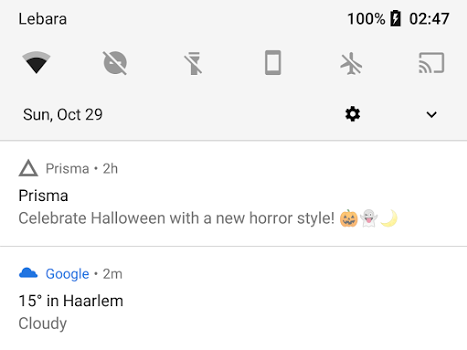
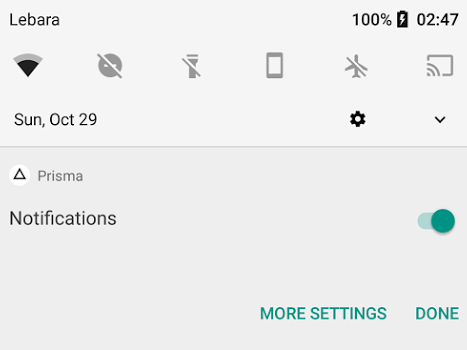
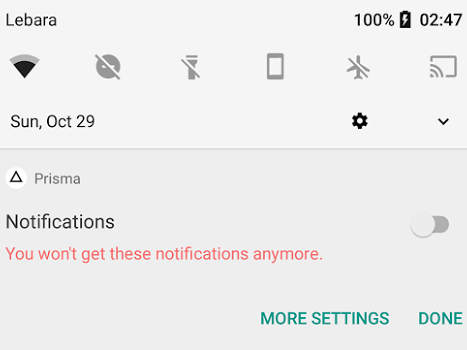
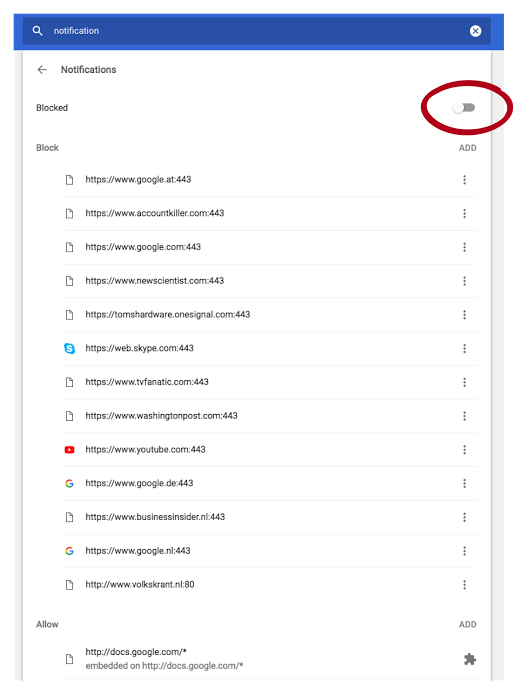
Android apps make sounds when posting notifications. So adding useless gets you on the blacklist quickly thereby disallowing your app for posting any notifications at all.
Kristian shows how and why at
How to lose notification privilege:
- Use notification for marketing.
- Long press.
- Disable.
It’s that easy. You never force grab my attention for marketing a second time, especially since Android notifications by default come with sound now. This one woke me up.
–jeroen

Posted in Android Devices, Google, Power User | Leave a Comment »
 The Wiert Corner - irregular stream of stuff