The Wiert Corner – irregular stream of stuff

Jeroen W. Pluimers on .NET, C#, Delphi, databases, and personal interests

  • My badges

  • Twitter Updates

  • My Flickr Stream

  • Pages

  • All categories

  • Enter your email address to subscribe to this blog and receive notifications of new posts by email.

    Join 1,839 other subscribers

Archive for the ‘Power User’ Category

How to disable your security questions at “Personal Info – Yahoo Account Settings”

Posted by jpluimers on 2016/09/23

Steps to disable the security questions in Yahoo:

  1. Logon at https://login.yahoo.com
  2. At the top right, click on your name, hover over your name and click “Account Info” to get to Personal Info – Yahoo Account Settings – https://login.yahoo.com/account/personalinfo
  3. On the left menu, click on “Account Security”.
  4. Click “Disable security questions”.

    Disable security questions - yahoo thinks they're a bad idea anyway

    Disable security questions – yahoo thinks they’re a bad idea anyway

  5. In the dialog, click “Yes, secure my account”
  6. In the next dialog, click “Close”
  7. Then verify your other security options (like phone/email recovery and two-factor logon) to enhance your security even more.

–jeroen

Posted in Power User, Security | Leave a Comment »

Mac OS X – Spotlight not finding many files: force a rescan solved it

Posted by jpluimers on 2016/09/23

I was looking for some PDF files that I knew for sure were on my SSD but Spotlight would not find them. Looking for more obvious files I noticed Spotlight was returning hardly any files at all: somehow the index was messed up.

Years ago I also had Spotlight issues; then it would find nothing (now it did find some files) which was solved by a reboot: Spotlight refuses to be enabled on Lion: reboot helped.
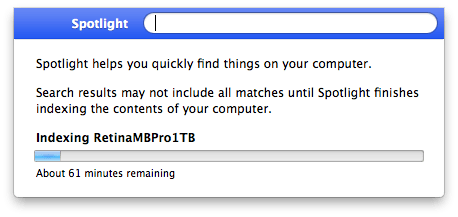
Screenshot 2016-06-29 12.57.34

Screenshot 2016-06-29 12.57.34

Now this was right after a reboot, and because Spotlight did find some files I know Spotlight was turned on (no need for mdutil tricks mentioned in After restoring fresh HDD from Time Machine Backup: No results from Spotlight).

So I dug a bit deeper and decided to try [WayBack] Rebuild the Spotlight index on your Mac – Apple Support with these steps:

  1. Search for something that returns few results (in my case Xyzzy)
  2. Click Spotlight Preferences...
  3. Go to the Privacy tab
  4. From the Finder, drag your disk(s) to the Prevent Spotlight from searching these locations list.
  5. Remove your disk(s) from that lists using the minus (-) button.
  6. Wait for re-indexing to complete

That worked like a charm to refresh the index: it started indexing again which took about one hour.

After a few minutes though, I found back the 32pfl7404h_12_dfu_nld.pdf I was looking for.

A second time, it had lost the index to iTunes, and found it back in about 2 hours (as the SSD was much more full).

A third time, this trick from [WayBack/Archive.is] Re-Index Spotlight from the Terminal, Re-Gain Valuable Time for Life [OS X Tips] | Cult of Mac worked:

sudo mdutil -E /

This basically re-indexes from the root (/) folder.

I find it easier than the above 6 steps (which are also on [WayBack/Archive.is] Make Spotlight Work Again [OS X Tips] | Cult of Mac).

–jeroen

Posted in Apple, Mac, Mac OS X / OS X / MacOS, MacBook, MacBook Retina, MacBook-Pro, OS X 10.10 Yosemite, OS X 10.11 El Capitan, OS X 10.9 Mavericks, Power User, SpotLight | Leave a Comment »

Smart Home review It’s been a few months since I replaced every switch in the…

Posted by jpluimers on 2016/09/23

For next year’s home fiddling project and a Somfy RTS hack that is not so expensive/clunky as the Somfy URTSI II.

Michael Aschenborn8:05 AM+5

I use openHAB and tasker as open source center of my home-automation. Use its bindings to knx, zwave, enocean, philipsTV, fritzbox, ifttt and network-pcs to control rollershutter, lights, multimedia, security etc.

It’s not app vs. wall-switches, thats interesting but the situative automatisation.

  • a wall switch near my bed to switch off everything in the house
  • automated rollershutter-settings if tv is switched on for not to be blinded
  • if it’s ringing at the door i can open it from my Moto 360
  • wheather-dependent automated control of my blinds saved me 500,- electricity-costs
  • led-signaling if any window is opened
  • jalousie and light-scenes instead of tons of wall-switches
  • sunlight dependent control of decorative lights in the house
  • remotecontrollabe per app, partial even per voice (“OK Google, shadow west facade”)
  • combination with nfc-tags: to enable a garden powersocket just hold your phone near to it
  • batteryless wireless enocean-wall-switches are perfect for kids loft bed or to stick it under the terrace-table

and much much more…

–jeroen

via: Smart Home review It’s been a few months since I replaced every switch in the….

Posted in LifeHacker, Power User | Leave a Comment »

Flybrix | Flybrix Kits Make Your Own Rebuildable Drones using LEGO® bricks

Posted by jpluimers on 2016/09/22

Flybrix kits include all you need to make your own rebuildable, crash-friendly drones using LEGO® bricks. For ages 14+. No tools needed, Arduino compatible.

Source: Flybrix | Flybrix Kits Make Your Own Rebuildable Drones using LEGO® bricks

Posted in Fun, Power User | Leave a Comment »

Jark/FTDISample: Note: As of version 10556.0 the ftdi driver does no longer seem to work. A sample application showcasing the FTDI D2XX driver use in Windows Universal projects (UWP). This sample is tested on the Raspberry PI 2 with Windows IOT installed and a FTDI FT232R usb-to-serial adapter.

Posted by jpluimers on 2016/09/22

Source: Jark/FTDISample: Note: As of version 10556.0 the ftdi driver does no longer seem to work. A sample application showcasing the FTDI D2XX driver use in Windows Universal projects (UWP). This sample is tested on the Raspberry PI 2 with Windows IOT installed and a FTDI FT232R usb-to-serial adapter.

Yeah, I couldn’t get this working either. I’m not sure where ReadTimeout is actually used by the SerialDevice class internally. But I did end up getting something working by copying the timeout to a

Source: c# – Unable to use SerialDevice.ReadTimeout in Windows 10 IoT – Stack Overflow

Source: Raspberry Pi • View topic – Windows 10 IoT Core Simple Serial Example not working

Posted in Development, IoT Internet of Things, Network-and-equipment, Power User, Software Development | Leave a Comment »

SPAM – Garantiebellen – +31172749040 – ‘Hang op! Klik weg! Bel uw bank!’ – #KVK doe er wat aan!

Posted by jpluimers on 2016/09/21

Onder het mom van ‘Hang op! Klik weg! Bel uw bank!’:

Ik werd net gebeld door +31172749040 die zich bekend maakten als “Garantie Bellen” en onder het mom van “partner van KPN” je proberen een nieuw abonnement met lagere tarieven aan te smeren.

Hun web-site meldt dat ze in Rotterdam zitten:

Hun algemene voorwaarden echter Utrecht:

Garantie Bellen, Churchilllaan 11, 3527 GV in Utrecht

Op de hele site geen informatie van het handelsregister, dus ze plegen sowieso een economisch delict:

Het niet naleven van de verplichting om het KvK-nummer te vermelden is een economisch delict (art. 1 sub 4 WED). Het is een overtreding die wordt gestraft met hechtenis van ten hoogste zes maanden, taakstraf of een geldboete van de vierde categorie (dat wil zeggen ten hoogste €19.000,-).

Die heb ik inmiddels zelf gevonden: 61233927 met als informatie:

Naam:  To the Max Callcenter B.V.
Vestigingsadres:    Westblaak  142  
Vestigingsplaats:   3012KM  Rotterdam
KvK-nummer: 61233927
Vestigingsnummer:   000030351928
Soort Inschrijving: Hoofdvestiging

To the Max Callcenter B.V.Hoofdvestiging
Bestaande handelsnamen
To the Max Callcenter B.V. | Garantiebellen | Garantie-bellen
Statutaire naam
To the Max Callcenter B.V.
KvK 61233927Vestigingsnr. 000030351928Westblaak 142 3012KMRotterdam
61233927 0000 000030351928 To the Max Callcenter BV. To the Max Callcenter BV, Garantiebellen, Garantie-bellen. Callcenters. …

–jeroen

Posted in Power User, SPAM | 3 Comments »

Tools to view Blue Screen info and Windows/Application Crash Reports

Posted by jpluimers on 2016/09/21

These NirSoft tools helped me finding out about some crashes that never made it to the event log:

At first I thought my own software development caused them, but In the end they were caused by buggy video drivers.

–jeroen

Posted in Development, Power User, Software Development, Windows | Leave a Comment »

Studenten Universiteit Eindhoven ontwikkelen slimme stopcontacten – Beeld en geluid – Nieuws – Tweakers

Posted by jpluimers on 2016/09/20

Studenten van de Universiteit van Eindhoven hebben een stopcontact ontwikkeld dat bestuurd kan worden met een app en op basis van beweging en tijdschema’s apparaten aan- en uit kan zetten. De Aucasi Socket verschijnt aanstaande zondag op Kickstarter.

Source: Studenten Universiteit Eindhoven ontwikkelen slimme stopcontacten – Beeld en geluid – Nieuws – Tweakers

Posted in Power User | Leave a Comment »

How to downgrade firmware on HP OfficeJet Pro 8610 to allow using old or refilled cartridges – Brozkeff’s lala-land

Posted by jpluimers on 2016/09/20

Source: How to downgrade firmware on HP OfficeJet Pro 8610 to allow using old or refilled cartridges – Brozkeff’s lala-land

via:

Posted in HP Printer Drivers, Power User, Printer drivers, Windows | 2 Comments »

SysInternals sdelete: zero wipe free space is called -z instead of -c

Posted by jpluimers on 2016/09/20

In the 2009 past, sdelete used the -c parameter to zero wipe clean a hard drive and -z would clean it with a random pattern.

That has changed. Somewhere along the lines, -c and -z has swapped meaning which I didn’t notice.

This resulted in many of my virtual machines image backups were a lot larger than they needed to be.

The reason is that now:

  • -c does a clean free space with a random DoD conformant pattern (which does not compress well)
  • -z writes zeros in the free space

Incidently, -c is a lot slower than -z as well.

TL;DR: use this command

sdelete -z C:

Where C: is the drive to zero clean the free space.

–jeroen

Posted in Batch-Files, Development, Fusion, Hyper-V, Power User, Proxmox, Scripting, sdelete, Software Development, SysInternals, View, VirtualBox, Virtualization, VMware, VMware ESXi, VMware Workstation, Windows | Leave a Comment »