Archive for the ‘Security’ Category
Posted by jpluimers on 2021/01/27
I am really glad this keynote got recorded. Still very relevant, it is as much about software development as it is about society.
Go watch it, as it gives you reason to think about your role in the software development process, and in the information fire hose at large.
Back in the days, David Intersimone was right when he created the regular blog post “Sip from the Firehose” (for early materials, see [WayBack] GetPublished – Author Information: Firehose).
The talk main thread is about current and ever growing overload of information which basically makes it disinformation, combined with the abundance of “AI” recording devices around you that basically make you the product.
Basically we reached all the tick marks of these books:
The session is not just about “how bad is the situation” (it is very), but also provides directions on how to get out of it for both people in the development process, as well as consumers, producers and sharers of information.
via:
–jeroen
Read the rest of this entry »
Posted in .NET, Development, Opinions, Power User, Security, Software Development | Leave a Comment »
Posted by jpluimers on 2021/01/25
[Archive.is] PassProtect – Chrome Web Store:
Stop using bad passwords. PassProtect alerts you about breached credentials. Powered by “Have I Been Pwned?”.
Interesting plugin. Will try this soon.
Via:
–jeroen
Posted in Authentication, Chrome, Firefox, LifeHacker, Power User, Security, Web Browsers | Leave a Comment »
Posted by jpluimers on 2021/01/22
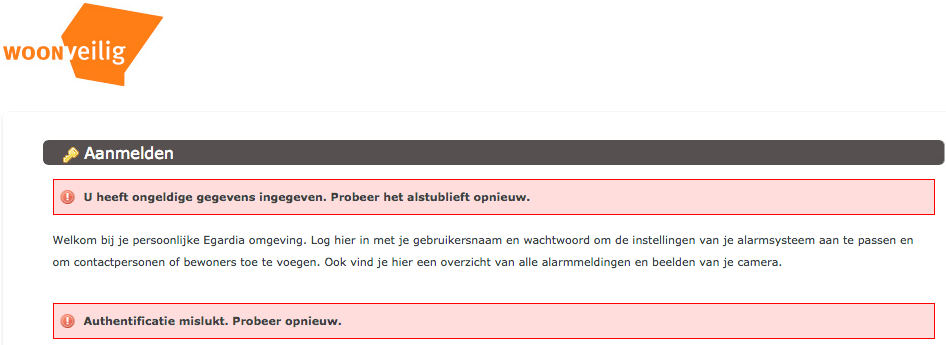
Ik had al eerder over woonveilig geschreven (Ik ben wat verward over de @WoonVeilig site. https://t.co/ui8agTkgM9 heeft het bijvoorbeeld over GATE-03 en GATE-02, maar…), nu iets meer over de installatie handleidingen van GATE-03:
De aanmeldprocedure brengt je naar [Archive.is] alarmsysteem.woonveilig.nl/nl_NL_woonveilig/registratie, die voor registratie nog verwijst naar:
Een paar tips tijdens de registratie en gebruik:
–jeroen
Posted in LifeHacker, Power User, Security | Leave a Comment »
Posted by jpluimers on 2021/01/22
Below are a few comments from [WayBack] Anyone tried #Telegram to communicate securely? Some nice features there… Looks way more secure than WeChat and all that. Thoughts? https://telegram…. – Jason Mayes – Google+.
The consensus seems to be
- Signal is the way to go for secure chat. It is open source too.
- When chatting with groups of people, there is technical security, but not social security.
- Telegram is easier to use than some other chat platforms, and has a large user base.
The comments:

Telegram is pretty nice, but its security leaves much to be desired. If it’s security and true privacy you want, Signal is the way to go.

Hi
+Ryan Ostendorf signal is indeed a way to go but didn’t have big users number compared to Telegram.

I use telegram, discord, slack & hangouts for variousn groups i talk with. Of those, telegeam is my preferred for ease of use etc. One thing i would like to see is a “index” of groups to maybe easier prioritise what i want to read (a-la how discord wokrs with its different servers) but im so used to the flat style of telegram/hangouts that i dont have a huge issue with its current design
Re security, im not an expert, but it seems ok, with multuple options available. Havent heard of anything being intercepted/hacked, but who really know what our alien overlords – err governments – and other interested parties are up to behind the scenes.

I use telegram more than whatsapp. I found many technical group discussion (at least for Indonesian) because telegram supports a huge amount of members per group.
also, the telegram bot and channel give a unique feature for a developer to build an application on top of it.

-
Thanks everyone for feedback!

I am using Telegram for 5 years now. Far faster and better than WhatsApp in many ways.

It’s security level depends on who you ask. If you take their word at face value it’s great. If you believe the rumors it’s totally bent by U.S. surveillance agencies.
Feature wise it’s decent otherwise.
A few of us are on the hunt for a good, secure, multi platform messaging platform to replace Hangouts when they kill that. We’ve narrowed it down to a few that we’re testing.
Signal was good until they killed their linux and browser clients.
Retroshare is on the to test list along with…
Viber.
Tox.

I have been a telegram user since october 2017.
And I wonder, how do telegram make profit.
Who is paying for the server to be alive ?
-
Side note. You can just assume that any product based out of the U.S. or any Five Eyes country is not secure. I wouldn’t trust anything EU based either. What’s that leave you?
-

For dependable privacy, I use two cans and a string.
-
+x Meta x I can use a laser pointed at your string to measure the sound being transferred over it though
-
-
I use the postal service. Nobody sends anything via that these days other than birthday cards from Nanna’s, so my most private missives go conpletely un-noticed by the authorities
-

I downloaded Telegram yesterday, in fact. Haven’t had a chance to try it out yet as I don’t know anyone using it. I had thought it would be more like BBM, with public groups in a social media-lite feature, but it’s not.
-
+Jason ON telegram got more than that. The setting let you do much more.
-
I remember getting very happy, when I got telegram from my father when I was a kid in about 80s. He had duty in other island faraway from home.

+Jason Mayes Check out Keybase.io they strike a sweet balance between Wire-like security (encrypted group chats), and Telegram-like usability/looks. And I thought it’s FOSS!

Keybase
keybase.io

Telegram has a very tempting feature set for a “messaging” service.
I have recently started using it. Top reasons I like it so far are the ability to add a username, which means I can be available without giving people my phone number.
My URL 👉 t.me/qwallis
Also the ability to have branded public broadcast channels is different. I’ve set one up for London Meet-ups for +Happening London the URL for that is here 👉 t.me/HappeningLondon
Any public post cam be embedded, so I’m surfacing the next meet-up on the +Happening London web site too 👉 happeninglondon.co.uk
Those feature (and others) make Telegram interesting.
-
+Robert Wallis I agree. With the caveat that this is as long as you aren’t expecting 100% guaranteed secure communications.
Of course the question of whether such a thing even exists is valid. But in Telegram’s case, at least expect your local Five Eyes government surveillance state to be “reading” them.

I’m giving Matrix/Synapse and riot.im a whirl.
Mostly because I can selfhost it, and it’s got some good things going for it, like encrypted convos.
They still got a mile or two on their clients and that’s where I’m holding off on inviting everyone and their dogs until there’s something that can be used by more people without becoming a troubleshooting nightmare/”this isn’t as easy as whatsapp. Can’t we use messenger instead?” kind of deal.

Riot – Riot – open team collaboration
about.riot.im
-
+Christopher Gaul yeah, but where aren’t they?
As far as I understand Telegram has been validated for “secret chats” between two users, where security models are more easily implemented, but for groups of up to 200,00 that’s never going to be “secret” just hidden, and public broadcast channels are … well public.
–jeroen
Posted in Chat, Keybase, LifeHacker, Power User, Security, SocialMedia, Telegram | Leave a Comment »
Posted by jpluimers on 2021/01/05
[WayBack] GitHub – andOTP/andOTP: Open source two-factor authentication for Android.
A few highlights:
- andOTP is a two-factor authentication App for Android 4.4+.It implements Time-based One-time Passwords (TOTP) and HMAC-Based One-Time Passwords (HOTP). Simply scan the QR code and login with the generated 6-digit code.
- OpenPGP: OpenPGP can be used to easily decrypt the OpenPGP-encrypted backups on your PC.
- BroadcastReceivers: AndOTP supports a number of broadcasts to perform automated backups, eg. via Tasker. These will get saved to the defined backup directory. These only work when KeyStore is used as the encryption mechanism
- org.shadowice.flocke.andotp.broadcast.PLAIN_TEXT_BACKUP: Perform a plain text backup. WARNING: This will save your 2FA tokens onto the disk in an unencrypted manner!
- org.shadowice.flocke.andotp.broadcast.ENCRYPTED_BACKUP: Perform an encrypted backup of your 2FA database using the selected password in settings.
- All three versions (Google Play, F-Droid and the APKs) are not compatible (not signed by the same key)! You will have to uninstall one to install the other, which will delete all your data. So make sure you have a current backup before switching!
PlayStore: [WayBack] andOTP – Android OTP Authenticator – Apps on Google Play
• Free and Open-Source
• Requires minimal permissions:
• Camera access for QR code scanning
• Storage access for import and export of the database
• Encrypted storage with two backends:
• Android KeyStore (can cause problems, please only use if you absolutely have to)
• Password / PIN
• Multiple backup options:
• Plain-text
• Password-protected
• OpenPGP-encrypted
• Sleek minimalistic Material Design with three different themes:
• Light
• Dark
• Black (for OLED screens)
• Great Usability
• Compatible with Google Authenticator
Via: [WayBack] ‘Aanvallen via ss7-protocol om 2fa-sms’jes te onderscheppen nemen toe’ – Computer – Nieuws – Tweakers
Check out @Jaykul’s Tweet: https://twitter.com/Jaykul/status/1091200778121957377
Instead of Google authenticator and Authy
Via https://twitter.com/martinfowler/status/1091097388201230339
Related :
Nope. It’s just a secret encoded in a QR code.
Here’s the docs on the format of the URI in the QR code: https://t.co/AJhT6PFAzx
The QR code delivers a simple, durable, shared secret.
Use U2F if you can. It is much safer, as it cannot be phished or copied.
Depends on your risk model. Device to device transfer would be a good mid-ground, but doesn’t solve the “my phone was stolen/bricked/damaged” scenario.
Which is your bigger risk – duplicating (normally encrypted) secrets or losing your device and access to everything?
–jeroen
Posted in Android, Development, Mobile Development, Security, Software Development | Leave a Comment »
Posted by jpluimers on 2020/12/04
Boy it was a long time ago that I did anything with gpg. Here is how to generate and sign keys.
[WayBack] gpg creation and sign Gino’s Key ($1785651) · Snippets · GitLab
And here to check your email confguration:
[WayBack] Home – dmarcian Founded in 2012 by the primary author of the DMARC specification, dmarcian is dedicated to upgrading the entire world’s email by making DMARC accessible to all. dmarcian brings together thousands of senders, vendors, and operators in a common effort to build DMARC into the email ecosystem.
–jeroen
Posted in *nix, Power User, Security | Leave a Comment »
Posted by jpluimers on 2020/11/09
I was looking for a bootable virus scanner supporting NTFS. Kaspersky was the first one I found, and it worked well.
Back then, these were the output locations:
The HTTP link can be convenient for locations that do not support TLS (cough, VMware ESXi wget, cough), which are OK if you calculate the sha256 hash from the TLS link first.
Likely there is a 2020 version by now.
I got the links via:
I might try BitDefender later.
–jeroen
Posted in LifeHacker, Power User, Security | Leave a Comment »
Posted by jpluimers on 2020/11/06
Hmm, one of my machines contained OpenCandy – Wikipedia as found by Malwarebytes (software) – Wikipedia:

Tracking back the installation, revealed it came with ImgBurn 2.5.8.0, which is now on my black-list.
In my case this was how to remove it:
rd /s /q %AppData%\OpenCandy
This is not universal; you might need to take additional measures like in [WayBack] How to Remove PUP.Optional.OpenCandy (Removal Guide).
I use this batch-file to get the most recent Malwarebytes and Chameleon:
:: redirects to something like wget https://data-cdn.mbamupdates.com/web/mb3-setup-consumer/mb3-setup-consumer-3.6.1.2711-1.0.508-1.0.8211.exe

wget --content-disposition https://downloads.malwarebytes.com/file/mb3/

:: redirects to something like wget https://data-cdn.mbamupdates.com/web/mbam-chameleon-3.1.33.0.zip

wget --content-disposition https://downloads.malwarebytes.com/file/chameleon/
If you do not have wget on your system, then try this PowerShell alternative (which does not show progress) via [WayBack] Windows batch file file download from a URL – Stack Overflow
:: in case you do not have wget:

powershell -Command "(New-Object Net.WebClient).DownloadFile('https://downloads.malwarebytes.com/file/mb3/', 'mb3.exe')"

powershell -Command "(New-Object Net.WebClient).DownloadFile('https://downloads.malwarebytes.com/file/chameleon/', 'chameleon.exe')"

:: note these do not show progress!

:: https://stackoverflow.com/questions/4619088/windows-batch-file-file-download-from-a-url
Related: [WayBack] Jeroen Pluimers on Twitter: “What if the most recent @Malwarebytes on a Windows 8.1 x64 VM (all patches installed) on ESXi backed by NVME hangs for hours on one file with hardly any CPU usage? Screenshots of mbam.exe, mbamservice.exe and mbamtray.exe thread usage below.
–jeroen
Posted in *nix, *nix-tools, LifeHacker, Power User, Security, wget, Windows | Leave a Comment »





 The Wiert Corner - irregular stream of stuff