The Wiert Corner – irregular stream of stuff

Jeroen W. Pluimers on .NET, C#, Delphi, databases, and personal interests

  • My badges

  • Twitter Updates

  • Pages

  • All categories

  • Enter your email address to subscribe to this blog and receive notifications of new posts by email.

    Join 1,854 other subscribers

Archive for the ‘Security’ Category

On Windows, having an empty password can improve security

Posted by jpluimers on 2021/08/11

From an interesting twitter thread started by SwitftOnSecurity:

Interesting thought that I need to let sink in for a while before trying it.

Great posts by Aaron

Finding out about and fixing Limited User Account bugs:

More to think about:

  • [WayBack] Table of Contents (Aaron Margosis’ Non-Admin WebLog) – Aaron Margosis’ Non-Admin, App-Compat and Sysinternals WebLog
  • [WayBack] Not running as admin… – Aaron Margosis’ Non-Admin, App-Compat and Sysinternals WebLog

    To be more secure, users should log on with a Limited (or “Least-privileged”) User account (LUA), and use elevated privileges only for specific tasks that require them.  Linux/Unix users have understood this for a long time

  • [WayBack] Why you shouldn’t run as admin… – Aaron Margosis’ Non-Admin, App-Compat and Sysinternals WebLog
    • The #1 reason for running as non-admin is to limit your exposure.
    • My #2 reason for running as non-admin applies to developers.  Developing software as User instead of Admin helps ensure that your software will run correctly on end-users’ systems.
    • My #3 reason applies just to Microsoft personnel, particularly those of us in customer-facing roles.  Hey, y’all!  We need to lead by example.
  • [WayBack] The easiest way to run as non-admin – Aaron Margosis’ Non-Admin, App-Compat and Sysinternals WebLog

    Here’s how I set up home computers for friends and relatives:

    • Create a Computer Administrator account called “Admin”.  No password.  (Read on before you flame.)
    • Create a Limited User account for each person who will be using the computer.  No passwords.
    • Enable the Guest account if it is anticipated that visitors may need to go online.

    I instruct all concerned that the Admin account is to be used only for installing software, and to use their individual accounts for all day-to-day use, including web, email, IM, etc.  This has worked quite well for everyone I’ve done this for, and don’t get calls anymore about home pages being hijacked, etc.  Users generally don’t even have to log out.  My 7-year old walks away, the screen saver kicks in, my 3-year old moves the mouse and clicks on his picture (or the frog or whatever it is now) and has his own settings.

    [added 2004.06.22]:  I also like to make the admin desktop noticeably different from normal user desktops, to help prevent accidental use.  For example, use the Windows Classic theme instead of the XP default, set a red background, or a wallpaper that says “For admin use only.  Are you sure you need to be here?”

    OK, I know you’re bursting already:  “No password?!?!  Are you insane?!?!”  Cool down, now.  Starting with Windows XP, a blank password is actually more secure for certain scenarios than a weak password.  By default, an account with a blank password can be used only for logging on at the console.  It cannot be used for network access, and it cannot be used with RunAs.  The user experience of just clicking on your name to log on can’t be beat for simplicity.  If you can trust everyone who has physical access to the computer not to log on as someone else or abuse the admin account, this is a great way to go.  If not, you can always enable passwords.

  • [WayBack] “RunAs” basic (and intermediate) topics – Aaron Margosis’ Non-Admin, App-Compat and Sysinternals WebLog

    The Secondary Logon service was first introduced in Windows 2000, and is in Windows XP and Server 2003.  When you start a new process through RunAs, you provide credentials for the account you want the process to run under – for example, the local Administrator account.  Assuming the credentials are valid, the Secondary Logon service then causes several things to happen:

    • creates a new logon session for the specified account, with a new token;
    • ensures that the new process’ token is granted appropriate access to the current window station and desktop (the specifics change somewhat for XP SP2, but aren’t important here);
    • creates a new job in which the new process and any child processes it starts will run, to ensure that the processes are terminated when the shell’s logon session ends (correcting a problem with the NT4 Resource Kit’s SU utility).
  • [WayBack] RunAs with Explorer – Aaron Margosis’ Non-Admin, App-Compat and Sysinternals WebLog
  • [WayBack] MakeMeAdmin — temporary admin for your Limited User account – Aaron Margosis’ Non-Admin, App-Compat and Sysinternals WebLog

    MakeMeAdmin.cmd invokes RunAs twice, prompting you first for your local admin password, then for your current account password.  The bit that runs as local administrator does the following:

    1. Adds your current account to the local Administrators group (using NET LOCALGROUP, avoiding the problem of needing network credentials to resolve names);
    2. Invokes RunAs to start a new instance of cmd.exe using your current account, which is at this instant a member of Administrators;
    3. Removes your current account from the local Administrators group.

    The result of the second step is a Command Prompt running in a new logon session, with a brand new token representing your current account, but as a member of Administrators.  The third step has no effect on the new cmd.exe’s token, in the same way that adding your account to Administrators does not affect any previously running processes.

  • [WayBack] MakeMeAdmin follow-up – Aaron Margosis’ Non-Admin, App-Compat and Sysinternals WebLog

    In my first MakeMeAdmin post, there’s a section called “Objects created while running with elevated privilege,” the main parts of which I’ll recap here:

    Normally, when a user creates a securable object, such as a file, folder, or registry key, that user becomes the “owner” of the object and by default is granted Full Control over it.  Prior to Windows XP, if the user was a member of the Administrators group, that group, rather than the user, would get ownership and full control….  Windows XP introduced a configurable option whether ownership and control of an object created by an administrator would be granted to the specific user or to the Administrators group.  The default on XP is to grant this to the object creator; the default on Windows Server 2003 is to grant it to the Administrators group….

    If I use MakeMeAdmin to install programs, my normal account will be granted ownership and full control over the installation folder, the program executable files, and any registry keys the installation program creates.  Those access rights will remain even when I am no longer running with administrator privileges.  That’s not what I want at all.  I want to be able to run the app, create and modify my own data files, but not to retain full control over the program files after I have installed it.

    I concluded by saying:

    For this reason, I changed the “default owner” setting on my computer to “Administrators group”.

    Today I would like to go further:  If you are going to use the same account for admin and non-admin activities (e.g., with MakeMeAdmin), I strongly recommend that you change the “Default owner” setting on your computer to “Administrators group”.

  • [WayBack] And so this is Vista… – Aaron Margosis’ Non-Admin, App-Compat and Sysinternals WebLog

    What becomes of all my earlier non-admin tips, tricks and recommendations vis-à-vis RunAsMakeMeAdminPrivBar and their interactions with IE and Explorer? The short answer is that Vista changes just about everything with respect to running with least privilege.

    Windows Vista makes running as a standard user (non-admin) much more pleasant, feasible and secure than it was on XP. I’m not going to drill into all those improvements here. Instead, the focus of this post is to update my earlier posts about running on XP as a standard user (the “Running as Admin Only When Required” posts in the Table of Contents) as they pertain to Windows Vista. To save some space, I’ll assume you’ve spent at least a little time running Vista.

    rwx—rwx

    > On XP/2003, MakeMeAdmin lets you run as a

    > standard user, and temporarily elevate your

    > standard account to run a selected program

    > with administrative privileges.

    Right.  It doesn’t mean temporarily elevating your administrative account to run elevated, it means temporarily elevating your standard account to run a selected program with administrative privileges in the context of your account.

    > Vista gives you the same ability

    It does not.  Here’s what Vista gives:

    > If you are a member of the Administrators

    > group on Vista

    Exactly.  It means temporarily elevating your administrative account to run elevated.  It doesn’t help your standard account at all.

    > “Run as administrator” serves as a superior

    > substitute. With the default settings, a

    > member of Administrators can use it as a

    > MakeMeAdmin replacement

    No, it is not a substitute, it’s different.  A member of Administrators can use it to temporarily switch context to an administrative account and run elevated in the administrative account.  If the administrator does this to install an application for all users then there’s no real problem, the application gets installed for all users just as it did in XP.  But if the administrator wanted to do this to install an application for the standard user, they can’t do it.  The administrator gets to install the application for one user’s account, which is going to be the administrator’s account, it’s not going to be the standard user’s account.  The standard user doesn’t get the benefit that MakeMeAdmin provided.

    Standard users in Vista still need a MakeMeAdmin tool.

  • [WayBack] Ctrl-C doesn’t work in RUNAS or MakeMeAdmin command shells – Aaron Margosis’ Non-Admin, App-Compat and Sysinternals WebLog

    Workaround: 

    Use Ctrl-Break instead.

    [Added, March 9, 2005: While this problem occurs on Windows XP, it does not occur on Server 2003 RTM! ]

  • [WayBack] Follow-up on “Setting color for *all* CMD shells based on admin/elevation status” – Aaron Margosis’ Non-Admin, App-Compat and Sysinternals WebLog
  • [WayBack] Running restricted — What does the “protect my computer” option mean? – Aaron Margosis’ Non-Admin, App-Compat and Sysinternals WebLog

    The bottom line is that the app runs with a “restricted token” that basically has these net effects:

    • Group membership:  If you were logged in as a member of Administrators, Power Users, or certain powerful domain groups, the app runs without the benefit of those group memberships.
    • Registry:  The app has read-only access to the registry, including HKEY_CURRENT_USER and HKEY_LOCAL_MACHINE.  The app has no access to HKCU\Software\Policies.
    • File system (assuming NTFS):  The app cannot access the user’s profile directory at all.  That includes “My Documents”, “Temporary Internet Files”, “Cookies”, etc.
    • Privileges:  The app has no system-wide privileges other than “Bypass traverse checking”.

    IE works fairly well this way, but with some odd and annoying problems:

    • You can’t use SSL (https) at all.
    • If you right-click on a hyperlink and choose “Open in New Window”, nothing happens.
    • If you enter a URL in the address bar without “http://” in front of it (e.g., “www.msn.com”), you get an error message like “C:\Documents and Settings\aaronmar\Desktop is not accessible.  Access is denied.”, before IE goes ahead and loads the site anyway.
    • On XP SP2 and on Server 2003, toolbars do not appear where you configured them, if they appear at all.  E.g., PrivBar always needs to be re-enabled; “Links” appears (on my machine) in the upper left, to the left of the menu bar.  (This wasn’t a problem with XP SP1.)

–jeroen

Posted in Development, Power User, Security, Software Development, Windows, Windows Development | Leave a Comment »

Is warshipping still a thing?

Posted by jpluimers on 2021/07/30

Reminder to self to see if warshipping is still a thing, and in which regions.

Related:

Via:

–jeroen

Read the rest of this entry »

Posted in Power User, Security | Leave a Comment »

Ken Thompson’s 1980 Unix password got cracked only a while ago: he used much entropy in his password

Posted by jpluimers on 2021/07/22

A few years back, Ken Thompson’s 1980 Unix password got cracked.

It took that long because his password p/q2-q4! had enough entropy by using uncommon characters so the crypt(3) based hash ZghOT0eRm4U9s was hard to crack.

The password was an opening chess move noted in the variety of the descriptive notation. A shorter notation would have been P-Q4, which would require months to crack in that era.

In modern chess notation, it would be 1. d4, moving the Queen’s Pawn from d2 to d4.

References (many interesting messages in the TUHS thread below):

Read the rest of this entry »

Posted in *nix, B, C, Development, Power User, Security, Software Development | Leave a Comment »

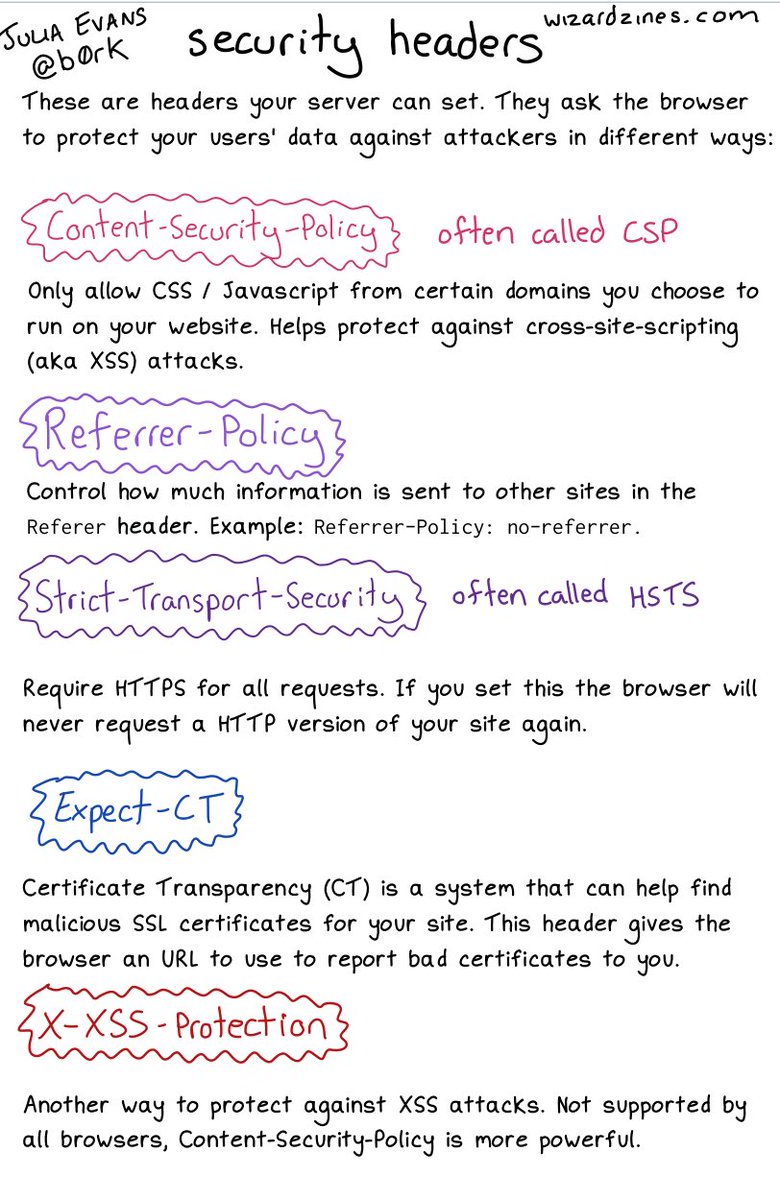
Many http headers via 🔎Julia Evans🔍 on Twitter: “some security headers… “

Posted by jpluimers on 2021/07/20

An image on CORS will follow; likely more on related topics too. [WayBack] 🔎Julia Evans🔍 on Twitter: “some security headers… “ about:

Interesting comments in the thread.

More to follow: [Archive.is] 🔎Julia Evans🔍 on Twitter: “going to talk about CORS headers on a different page because that’s a Whole Thing but i’d love to know what else I left out / got wrong here :)” including these:

Read the rest of this entry »

Posted in Communications Development, Development, Encryption, HTTP, https, HTTPS/TLS security, Internet protocol suite, Power User, Security, TCP | Leave a Comment »

Criminals are mailing altered Ledger devices to steal cryptocurrency: looks added USB flash card is from Intenso

Posted by jpluimers on 2021/06/28

Last week, Bleeping Computer write about [Wayback] Criminals are mailing altered Ledger devices to steal cryptocurrency:

Scammers are sending fake replacement devices to Ledger customers exposed in a recent data breach that are used to steal cryptocurrency wallets.

The fake Ledger hardware wallet has a piggy back USB flash device on it (image from Mike):

[Archive.is] _MG_ on Twitter: “Malicious hardware implant in the wild! I helped @LawrenceAbrams dig into this. It’s a hardware wallet with a malicious implant added. It’s being mailed to targets. Read about it here: “

This week, Jilles opened up a bunch of USB flash devices to compare them with the pictures of the fake Ledger hardware wallet, where Mike noted that likely an Intenso device. It all started with a compliment

I reacted that earlier this year, I had an Intenso device die that was the boot stick for an ESXi server which after booting (once in months at most) only does read-only access to it. If I find it back (I might have ditched it), I will open it up and post pictures.

[Wayback] Jeroen Wiert Pluimers on Twitter: “Note I had one of these Intenso sticks die in an ESXi server: it was just the boot stick, so no writes at all. “

Anyway, this was the one that died (maybe because it was very cheap):

According to [Wayback] USB Sticks | Intenso, these devices are manufactured by or for this German company:

Intenso International GmbH
Gutenbergstraße 2
49377 Vechta, Germany

Indeed the conclusion of Jilles and Mike, while figuring out the type of USB PCB, was already that opening up the device could give an indication in what geographic region or what era these fakes might originate from:

Meta-information is information too, and especially important in forensics.

Fake Ledger hardware wallet video

Mike also created a video. It is below the signature.

This was the tweet about it: [Archive.is] _MG_ on Twitter: “I sat down and walked through the Ledger Wallet implant. From phish, to Amazon poisoning attack, to implant, and what’s next. “

Attribution

As Jilles mentioned, attribution is important, though both Mike and Jilles hardly sees that with red teams. So thanks Mike and Jilles for doing the grunt work.

[Archive.is] Jilles on Twitter: “Thanks @_MG_! One of the hard things about creating cool stuff for red teams is that you usually cannot share what epic stuff you did, apart from your team and the client. Unless… You see one of your methods in the wild. And really love the tiny USB modules being used here.… https://t.co/Cs4rzvuNrT”

[Archive.is] Jilles on Twitter: “I have actually been working on assignments where attribution, purpose and forensics of discovered implants had to take place. Not a red team exercise.… “

–jeroen

Read the rest of this entry »

Posted in Power User, Security | Leave a Comment »

mnot S05E03 – Boba – Met Nerds om Tafel

Posted by jpluimers on 2021/06/18

Some links via [WayBack] S05E03 – Boba – Met Nerds om Tafel:

–jeroen

Read the rest of this entry »

Posted in LifeHacker, Power User, Privacy, Security | Leave a Comment »

Chocolatey: installing Oracle SQL Developer and updating the chocolatey package

Posted by jpluimers on 2021/05/13

Sometimes an install is not just as simple as C:\>choco install --yes oracle-sql-developer.

Edit 20210514:

Note that most of the below pain will be moot in the future as per [Archive.is] Jeff Smith 🍻 on Twitter: “we’re working on removing the SSO requirement, it’s already done for @oraclesqlcl – see here … “ referring to [Wayback] SQLcl now under the Oracle Free Use Terms and Conditions license | Oracle Database Insider Blog

SQLcl, the modern command-line interface for the Oracle Database, can now be downloaded directly from the web without any click-through license agreement.

It means the Oracle acount restriction will be lifted, and downloads will be a lot simpler.

I started with the below failing command, tried a lot of things, then finally almost gave up: Oracle stuff does not want to be automated, which means I should try to less of their stuff.

First of all you need an Oracle account (I dislike companies doing that for free product installs; I’m looking at Embarcadero too) by going to profile.oracle.com:

[WayBack] Chocolatey Gallery | Oracle SQL Developer 18.4.0 (also: gist.github.com/search?l=XML&q=oracle-sql-developer)

Notes

  • This version supports both 32bit and 64bit and subsequently does not have a JDK bundled with it. It has a
    dependency on the jdk8 package to meet the application’s JDK requirement.
  • An Oracle account is required to download this package. See the “Package Parameters” section below for
    details on how to provide your Oracle credentials to the installer. If you don’t have an existing account, you can
    create one for free here: https://profile.oracle.com/myprofile/account/create-account.jspx

Package Parameters

The following package parameters are required:

/Username: – Oracle username
/Password: – Oracle password

(e.g. choco install oracle-sql-developer --params "'/Username:MyUsername /Password:MyPassword'")

To have choco remember parameters on upgrade, be sure to set choco feature enable -n=useRememberedArgumentsForUpgrades.

Then the installation failed fail again: ERROR: The response content cannot be parsed because the Internet Explorer engine is not available, or Internet Explorer's first-launch configuration is not complete. Specify the UseBasicParsing parameter and try again.

The trick is to RUN IEXPLORE.EXE AS ADMINISTRATOR ONCE BEFORE INSTALLING FROM CHOCOLATEY. Who would believe that.

The reason is that the package uses Invoke-WebRequest which requires Internet Explorer and PowerShell 3. Chocolatey packages however need to be able to run on just PowerShell 2 without Invoke-WebRequest.

Maybe using cURL can remedy that; adding a dependency to is is possible, as cURL can be installed via chocolatey: [WayBack] How to Install cURL on Windows – I Don’t Know, Read The Manual. Another alternative might be [WayBack] Replace Invoke-RestMethod in PowerShell 2.0 to use [WayBack] WebRequest Class (System.Net) | Microsoft Docs.

Read the rest of this entry »

Posted in CertUtil, Chocolatey, CommandLine, Database Development, Development, DVCS - Distributed Version Control, git, Hashing, OracleDB, Power User, PowerShell, Security, SHA, SHA-1, Software Development, Source Code Management, Windows, XML, XML/XSD | Leave a Comment »

Certified Secure – XS4ALL Challenge

Posted by jpluimers on 2021/04/23

This was a cool one a few years back: [WayBack] Certified Secure – XS4ALL Challenge

–jeroen

Posted in Fun, History, Power User, Security | Leave a Comment »

<3 "Minimum Defendable Product": it is part of "Minimum Viable Product".

Posted by jpluimers on 2021/04/21

An important concept in [Archive.is] Kristian Köhntopp on Twitter: “<3 “Minimum Defendable Product”. Das ist ein wichtiges Konzept, das übernehme ich in meinen Sprachgebrauch.… “ quoting

[Archive.is] Mario Hachemer on Twitter: “Ich hab einen Vortrag gehalten zu dem Thema IT Security in Start-ups. Einen Begriff den ich zu dem Zweck definiert hab war das “Minimum Defendable Product” im Kontrast zum MVP. Es bietet sich an als Startup kritisch zu ermitteln welche Assetklassen man sichern kann. Das spart.… “

It is from this thread (also a threat) [Archive.is] Kristian Köhntopp on Twitter: “Operational excellence… “:

Operational excellence

Secrets gehören nicht in Source. Keine SSL Keys, keine Datenbank Passworte, und auch sonst nichts.

In Source gehört Code, der Secrets aus einem Secrets Service (Vault et al) holt, oder, wenn man einige Jahre hinterher ist, aus Files, die von hierasecrets gebaut werden.
Auch zum Testen gehören keine Secrets in den Code. auch hier können Testkeys wie in Production provisioniert werden und nach dem Test verworfen werden (wenn man will)

Die Option, Secrets im Code zu haben muss im Code Review angemeckert werden.
Willkommen in 2021, willkommen zu Operational Excellence.

[Wayback] docs.aws.amazon.com/config/latest/…
Hier die passende AWS OE Security Pillar

The first tweet quoted a surprise about the Luca App (which is highly controversial in Germany: it is a Corona contact tracing app which has some [Wayback] severe security issues):

Read the rest of this entry »

Posted in Conference Topics, Conferences, Development, Event, Security, Software Development | Leave a Comment »

Some links with notes on WoonVeilig/Egardia security system communications, protocols and support by 3rd party home automation apps

Posted by jpluimers on 2021/03/23

Security issues for older models (mainly GATE01 and WV-1716 systems; which used a lot of Climax components):

A more recent security review:

Physical security is important too; ensure the system is in an enclosed closet, powered by a UPS and your communication lines are secured as well: [WayBack] Manipulationen an Alarmanlagen verhindern – Smarthomewiki

Dutch links on the hardware connections and protocols used:

More recent information:

API usage:

More subdomains (in 2019) via:

–jeroen

Read the rest of this entry »

Posted in Communications Development, Development, Power User, Security, Software Development | Leave a Comment »