Posted by jpluimers on 2016/12/30
When you ship OpenSSL DLLs, you should provide an update mechanism outside of your regular product cycle that updates these shortly after vulnerabilities are fixed.
Few if any products do that. So I made an overview from products and OpenSSL DLL versions I had installed on various systems.
I’m a developer, so the list is biased towards tools I use often.
All of them are vulnerable: [WayBack] https://www.openssl.org/news/vulnerabilities.html
- 1.0.2.h by ContinuaCI 1.8.1.185 PostgreSQL and Avast 12.3
- 1.0.2.g by SourceTree 1.9.x embedded git_local
- 1.0.2d by Git for Windows 2.6.1
- 1.0.2a by SQLite browser 3.7.0
- 1.0.1m by Delphi 10.0 Seattle
- 1.0.1l by Ruby 2.3
- 1.0.1f by SlikSvn 1.8.5
- 1.0.1g by Delphi XE8, Delphi XE7, VMware Workstation OVF tool and Adobe Creative Cloud 2.8.1
- 1.0.0g by Delphi XE6, Delphi XE5, Delphi XE4, Delphi XE3, Appmethod 1.13 and CollabNet SVN Client 1.7.5
- 1.00d by MarkdownPad 2
- 1.0.0 by FinalBuider 7 XE2 and FinalBuilder 7 EE
- 0.9.8za by VMware Remote Console Plug-in 5.1 and VMware Virtual Infrastructure Client 5.1
- 0.9.8y by VMware VIX Workstation 10
- 0.9.8t by Veaam Backup and Replication
- 0.9.8r by ContinuaCI 1.8.1.185 hg support, VMware VIX and VMware Workstation 8.0.2
- 0.9.8q by Veeam Backup Transport, Veaam Backup, xampp 1.7.4 and Replication and VMware Virtual Infrastructure Client 5.0
- 0.9.8o by xampp 1.7.4
- 0.9.8l by xampp 1.7.4
- 0.9.8n by Delphi XE2, Delphi XE and VMware VIX Workstation 7.1.0
- 0.9.8m by VMware VMRC Plug-in, VMware VIX and VMware Workstation 8.0.2
- 0.9.8i by VMware Virtual Infrastructure Client 4.1
- 0.9.8d by Database Workbench Pro 4.4.3, Database Workbench Pro 5.2.4 and VMware vSphere CLI Perl
- 0.9.8b by Adobe Creative Suite 5
- 0.9.7m by VMware VIX server 1.0.9
- 0.9.7l by VMware VIX VIServer 2
- N/A by Adobe Create Suite 5 and VMware VIX server 1
–jeroen
via: [WayBack] Does Delphi installer install OpenSSL dll’s?
PS: Below some Software Archeology related links in the comments.
Posted in .NET, CollabNet, Delphi, Development, DVCS - Distributed Version Control, git, OpenSSL, Power User, Ruby, Security, Software Development, Source Code Management, SourceTree, Subversion/SVN | 7 Comments »
Posted by jpluimers on 2016/12/30
Now that everyone has had enough time to get proper TLS certificates using for instance LetsEncrypt, it’s time to up the ante: score better than an A on the SSL Labs tests from either their main site or dev site:
Here are some links to get there:
–jeroen
Posted in *nix, Apache2, Communications Development, Development, Encryption, Internet protocol suite, Let's Encrypt (letsencrypt/certbot), Power User, Security, TCP, TLS | Leave a Comment »
Posted by jpluimers on 2016/12/09
I’m going to try to make room in my agenda to follow this course.
–jeroen
via: [WayBack] Alan Cox – Google+
Posted in Power User, Security | Leave a Comment »
Posted by jpluimers on 2016/11/20
Conclusions:
- Always put your IoT devices behind a firewall
- Isolate each IoT device into it’s own “world” that can communicate as little with the rest of your networks as possible
- Preferably isolate each set of IoT devices that do need to communicate in their LoT (Lan of Things)
- Use Ad-Blockers
“1/x: So I bought a surveillance camera”: [WayBack] Rob Graham 🦃 on Twitter: “1/x: So I bought a surveillance camera https://t.co/HbmPzrZgFK”
Interesting: [WayBack] Errata Security: Configuring Raspberry Pi as a router
Via: [WayBack] Plugging in a new IP webcam. 98 seconds. infected. Wow. https://twitter.com/E… – G+ Jan Wildeboer
Interesting: [WayBack] Errata Security: Configuring Raspberry Pi as a router
Of course Rob tried many webcams to find a vulnerable one. And putting telnet port 23 to the open is not the best idea, but people do that or get an indirect infection by some piece of JavaScript from an Ad-Network that searches for local vulnerable devices. That’s how the internet works!
Since Twitter and other social media ten to show the non-interesting part of a stream, here is the full one (no time to edit out the superfluous stuff):
Read the rest of this entry »
Posted in IoT Internet of Things, Network-and-equipment, Power User, Security | Leave a Comment »
Posted by jpluimers on 2016/11/18
Security always has the human factor involved which means that we screw up like here:
Source: [WayBack] If you are a KDE neon user, reinstall your distro now! | CIO
A little blunder was committed by the core developers that made the entire archive insecure:
“Best practice when setting that up is to use the trusted SSH protocol to open a tunnel and upload through that,” said Riddell, “Unfortunately in setting up that new archive I had it listening for uploads on the whole network not just the local SSH tunnel.”
–jeroen
via: [WayBack] hmmm – looks legithttp://www.cio.com/article/3142789/linux/if-you-are-a-kde-neon-user-reinstall-your-distro-now.html – Joe C. Hecht – Google+
Posted in Power User, Security | Leave a Comment »
Posted by jpluimers on 2016/10/28
I’m really glad that more and more suppliers are providing sha hashes for their downloads.
It allows you to verify an already downloaded binary is in fact
For instance, Cisco does this with their Jabber Messaging software. That way I could verify the (when I wrote this) most recent versions were indeed the ones I already had by just clicking on the filename (no need to click on the Download button).
- Mac:
- $ shasum -a 512 CiscoJabberMac-11.0.0.216341.zipbd03b0f8542e0244b30601647e991eec74c2e5b358bf68cdf1b4d6f4e62f96fed83f813d0033e696012dc320a80cc96b9c17d5f98250d44b5252c06732c16df5 CiscoJabberMac-11.0.0.216341.zip
- Windows:
- $ shasum -a 512 CiscoJabber-Install-ffr.11-0-1.zip
7335b739498ca365952325931709bae1c0f5916302117b75fc06862d5623a017834ef3f6fafe76feb722dca5618c1e2d11be17e739a59e0b76a3c382f6d9c31b CiscoJabber-Install-ffr.11-0-1.zip
–jeroen
Posted in Hashing, Power User, Security | Leave a Comment »
Posted by jpluimers on 2016/10/24
This Plain Text Offenders site lists email screenshots of organisations sending back plain-text passwords they kept on file (According to Robert Love, Idera/Embarcadero should be on the list as well).
It is one of the most horrible things that can be done for a password.
Business and IT do many horrible things, so I really hope someone will start a similar site about SSL Labs F-rated domains. The ones that are so broken that they degraded their https to virtually plain-text http quality.
In the past, a notorious example of this was Embarcadero, who in the past managed to get F-rating or had wrong configurations on the below domains, therefore preventing me from logging in and getting new products from them (which is far worse than them not cleaning up their bug database):
Read the rest of this entry »
Posted in Delphi, Development, Hashing, https, OpenSSL, Power User, Public Key Cryptography, QC, Security, Signing, Software Development | 3 Comments »
Posted by jpluimers on 2016/10/13
IRC #letsencrypt-dev today:
wiert
Is there any way for `certbot-auto` to show for which domains/apache-configs it has certificates?
pdeee
wiert, we actually made a ticket for 0.10.0 to do that
https://github.com/certbot/certbot/issues/3615
in the mean time, your imperfect options are:
for file in /etc/letsencrypt/live/*/fullchain.pem ; do echo -n $file ; openssl x509 -text -noout -in $file | grep DNS; done
for installation in Apache configs, you can follow that with:
grep /etc/letsencrypt/live /etc/apache2/sites-enabled/*
wiert
@pdeee on OpenSuSE, the last statement should be
grep -r /etc/letsencrypt/live /etc/apache2/*
–jeroen
Posted in *nix, Encryption, Let's Encrypt (letsencrypt/certbot), Linux, openSuSE, Power User, Security, SuSE Linux | Leave a Comment »
Posted by jpluimers on 2016/09/23
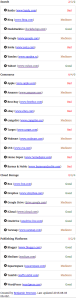 HTTPSWatch tracks the HTTPS support of prominent websites.
Source: HTTPSWatch | Global
Like on the right side.
https isn’t everywhere yet, but growing.
–jeroen
Posted in https, Power User, Security | Leave a Comment »


 The Wiert Corner - irregular stream of stuff