Archive for the ‘Security’ Category
Posted by jpluimers on 2016/09/23
Logon at https://login.yahoo.com
At the top right, click on your name, hover over your name and click “Account Info” to get to Personal Info – Yahoo Account Settings – https://login.yahoo.com/account/personalinfo
On the left menu, click on “Account Security”.
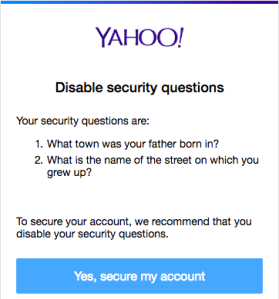
Click “Disable security questions”.
Disable security questions – yahoo thinks they’re a bad idea anyway
In the dialog, click “Yes, secure my account”
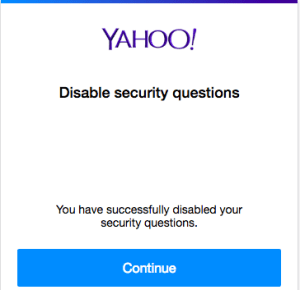
In the next dialog, click “Close”
Then verify your other security options (like phone/email recovery and two-factor logon) to enhance your security even more.
–jeroen
Posted in Power User , Security | Leave a Comment »
Posted by jpluimers on 2016/08/29
The canonical answer on extensions and formats like csr, pem, key, pkcs12, pfx, p12, der, cet, cer, crt, p7b, crl, PEM, PKCS7, PKCS12, PKCS10, DER, text, binary, ASN1: certificate – What is a Pem file and how does it differ from other OpenSSL Generated Key File Formats? – Server Fault .
Oh and it contains some openssl conversion tips as well, though this link has more: DER vs. CRT vs. CER vs. PEM Certificates and How To Convert Them .
–jeroen
Posted in Encryption , OpenSSL , Power User , Security | Leave a Comment »
Posted by jpluimers on 2016/08/26
There are quite a few pages on Webserver Cypher Hardening. This is yet another one born because I didn’t know how to compare these lists and why they were so different.
Apparently, OpenSSL has various ways of naming (groups of) cyphers. OpenSSL also disregards any cyphers it doesn’t have.
Basically there are two far ends for cypher lists:
Fully name all cyphers and their order: long list fine grained control
Name groups including group order and let OpenSSL expand the groups: short list but coarse grained control.
A way to compere them using openssl ciphers -V is answered at ssl – Hardening web server cyphers: which cypher list to choose, or how to map between Mozilla and Hynek – Server Fault .
Some of the cypher lists I found:
There are two great SSL tests I found out. The first one is online, the second one from the shell.
SSL Labs:
shell based SSL/TLS tester: testssl.sh .
–jeroen
Posted in *nix , OpenSSL , Power User , Security | Leave a Comment »
Posted by jpluimers on 2016/08/17
A while ago, testssl.sh [WayBack ] needed Darwin binaries (for OS X ): Supply Darwin binaries + install documentation · Issue #127 · drwetter/testssl.sh [WayBack ]
So I created the small Bourne shell (sh ) script below to deliver them.
It allows me to update these gists:
The build script itself is in a gist as well: https://gist.github.com/f4de3937630b87753133.git [WayBack ]
It helped me to contribute to these testssl.sh issues:
Not all of these binaries are in https://github.com/drwetter/testssl.sh/tree/master/bin [WayBack ] as it makes the testssl.sh repository too bloated. Some (including non-OSX builds made by others) are here:
Eventually the script might get merged into https://github.com/drwetter/testssl.sh/blob/master/utils/make-openssl.sh [WayBack ] as there is a Darwin switch in this commit: https://github.com/drwetter/testssl.sh/commit/6efc3e90f52e5926b0853d3b2fb221b631dcf452 [WayBack ]
Read the rest of this entry »
Posted in Apple , Development , Mac , Mac OS X / OS X / MacOS , Mac OS X 10.4 Tiger , Mac OS X 10.5 Leopard , Mac OS X 10.6 Snow Leopard , Mac OS X 10.7 Lion , MacBook , MacBook Retina , MacBook-Air , MacBook-Pro , MacMini , OpenSSL , OS X 10.10 Yosemite , OS X 10.8 Mountain Lion , OS X 10.9 Mavericks , Power User , Security , Software Development , xCode/Mac/iPad/iPhone/iOS/cocoa | Leave a Comment »
Posted by jpluimers on 2016/08/08
Attack from the ’90s resurfaces more deadly than before
Source: Windows Flaw Reveals Microsoft Account Passwords, VPN Credentials
TL;DR: block LAN->WAN port 445
Note this won’t affect web-dav shares like \live.sysinternals.com\DavWWWRoot as that uses ports 443 and 80.
–jeroen
via:
Posted in Communications Development , Development , https , Internet protocol suite , Microsoft Surface on Windows 7 , NTLM , Power User , Security , SMB , TCP , WebDAV , Windows , Windows 10 , Windows 7 , Windows 8 , Windows 8.1 , Windows 9 , Windows Server 2008 , Windows Server 2008 R2 , Windows Server 2012 , Windows Server 2012 R2 , Windows Vista , Windows XP | Leave a Comment »
Posted by jpluimers on 2016/08/03
Frequent password changes are the enemy of security, FTC technologist says
Source: Kristian Köhntopp – Google+
Since the 1980s I’ve been advocating the above opinion and I’m glad some people now agree with me.
If you ever hire or employ me and force such a regular password change policy upon me without allowing me to use a password manager that can communicate securely with the cloud (which means you don’t play TLS man-in-the-middle) then I will either:
create a password-change script that invalidates the password history you keep and re-use my really secure password of choice.
if that fails: add an incrementing value to a reasonably secure base password.
–jeroen
Posted in Power User , Security | Leave a Comment »
Posted by jpluimers on 2016/07/25
Interesting:
just for completeness:
testssl.sh is a nice, console-based tool to check ssl-setups of any ssl/ts – enabled servers, in oposite to ssllabs
It helped me solving this:
Host: http://www.beginend.net
Reason: error:14094410:SSL routines:SSL3_READ_BYTES:sslv3 alert handshake failure
Within the testssl.sh directory, you can use this to test with many cyphers:
OPENSSL=./openssl-bins/openssl-1.0.2-chacha.pm/openssl32-1.0.2pm-krb5.chacha+poly ./testssl.sh www.example.com
–jeroen
via
Posted in *nix , https , OpenSSL , Power User , Security | Leave a Comment »
Posted by jpluimers on 2016/07/20
Great explanation of Diffie-Hellman Key Exchange – YouTube .
It is based on mixing colors and some colors of the mix being private.
Brilliant!
–jeroen
VIDEO
Posted in Algorithms , Development , Encryption , Hashing , https , OpenSSL , Power User , Public Key Cryptography , Security , Software Development | Leave a Comment »
Posted by jpluimers on 2016/07/11
Still relevant after a few years: DEFCON 17: More Tricks For Defeating SSL – YouTube .
VIDEO
I landed there after trying to find out how to verify the Internic root server file is actually pubished by Internic via authentication – Ways to sign gpg public key so it is trusted? – Information Security Stack Exchange .
I remember reading his “if you have to perform any cryptographic operation before verifying the MAC on a message you’ve received, it will somehow inevitably lead to doom” post (Moxie Marlinspike >> Blog >> The Cryptographic Doom Principle ), but never noticed his videos .
It is still relevant as there are lots of implementations still vulnerable to these kinds of attacks.
Many more of his blog entries are interesting as well:
Read the rest of this entry »
Posted in Encryption , Hashing , https , OpenSSL , PKI , Power User , Public Key Cryptography , Security , Signing | Leave a Comment »


 Steps to disable the security questions in Yahoo:


 The Wiert Corner - irregular stream of stuff