Archive for the ‘ESXi4’ Category
Posted by jpluimers on 2022/02/16
Posted in ESXi4, ESXi5, ESXi5.1, ESXi5.5, ESXi6, ESXi6.5, ESXi6.7, ESXi7, Power User, Virtualization, VMware, VMware ESXi | Leave a Comment »
Posted by jpluimers on 2022/02/15
This post amends the post last week on rsync backup of your ESXi box: How to make a statically linked rsync binary « The Wiert Corner – irregular stream of stuff.
Two weeks ago, I posted about Source: ESXi: searching for “vim-cmd vmsvc/message” lead me to the “Managing ESXi Without VI Client” series of blog posts.
It got me looking more deeply in the VM-Help site, and I found [Wayback] Developing for VMware ESXi – Virtual Machine and VPS Tutorials, for which I have materialised the links below and checked their WayBack machine status.
Compiling Utilities for ESXi
Given that ESXi is not based on Linux you won’t find any installer which you could use to install any Linux components that you might want to add to ESXi. However, ESXi does make use of a number of Open Source packages such as OpenSSL, Python, and Openwsman (WS-Management). The key to compiling a utility for ESXi is creating a statically linked version of the tool. With a statically linked version, there are no dependencies on other libraries that may not be present on ESXi. The downside to this method of compiling is that the utility may be larger than a dynamically linked version. With a dynamically linked version the utility assumes that other libraries are present and can rely on subroutines within those libraries.
Compiling rsync – [Wayback] How to compile a statically linked rsync binary for ESXi
Compiling Busybox – [Wayback] How to compile Busybox for ESXi … kind of Part 1
Discussion of compiling UNFS – http://www.vm-help.com/forum/viewtopic.php?f=16&t=2280&p=10185&e=10185 (not archived in the WayBack machine nor available on-line)
Notes on compling binaries – [Wayback] Stjepan Groš – Homepage
Compiling Drivers for ESXi
Given the common misunderstanding that ESXi is Linux based, a new user often inquires about the process of copying a Linux driver to their ESXi install. This is not possible. ESXi includes a Linux driver compatibility module. This allows for Linux source code to be used to compile drivers for ESXi, but the drivers are still specific to ESXi. The following links provides some samples and notes for compiling drivers for ESXi.
Compiling a Silicon Image 3132 driver – [Archive.is] Wayback: Adding Driver Support to VMware ESXi 4 | Tip’s Notebook
Compiling a Marvell sky2 driver – [Wayback] Using a Marvell LAN card with ESXi 4 – KernelCrash
(Note: This post was initially written when ESXi 4.0 was available. As of late 2010, ESXi 4.1 has been released, and it does actually include a sky2 driver that may or may not work with various Marvell LAN chipsets. The post is still relevant (especially the comments) if your particular Marvell chipset does not work with the sky2 driver in ESXI 4.1. Also, the post is relevant if you’re interested in porting other network drivers to ESXi)
Open Virtualization Drivers development notes
Being from the ESXi 4 and 5 era, the links seem to hold up remarkably well. Despite ESXi 3 being Linux based (see [Archive.is] VMware ESX Server – Wikipedia, the free encyclopedia), as opposed to ESXi 4 and up that run a microkernel, Linux based tools still can be used to develop tooling and drivers.
–jeroen
Posted in ESXi4, ESXi5, ESXi5.1, ESXi5.5, ESXi6, ESXi6.5, ESXi6.7, ESXi7, Power User, Virtualization, VMware, VMware ESXi | Leave a Comment »
Posted by jpluimers on 2022/02/02
Posted in ESXi4, ESXi5, ESXi5.1, ESXi5.5, ESXi6, ESXi6.5, ESXi6.7, ESXi7, Power User, Virtualization, VMware, VMware ESXi | Leave a Comment »
Posted by jpluimers on 2020/01/20
Rephrased from [WayBack] Jeroen Wiert Pluimers – Google+:
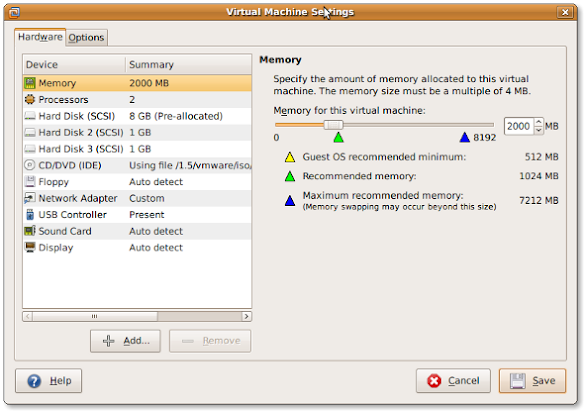
If you install a virtual machine, ensure the disk controller and disks are SCSI based.
This has many advantages, including:
- speed (usually the SCSI drivers can be paravirtualised)
- hot addition of new disks
It holds for virtually any virtualization platform including all non-ancient (less than ~10 year old) versions of:
- VMware (Workstation, Viewer, but I expect this also to work on vSphere, ESXI, Fusion)
- Hyper-V
- KVM (and therefore Proxmox)
- VirtualBox
Based on my notes in the above link and the links below:
Note this isn’t just for Linux guests/hosts: Most guests (including Windows) can do a SCSI bus re-scan and detect new SCSI devices.
The trick here is that the guest must already have a virtual SCSI controller (adding that will require a reboot of the guest).
Then adding a new SCSI disk on that controller from any host (Windows, Mac, ESXi, vSphere) should work fine.
–jeroen
Posted in ESXi4, ESXi5, ESXi5.1, ESXi5.5, ESXi6, ESXi6.5, Fusion, Hyper-V, KVM Kernel-based Virtual Machine, Power User, Proxmox, View, VirtualBox, Virtualization, VMware, VMware ESXi, VMware Workstation | Leave a Comment »
Posted by jpluimers on 2019/05/09
For my own ference:
disk space under VMFS-3 is organized according to four resource types. They are : blocks, sub-blocks, pointer blocks, and file descriptors. Resources are grouped into clusters, which form cluster groups. Every resource type is administered by one or a number of system files. Lets have a look at what those abbreviated file names stand for:
- fbb.sf = file block bitmap.sf
- fdc.sf = file descriptor cluster.sf
- pbc.sf = pointer block cluster.sf
- sbc.sf = sub-block cluster.sf
- vh.sf = volume header.sfs
- dd.sf = scsi device description.sf
The VMFS-5 uses one more system file:
- pb2.sf = pointer block 2.sf
Source: [Archive.is] VMFS metadata files
Posted in ESXi4, ESXi5, ESXi5.1, ESXi5.5, ESXi6, ESXi6.5, Power User, Virtualization, VMware, VMware ESXi | Leave a Comment »
Posted by jpluimers on 2019/04/29
I found out that I had some very old draft notes below, but since then the source has moved to github: lamw/ghettoVCB: ghettoVCB.
Since I find VIB easier to use than the Offline Bundle (for differences see [WayBack] VIB vs. Offline Bundle and [WayBack] VMware Front Experience: ESXi Community Packaging Tools) these are the VIB steps to get it installed:
- Download https://github.com/lamw/ghettoVCB/raw/master/vghetto-ghettoVCB.vib
- Put it in the
/tmp directory on your ESXi box (using for instance FileZilla, WinSCP, SCP or other tools)
- Install it using
esxcli software vib install -v /tmp/vghetto-ghettoVCB.vib -f
Then use it to make backups or restores as described at:
Note that contrary to the documentation, the config file has moved to /etc/ghettovcb/ghettoVCB.conf.
Because of Keeping your root visorfs clean: point the path to your own binaries stored on a vmfs volume I’m using a copy of that stored in my local-bin directory (which is backed-up by rsync to another disk) and a small ghettoVcb.sh bootstrap script referencing that config-file, so the backup command for one command now is this:
ghettoVcb.sh -m diaspore.opensuse-Tumbleweed-x64
or this for all VMs (about 2 hours from NVME SSD to HDD; will probably make this a 2 stage thing):
ghettoVcb.sh -a
VMs are backed-up under the directory specified in VM_BACKUP_VOLUME(below that’s ./) in a schema like this:
./diaspore.opensuse-Tumbleweed-x64

./diaspore.opensuse-Tumbleweed-x64/diaspore.opensuse-Tumbleweed-x64-2017-09-24_16-07-08

./diaspore.opensuse-Tumbleweed-x64/diaspore.opensuse-Tumbleweed-x64-2017-09-24_16-07-08/diaspore.opensuse-Tumbleweed-x64.vmx

./diaspore.opensuse-Tumbleweed-x64/diaspore.opensuse-Tumbleweed-x64-2017-09-24_16-07-08/diaspore.opensuse-Tumbleweed-x64-flat.vmdk

./diaspore.opensuse-Tumbleweed-x64/diaspore.opensuse-Tumbleweed-x64-2017-09-24_16-07-08/diaspore.opensuse-Tumbleweed-x64.vmdk

./diaspore.opensuse-Tumbleweed-x64/diaspore.opensuse-Tumbleweed-x64-2017-09-24_16-07-08/STATUS.ok
In the future, I might move to an NFS based back-up based on these links:
–jeroen
Very old notes:
–jeroen
Posted in ESXi4, ESXi5, ESXi5.1, ESXi5.5, ESXi6, ESXi6.5, Power User, Virtualization, VMware, VMware ESXi | Leave a Comment »
Posted by jpluimers on 2019/03/13
Reminder to self when checking “new” disks to see what partitions they contain before formatting them as VMFS.
There is a truckload information at [WayBack] Using the partedUtil command line utility on ESXi and ESX (1036609) | VMware KB.
A few tips; example output is further below:
- Disks are listed under
/vmfs/devices/disks/ where there are two entries per device: a path leading to the device, and a link to that path which starts with vml. which I filter out with grep.
- If a disk under under
/vmfs/devices/disks/ ends with :# where # is a number, then it is a partition
- Just skip
partedUtil get as partedUtil getptblwill give you exactly the same information,
- plus an extra initial line indicating what kind of partition table it is. KB 1036609 has a longer list, but these are the ones you usually see:
unknown: the disk has no partition table yet (usually), or the type of partition table cannot be determined (hardly)gpt: there is a GUID Partition Tablemsdos: there is a Master Boot Record partition table
- on ESXi 6.x two extra columns listing the partition GUID and partition type description
- The output of
partedUtil is unformatted, which means it is easy to parse, but hard to read for humans. You can pipe through sed 's/ /\t/g' (as there is no tr on the ESXi busybox)
Some more background reading
On scripting:
- The shell is
sh (always been there)
- There is
Python (ESXi 5.1 has Python 2.7.8; ESXi 6.5 has Python 3.5.3; it has likely been available in earlier versions too).
On device names:
On errors:
-
~ # find /vmfs/devices/disks/ | grep T1500LM0032D9YH148

/vmfs/devices/disks/t10.ATA_____ST1500LM0032D9YH148__________________________________Z110C4Q0a

~ # partedUtil getptbl /vmfs/devices/disks/t10.ATA_____ST1500LM0032D9YH148__________________________________Z110C4Q0

unknown

182401 255 63 2930277168

~ #
I know of three VMFS types:
- VMFS-3: Supported in ESXi 3.X, 4.X, 5.x & 6.x; deprecated as of 6.0 (cannot be created as of 6.0), has quite some limitations.
- VMFS-4: got never released.
- VMFS-5: Can be converted from VMFS-3
- VMFS-6: Cannot be converted from other VMFS types
Some interesting links about the various VMFS types:
Busybox has been updated over time:
Examples and output
Example outputs on one of my systems, of which I stripped most of the disks as they’re not really relevant here.
[root@ESXi-X10SRH-CF:~] ls -1 /vmfs/devices/disks/ | grep -v '^vml\.'
naa.5000c50087762d1b
...
naa.600605b00aa054a0ff000021022683ae
naa.600605b00aa054a0ff000021022683ae:1
...
t10.ATA_____ST1500LM0032D9YH148__________________________________Z110C4Q0
t10.ATA_____Samsung_SSD_850_PRO_2TB_________________S2KMNCAGB04321L_____
t10.ATA_____Samsung_SSD_850_PRO_2TB_________________S2KMNCAGB04321L_____:1
...
t10.SanDisk00Ultra_Fit000000000000004C530001240406103372
t10.SanDisk00Ultra_Fit000000000000004C530001240406103372:1
t10.SanDisk00Ultra_Fit000000000000004C530001240406103372:5
t10.SanDisk00Ultra_Fit000000000000004C530001240406103372:6
t10.SanDisk00Ultra_Fit000000000000004C530001240406103372:7
t10.SanDisk00Ultra_Fit000000000000004C530001240406103372:8
t10.SanDisk00Ultra_Fit000000000000004C530001240406103372:9
[root@ESXi-X10SRH-CF:~] partedUtil getptbl /vmfs/devices/disks/t10.ATA_____ST1500LM0032D9YH148__________________________________Z110C4Q0
unknown
182401 255 63 2930277168
[root@ESXi-X10SRH-CF:~] partedUtil get /vmfs/devices/disks/t10.ATA_____ST1500LM0032D9YH148__________________________________Z110C4Q0
182401 255 63 2930277168
[root@ESXi-X10SRH-CF:~] partedUtil get /vmfs/devices/disks/t10.ATA_____SAMSUNG_MZHPV512HDGL2D00000______________S1X1NYAGB09589______
62260 255 63 1000215216
1 2048 1000214527 0 0
[root@ESXi-X10SRH-CF:~] partedUtil getptbl /vmfs/devices/disks/t10.ATA_____SAMSUNG_MZHPV512HDGL2D00000______________S1X1NYAGB09589______
gpt
62260 255 63 1000215216
1 2048 1000214527 AA31E02A400F11DB9590000C2911D1B8 vmfs 0
[root@ESXi-X10SRH-CF:~] partedUtil getptbl /vmfs/devices/disks/t10.SanDisk00Ultra_Fit000000000000004C530001240406103372
gpt
3738 255 63 60062500
1 64 8191 C12A7328F81F11D2BA4B00A0C93EC93B systemPartition 128
5 8224 520191 EBD0A0A2B9E5443387C068B6B72699C7 linuxNative 0
6 520224 1032191 EBD0A0A2B9E5443387C068B6B72699C7 linuxNative 0
7 1032224 1257471 9D27538040AD11DBBF97000C2911D1B8 vmkDiagnostic 0
8 1257504 1843199 EBD0A0A2B9E5443387C068B6B72699C7 linuxNative 0
9 1843200 7086079 9D27538040AD11DBBF97000C2911D1B8 vmkDiagnostic 0
[root@ESXi-X10SRH-CF:~] partedUtil get /vmfs/devices/disks/t10.SanDisk00Ultra_Fit000000000000004C530001240406103372
3738 255 63 60062500
1 64 8191 0 128
5 8224 520191 0 0
6 520224 1032191 0 0
7 1032224 1257471 0 0
8 1257504 1843199 0 0
9 1843200 7086079 0 0
[root@ESXi-X10SRH-CF:~] partedUtil getptbl /vmfs/devices/disks/t10.SanDisk00Ultra_Fit000000000000004C530001240406103372 | sed 's/ /\t/g'
gpt
3738    255 63  60062500
1   64  8191    C12A7328F81F11D2BA4B00A0C93EC93B    systemPartition 128
5   8224    520191  EBD0A0A2B9E5443387C068B6B72699C7    linuxNative 0
6   520224  1032191 EBD0A0A2B9E5443387C068B6B72699C7    linuxNative 0
7   1032224 1257471 9D27538040AD11DBBF97000C2911D1B8    vmkDiagnostic   0
8   1257504 1843199 EBD0A0A2B9E5443387C068B6B72699C7    linuxNative 0
9   1843200 7086079 9D27538040AD11DBBF97000C2911D1B8    vmkDiagnostic   0
[root@ESXi-X10SRH-CF:~] partedUtil get /vmfs/devices/disks/t10.SanDisk00Ultra_Fit000000000000004C530001240406103372 | sed 's/ /\t/g'
3738    255 63  60062500
1   64  8191    0   128
5   8224    520191  0   0
6   520224  1032191 0   0
7   1032224 1257471 0   0
8   1257504 1843199 0   0
9   1843200 7086079 0   0
[root@ESXi-X10SRH-CF:~] partedUtil --help
Usage:
 Get Partitions : get
 Set Partitions : set  ["partNum startSector endSector type attr"]*
 Delete Partition : delete
 Resize Partition : resize
 Get Partitions : getptbl
 Set Partitions : setptbl   ["partNum startSector endSector type/guid attr"]*
 Fix Partition Table : fix
 Create New Label (all existing data will be lost): mklabel
 Show commonly used partition type guids : showGuids
 Get usable first and last sectors : getUsableSectors
 Fix GPT Table interactively : fixGpt

[root@ESXi-X10SRH-CF:~] partedUtil showGuids
 Partition Type       GUID
 vmfs                 AA31E02A400F11DB9590000C2911D1B8
 vmkDiagnostic        9D27538040AD11DBBF97000C2911D1B8
 vsan                 381CFCCC728811E092EE000C2911D0B2
 virsto               77719A0CA4A011E3A47E000C29745A24
 VMware Reserved      9198EFFC31C011DB8F78000C2911D1B8
 Basic Data           EBD0A0A2B9E5443387C068B6B72699C7
 Linux Swap           0657FD6DA4AB43C484E50933C84B4F4F
 Linux Lvm            E6D6D379F50744C2A23C238F2A3DF928
 Linux Raid           A19D880F05FC4D3BA006743F0F84911E
 Efi System           C12A7328F81F11D2BA4B00A0C93EC93B
 Microsoft Reserved   E3C9E3160B5C4DB8817DF92DF00215AE
 Unused Entry         00000000000000000000000000000000
[root@ESXi-X10SRH-CF:~] cat /local/bin/what-is-my-shell.sh
if test -n "$ZSH_VERSION"; then
  PROFILE_SHELL=zsh
elif test -n "$BASH_VERSION"; then
  PROFILE_SHELL=bash
elif test -n "$KSH_VERSION"; then
  PROFILE_SHELL=ksh
elif test -n "$FCEDIT"; then
  PROFILE_SHELL=ksh
elif test -n "$PS3"; then
  PROFILE_SHELL=unknown
else
  PROFILE_SHELL=sh
fi
echo $PROFILE_SHELL
echo $SHELL
[root@ESXi-X10SRH-CF:~] /local/bin/what-is-my-shell.sh
sh
/bin/sh
[root@ESXi-X10SRH-CF:~] python --version
Python 3.5.3
[root@ESXi-X10SRH-CF:~]
–jeroen
Posted in Development, ESXi4, ESXi5, ESXi5.1, ESXi5.5, ESXi6, ESXi6.5, Power User, Software Development, Virtualization, VMware, VMware ESXi | Leave a Comment »
Posted by jpluimers on 2019/03/12
Steps to get it working on ESXi 6.x with p7zip 16.02:
- Copy the output of https://sourceforge.net/projects/p7zip/files/p7zip/16.02/p7zip_16.02_x86_linux_bin.tar.bz2/download to a place where you can reach it through http (as
wget on ESXi does not understand https)
- Follow the script below
mkdir -p /local/bin

cd /local bin

wget http://192.168.71.62/esxi/netcologne.dl.sourceforge.net/project/p7zip/p7zip/16.02/p7zip_16.02_x86_linux_bin.tar.bz2

bzip2 -d p7zip_16.02_x86_linux_bin.tar.bz2

mv p7zip_16.02/bin/7z* .

chmod 755 7z 7za 7zra
Based on much longer steps involving Windows and an older version of p7zip: 7zip on ESXi through p7zip.
–jeroen
Posted in 7zip, Compression, ESXi4, ESXi6, ESXi6.5, Power User, Virtualization, VMware, VMware ESXi | Leave a Comment »
Posted by jpluimers on 2017/05/19
Boy, I totally forgot to post this. It runs also ESXi 5.x; I’ve not tried more recent ESXi versions as they just run fine.
As a follow-up on [WayBack] VMware Communities: ESX 3.5 Whitebox on HP xw6600 …, I have installed ESXi 4.0.0.Update01-208167 on a HP XW6600 workstation.
Good news: the generic ESXi 4 installation works, whereas the HP specific ESXi 4 fails (you get a nice purple screen of death).
[WayBack] http://www.vm-help.com//esx40i/esx40_whitebox_HCL.php
–jeroen
Posted in ESXi4, ESXi5, ESXi5.1, ESXi5.5, Hardware, HP XW6600, Power User, Virtualization, VMware, VMware ESXi | Leave a Comment »
Posted by jpluimers on 2016/11/11
To grow you must first change the size of the container: the partition, the LV, or arraydevice. Then you can resize the file system. It’s the same with XFS, and NTFS. I’m only aware of Apple’sdiskutil resizevolume command that resizes the flavors of HFS+ and at the same time sets the new end valuefor the partition entry.
Source: Development of the BTRFS linux file system (not yet archived at the WayBack machine)
I will need the above for a single disk device having a BTRFS partition sandwiched between a swap and xfs partition:
# parted -l
Model: VMware Virtual disk (scsi)
Disk /dev/sda: 21.5GB
Sector size (logical/physical): 512B/512B
Partition Table: msdos
Disk Flags:

Number  Start   End     Size    Type     File system     Flags
 1      1049kB  1562MB  1561MB  primary  linux-swap(v1)  type=82
 2      1562MB  17.7GB  16.1GB  primary  btrfs           boot, type=83
 3      17.7GB  21.5GB  3799MB  primary  xfs             type=83
I’ll likekly be:
- extend the disk inin ESXi
- use gparted to move the xfs partition to the end of the disk
- use gparted to extend the btrfs partition
- use btrfs to extend the volume inside the btrfs partition
I might be able to do all this from the gparted live CD as moving xfs and growing btrfs is on the GParted — Features list.
Fingers crossed. Luckily I’ve backups (:
–jeroen
Posted in *nix, ESXi4, ESXi5, ESXi5.1, ESXi5.5, ESXi6, Linux, openSuSE, Power User, SuSE Linux, Tumbleweed, VMware, VMware ESXi | Leave a Comment »


 The Wiert Corner - irregular stream of stuff