Archive for the ‘VMware’ Category
Posted by jpluimers on 2021/04/21
Every now and then it is useful to be able to do maintenance work from the ESXi console addition to the ESXi web-user interface.
I know there are many sites having this information, but many of them forgot to format the statements with code markup, so parameters with two dashes -- (each a Wayback Unicode Character ‘HYPHEN-MINUS’ (U+002D)) now have become an [Wayback] Unicode Character ‘EN DASH’ (U+2013) which is incompatible with most console programs, especially the ESXi ones (as they are Busybox based to minimise footprint).
Note you can use this small site (which runs in-browser, so does not phone home) to get the unicode code points for any string: [Wayback] What Unicode character is this ?.
Links like below (most on the vmware.com domain) have this EN DASH and make me document things on my blog instead of trying code directly from blogs or forum posts:
So below are three commands I use that have to do with the maintenance mode (the mode that for instance you can use to update an ESXi host to the latest patch level).
-
- Check the maintenance mode (which returns
Enabled or Disabled):
esxcli system maintenanceMode get
- Enable maintenance mode (which returns nothing when succeeded, and
Maintenance mode is already enabled. when failed):
esxcli system maintenanceMode set --enable true
- Disable maintenance mode (which returns nothing when succeeded, and
Maintenance mode is already disabled. when failed):
esxcli system maintenanceMode get
Some examples, especially an the various output possibilities (commands in bold, output in italic):
# esxcli system maintenanceMode get
Disabled
# esxcli system maintenanceMode set --enable false
Maintenance mode is already disabled.
# esxcli system maintenanceMode set --enable true
# esxcli system maintenanceMode get
Enabled
# esxcli system maintenanceMode set --enable true
Maintenance mode is already enabled.
# esxcli system maintenanceMode set --enable false
# esxcli system maintenanceMode get
Disabled
I made these scripts for this:
esxcli-maintenanceMode-show.sh:
#!/bin/sh
esxcli system maintenanceMode get
esxcli-maintenanceMode-enter.sh:
#!/bin/sh
esxcli system maintenanceMode set --enable true
esxcli-maintenanceMode-exit.sh:
#!/bin/sh
esxcli system maintenanceMode set --enable false
Note I have not checked the exit codes for these esxcli commands yet, but did blog about how to do that: Busybox sh (actually ash derivative dash): checking exit codes.
–jeroen
Posted in BusyBox, Development, Encoding, ESXi6, ESXi6.5, ESXi6.7, ESXi7, Power User, Software Development, Unicode, Virtualization, VMware, VMware ESXi | Leave a Comment »
Posted by jpluimers on 2021/04/15
The free ESXi 7 download page only get these downloads:
VMware vSphere Hypervisor – Binaries
VMware vSphere Hypervisor (ESXi ISO) image
2020-06-23 | 7.0b | 351.9 MB | iso
Boot your server with this image in order to install or upgrade to ESXi (ESXi requires 64-bit capable servers). This ESXi image includes VMware Tools.
MD5SUM(¹): 6b74910d911cabcd346028071eb83682
SHA1SUM(¹): 9eeff60e4257d763f49d9b39e1dbaee4fe22acbd
SHA256SUM(¹): 7bebfc1bc0794b0964b9ee731860785794fb678d49a1f06d5e62524b805f2b72
VMware vSphere Hypervisor (ESXi) Offline Bundle
2020-06-23 | 7.0b | 346 MB | zip
Contains VIB packages and image profiles for ESXi including VMware Tools. Use the image profiles and the VIB packages with VMware Image Builder and VMware Auto Deploy to create custom image/ISO generation for ESXi deployments.
MD5SUM(¹): d40887d357dd7042d75d1460d70396ca
SHA1SUM(¹): 620bc355af3d23436eedc1ef49a62225a18f862f
SHA256SUM(¹): d26ce8c036cc2a6c1a49a15c2ecfd471f17df80b4b88e9ed4093671be6b0dec5
There have been many more ESXi versions, that some of the time you want for regression, and some of the time because they are better.
Some of the times (like right now) you do also do NOT want a version, like the current ESXi 7.0 update 2 which got retracted on March 13th, but is still available on the free vSphere 7 evaluation.
I started to notice yesterday that a few folks in the community were running into the following error after upgrading their ESXi hosts to latest 7.0 Update 2 release: Failed to load crypto64.efi Fa…
UPDATE (03/13/2021) – It looks like VMware has just pulled the ESXi online/offline depot and has updated KB 83063 to NOT recommend customers upgrade to ESXi 7.0 Update 2. A new patch is actively being developed and customers should hold off upgrading until that is made available.
UPDATE (03/10/2021) – VMware has just published KB 83063 which includes official guidance relating to the issue mentioned in this blog post.
Warning! – Mar 13 2021 Update – Don’t upgrade to 7.0 Update 2 yet.
If you try to upgrade now anyway, you may experience one of these two errors:
to update your ESXi host, you see this error:
  Loading /boot.cfg
  Failed to load crypto64.efi
  Fatal error: 15 (Not found)
to update your ESXi host, you see this error:
  [root@xd-1541-5028d:~] esxcli software profile update -p ESXi-7.0.2-17630552-standard -d https://hostupdate.vmware.com/software/VUM/PRODUCTION/main/vmw-depot-index.xml
  [NoMatchError]
  No image profile found with name 'ESXi-7.0.2-17630552-standard'
        id = ESXi-7.0.2-17630552-standard
  Please refer to the log file for more details.
  [root@xd-1541-5028d:~]
you’ll want to see this excerpt from VMware KB 83063 published on Mar 12 2021
The vSphere 7 evaluation page is always the one where to get the latest version: [Wayback/Archive.is] How do I download the latest ESXi 7.x .iso? VMWare’s site only lists 7.0.0 : vmware.
Do not get ESXi 7.0 update 2 yet [Wayback] my.vmware.com/en/group/vmware/evalcenter?p=vsphere-eval-7:
The hypervisor should be directly installed on any supported physical server targeted for hosting virtual machines.
VMware vSphere Hypervisor (ESXi ISO) image
2021-03-09 | 7.0U2 | 390.53 MB | iso
Boot your server with this image in order to install or upgrade to ESXi (ESXi requires 64-bit capable servers). This ESXi image includes VMware Tools.
MD5SUM(¹): a085686c3fc8a438a40382118448a846
SHA1SUM(¹): 1ceed7c40b1cd6f97f12eacc027037e202fcb6e9
SHA256SUM(¹): ff20603e4a3e75ab20c7752ca4e3e28d55d28730d6947c849a4cc5beacf9878d
There are many sites outside of VMware where you can get these versions, which you can validate by verifying their checksums.
Luckily, VMware has pages with checksums of the Offline Bundle files, so I have listed them below.
- [Wayback] VMware ESXi 7.0 Update 2 Release Notes
| Download Filename: |
VMware-ESXi-7.0U2-17630552-depot.zip |
| Build: |
17630552 |
| Download Size: |
390.9 MB |
| md5sum: |
4eae7823678cc7c57785e4539fe89d81 |
| sha1checksum: |
7c6b70a0190bd78bcf118f856cf9c60b4ad7d4b5 |
| Host Reboot Required: |
Yes |
| Virtual Machine Migration or Shutdown Required: |
Yes |
- [Wayback] VMware ESXi 7.0 Update 1d Release Notes
| Download Filename: |
VMware-ESXi-7.0U1d-17551050-depot.zip |
| Build: |
17551050 |
| Download Size: |
363.0 MB |
| md5sum: |
2ff3ce7fb83ac1659a9142ad4510bdfe |
| sha1checksum: |
a84b2bcdae56a95609844f3f8dcc46d28e736b39 |
| Host Reboot Required: |
Yes |
| Virtual Machine Migration or Shutdown Required: |
Yes |
- [Wayback] VMware ESXi 7.0 Update 1c Release Notes
| Download Filename: |
VMware-ESXi-7.0U1c-17325551-depot.zip |
| Build: |
17325551 |
| Download Size: |
523.2 MB |
| md5sum: |
d1410e6c741ada23c3570e07b94bd8c7 |
| sha1checksum: |
a70defe8353b39f74339b158697ed1a12df6c55d |
| Host Reboot Required: |
Yes |
| Virtual Machine Migration or Shutdown Required: |
Yes |
- [Wayback] VMware ESXi 7.0 Update 1b Release Notes
| Download Filename: |
VMware-ESXi-7.0U1b-17168206-depot.zip |
| Build: |
17168206 |
| Download Size: |
360.6 MB |
| md5sum: |
f6651dba2cf3e28f639b45068760f286 |
| sha1checksum: |
1fa79325cefa5730f1fa6f6e8a958b499051d81a |
| Host Reboot Required: |
Yes |
| Virtual Machine Migration or Shutdown Required: |
Yes |
- [Wayback] VMware ESXi 7.0 Update 1a Release Notes
| Download Filename: |
VMware-ESXi-7.0U1a-17119627-depot.zip |
| Build: |
17119627 |
| Download Size: |
360.6 MB |
| md5sum: |
37209643e5d483f70d82c39d3a0e02c8 |
| sha1checksum: |
19efc144e0bccef65e3e27f815502bfb73a05782 |
| Host Reboot Required: |
Yes |
| Virtual Machine Migration or Shutdown Required: |
Yes |
- [Wayback] VMware ESXi 7.0 Update 1 Release Notes
| Download Filename: |
VMware-ESXi-7.0U1-16850804-depot.zip |
| Build: |
16850804 |
| Download Size: |
360.6 MB |
| md5sum: |
3c12872658250d3bd12ed91de0d83109 |
| sha1checksum: |
7cc4e669e3dddd0834487ebc7f90031ae265746c |
| Host Reboot Required: |
Yes |
| Virtual Machine Migration or Shutdown Required: |
Yes |
- [Wayback] VMware ESXi 7.0, Patch Release ESXi 7.0b
| Download Filename: |
VMware-ESXi-7.0b-16324942-depot.zip |
| Build: |
16324942 |
| Download Size: |
508.5 MB |
| md5sum: |
18a8c2243a0bd15286c331092ab028fc |
| sha1checksum: |
d0a02bbf0716364fb3e799501357944c88e17401 |
| Host Reboot Required: |
Yes |
| Virtual Machine Migration or Shutdown Required: |
Yes |
–jeroen
Posted in ESXi7, Power User, Virtualization, VMware, VMware ESXi | Leave a Comment »
Posted by jpluimers on 2021/04/15
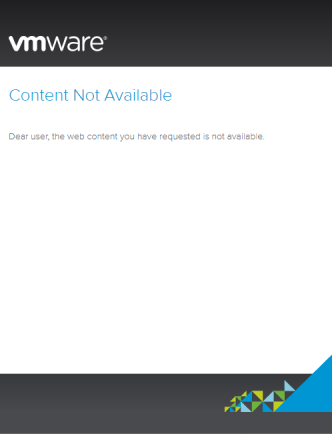
VMware ESXi 7 registration fails on Chrome
The “free-esxi#” pages are the only place where you can register for and view your ESXi licenses, as they are not part of my.vmware.com/group/vmware/my-licenses (that would make it easy, but that’s not how VMware is a corporate).
It really is the only place, and the documentation is buried deep in the KB pages: [Archive.is] Downloading and licensing vSphere Hypervisor (ESXi 6.x & 7.x) (2107518).
If you get “content not avaiable” while registering for ESXi 7 [Wayback] maintenance.vmware.com/info4.html?source=dwnp&p=free-esxi7 by clicking on the “Register” button on [Wayback] my.vmware.com/en/web/vmware/evalcenter?p=free-esxi7 …
The dreaded register button.
Content Not Available
Dear user, the web content you have requested is not available.
… then remember that VMware has been as corporate as banks for years, which means that their web-sites only work properly in a limited set of browsers. Chrome is not one of them any more, but Firefox seems to for for me.
I am not alone bumping into this, many have and the site has been working/failing for years, for instance back in 2019: [Wayback] Is there still a free version of ESXI that is not … – VMware Technology Network VMTN
–jeroen
Posted in ESXi7, Power User, Virtualization, VMware, VMware ESXi | Leave a Comment »
Posted by jpluimers on 2021/04/09
A long time I wondered why I saw ESXi systems on my local network have two entries in their /etc/hosts file:
[root@ESXi-X10SRH-CF:~] cat /etc/hosts
# Do not remove the following line, or various programs
# that require network functionality will fail.
127.0.0.1   localhost.localdomain localhost
::1     localhost.localdomain localhost
192.168.71.91   ESXi-X10SRH-CF ESXi-X10SRH-CF
Then I bumped into someone who had a different setup:
[root@ESXi-X10SRH-CF:~] cat /etc/hosts
# Do not remove the following line, or various programs
# that require network functionality will fail.
127.0.0.1   localhost.localdomain localhost
::1     localhost.localdomain localhost
192.168.0.23    esxi.dynamic.ziggo.nl esxi
So now I knew that the first entry can have a domain resolving it (it still makes be wonder why ziggo is using a top-level domain to resolve local stuff; but searching for dynamic.ziggo.nl did not get me further on that).
So I installed a quick ESXi machine on that local network, and got the same.
When back home the machine still thought it was esxi.dynamic.ziggo.nl, though clearly I was outside a Ziggo network
I wanted to get rid of it, but that was hard.
Since I forgot to take screenshots beforehand, I can only provide the ones without a search domain bellow.
Reminder to self: visit someone within the Ziggo network, then retry.
Normally you can edit things like these in the default TCP/IP stack. There are two places to change this:
Neither of these allowed me to change it to a situation like this, but luckily the console did.
In the below files, I had to remove the bold parts, then restart the management network (I did keep a text dump, lucky me):
[root@esxi:/etc] grep -inr ziggo .
./vmware/esx.conf:116:/adv/Misc/HostName = "esxi.dynamic.ziggo.nl"
./resolv.conf:2:search dynamic.ziggo.nl
./hosts:5:192.168.71.194    esxi.dynamic.ziggo.nl esxi
[root@esxi:/etc] cat /etc/resolv.conf
nameserver 192.168.71.3
search dynamic.ziggo.nl
[root@esxi:/etc] cat /etc/hosts
# Do not remove the following line, or various programs
# that require network functionality will fail.
127.0.0.1   localhost.localdomain localhost
::1     localhost.localdomain localhost
192.168.71.194  esxi.dynamic.ziggo.nl esxi
Future steps
- Read more on local domains, search domains and related topics
- Configure a local domain on my local network, so DHCP hands it out, and DHCP handed out host names are put in the local DNS
- Test if all services on all machines still work properly
Reading list
Read the rest of this entry »
Posted in DNS, ESXi6.5, ESXi6.7, Hardware, Internet, Mainboards, Network-and-equipment, Power User, SuperMicro, Virtualization, VMware, VMware ESXi, X10SRH-CF, X9SRi-3F | Leave a Comment »
Posted by jpluimers on 2021/04/09
This LSI 3008 HBA update to TI firmware is still on my wish list, but I could not find it when I bought the board in 2018.
[WayBack] Supermicro Single CPU Board for ESXi Home lab – Upgrading LSI 3008 HBA on the X10SRH-CLN4F | ESX Virtualization:
As you know my lab got an addition this year with Supermicro’s Single CPU board, the X10SRH-CLN4F. In this post we will be upgrading LSI 3008 HBA on the X10SRH-CLN4F.
…
I have learned a new way to patch via UEFI. In fact, it’s same (or easier) than through DOS-based bootable USB. The IT firmware can be reverted back to IR firmware as in the ZIP package there are both versions there. So in case you need a server with hardware RAID, you can use the IR version. I was actually wondering what it means the IT and IR and here is what I have found at LSI (Avago) website:
“IT” firmware maximizes the connectivity and performance aspects of the HBA. “IR” firmware offers RAID functionality via RAID 0, 1, and 10 capabilities.
Via:
SR-IOV?
The step afterwards is to enable SR-IOV for this LSI 3008 HBA.
These links should help with that:
–jeroen
Posted in ESXi6.5, ESXi6.7, Hardware, Mainboards, Power User, SuperMicro, Virtualization, VMware, VMware ESXi, X10SRH-CF | Leave a Comment »
Posted by jpluimers on 2021/04/02
A similar ESXi 6.5 box worked well to ssh into, but on ESXi 6.7 it failed:
SSH into ESXi 6.7 box resulting in “debug1: expecting SSH2_MSG_KEXDH_REPLY“, delay and after entering password “Permission denied, please try again.“
I had a hard time figuring out why: Login with the same user+password on the web user interface, DCUI and console shell work fine (see [WayBack] Enable SSH on VMware ESXi 6.x – VirtuBytes).
Searches that led me to EBCAK:
Read the rest of this entry »
Posted in ESXi6.5, ESXi6.7, Hardware, IPMI, Mainboards, Power User, PowerCLI, SuperMicro, Virtualization, VMware, VMware ESXi | Leave a Comment »
Posted by jpluimers on 2021/03/29
Sometimes you have a long enough password, that matches with the confirmation, but pressing “Enter” to continue gives “Password does not have enough character types”:
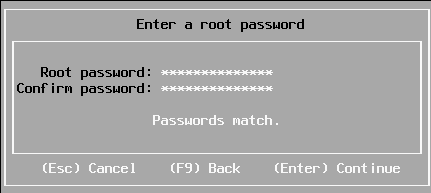
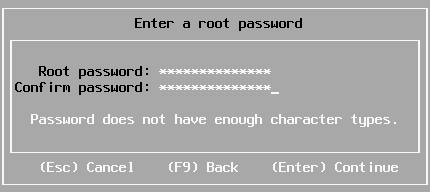
From [WayBack] Disable ESXi Password Complexity – Perfect Cloud:
A part of my job as a VMware Certified Instructor is to update our lab systems whenever new vSphere versions come out. After upgrading from 5.5 to 6.0 I decided we should change passwords, h…
This is the workflow:
- Make a backup of
/etc/pam.d/passwd.
- Use
vi to edit /etc/pam.d/passwd, and:
- Put a
# in front of the lines starting with password requisite
- Remove the
use_authtok bit of the line starting with password sufficient
- Put a
# in front of the line starting with password required
- Quit
vi while saving (press Esc, then enter :wq on the prompt)
- Change the password to a less secure one
- Restore the original
/etc/pam.d/passwd.
Via: esxi 6 force short password – Google Search
Working around this on during ESXi installation fails
I tried this:
- Press Alt-F1 to go from the installation screen to the console screen
- Logon as root, with no password at all to get to the command-prompt:
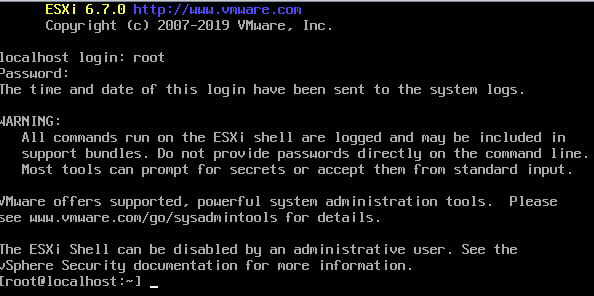
- Perform the
/etc/pam.d/passwd editing steps above
- Press Alt-F2 to go back to the install screen
- Enter root password
The password requirements stayed.
(more screenshots at [WayBack] ESXi 6.7 installation Guide – Let We-i Go)
Related
- [WayBack] passwdqc – password/passphrase strength checking and policy enforcement toolset for your servers and software
- [WayBack] installing ESXi 6.7, stuck on root password with this message :password must be at least 7 characters long : vmware
The default required password complexity changed between 6.5 and 6.7.
In addition to needing to be at least seven characters, the password must include at least three of the four character classes:
-
Upper case – exception: the first character being upper case does not count towards the class requirement
-
Lower case
-
Numbers – exception: the last character being a number does not count towards the class requirement
-
Symbols
Also, no dictionary words (whether spelt forwards or backwards).
- [WayBack] ESXi Passwords and Account Lockout
For ESXi hosts, you have to use a password with predefined requirements. You can change the required length and character class requirement or allow pass phrases using the Security.PasswordQualityControl advanced option.
- “Security.PasswordQualityControl” – Google Search
- [WayBack] ESXi 6.x Password Calculator for Security.PasswordQualityControl | Virtually Blogging
- [WayBack] Virtual Maestro: VMware ESXi 6.X password policy
- [WayBack] VMware ESXi6 Password Policy – ivobeerens.nl
- [WayBack] Virtual Maestro: VMware ESXi 6.X password policy
- [Archive.is] vSphere Documentation Center
Example: Editing /etc/pam.d/passwd
password requisite /lib/security/$ISA/pam_passwdqc.so retry=N min=N0,N1,N2,N3,N4
values
password requisite /lib/security/$ISA/pam_passwdqc.so retry=3 min=12,9,8,7,6
With this setting in effect, the password requirements are:
- retry=3: A user is allowed 3 attempts to enter a sufficient password.
- N0=12: Passwords containing characters from one character class must be at least 12 characters long.
- N1=9: Passwords containing characters from two character classes must be at least nine characters long.
- N2=8: Passphrases must contain words that are each at least eight characters long.
- N3=7: Passwords containing characters from three character classes must be at least seven characters long.
- N4=6: Passwords containing characters from all four character classes must be at least six characters long.
- [WayBack] VMware:ESXi Kennwortsicherheit heruntersetzen oder ändern – znilwiki
Passwortklassen sind schlicht
Grossbuchstaben
Kleinbuchstaben
Zahlen
Sonderzeichen
wobei das erste Zeichen nicht zählt. Also gilt
dumpfbacke     : 1 Passwortklasse
Dumpfbacke      : 1 Passwortklasse
DumpfBacke      : 2 Passwortklassen
DumpfBacke1     : 3 Passwortklassen
DumpfBacke1%            : 4 Passwortklassen
Indem man alle Werte auf 0 setzt, also
password requisite /lib/security/$ISA/pam_passwdqc.so retry=3 min=0,0,0,0,0
schaltet man alle Anforderungen aus.
Alternativ geht das auch mit
password requisite /lib/security/$ISA/pam_passwdqc.so retry=3 min=8,8,8,7,6 enforce=none
On my ESXI 6.5 system where the italic bit is removed, besides the two lines being commented out:
- original
/etc/pam.d/passwd:
#%PAM-1.0

# Change only through host advanced option "Security.PasswordQualityControl".
password   requisite    /lib/security/$ISA/pam_passwdqc.so retry=3 min=disabled,disabled,disabled,7,7
password   sufficient   /lib/security/$ISA/pam_unix.so use_authtok nullok shadow sha512
password   required     /lib/security/$ISA/pam_deny.so
- modified
/etc/pam.d/passwd:
#%PAM-1.0

# Change only through host advanced option "Security.PasswordQualityControl".
#password   requisite    /lib/security/$ISA/pam_passwdqc.so retry=3 min=disabled,disabled,disabled,7,7
password   sufficient   /lib/security/$ISA/pam_unix.so nullok shadow sha512
#password   required     /lib/security/$ISA/pam_deny.so
On my ESXI 6.7 system (which adds the bold lines below):
- original
/etc/pam.d/passwd:
#%PAM-1.0

# Change only through host advanced option "Security.PasswordQualityControl".
password   requisite    /lib/security/$ISA/pam_passwdqc.so retry=3 min=disabled,disabled,disabled,7,7

# Change only through host advanced option "Security.PasswordHistory"
password   requisite    /lib/security/$ISA/pam_pwhistory.so use_authtok enforce_for_root retry=2 remember=0

password   sufficient   /lib/security/$ISA/pam_unix.so use_authtok nullok shadow sha512
password   required     /lib/security/$ISA/pam_deny.so
- modified
/etc/pam.d/passwd:
#%PAM-1.0

# Change only through host advanced option "Security.PasswordQualityControl".
#password   requisite    /lib/security/$ISA/pam_passwdqc.so retry=3 min=disabled,disabled,disabled,7,7

# Change only through host advanced option "Security.PasswordHistory"
#password   requisite    /lib/security/$ISA/pam_pwhistory.so use_authtok enforce_for_root retry=2 remember=0

password   sufficient   /lib/security/$ISA/pam_unix.so nullok shadow sha512
#password   required     /lib/security/$ISA/pam_deny.so
–jeroen
Posted in *nix, ESXi6, ESXi6.5, ESXi6.7, Power User, Virtualization, VMware, VMware ESXi | Leave a Comment »
Posted by jpluimers on 2021/03/12
I still like this board: Supermicro | Products | Motherboards | Xeon® Boards | X9SRi-3F.
It has been in a storage solution for a while, uses OK power, has not many SATA ports, but enough slots for expansion cards, and comes with two network connections and 8 slots which I fitted with a total of 256 gibibyte of memory.
Some links, as SuperMicro tends to hide them behind POST requests:
Note that IPMI over je Java Web Start.app runs into certificate signing issues, so better use Supermicro IPMIViewer for this:
IPMIView links via:
The errors when running the KVM Console from your web browser are waved away by SuperMicro, but more and more people bump into them:
–jeroen
Posted in Development, Hardware, Mainboards, Power User, Software Development, SuperMicro, Virtualization, VMware, VMware ESXi, X9SRi-3F | Leave a Comment »
Posted by jpluimers on 2021/02/03
Sometimes I forget the choco install mnemonics for various tools, so here is a small list below.
Of course you have to start with an administrative command prompt, and have a basic Chocolatey Installation in place.
If you want to clean cruft:
choco install --yes choco-cleaner
Basic install:
choco install --yes 7zip
choco install --yes everything
choco install --yes notepadplusplus
choco install --yes beyondcompare
choco install --yes git.install --params "/GitAndUnixToolsOnPath /NoGitLfs /SChannel /NoAutoCrlf /WindowsTerminal"
choco install --yes hg
choco install --yes sourcetree
choco install --yes sysinternals
For VMs (pic one):
choco install --yes vmware-tools
choco install --yes virtio-drivers
For browsing (not sure yet about Chrome as that one has a non-admin installer as well):
choco install --yes firefox
For file transfer (though be aware that some versions of Filezilla contained adware):
choco install --yes filezilla
choco install --yes winscp
For coding:
choco install --yes vscode
choco install --yes atom
For SQL server:
choco install --yes sql-server-management-studio
For web development / power user:
choco install --yes fiddler
For SOAP and REST:
choco install --yes soapui
If you don’t like manually downloading SequoiaView at gist.github.com/jpluimers/b0df9c2dba49010454ca6df406bc5f3d (e8efd031d667de8a1808d6ea73548d77949e7864.zip):
choco install --yes windirstat
For drawing, image manipulation (paint.net last, as it needs a UI action):
choco install --yes gimp
choco install --yes imagemagick
choco install --yes paint.net
For ISO image mounting in pre Windows 10:
choco install --yes wincdemu
For hard disk management:
choco install --yes hdtune
choco install --yes seatools
choco install --yes speedfan
For Fujitsu ScanSnap scanners (not sure yet this includes PDF support):
choco install --yes scansnapmanager
–jeroen
Posted in 7zip, atom editor, Beyond Compare, Chocolatey, Compression, Database Development, Development, DVCS - Distributed Version Control, Everything by VoidTools, Fiddler, Firefox, Fujitsu ScanSnap, git, Hardware, Mercurial/Hg, Power User, Scanners, SOAP/WebServices, Software Development, Source Code Management, SQL Server, SSMS SQL Server Management Studio, SysInternals, Text Editors, Versioning, Virtualization, VMware, VMware ESXi, vscode Visual Studio Code, Web Browsers, Web Development, Windows | Leave a Comment »
Posted by jpluimers on 2020/11/16
Interesting: I never realised that getting MacOS installed on ESXi was relatively easy!
[WayBack] OSX 10.13 with vSphere 6.7 – Virtual Odyssey:
vCenter 6.7a/ESXi 6.7a Installing OSX 10.13 seemed pretty straight forward on 6.7. Essentially, you mount the ISO as per usual, and the only thing I had to do before starting the installation was to format the disk via terminal. Once…
So no need for all this:
–jeroen
Posted in ESXi6.5, ESXi6.7, Power User, Virtualization, VMware, VMware ESXi | Leave a Comment »


 The Wiert Corner - irregular stream of stuff