


Source: [WayBack] How to install Telnet with only one command:
dism /online /Enable-Feature /FeatureName:TelnetClient
–jeroen
Posted by jpluimers on 2020/12/01
Source: [WayBack] How to install Telnet with only one command:
dism /online /Enable-Feature /FeatureName:TelnetClient
–jeroen

Posted in Microsoft Surface on Windows 7, Power User, Windows, Windows 10, Windows 7, Windows 8, Windows 8.1, Windows 9, Windows Server 2008, Windows Server 2008 R2, Windows Server 2012, Windows Server 2012 R2, Windows Server 2016, Windows Vista | Leave a Comment »
Posted by jpluimers on 2020/11/27
Microsoft keeps more and more under C:\Users\All Users\Microsoft\ClickToRun\ProductReleases (also accessible via C:\ProgramData\Microsoft\ClickToRun\ProductReleases or more precisely %AllUsersProfile%\Microsoft\ClickToRun\ProductReleases).
This can be huge, running into 10s of gigabytes, which – for todays cloud, VM and light-weight device based world – is huge.
Compressing seems to fail for me consistently, as I get “access denied” while compressing when elevating from Windows Explorer.
So this is a reminder to sort this out eventually.
These did not help yet:
I don’t dare deleting it:
Hopefully it is something explainable like the a virus scanner.
Yup: it was the Avira Virus Scanner.
Somehow it has the Windows Explorer UI cause an “Access Denied” message to appear when elevating, but you can still compress files fine in a subdirectory with these steps:
Given a subdirectory named
C:\SomeDir\Ado this:
pushd C:\SomeDir\Acompact /c /s *.*cd ..compact /c Apopd
It is not the first time I bump into Avira stuff (but I only blogged about it once, dumb me: VirusTotal: Avira marks a Delphi built executable als false positive), but the decision of using it was outside my control.
–jeroen
Posted in Power User, Windows, Windows 10 | Leave a Comment »
Posted by jpluimers on 2020/11/24
The keyboard bindings for the Microsoft Narrator changed in Windows 10 from Windows 8.1 and earlier.
Since the below support pages refuse to save in the WayBack machine and Archive.is, I copy-pasted some bits of them.
Related:
Posted in Power User, Windows, Windows 10, Windows 8, Windows 8.1 | Leave a Comment »
Posted by jpluimers on 2020/11/17
[WayBack] FeaturesShim is a cool Chocolatey feature that uses ShimGen.
This allows Chocolatey to take only one directory in your search PATH, with a lot of small files, that link to the much larger actual executable files.
ShimGen (like many other parts of Windows and some other parts of Chocolatey) is not open source, but the mechanism is documented.
More information:
–jeroen
Posted in .NET, Development, Power User, Software Development, Windows, Windows Development | Leave a Comment »
Posted by jpluimers on 2020/11/09
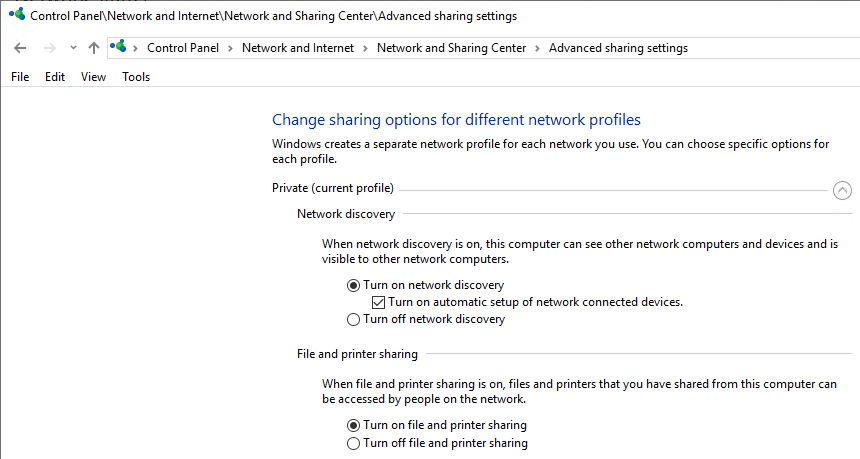
On my research list: none of my Windows 10 PC’s in WORKGROUP can see that other machines exist, but they can connect to each other.
C:\>net view
System error 1231 has occurred.c

C:\>net view
System error 6118 has occurred.
On Windows 8.1 and 7 (I know: both beyond end-of-support) can see both Windows 8.1/7 machines and Windows 10 machines:
C:\>net view
Server Name          Remark
-------------------------------------------------------------------------------
\\...
The command completed successfully.
It is unclear on which Windows 10 release this started failing. I think it is around 1803 (April 2018 Update) or 1709 (Fall Creators Update). It fails despite all settings indicating sharing and discovery are enabled:
Tried from an administrative command prompt, then waited a minute:
C:\net start WebClient
The WebClient service is starting.
The WebClient service was started successfully.
Failed.
Via: [WayBack] System error 1231 has occurred – Microsoft Community
The system names were already in uppercase.
Via: [WayBack] Win10 10586 – FOUND FIX for system error 1231 bug ( network shares – Microsoft Community
Note: do not re-enable SMBv1 as it is inherently insecure!
–jeroen

Posted in Power User, Windows, Windows 10 | Leave a Comment »
Posted by jpluimers on 2020/11/06
Hmm, one of my machines contained OpenCandy – Wikipedia as found by Malwarebytes (software) – Wikipedia:
Tracking back the installation, revealed it came with ImgBurn 2.5.8.0, which is now on my black-list.
In my case this was how to remove it:
rd /s /q %AppData%\OpenCandy
This is not universal; you might need to take additional measures like in [WayBack] How to Remove PUP.Optional.OpenCandy (Removal Guide).
I use this batch-file to get the most recent Malwarebytes and Chameleon:
get-malware-bytes.bat
:: redirects to something like wget https://data-cdn.mbamupdates.com/web/mb3-setup-consumer/mb3-setup-consumer-3.6.1.2711-1.0.508-1.0.8211.exe

wget --content-disposition https://downloads.malwarebytes.com/file/mb3/

:: redirects to something like wget https://data-cdn.mbamupdates.com/web/mbam-chameleon-3.1.33.0.zip

wget --content-disposition https://downloads.malwarebytes.com/file/chameleon/
If you do not have wget on your system, then try this PowerShell alternative (which does not show progress) via [WayBack] Windows batch file file download from a URL – Stack Overflow
:: in case you do not have wget:

powershell -Command "(New-Object Net.WebClient).DownloadFile('https://downloads.malwarebytes.com/file/mb3/', 'mb3.exe')"

powershell -Command "(New-Object Net.WebClient).DownloadFile('https://downloads.malwarebytes.com/file/chameleon/', 'chameleon.exe')"

:: note these do not show progress!

:: https://stackoverflow.com/questions/4619088/windows-batch-file-file-download-from-a-url
Related: [WayBack] Jeroen Pluimers on Twitter: “What if the most recent @Malwarebytes on a Windows 8.1 x64 VM (all patches installed) on ESXi backed by NVME hangs for hours on one file with hardly any CPU usage? Screenshots of mbam.exe, mbamservice.exe and mbamtray.exe thread usage below.
–jeroen

Posted in *nix, *nix-tools, LifeHacker, Power User, Security, wget, Windows | Leave a Comment »
Posted by jpluimers on 2020/10/30
I hate applications that globally install Windows shortcut keys without the setup/install either warn about it or make it configurable.
In this case it is about CardMinder Viewer that ships with the Fujitsu ix500 scanner and installs a global shortcut, by default Alt-F3.
CardMinder Viewer is especially bad because the “settings” are not in the application: the settings are part of the Windows notification area (usually on the lower left of your screen; many people call it “the tray” as it was called tray in the Cairo research that led to Windows 95 and Windows NT 3.5).
So here is how to get rid of the Alt–F3 shortcut to be stolen:

Posted in Fujitsu ScanSnap, Hardware, ix500, Power User, Scanners, Windows | Leave a Comment »
Posted by jpluimers on 2020/10/28
I will limit myself to software that needs Administrative elevation in order to be installed. This is the default use-case for Chocolatey. It is way way easier than installing software all by hand, but there are a few things you need to know, hence these notes.
Since the default use case is installing software that requires Administrative elevation during install, Chocolatey needs to run with Administrative privileges in order to perform these installs.
If you were hoping for a way around this (for instance by having a client/service architecture), then just stop here.
Even though such a structure could technically be created, getting it stable and working it correctly with a truckload of software to be installed (much of which not available as packages during Chocolatey development in the first place) is a task too big.
Think of the size of the Windows Installer team at Microsoft to get installers working in the first place, the extra effort needed by Chocolatey volunteers to get the installers working from the console, then another much more complex layer of getting them running from inside a service and communicating everything back and forth to a non-elevated command prompt would be a nightmare.
I won’t even mention the security steps involved to ensure the non-elevated command prompt has enough rights to send installation instructions to the elevated service.
So the first step is to have an elevated command prompt for Chocolatey.
Being elevated, and Chocolatey needing to download installers requires a local temporary place for them.
By default, that place is %Temp%\chocolatey of the administrative user that elevated the Chocolatey command prompt.
This directory can grow quite big, so dir, so – since there is no choco cleanup yet [WayBack] you need to either:
%ChocolateyInstall%\lib\choco-cleaner\tools\choco-cleaner-manual.batrd /s /q %Temp%\chocolatey% every now and then (cleans less than the above methods).Either the direct one below, or the more secure one (so you can inspect the intermediate [WayBack] install.ps1) at [WayBack] Installation using PowerShell from cmd.exe:
@echo off
SET DIR=%~dp0%
::download install.ps1
%systemroot%\System32\WindowsPowerShell\v1.0\powershell.exe -NoProfile -ExecutionPolicy Bypass -Command "((new-object net.webclient).DownloadFile('https://chocolatey.org/install.ps1','%DIR%install.ps1'))"
::run installer
%systemroot%\System32\WindowsPowerShell\v1.0\powershell.exe -NoProfile -ExecutionPolicy Bypass -Command "& '%DIR%install.ps1' %*"
If you want to get rid of it, use [WayBack] Uninstallation.
Besides the one above and below, there are many more [WayBack] Installation: more install options
Output of direct install as Administrator (disclaimers apply):
C:\WINDOWS\system32>powershell -NoProfile -ExecutionPolicy Bypass -Command "[System.Net.WebRequest]::DefaultWebProxy.Credentials = [System.Net.CredentialCache]::DefaultCredentials; iex ((New-Object System.Net.WebClient).DownloadString('https://chocolatey.org/install.ps1'))" && SET PATH="%PATH%;%ALLUSERSPROFILE%\chocolatey\bin"
Getting latest version of the Chocolatey package for download.
Getting Chocolatey from https://chocolatey.org/api/v2/package/chocolatey/0.10.11.
Downloading 7-Zip commandline tool prior to extraction.
Extracting C:\Users\JEROEN~1\AppData\Local\Temp\chocolatey\chocInstall\chocolatey.zip to C:\Users\JEROEN~1\AppData\Local\Temp\chocolatey\chocInstall...
Installing chocolatey on this machine
Creating ChocolateyInstall as an environment variable (targeting 'Machine')
  Setting ChocolateyInstall to 'C:\ProgramData\chocolatey'
WARNING: It's very likely you will need to close and reopen your shell
  before you can use choco.
Restricting write permissions to Administrators
We are setting up the Chocolatey package repository.
The packages themselves go to 'C:\ProgramData\chocolatey\lib'
  (i.e. C:\ProgramData\chocolatey\lib\yourPackageName).
A shim file for the command line goes to 'C:\ProgramData\chocolatey\bin'
  and points to an executable in 'C:\ProgramData\chocolatey\lib\yourPackageName'.

Creating Chocolatey folders if they do not already exist.

WARNING: You can safely ignore errors related to missing log files when
  upgrading from a version of Chocolatey less than 0.9.9.
  'Batch file could not be found' is also safe to ignore.
  'The system cannot find the file specified' - also safe.
chocolatey.nupkg file not installed in lib.
 Attempting to locate it from bootstrapper.
PATH environment variable does not have C:\ProgramData\chocolatey\bin in it. Adding...
WARNING: Not setting tab completion: Profile file does not exist at 'C:\Users\jeroenAdministrator\Documents\WindowsPowerShell\Microsoft.PowerShell_profile.ps1'.
Chocolatey (choco.exe) is now ready.
You can call choco from anywhere, command line or powershell by typing choco.
Run choco /? for a list of functions.
You may need to shut down and restart powershell and/or consoles
 first prior to using choco.
Ensuring chocolatey commands are on the path
Ensuring chocolatey.nupkg is in the lib folder
choco install #packageName#--yes to each install commandrefreshenv in each command-prompt to reflect any changes to the registry
cmd.exe or batch file: [WayBack] choco/RefreshEnv.cmd at master · chocolatey/choco · GitHubIf you run out of SSD or VM disk space, you can try compress using compact /c /s *.* in these directories:
C:\ProgramData\Package CacheC:\ProgramData\Microsoft\VisualStudio\PackagesC:\ProgramData\Microsoft\ClickToRun\ProductReleasesuseRememberedArgumentsForUpgrades: [WayBack] Chocolatey Gallery | Visual Studio Code 1.30.0 how to make /NoContextMenuFolders permanent.–jeroen
Posted in Chocolatey, CommandLine, Conference Topics, Conferences, Development, Event, Power User, PowerShell, PowerShell, Scripting, Software Development, Windows | Leave a Comment »
Posted by jpluimers on 2020/10/26
[WayBack] [Random] How to quickly view a binary’s embedded manifest? – MITHUN SHANBHAG’s blog
Cool! sigcheck -m dumps a manifest if there is one:
C:\>\\live.sysinternals.com\tools\sigcheck.exe -m C:\Windows\notepad.exe
Background information: [WayBack] Sigcheck – Windows Sysinternals | Microsoft Docs: Dump file version information and verify that images on your system are digitally signed.
[WayBack] License to Kill: Malware Hunting with the Sysinternals Tools | TechEd North America 2013 | Channel 9 This session provides an overview of several Sysinternals tools, including Process Monitor, Process Explorer, and Autoruns, focusing on the features useful for malware analysis and removal. These util
–jeroen
Posted in LifeHacker, Power User, Windows, Windows 10 | Leave a Comment »
Posted by jpluimers on 2020/10/21
One of the dreaded things when logging on using RDP is that if another user is logged on, you have to first indicate you want to indeed logon (if you don’t, the RDP connection will close after some 15-30 seconds), then wait for their approval time-out before you can logon.
As of writing there is no way around this.
Some links that helped me conclude this:
–jeroen
Posted in Development, Power User, Software Development, Windows, Windows 10, Windows 7, Windows 8, Windows 8.1, Windows Development | Leave a Comment »

 The Wiert Corner - irregular stream of stuff