


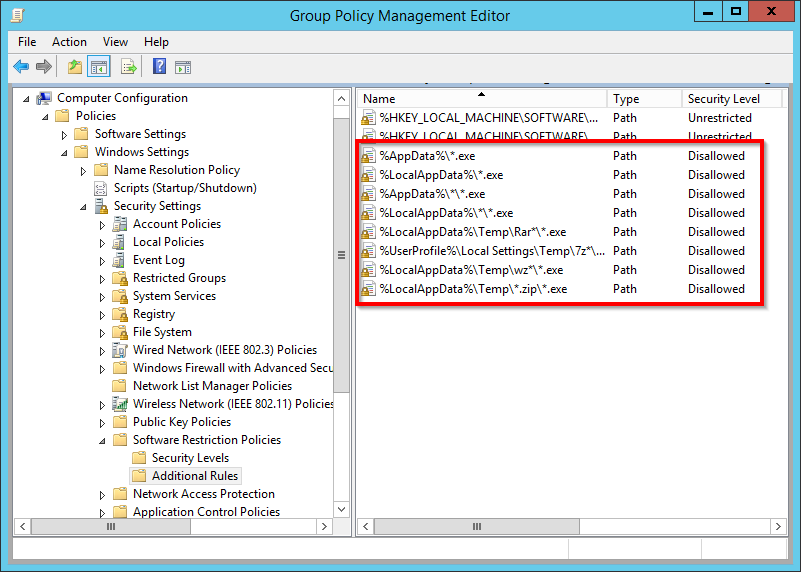
Interesting: [Ardhive.is] Use Software Restriction Policies to block viruses and malware | Branko Vucinec
via: [WayBack] Ransomware treft Tweede Kamer – Malware versleutelt overheidsbestanden – IT Pro – Nieuws – Tweakers
–jeroen
Posted by jpluimers on 2018/06/25
Interesting: [Ardhive.is] Use Software Restriction Policies to block viruses and malware | Branko Vucinec
via: [WayBack] Ransomware treft Tweede Kamer – Malware versleutelt overheidsbestanden – IT Pro – Nieuws – Tweakers
–jeroen

Posted in Microsoft Surface on Windows 7, Power User, Windows, Windows 10, Windows 7, Windows Server 2003, Windows Server 2003 R2, Windows Server 2008, Windows Server 2008 R2, Windows Server 2012, Windows Server 2012 R2, Windows Server 2016, Windows Vista, Windows XP | Leave a Comment »
Posted by jpluimers on 2018/06/19
Thanks [WayBack] gbabu for the below PowerShell ide
As PowerShell command:
Get-EventLog System | Where-Object {$_.EventID -eq "1074" -or $_.EventID -eq "6008" -or $_.EventID -eq "1076"} | ft Machinename, TimeWritten, UserName, EventID, Message -AutoSize -Wrap
Based on it and my own experience, thse Event IDs can be interesting:
You can also run this as a batch file, but not you need to escape the pipe | into ^| like this:
PowerShell Get-EventLog System ^| Where-Object {$_.EventID -eq "1074" -or $_.EventID -eq "6008" -or $_.EventID -eq "1076"} ^| ft Machinename, TimeWritten, UserName, EventID, Message -AutoSize -Wrap
If you have PowerShell 3.0 or greater, then you can use the [Archive.is] -In operator:
PowerShell Get-EventLog System ^| Where-Object {$_.EventID -in "41", "109", "1074", "6008", "1076"} ^| ft Machinename, TimeWritten, UserName, EventID, Message -AutoSize -Wrap
–jeroen

Posted in Batch-Files, CommandLine, Development, Power User, PowerShell, PowerShell, Scripting, Software Development, Windows | Leave a Comment »
Posted by jpluimers on 2018/06/04
RDP Wrapper works as a layer between Service Control Manager and Terminal Services, so the original termsrv.dll file remains untouched. Also this method is very strong against Windows Update.
I’ve tested this on Windows 7 Home Premium and it works fine, see the log below. On Windows 10 Fall Creators Update and up, I had to get the rfxvmt.dll files (in %windir%\System32 and %windir%\SysWOW64) from a Windows Professional system, see Known Issues. You can download them from the repository as well.
install.bat:C:\Users\jeroenp\Downloads\RDPWrap-v1.6.1>install.bat RDP Wrapper Library v1.6 Installer v2.3 Copyright (C) Stas'M Corp. 2016 [*] Notice to user: - By using all or any portion of this software, you are agreeing to be bound by all the terms and conditions of the license agreement. - To read the license agreement, run the installer with -l parameter. - If you do not agree to any terms of the license agreement, do not use the software. [*] Installing... [*] Terminal Services version: 6.1.7600.16385 [+] This version of Terminal Services is fully supported. [+] TermService found (pid 1168). [*] Shared services found: CryptSvc, Dnscache, LanmanWorkstation, NlaSvc [*] Extracting files... [+] Folder created: C:\Program Files\RDP Wrapper\ [*] Downloading latest INI file... [+] Latest INI file -> C:\Program Files\RDP Wrapper\rdpwrap.ini [+] Extracted rdpw64 -> C:\Program Files\RDP Wrapper\rdpwrap.dll [+] Extracted rdpclip6164 -> C:\Windows\System32\rdpclip.exe [*] Configuring service library... [*] Checking dependencies... [*] Checking CertPropSvc... [*] Checking SessionEnv... [*] Terminating service... [*] Starting CryptSvc... [*] Starting Dnscache... [*] Starting LanmanWorkstation... [*] Starting NlaSvc... [-] StartService error (code 1056). [*] Starting TermService... [*] Configuring registry... [*] Configuring firewall... OK. [+] Successfully installed. ______________________________________________________________ You can check RDP functionality with RDPCheck program. Also you can configure advanced settings with RDPConf program. Druk op een toets om door te gaan. . . C:\Users\jeroenp\Downloads\RDPWrap-v1.6.1>rdpcheck
Note that this “error” is normal: [-] StartService error (code 1056). as it means the service is already started: [WayBack] System Error Codes (1000-1299) (Windows)
ERROR_SERVICE_ALREADY_RUNNING
- 1056 (0x420)
- An instance of the service is already running.
–jeroen
Posted in Power User, Remote Desktop Protocol/MSTSC/Terminal Services, Windows | Leave a Comment »
Posted by jpluimers on 2018/05/28
As of Windows 10 fall creators update, the WDAGUtilityAccount was added, so the default accounts on such a machine are these:
Then there is one account for the user that installed the system (which is named by that user).
Windows Defender Application Guard is the reason for WDAGUtilityAccount as explained here:
–jeroen
Posted in Power User, Windows, Windows 10 | Leave a Comment »
Posted by jpluimers on 2018/05/21
[WayBack] Microsoft is gestopt met gratis Windows 10-upgrade via toegankelijkheidspagina – Computer – Nieuws – Tweakers
Licenses: Retail, OEM, ODM, VLK.
[WayBack] Activation in Windows 10 – Windows Help
Notes
- Microsoft doesn’t keep a record of purchased product software keys.
- For help finding your product key, see Find your Windows product key.
- If you don’t have a product key, you can purchase a Windows 10 license after installation finishes. Select the Start button > Settings > Update & Security > Activation . Then select Go to Store to go to the Windows Store, where you can purchase a Windows 10 license.
–jeroen
Posted in Power User, Windows, Windows 10 | Leave a Comment »
Posted by jpluimers on 2018/05/18
Interesting as bgInfo does not support top most windows or overlay: it only does the Desktop background, and you need to go through hoops to recreate the background on each logon:
Enter dzComputerInfo. It’s a small tool that I wrote the evening after the above incident which does exactly one thing: It shows a window on top of all other windows displaying the computer name and currently logged on user. Since the window is so small and it places itself automatically just above the start button, it does not really become a nuisance.
The tool and the source code is available from sourceforge, if anybody else thinks he has a use for it.
The G+ thread also the interesting comment by Gaurav Kale:
The Classic Shell Start button supports environment variables in its tooltip. So just specify: %username% on %computername% for the Setting called “Button Tooltip”. Then to see the currently logged on user and computer name, you just have to HOVER over the Start button!
–jeroen
Posted in Power User, SysInternals, Windows | Leave a Comment »
Posted by jpluimers on 2018/05/14
Since:
every now and then you will get strange characters in only your development tools.
You can change this Windows setting, but be aware that every now and then, various Windows versions will re-enable the Left Alt+Shift even if you have previously disabled it. As of Windows 7 this occurs far less often, but still seems to occur.
Source: Question: Does anyone else have instances in the IDE (Berlin but has happened…
Comments at https://plus.google.com/+JeroenPluimers/posts/ektRa2qW92L
Posted in internatiolanization (i18n) and localization (l10), Keyboards and Keyboard Shortcuts, Power User, Windows | Leave a Comment »
Posted by jpluimers on 2018/05/07
Reminder to self for Windows Firewall: Block rules take precedence over Allow rules (see * below as actually it is even more complex); [WayBack] Firewall Rule Properties Page: General Tab has
Firewall rules are evaluated in the following order:
- Allow if secure with Override block rules selected in the Customize Allow if Secure Settings dialog box.
- Block the connection.
- Allow the connection.
- Default profile behavior (allow or block as specified on the applicable Profile tab of the Windows Firewall with Advanced Security Properties dialog box).
Within each category, rules are evaluated from the most specific to the least specific. A rule that specifies four criteria is selected over a rule that specifies only three criteria.
Which means that this will block TCP port 1024 traffic to bar.exe:

The Block rules are inserted by Windows if you click “Cancel” on a dialog like this (note the lowercase path, despite the application being at C:\Program Files (x86)\Foo\Bar.exe):

Posted in Firewall, Infrastructure, Power User, Windows | 1 Comment »
Posted by jpluimers on 2018/04/21
Does anyone know how to disable Edge popping up with a failed link www.msftconnecttest.com/redirect on machines blocked by a router?
This happens on the PC running Windows 10 Pro N (winver shows 1709 build 16299.371) that is not allowed to do any internet access.
Related: [WayBack] How to Find Out Which Build and Version of Windows 10 You Have | ilicomm
Later:
This seems to be intended as per these links:
This can happen on Windows 8 and up when Windows thinks there is a partial network connection and a logon to a proxy or captive portal might solve the solution.
Allowing these in the proxy for port 80 solves the issue:
*.msftncsi.com*.msftconnecttest.com--jeroen
Posted in Captive Portal, Internet, Power User, Windows, Windows 10 | Leave a Comment »
Posted by jpluimers on 2018/04/20
A while ago I had an Intel Matrix RAID-1 pair of drives that got broken. One of them turned “red” and – since both drives were only a few serial numbers apart – the other was giving issues the moment I tried fiddling with it.
These actions failed:
What had succeeded was a regular Windows backup (a non-image one).
This is what I finally did to get it working again:
–jeroen
References:
Posted in NTFS, Power User, Windows, Windows 10 | Leave a Comment »
 The Wiert Corner - irregular stream of stuff