


[Wayback/Archive] John Scott-Railton on X: “Where are the Quote Tweets? 1️⃣ Find & click the tiny dots 2️⃣ Navigate this cumbersome menu 3️⃣ Marvel at the deliberate enshittification of Twitter 4️⃣ Ponder whether this change is because someone didn’t enjoy getting ratioed.”
Archive for the ‘SocialMedia’ Category

Help:Two-factor authentication – Wikipedia
Posted by jpluimers on 2023/09/06
For my link archive as this page contains instructions to request 2FA privileges at Wikipedia: [Wayback/Archive] Help:Two-factor authentication – Wikipedia
Checking whether 2FA is enabled
To determine whether your account has 2FA enabled, go to Special:Preferences. Under “Basic information”, check the entry for “Two-factor authentication”, which should be between “Global account” and “Global preferences”:
- If the entry says “TOTP (one-time token)”, 2FA is currently enabled on your account.
- If the entry says “None enabled”, 2FA is currently disabled on your account.
- If there is no entry for “Two-factor authentication”, your account currently doesn’t have access to 2FA, and you’ll need to request access at [Wayback] m:Steward requests/Global permissions#Requests for 2 Factor Auth tester permissions before you can enable 2FA.
Viewing m:Steward requests/Global permissions#Requests for 2 Factor Auth tester permissions is possible to do without being logged on at Wikipedia, but for requesting the 2FA permission and accessing Special:Preferences you need to be logged on.
Visit [Wayback/Archive] Steward requests/Global permissions/2018-12 – Meta and look for “OATH tester” for some examples of motivations for requesting.
–jeroen
Share this:
Posted in 2FA/MFA, Authentication, Power User, Security, SocialMedia, wikipedia | Leave a Comment »
Email Handling and vBulletin Cloud – vBulletin Community Forum
Posted by jpluimers on 2023/08/25
For my link archive: [Wayback/Archive] Email Handling and vBulletin Cloud – vBulletin Community Forum.
- Asking your end users to white list your email address and the Sendgrid IP (
167.89.58.99) can help alleviate the issues.
I didn’t know the above but bumped into an issue because I didn’t know a supplier had moved to vBulletin Cloud, my account password stopped being accepted and my account password reset messages would not arrive.
So I wrote this as part of a mail to sort this out, and it was confirmed to be correct:
Then I re-checked a few connection refusals that appeared close to the password reset tries. Not sure if this a pattern, but a few of them had this:2022-02-20T19:41:42.999415+01:00 snap sendmail[24314]: NOQUEUE: connect from o1678958x99.outbound-mail.sendgrid.net [167.89.58.99]
2022-02-20T19:41:43.015958+01:00 snap sendmail[24314]: NOQUEUE: dns 99.58.89.167.bl.spamcop.net. => 127.0.0.2
2022-02-20T19:41:43.016442+01:00 snap sendmail[24314]: ruleset=check_relay, arg1=o1678958x99.outbound-mail.sendgrid.net, arg2=127.0.0.2, relay=o1678958x99.outbound-mail.sendgrid.net [167.89.58.99], reject=553 5.3.0 Spam blocked see: http://spamcop.net/bl.shtml?167.89.58.99
2022-02-20T19:42:29.527789+01:00 snap sendmail[23814]: 21KIeTfo023814: engine10.uptimerobot.com [69.162.124.231] did not issue MAIL/EXPN/VRFY/ETRN during connection to MTAFrom the linked page I got to https://www.spamcop.net/w3m?action=blcheck&ip=167.89.58.99 indicating167.89.58.99 listed in bl.spamcop.net (127.0.0.2)
If there are no reports of ongoing objectionable email from this system it will be delisted automatically in approximately 13 hours.
Causes of listing
- System has sent mail to SpamCop spam traps in the past week (spam traps are secret, no reports or evidence are provided by SpamCop)
Express-delisting is not available
Listing HistoryIn the past 44.4 days, it has been listed 12 times for a total of 13.3 days
Can you check if the forum software uses sendgrid?
The confirmation linked to the first post in this blog entry on how to whitelist the SendGrid outgoing IP-address.
One thing I wonder: why does SendGrid use a single outgoing IP-address? If it gets blacklisted, many of their clients have problems.
Anyway: before adding the entry to my whitelist, the problem had resolved itself, and the blacklist entries were done:
- [Wayback/Archive] SpamCop.net – Blocking List ( bl.spamcop.net )
Information about the reasons for IP listing (blocking) your mail server (167.89.58.99)
- [Wayback/Archive] SpamCop.net – blcheck – 167.89.58.99
Query
bl.spamcop.net–167.89.58.99…
167.89.58.99not listed inbl.spamcop.net
Related: [Wayback/Archive] Forum Move – Scooter Forums
We’ve moved our forums to vBulletin Cloud.
New forum URL: https://forum.scootersoftware.com/
Links to the old forum will be redirected to the new URL.
If you notice any problems after the move, please let us know.
[Wayback/Archive] Forums – Scooter Forums
–jeroen
Share this:
Posted in Communications Development, Development, eMail, GMail, Google, Internet protocol suite, Power User, SMTP, SocialMedia | Leave a Comment »
Some notes on the WordPress Press-This bookmarklet
Posted by jpluimers on 2023/08/23
I want to improve my WordPress blogging experience especially since most of the pages I link also have two extra links of the archived pages in the Wayback Machine and Archive.is.
The WordPress Press-This bookmarklet does not always cut it. It is slow too as it does a POST request to the WordPress site which then renders a new page.
It is also highly minified, so below are some links that will hopefully allow me to research it further to see if I either could improve it for my own workflow, or need to start from scratch.
- I think the
window.pt_urlparameter is the URL-Encoding of the Press-This base URL (for my blog, it is"https:\/\/wiert.wordpress.com\/wp-admin\/press-this.php?v=8"in the JavaScript source of the bookmarklet, which – unencoded – is https://wiert.wordpress.com\/wp-admin\/press-this.php?v=8). - Potentially most recent versions in the WordPress core code:
- [Wayback/Archive.is] https://github.com/WordPress/wordpress-develop/blob/4.8/src/wp-admin/js/bookmarklet.js
- [Wayback/Archive.is] https://github.com/WordPress/wordpress-develop/blob/4.8/src/wp-admin/js/bookmarklet.min.js
- [Wayback/Archive.is] https://github.com/WordPress/wordpress-develop/tree/4.9/src/wp-admin/js WordPress 4.9 removed it, but after backlash it got into a Press This plugin, see below
- Older SVN versions via [Wayback/Archive] “pt_url” “WordPress” – Google Search
- [Wayback/Archive] Changeset 31609 – WordPress Trac
- [Wayback/Archive] Changeset 31584 – WordPress Trac
- [Wayback/Archive] Changeset 31565 – WordPress Trac
- [Wayback/Archive] Changeset 31534 – WordPress Trac
- [Wayback/Archive] bookmarklet.js in trunk/src/wp-admin/js – WordPress Trac: rev=31609
- [Wayback/Archive] bookmarklet.js in trunk/src/wp-admin/js – WordPress Trac: rev=31609&order=name
- [Wayback/Archive] trunk/src/wp-admin/js/bookmarklet.js (log) – WordPress Trac: rev=31609
- [Wayback/Archive] bookmarklet.js in trunk/src/wp-admin/js – WordPress Trac: rev=31584
- [Wayback/Archive] bookmarklet.js in trunk/src/wp-admin/js – WordPress Trac: rev=31565
- [Wayback/Archive] bookmarklet.js in trunk/src/wp-admin/js – WordPress Trac: rev=31534
- Other GitHub versions
- https://github.com/WordPress/press-this/blob/add/cs/assets/bookmarklet.js
- https://github.com/WordPress/press-this/blob/add/cs/assets/bookmarklet.min.js
- https://github.com/WordPress/press-this/commit/0f7e59d8f10477b7e8399b1ab1c8906229b799d4
- https://github.com/WordPress/press-this/pull/29 – restore bookmarklet feature
- https://github.com/WordPress/press-this/pull/29/commits/bbe42d896937bbf199c7d3e7c1df8d1dde405260 (has restored
bookmarklet.jsandbookmarklet.min.js) - https://github.com/WordPress/press-this/pull/29/commits/557bf59f24be9a0c8f2e859f423b8c9fe009c40a (documentation including the version 4.9 remark I mentioned above)
- https://github.com/WordPress/press-this/blame/trunk/assets/bookmarklet.js – just one commit; need to figure out where the history is on core
- https://github.com/WordPress/press-this/issues/15 – restore bookmarklet issue
- https://github.com/WordPress/press-this/issues/17 – on the extraction process of Press-This from the WordPress Core into a separate plugin (that by default is included on WordPress.com blogs)
- https://github.com/WordPress/press-this/commits/trunk – main branch
- https://github.com/WordPress/press-this/commits/improve/bookmarklet – newer than main
- https://github.com/WordPress/press-this/blob/improve/bookmarklet/assets/bookmarklet.js (there is no
bookmarklet.min.js)
- Gists
- Documentation
- https://codex.wordpress.org/Press_This (which documents the parameters)
-
Technical Note
Using this bookmarklet to publish posts does not pass the $_POST['post_type'] variable with the value of “post”.
The bookmark calls
http://example.com/wp-admin/press-this.php?u=&t=&s=&i=u= the url of the current paget= the title of the current pages= the text selection from the current pagei= url of an image file
-
- https://codex.wordpress.org/Press_This (which documents the parameters)
- Git and GitHub related questions:
- My earlier blog posts:
I want to figure out:
- what the values of the
v=version parameter were (I know aboutv=8andv=4, there are likely more) - which commits were involved
- can I get more information (like summary, first heading or first paragraph of a page too)
- what techniques are used for opening new windows/tabs
TODO: make diffs of the various versions
–jeroen
Share this:
Posted in Bookmarklet, Development, JavaScript/ECMAScript, Power User, Scripting, SocialMedia, Software Development, Web Browsers, Web Development, WordPress, WordPress | Leave a Comment »
Burninator Sec: Twitter Removed the Blocked Account Export – Let’s Put it Back!
Posted by jpluimers on 2023/08/18
Hoping I can still use the Twitter API to perform thousands of requests: [Wayback/Archive] Burninator Sec: Twitter Removed the Blocked Account Export – Let’s Put it Back!
I dug around in the Data Archive and eventually found block.js, which is a JSON object of all the blocked accounts in their ideas. From there you can write a quick Python script to use the Twitter API to resolve all of those IDs to usernames.
Related: [Wayback/Archive] How to download your Twitter archive and Tweets | Twitter Help.
Via [Wayback/Archive] twitter export blocklist – Google Search and
Share this:
Posted in Development, Python, Scripting, SocialMedia, Software Development, Twitter | Leave a Comment »
WhatsApp Help Center – How to use broadcast lists
Posted by jpluimers on 2023/08/18
Cool, did not know this and used readonly groups (with one writer) for this before: [Wayback/Archive] WhatsApp Help Center – How to use broadcast lists
Via: [Archive] Sylvia on Twitter: “Ik wist nooit van t bestaan van verzendlijsten op whapp. Zusje kwam er gisteravond mee. Ging wereld voor mij open. Ideaal in deze situatie. Gewoon 1 bericht er uit en hele familie en vriendenkring is op de hoogte.”
–jeroen
Share this:
Posted in Android Devices, Power User, SocialMedia, WhatsApp, WhatsApp for Android | Leave a Comment »
Youtube – Extract Meta Data – Amnesty International
Posted by jpluimers on 2023/08/16
Cool that Amnesty International can do a YouTube [Wayback/Archive] Extract Meta Data (Amnesty International).
Via:
- [Wayback/Archive] find youtube publish timestamp – Google Search
- [Wayback/Archive] How To: Determine The Exact (Local) Upload Time Of A YouTube Video – Citizen Evidence Lab – Amnesty International
- [Wayback/Archive] YouTube Data Viewer – Citizen Evidence Lab – Amnesty International
I wonder if I can write a Bookmarklet for this (it will likely require an HTTP POST request).
–jeroen
Share this:
Posted in Development, HTML, JavaScript/ECMAScript, LifeHacker, Power User, Privacy, Scripting, SocialMedia, Software Development, Web Development, YouTube | Leave a Comment »
Interesting: analytics.twitter.com
Posted by jpluimers on 2023/08/03
I didn’t know about analytics.twitter.com. It cannot be archived in the WayBack machine or Archive Today (because of http 307 redirects without a logged on Twitter account), but it gives analytics of your past twitter behaviour.
The about link does archive though: [Wayback/Archive] Twitter Analytics: about.
Via [Archive] An on Twitter: “@Walrathis al even gekeken op analytics.twitter.com?” / Twitter
–jeroen
Share this:
Posted in Power User, SocialMedia, Twitter | Leave a Comment »
Characters you need to escape in the Title of a WordPress post
Posted by jpluimers on 2023/07/18
I forgot to post this: [Wayback/Archive] Which characters need to be escaped in HTML? – Stack Overflow
If you’re inserting text content in your document in a location where text content is expected1, you typically only need to escape the same characters as you would in XML. Inside of an element, this just includes the entity escape ampersand&and the element delimiter less-than and greater-than signs<>:& becomes & < becomes < > becomes >
I didn’t quote further, as this bit is somehow important for WordPress posts. WordPress reminded me the hard way when initially these posts were wrongly titled:
- What is the difference between
<p>,<div>and<span>in HTML&XHTML? (wrongly titled “What is the difference between , and in HTML&XHTML?“)- The text of the Title needed to be escaped into
Another difference between the <p> and <div> element in HTML&XHTML
- The text of the Title needed to be escaped into
- Another difference between the
<p>and<div>element in HTML&XHTML (wrongly titled “Another difference between the and element in HTML&XHTML“)- The text of the title neede to be escaped into
Another difference between the <p> and <div> element in HTML&XHTML
- The text of the title neede to be escaped into
Warning:
It also means the “Press This” bookmarklet always gets unescaped plain text wrong. Watch this when selecting text for blogging and check if the selected text actually got into your post fine.
Thanks [Wayback/Archive] Ahmet for asking the above question and [Wayback/Archive] Jeremy for answering it.
–jeroen
Share this:
Posted in Development, HTML, HTML5, SocialMedia, Software Development, Web Development, WordPress, WordPress | Leave a Comment »
@b0rk (Julia Evans): SPF & DKIM records
Posted by jpluimers on 2023/07/17
A nice zine by @b0rk (Julia Evans) [Wayback/Archive.is] SPF & DKIM records
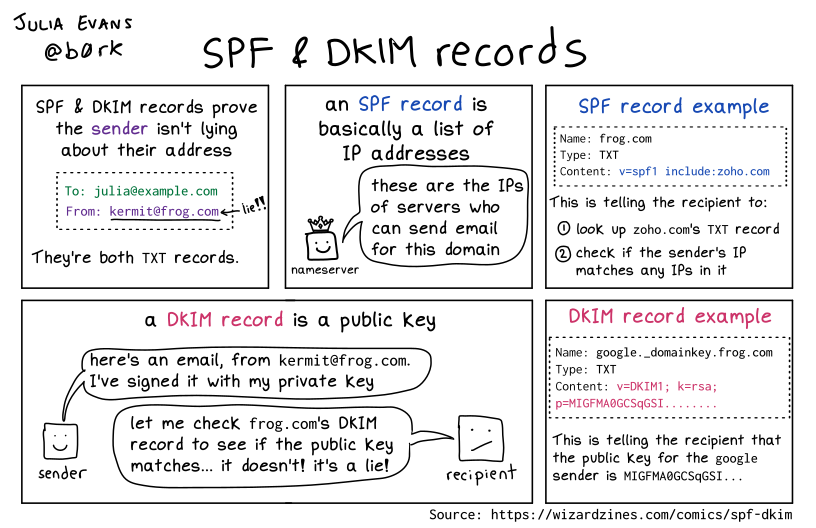
And a few days later [Archive] 🔎Julia Evans🔍 on Twitter: “… looks like a really nice way to learn about SPF/DKIM (h/t @CubicleApril) you send it an email and it walks you through everything the receiver does to verify the email …” / Twitter which referred to
[Wayback/Archive] Learn and Test DMARC.

Related:
- [Archive] 🔎Julia Evans🔍 on Twitter: “nice tweet with some things that are complicated about spf/dkim/dmarc :) …” / Twitter
- [Archive] Simon on Twitter: “@b0rk Nice :) The problem with SPF, DKIM and then DMARC is what they look at and verify : SPF looks at the envelope from/returnpath/… And DKIM uses whatever is in d= But those can be “bogus”, so now we need alignment and that gets important in DMARC.” / Twitter
- [Archive] Simon on Twitter: “@b0rk https://t.co/DzjlxOIZU6 good post about the subject” / Twitter
Via: [Archive] 🔎Julia Evans🔍 on Twitter: “SPF & DKIM records …” / Twitter (the original got deleted as it had a [Archive] typo)
–jeroen
Share this:

Posted in DNS, eMail, Internet, Power User, SocialMedia | Leave a Comment »
 The Wiert Corner - irregular stream of stuff