The Wiert Corner – irregular stream of stuff

Jeroen W. Pluimers on .NET, C#, Delphi, databases, and personal interests

  • My badges

  • Twitter Updates

  • My Flickr Stream

  • Pages

  • All categories

  • Enter your email address to subscribe to this blog and receive notifications of new posts by email.

    Join 1,854 other subscribers

google chrome devtools – Use JavaScript to set value of textbox when .value and events don’t seem to work – Stack Overflow

Posted by jpluimers on 2022/11/29

For my link archive: [Wayback/Archive] google chrome devtools – Use JavaScript to set value of textbox when .value and events don’t seem to work – Stack Overflow

TL;DR

Sometimes fields are blocked from pasting values.

Normally a trick like this works in the chrome development panel console:

document.getElementById('nonPasteElementID').value = 'myValueFromTheClipboard'

With some web development environments this does not work.

For react, after finding the react render name for the input (in the case of the answer, it was “reactNameForInputElement“) this is a solution:

To make it work you will need this:

const input = document.getElementById('nonPasteElementID');
const event = new Event('reactNameForInputElement', { bubbles: true });
input.value = '1';
input.dispatchEvent(event);

–jeroen

Posted in Chrome, Chrome, Development, Google, JavaScript/ECMAScript, Power User, Scripting, Software Development, Web Browsers, Web Development | Leave a Comment »

Kamer van Koophandel: de Non-Mailing-Indicator

Posted by jpluimers on 2022/11/28

I wish they had mailed me about this: [Wayback/Archive] De Non-Mailing-Indicator

Als je na je inschrijving in het Handelsregister niet benaderd wilt worden met fysieke post of huis-aan-huis bezoek op je ingeschreven adres, dan kun je de NMI activeren. Hiermee geef je aan dat je geen ongevraagde reclame per post of verkoop aan je deur wilt.

Na het activeren van de NMI staat dit zowel op het uittreksel als in de gratis toegankelijke informatie op de website.

De bescherming die de NMI biedt, is beperkt tot fysieke post en huis-aan-huis bezoek. De NMI beschermt niet tegen reclame en aanbiedingen via e-mail, telefoon, sms of WhatsApp. Je moet er rekening mee houden dat je ondanks de activering snel na je inschrijving benaderd gaat worden met allerlei aanbiedingen. Bedrijven en organisaties maken daarvoor gebruik van de openbare gegevens van het Handelsregister.

Het aanzetten van de NMI betekent dat je minder goed gevonden wordt. Zo heeft Google als beleid dat ze bedrijven met een NMI niet opneemt in Google Maps.

Je kunt eenvoudig via een formulier de [Wayback/Archive] Non-Mailing-Indicator activeren of deactiveren.

Met dit formulier kun je de non-mailing-indicator (NMI) activeren of deactiveren. Kies je voor ‘activeren’ dan mogen jouw gegevens uit het Handelsregister niet worden gebruikt voor postreclame of verkoop aan de deur. Je kunt zelf checken of je de NMI wel of niet hebt geactiveerd. Doe hiervoor de volgende stappen:

  • Ga naar [Wayback/Archive] de bedrijvenzoeker en vul je bedrijfsnaam of KVK-nummer in.
  • Klik op jouw bedrijfsnaam. Je gaat nu naar een pagina waar alle gegevens van jouw bedrijf staan.
  • Zie jij de zin “De onderneming/organisatie wil niet dat haar adresgegevens worden gebruikt voor ongevraagde postreclame en verkoop aan de deur” staan? Dan heb jij je NMI geactiveerd. Zie je deze zin niet, dan heb jij de NMI niet geactiveerd.

Als je je inschrijft in het Handelsregister kun je direct de NMI activeren. Als je de NMI op een later tijdstip activeert, bijvoorbeeld enkele maanden na je inschrijving, dan zijn je gegevens al bij veel bedrijven en organisaties bekend en opgenomen in hun databestanden. Dit wordt niet automatisch aangepast tenzij deze bedrijven regelmatig via KVK een update aanvragen. Omdat het achteraf activeren van de NMI in de praktijk weinig effect blijkt te hebben, kun je er het beste voor kiezen om dat meteen bij de inschrijving te doen.

jeroen

Posted in About, LifeHacker, Personal, Power User, Security | Leave a Comment »

Isotopp’s home sensor network

Posted by jpluimers on 2022/11/25

For my link archive an interesting blog post by isotopp (Kristian Köhntopp)

[Wayback] My home sensor network

I have been asked to document my home sensor network. Being married to a person with a background in web security sets boundary conditions:

  1. No cloud. We are running all services locally.
  2. No control, only metrics.

I am collecting data from a number of plugs with power meters over Wifi, using the MQTT protocol. I am also collecting data from a number of temperature sensors over Zigbee, and convert to MQTT. The MQTT data is ingested into Influx, and then read and plotted in Grafana. All of this is dockered and runs locally on an Ubuntu server.

Via [Archive] Kristian Köhntopp on Twitter: “For @sluongng …”

–jeroen

Posted in Hardware, IoT Internet of Things, Power User | Leave a Comment »

Great tags: #BugMagnet #IAmATester

Posted by jpluimers on 2022/11/24

I should use the great tags #BugMagnet #IAmATester more often.

Via: [Archive.is] Stephan Kämper on Twitter: “Moin @VIVANI_official, wenn man vom Twitter-Profil auf den Link zur Webseite klick, dann landet man auf einer Login-Seite von @WordPress, nicht beim Impressum, wie es der Link-Text vermuten lässt. #BugMagnet #IchBinEinTester”

–jeroen

Posted in Development, SocialMedia, Software Development, Testing | Leave a Comment »

Hugo, a static website engine written in Go: I might eventually switch WordPress to it

Posted by jpluimers on 2022/11/23

A long time ago, when just recovering from my december 2019 rectum cancer radiation treatments, I asked what Hugo was, to which tiara fan Jenn happily replied “[Archive] Jenn on Twitter: “It is a static website engine written in Go, … ““.

Like me, writing down or trying stuff is her way to remember things: [Archive] Jenn on Twitter: “For some reason, handwriting terminal commands helps to cement them in my head.… “

In 2021, Isotopp moved over to Hugo and I kindly asked if in the future he would help me out if I wanted to move from WordPress to Hugo.

The thread:

I will need to find a way to schedule posts though.

Note I archived Isotopp’s full thread at [Wayback/Archive] Thread by @isotopp on Thread Reader App – Thread Reader App.

–jeroen


https://twitter.com/geekgalgroks/status/1213574787785744384

It is a static website engine written in Go, https://t.co/msgP26rYRM

Related tweets in August 2020:

https://twitter.com/isotopp/status/1299319847617286146

Wo ich arbeite scheint alles auf ein Markdown im Git und eine Variante von Hugo, Jekyll oder ähnlich zu konvergieren.

https://twitter.com/mausdompteur/status/1299320903524851713

Gitlab Pages für Gitlab Häuser, die nicht schon Jira haben. Mit Web IDE ist das online und Inline zu bedienen.

Posted in Blogging, Development, Go (golang), SocialMedia, Software Development, Web Development | Leave a Comment »

Migration from Twitter to Mastodon | ads’ corner

Posted by jpluimers on 2022/11/22

Yet another interesting post (I think it is via [Wayback/Archive] isotopp, but I cannot find the original message any more): [Wayback/Archive] Migration from Twitter to Mastodon | ads’ corner.

jeroen

Posted in Mastodon, SocialMedia, Twitter, Uncategorized | Leave a Comment »

A while ago I bumped into some GPI Mojibake examples, but soon found out I should use the ftfy test cases

Posted by jpluimers on 2022/11/22

I have been into more and more Mojibake example pages like [Wayback] Mojibake: Question Marks, Strange Characters and Other Issues | GPI

Have you ever found strange characters like these ���  when viewing content in applications or websites in other languages?

They made me realise that all these (including the Mojibake examples on my blog) are just artifacts, but the real list of examples is the set of ftfy test cases at [Wayback/Archive.is] python-ftfy/test_cases.json at master · LuminosoInsight/python-ftfy

I got reminded when Waternet moved from paper mail using “Pyreneeën” to email using “Pyreneeën“. Not as bad as Waterschap AGV did earlier: they took it one level further and made “Pyreneeën” out of it, see Last year, a classic Mojibake was introduced when Waterschap Amstel, Gooi en Vecht redesigned their IT systems.

This seems like a trend where newer systems perform worse than older systems. I wonder why that is.

BTW: the trick on the [Wayback/Archive] Python.org shell to run ftfy (which is not installed by default) is first dropping to the shell (see my post How do I drop a bash shell from within Python? – Stack Overflow), then starting python again:

Read the rest of this entry »

Posted in CP850, Development, Encoding, ftfy, ISO-8859, Mojibake, Python, Scripting, Software Development, Unicode, UTF-8, UTF8 | Leave a Comment »

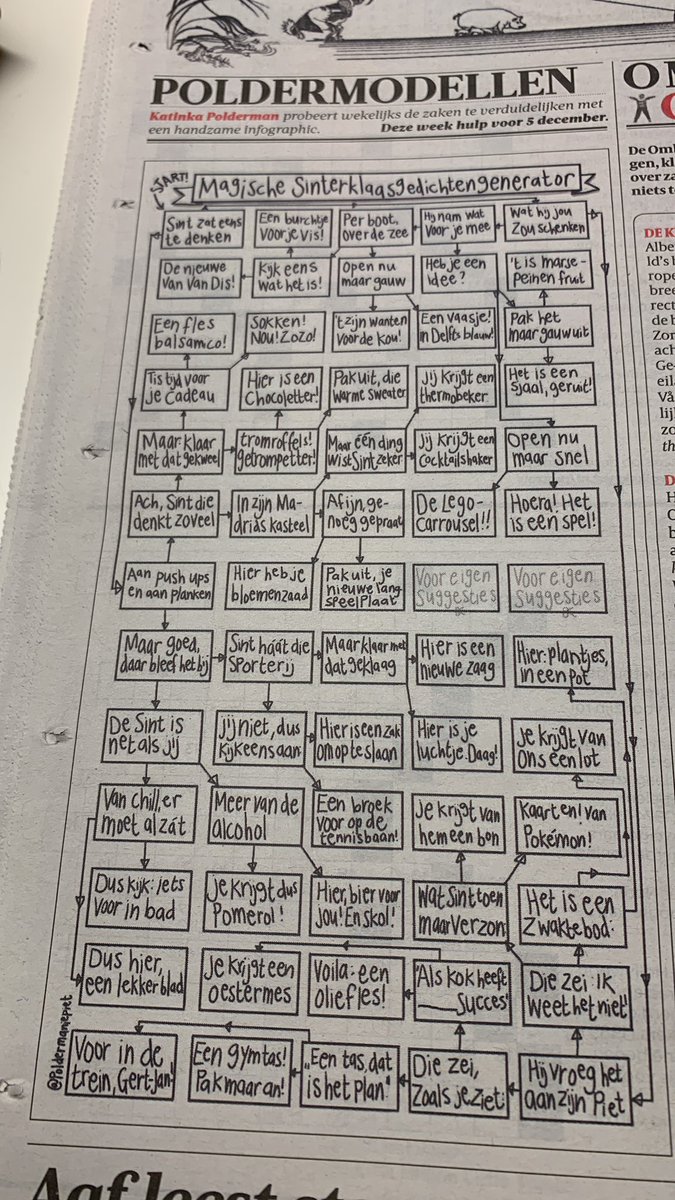
Polderman: “Alsjeblieft: mijn magische sinterklaasgedichtengenerator!… “

Posted by jpluimers on 2022/11/21

Voor een jaar waarin corona voorbij is en we toch een Sinterklaasgedicht nodig hebben:

[Archive] Polderman, beslisbomenmaker des vaderlands 🌳 on Twitter: “Alsjeblieft: mijn magische sinterklaasgedichtengenerator!… “

Er is ook een [Wayback/Archive] groot plaatje door [Archive] Bart van der Linden on Twitter: “.@Poldermanie zat te denken, waarom zou ik Nederland niet een magische sinterklaasgedichtengenerator schenken…… “.

Via [Archive] Ionica Smeets on Twitter: “Echt jammer dat ik niet het lootje van Gert-Jan heb.… “.

–jeroen

Posted in LifeHacker, Power User | Leave a Comment »

Kris helped me motivate to enter the Fediverse, so here I am: @wiert@mastodon.social

Posted by jpluimers on 2022/11/18

Given Elon Musk taking over Twitter, I decided to create an account in the federated social network Mastodon part of the Fediverse realm. In my case it is [Wayback/Archive] Jeroen Wiert Pluimers (@wiert@mastodon.social) – Mastodon (which you can visit at mastodon.social/@wiert).

Right now the account is rudimentary. More meta-data and media will be added later.

Mastodon is open source at [Wayback/Archive] mastodon/mastodon: Your self-hosted, globally interconnected microblogging community and you can join via [Wayback/Archive] Mastodon – Decentralized social media (joinmastodon.org) after choosing a Mastodon server/website. I have chosen [Wayback/Archive] Home – Mastodon (mastodon.social).

Given a Mastodon has a trunk, messages on Mastodon are called “Toots”.

For now some of the Tweets and links that Kris ([Wayback/Archive] Kris (@isotopp@chaos.social) – chaos.social) posted helping me to start on Mastodon.

Read the rest of this entry »

Posted in Mastodon, SocialMedia, Twitter | Leave a Comment »

I switched from SysInternals’ TcpView to NirSoft’s CurrPorts (cports)

Posted by jpluimers on 2022/11/18

I was a long time user of SysInternalsTcpView, but a while back I switched to NirSoft‘s CurrPorts (cports).

The main reason is that TcpView does not support filtering, which in the long past was not a problem since few Windows applications keep TCP connection open.

But nowadays with so many network dependencies, especially when using cloud services like DropBox/OneDrive/GoogleDrive/backblaze, these clutter the view a lot.

NirSoft’s CurrPorts (actually the executable is called [Wayback/Archive] cports.exe) can filter for both inclusion/exclusion on the open ports list based on many parameters (search for the “Using Filters” section in the cports.exe documentation: it’s a little bit below the version history).

The filtering syntax is extensive, and for ease of use, the context menu of the open ports list allows adding include/exclude filters on various parameters. After doing that, you can inspect the filter list to get an idea of possibilities and syntax.

For me, the easiest way to install CurrPorts is through [Wayback/Archive] Chocolatey Software | CurrPorts 2.65.

I found CurrPorts when trying to figure out how to use filters in TcpView: [Wayback/Archive] tcpview filter by process – Google Search

–jeroen

Posted in Chocolatey, NirSoft, Power User, SysInternals, Windows | Leave a Comment »