


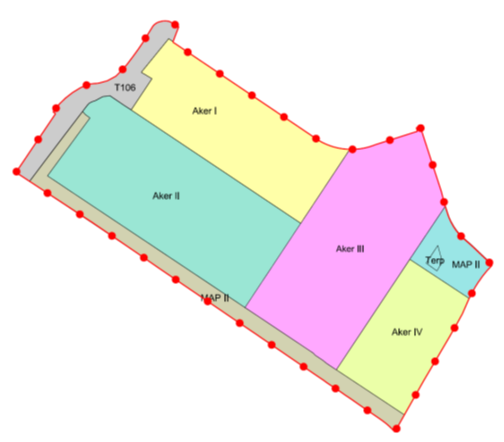
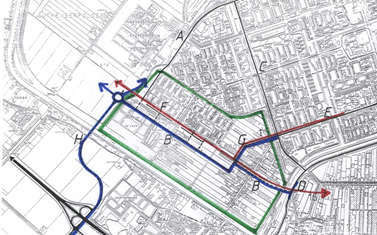
[Wayback] De Aker: Toelichting
Found via [Wayback] “NL.IMRO.0363.F1312BPSTD-VO01”, archived version [Wayback] “NL.IMRO.0363.F1312BPSTD-OW01”.
Posted by jpluimers on 2022/02/25
[Wayback] De Aker: Toelichting
Found via [Wayback] “NL.IMRO.0363.F1312BPSTD-VO01”, archived version [Wayback] “NL.IMRO.0363.F1312BPSTD-OW01”.

Posted in LifeHacker, Power User | Leave a Comment »
Posted by jpluimers on 2022/02/25
When downloading Windows 10 builds, I usually want them as ISO files because I test them out as Virtual Machines before running on real hardware.
Downloading can be done from [WayBack] www.microsoft.com/en-us/software-download/windows10, however what you get depends on what machine you start browsing.
The above WayBack link, because it got archived from a non-Windows machine redirects from https://web.archive.org/web/20210321163339/https://www.microsoft.com/en-us/software-download/windows10 to https://web.archive.org/web/20210321143203/https://www.microsoft.com/en-us/software-download/windows10ISO.
On Windows systems the redirect goes from https://web.archive.org/web/20210321143203/https://www.microsoft.com/en-us/software-download/windows10ISO to https://web.archive.org/web/20210321163339/https://www.microsoft.com/en-us/software-download/windows10
By default, when you are on a Windows machine, the download link only provides the Media Creation tool. This forces an extra step into getting the ISO file on the virtual machine host.
When downloading from a non-Windows machine, you get a possibility to download the ISO file directly after selecting which kind of build and language you need. This provides you with a time limited https link to download the ISO (in practice this seems to last at least an hour).
I didn’t dig into this before, but luckily others did, and the difference is as easy as changing the User-Agent in your browser, as these posts describe:
Luckily, since ESXi 6.7, VMware ESXi added https as protocol to wget, so now you can download the https link you get via the above trick without hassle.
Oh, this answers my question from a few years back too: How can I get Win10_1511_1_English_x64.iso or Win10_1511_1_EnglishInternational_x64.iso ?

Posted in Chrome, ESXi6.7, Power User, Virtualization, VMware, VMware ESXi, Web Browsers, Windows, Windows 10 | Leave a Comment »
Posted by jpluimers on 2022/02/25
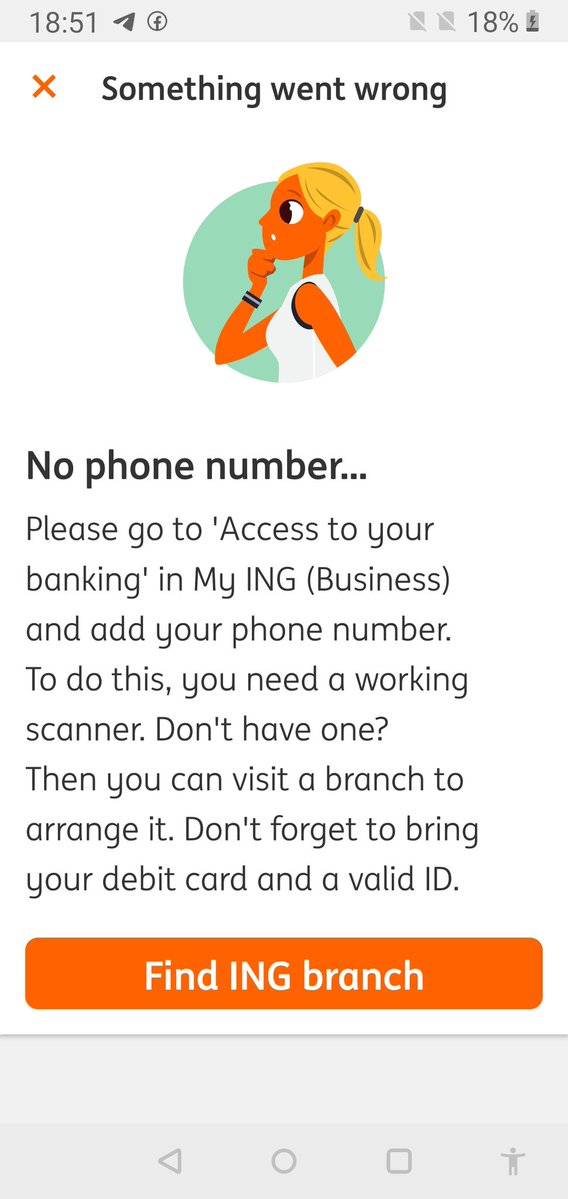
The target URL is this one: https://mijn.ing.nl/banking/settings/security and titled as such in:
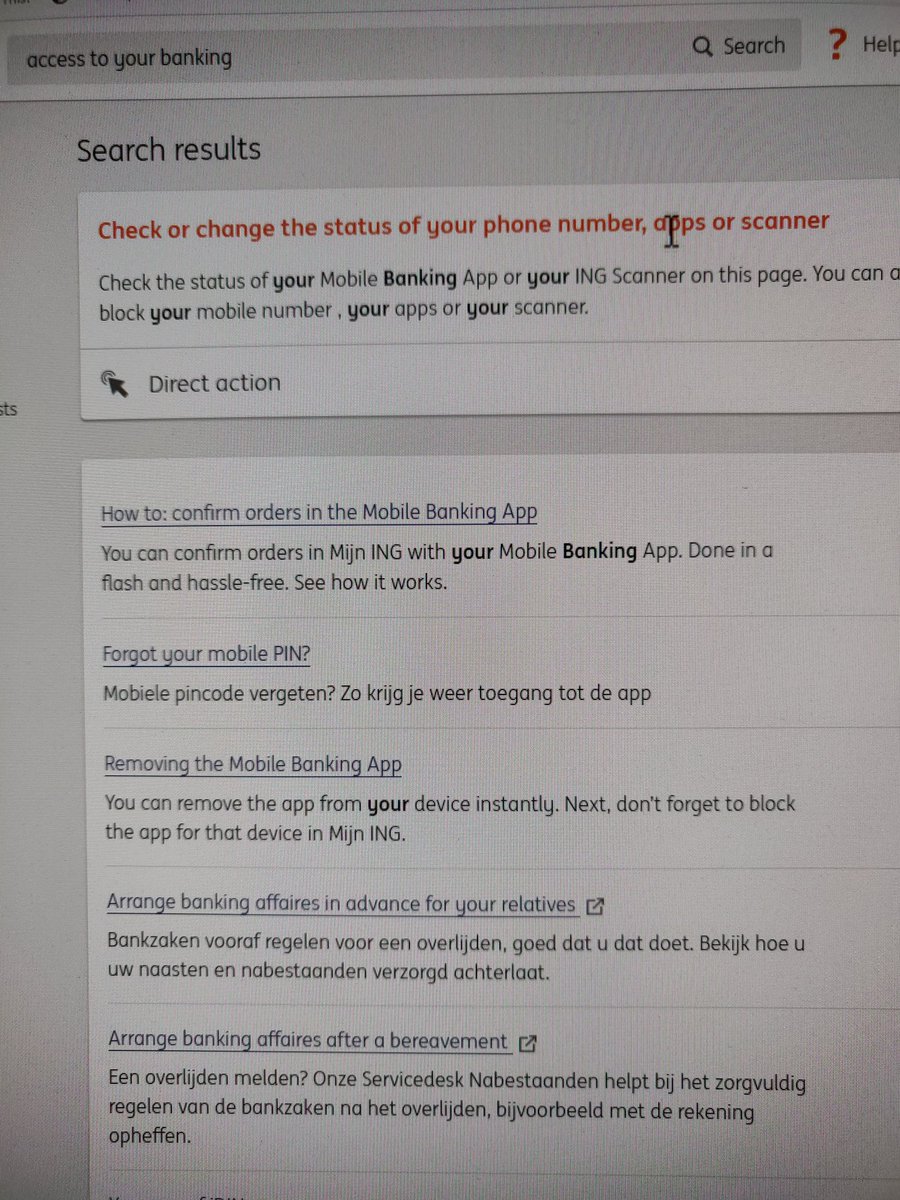
The page title “Access to your banking” is not to be found when you search on the Mijn ING site no matter if you configured Engish or Dutch as your Mijn ING language.
[Archive.is] Jeroen Wiert Pluimers on Twitter: “Waar zit in de My ING omgeving van @ingnl “access to your banking”? Ook met de site in het Engels kan ik het niet terugvinden, maar 1 van de apps heeft het wel nodig.… https://t.co/GU3TXwMbjf”
–jeroen

Posted in LifeHacker, Power User | Leave a Comment »
Posted by jpluimers on 2022/02/24
IoT devices still often use the ‘Basic’ HTTP Authentication Scheme for authorisation, see [Wayback] RFC7617: The ‘Basic’ HTTP Authentication Scheme (RFC ) and [Wayback] RFC2617: HTTP Authentication: Basic and Digest Access Authentication (RFC ).
Often this authentication is used even over http instead of over https, for instance the Egardia/Woonveilig alarm devices I wrote about yesterday at Egardia/Woonveilig: some notes about logging on a local gateway to see more detailed information on the security system. This is contrary to guidance in:
   This scheme is not considered to be a secure method of user
   authentication unless used in conjunction with some external secure
   system such as TLS (Transport Layer Security, [RFC5246]), as the
   user-id and password are passed over the network as cleartext.
   "HTTP/1.0", includes the specification for a Basic Access
   Authentication scheme. This scheme is not considered to be a secure
   method of user authentication (unless used in conjunction with some
   external secure system such as SSL [5]), as the user name and
   password are passed over the network as cleartext.
Fiddling with those alarm devices, I wrote these two little bash functions (with a few notes) that work both on MacOS and in Linux:
# `base64 --decode` is platform neutral (as MacOS uses `-D` and Linux uses `-d`)
# `$1` is the encoded username:password
function decode_http_Basic_Authorization(){
  echo $1 | base64 --decode
  echo
}

# `base64` without parameters encodes
# `echo -n` does not output a new-line
# `$1` is the username; `$2` is the password
function encode_http_Basic_Authorization(){
  echo $1:$2 | base64
}
The first decodes the <credentials> from a Authorization: Basic <credentials> header into a username:password clean text followed by a newline.
The second one encodes a pair of username and password parameters into such a <credentials> string.
They are based on these initial posts that were not cross platform or explanatory:
–jeroen
Posted in *nix, *nix-tools, Apple, Authentication, bash, bash, Communications Development, Development, HTTP, Internet protocol suite, Linux, Mac OS X / OS X / MacOS, Power User, Scripting, Security, Software Development, TCP, Web Development | Leave a Comment »
Posted by jpluimers on 2022/02/24
If you do business with for instance Jordan for he first time, then is likely -1 because tomorrow their clock moves forward one hour.
The 2022 daylight saving time changes (summer time / winter time) are at time.is/DST_2022 [Wayback/Archive.is]
[Archive.is] Dr. Jessie Christianstein 👩🏻🔬🧟♀️ on Twitter: “… “
–jeroen

Posted in Algorithms, Development, Software Development | Leave a Comment »
Posted by jpluimers on 2022/02/24
Two command-lines I use to view my Postfix logs:
journalctl --unit postfix --since "2 days ago"journalctl --unit postfix --pager-endNote that neither of these work well with the
--follow(or equivalent-f) option, as this will effectively disable the pager (which by default isless).
The second is via [Wayback] systemd – How to see the latest x lines from systemctl service log – Unix & Linux Stack Exchange (which got the--pagerend bit wrong, as it misses a dash and should be --pager-end, but still thanks [Wayback] Daniel Kmak):
Just:
journalctl -u SERVICE_NAME -eParameter
-estands for:-e –pagerend
…
That’s the one ! Other answers will go through the whole log to get to its end, which can be veeeeery long for large syslogs.
The last bit (by [Wayback] Léo Germond, thanks!) is why I like it most.
Similarly, specifying --since in the first example will not go through the whole log.
Some background information:
Posted in *nix, *nix-tools, bash, Development, journalctl and journald, Linux, postfix, Power User, Scripting, Software Development, systemd | Leave a Comment »
Posted by jpluimers on 2022/02/23
A follow-up on Source: Some links with notes on WoonVeilig/Egardia security system communications, protocols and support by 3rd party home automation apps:
Instructions on how to setup Egardia / Woonveilig within Home Assistant.
…
If the system support XMPP, disable XMPP by invalidating the configuration in the XMPP menu (for example by changing the user name). This is required for recent firmwares of the GATE-03 system as it does not use the Reporting server at all in the case of a valid XMPP configuration.
This is the actual Woonveilig/Egardia plugin that Home Assistant can use. It is integrated through [Wayback] pythonegardia · PyPI via [Wayback/Archive.is] core/requirements_all.txt at dev · home-assistant/core
Python library to interface with Egardia / Woonveilig alarm. Tested with WV-1716, GATE-01, GATE-02 and GATE-03 version of Egardia / Woonveilig. Other versions might work, but unsure. Originally written for integration with Home Assistant it can also by used to integrate with these alarms in other solutions.
Notes on the Woonveilig/Egardia GATE-03 model alarm hub (where 192.168.x.y is the IPv4 address that hub):
http://192.168.x.y/setting/xmpp.htm.xmpp01.egardia.com as primary and xmpp01.alt.egardia.com as secondary server on port 443.arg-####-auth where ###### are the last 6 *lowercase* hexadecimal digits of the MAC address of the GATE-03.http://192.168.x.y/action/xmppGet http GET request fired by http://192.168.x.y/setting/xmpp.htm.ip://######@ics.alt.egardia.com:52010/CID where ###### are the last 6 *uppercase* hexadecimal digits of the MAC address of the GATE-03.http://192.168.x.y/setting/userCode.htm together with their user names.http://192.168.x.y/setting/codeSetting.htm and obtained via http://192.168.x.y/action/areaListGet and http://192.168.x.y/action/codeSettingGetI got all of the above via: [Wayback/Archive.is] GATE-03 system does not report to Egardiaserver · Issue #26 · jeroenterheerdt/python-egardia (which by coincidence used the same firmware I had: HSGW 0.0.2.18.1 HPGW-L2-XA35H).
Which brings me to some Google search with some remarkable results:
…
LUPUSEC simply re-branded a Climax HPGW-G2 system and loaded some of their custom firmware on it.
…
So I did a quick look at LUPUS XT* based products:
Then at the Woonveilig/Egardia and Climax shops:
Conclusions:
Side note on open ports
PORT    STATE    SERVICE      VERSION
9/tcp   filtered discard
25/tcp  filtered smtp
80/tcp  open     http
445/tcp filtered microsoft-ds
PORT      STATE    SERVICE      VERSION
9/tcp     filtered discard
21/tcp    open     ftp          oftpd
25/tcp    filtered smtp
80/tcp    open     tcpwrapped
445/tcp   filtered microsoft-ds
554/tcp   open     rtsp
711/tcp   open     cisco-tdp?
1935/tcp  open     rtmp?
6000/tcp  open     X11?
49152/tcp open     upnp         Portable SDK for UPnP devices 1.6.17 (Linux 3.4.35; UPnP 1.0)
Posted in Communications Development, Development, Python, Scripting, Software Development | Leave a Comment »
Posted by jpluimers on 2022/02/23
Earlier this month, I ended ESXi: editing /etc/vmware/hostd/vmInventory.xml to fix the datastore UUID for unavailable VMs part 2 with this:
A final note: I need to check out if
.vswpfiles need to be there at all, as my ESXi servers have plenty of physical memory in order not to swap out to disk. More on that in a future blog post.
Browsing back through my blog posts, I mentioned .vswp files before, but never really dug into them:

Posted in ArchiveTeamWarrior, ESXi6, ESXi6.5, ESXi6.7, ESXi7, Internet, InternetArchive, Power User, Virtualization, VMware, VMware ESXi, WayBack machine | Leave a Comment »
Posted by jpluimers on 2022/02/23
Yesterday I wrote about I consider stealing the user’s time because of a bad UX design among the Dark Patterns.
It was about a site blocking the paste of an e-mail field.
I forgot about an almost Dark Pattern on the same site that might be not obvious for English and French readers, but (though there is little documentation on this) there are a lot of countries having the house number put after the street name.
When filling out forms, it makes a lot of sense to put the house number and street name fields in the order of use for the majority of people living that country.
Not doing so rates a form almost as Dark Pattern, for instance the Dutch “MijnOLVG” site, as this is their account sign-up form:

Posted in Dark Pattern, Development, Power User, Software Development, User Experience (ux), Web Development | Leave a Comment »
Posted by jpluimers on 2022/02/22
I an with [Wayback] Craig Buckler to consider Dark Patterns being wider than the strict sense.
For me anything that costs a user extra time or makes accessibility harder is a Dark Pattern.
So I agree with the issues he explains at [Wayback] The Web’s Most Annoying Dark Patterns – SitePoint
Does the web delight or displease you? Craig lists his least favourite UI and marketing dark patterns. Have you developed on the dark side?

Paste is enabled, but does not function
Having had RSI, I’m dependent on keeping my hands and arms in good shape. This means minimising the use of pointing devices and also trying to minimise typing.
In addition, I have heavily segmented my use of email addresses (among others for cutting down SPAM). Basically any point of contact gets a new email address.
This means I realy on tooling like password managers and email address generators. It means copying and pasting information.
So I bumped into a web-site that disallowed pasting the (unique and long!) email address into the email verification field.
[Archive.is] Jeroen Wiert Pluimers on Twitter: “The @olvg #mijnOLVG site is now on my Dark Patterns list as they make #accessibility harder by blocking pasting into the email address verification field. Blocking the paste-blocker. CC some people advocating mijnolvg.nl @MauricevdBosch @ronklitsie63 @kyntha”
Despite the popup menu, paste didn’t work. Chrome autofill did, but didn’t have the information for this particular (new and unique) email address yet, so could not be used yet.
It is relatively easy to disable a paste block. In this case, I was using chrome, but this can be done with any browser. Some browsers even have optional extensions that can do this for you.
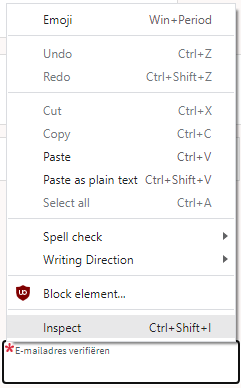
In the case of Chrome, when right clicking, there is an “Inspect” option
Inspect is enabled and actually works.
It inspects the current element, which on this site looks like this:
The element does not contain event handlers. But the code hooks them behind our backs.
On the “Event Listeners” tab on the right, you can see there are two JavaScript methods hooked to the paste handler:
The paste handlers. The first is OK, the second blocks paste.
The first one is OK, though I did not really look into what the proxy does.
Second paste event handler: remove this one.
First paste event handler: keep this one.
The second is not OK, as it effectively prevents the event from being handled any further at all by calling preventDefault
Second paste event handler: remove this one.
- [Wayback] Event.preventDefault() – Web APIs | MDN
The Event interface’s preventDefault() method tells the user agent that if the event does not get explicitly handled, its default action should not be taken as it normally would be.
By clicking on the second Remove button above, the paste blocker is gone and you can paste again.
–jeroen

Posted in Chrome, Chrome, Dark Pattern, Development, Google, JavaScript/ECMAScript, Power User, Scripting, Software Development, User Experience (ux), Web Browsers | Leave a Comment »





 The Wiert Corner - irregular stream of stuff