The Wiert Corner – irregular stream of stuff

Jeroen W. Pluimers on .NET, C#, Delphi, databases, and personal interests

  • My badges

  • Twitter Updates

  • My Flickr Stream

  • Pages

  • All categories

  • Enter your email address to subscribe to this blog and receive notifications of new posts by email.

    Join 1,854 other subscribers

Too bad: ESXi busybox has `diff`, but not `patch`

Posted by jpluimers on 2022/03/02

On my ESXi boxes, I have a directory with local scripts that in part depend on the machine.

So I contemplated patching the dending parts with patch.

Then I found out that the BusyBox that VMware built for ESXi does have diff, but not patch:

# $(readlink -f "`which diff`")
BusyBox v1.29.3 (2021-01-17 01:25:00 PST) multi-call binary.
BusyBox is copyrighted by many authors between 1998-2015.
Licensed under GPLv2. See source distribution for detailed
copyright notices.

Usage: busybox [function [arguments]...]
   or: busybox --list
   or: function [arguments]...

    BusyBox is a multi-call binary that combines many common Unix
    utilities into a single executable.  Most people will create a
    link to busybox for each function they wish to use and BusyBox
    will act like whatever it was invoked as.

Currently defined functions:
    addgroup, adduser, arch, ash, awk, basename, bunzip2, bzcat, bzip2, cat, chgrp, chmod, chown, chvt, cksum, clear, cp, crond,
    cut, date, dd, delgroup, deluser, diff, dirname, dnsdomainname, du, echo, egrep, eject, env, expr, false, fdisk, fgrep, find,
    fstrim, getty, grep, groups, gunzip, gzip, halt, head, hexdump, hostname, inetd, init, kill, ln, logger, login, ls, lzop,
    lzopcat, md5sum, mkdir, mkfifo, mknod, mktemp, more, mv, nohup, nslookup, od, passwd, poweroff, printf, readlink, reboot,
    reset, resize, rm, rmdir, sed, seq, setsid, sh, sha1sum, sha256sum, sha3sum, sha512sum, sleep, sort, ssl_client, stat, stty,
    sum, sync, tail, tar, taskset, tee, test, time, timeout, touch, true, uname, uniq, unlink, unlzop, unzip, usleep, vi, watch,
    wc, wget, which, who, xargs, zcat

This list is much shorter than the applets that are supported in [Wayback] BusyBox – The Swiss Army Knife of Embedded Linux, so VMware did cut out quite a few.

Generating the above output

The command-line trick above first expands diff using the output of which diff, then finds out where it links to through the readlink -f wrapper there the back-quotes “`” get this output:

# readlink -f "`which diff`"
/usr/lib/vmware/busybox/bin/busybox

Finally the $(...) executes the output of readlink.

It is based on [Wayback] bash – How to resolve symbolic links in a shell script – Stack Overflow

readlink -f "$path"

Editor’s note: The above works with GNU readlink and FreeBSD/PC-BSD/OpenBSD readlink, but not on OS X as of 10.11.GNU readlink offers additional, related options…

Need to devise a way to apply patches

Given there is no patch, I need to think about a good way to apply patches, for instance to snip this into /etc/rc.local.d/local.sh in a reliable way:

## BEGIN-PATCH-PATH

# local binaries are in /vmfs/volumes/NVMe980PRO_1TB/local-bin/
# link that directory from /opt/bin
# then add /opt/bin to the PATH in /etc/profile so that on each logon it becomes available
# this means you need to logon twice after reboot:
# - first to patch /etc/profile
# - second to have the correct PATH loaded from /etc/profile
# direcory exist trick from https://stackoverflow.com/questions/59838/how-can-i-check-if-a-directory-exists-in-a-bash-shell-script

patch_etc_profile_PATH() {
    if [ -d "$1" ]; then
      ln -s "$1" "/opt/bin"
      sed -i -e 's!PATH=/bin:/sbin!PATH=/bin:/sbin:/opt/bin/!' /etc/profile
    fi
}

patch_etc_profile_PATH /vmfs/volumes/NVMe980PRO_1TB/local-bin/

## END-PATCH-PATH

–jeroen

Posted in *nix, *nix-tools, ash/dash, ash/dash development, BusyBox, Development, ESXi6, ESXi6.5, ESXi6.7, ESXi7, Power User, Scripting, Software Development, Virtualization, VMware, VMware ESXi | Leave a Comment »

Some links on repairing the Windows Recovery partition after cloning a Windows 10 disk

Posted by jpluimers on 2022/03/01

Somehow after cloning a Windows 10 disk to SSD, the regular partition worked fine, but the recovery partition (sometimes called WinRE: short for Windows Recovery Environment or Windows RE) didn’t.

In short, I only had to perform two actions to get this fixed, both from the Administrator elevated command prompt:

  • Set the partition ID of the Recovery partition from 7 to 27 (this is for an MBR disk; for GPT disks, these values are different, see the first link below). I did this using diskpart.
  • Re-enabling the Recovery partition by executing reagentc /info to check if it was disabled, then reagentc /enable (if it wasn’t disabled first, I had to precede it with reagentc /enable).

    Before this, bcdedit /enum would only return the Windows Boot Loader entry for the C: drive, but had no recoverysequence and now it had.

Since there are cases where much more action is needed, here are some links for just when I run into more complicated situations:

Read the rest of this entry »

Posted in Power User, Windows, Windows 10 | Leave a Comment »

Learned that figuring out Excel formula dependencies has been there since at least Excel 2000 (:

Posted by jpluimers on 2022/03/01

Sometimes, you figure out Excel functionality you have never needed before, but has been there for decades.

A while ago, I had a very complex with formulas referencing full columns back and forth when suddenly I got into something strange: when reloading the spreadsheet, values would not appear because of recursion errors. Before saving this was fine, so it was hard to track back where I want wrong.

So I was happy to find out that Excel has two cool features for this:

  • Trace Precedents
  • Trace Dependents

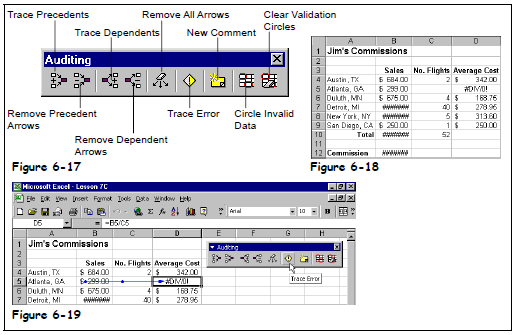
Heck, looking at the icons I had a feel these features had been there for a long time. Boy, was I surprised to find them in [Wayback] Excel 2000 – Student Edition – Complete (a great book by the way), as you can see in this picture:

Excel 2000 - Student Edition - Complete - Trace precedents, dependents, error

Excel 2000 – Student Edition – Complete – Trace precedents, dependents, error

As others can explain this feature so much better than I can, here are some links:

–jeroen


Posted in Excel, Office, Office 2000, Office 2003, Office 2007, Office 2010, Office 2011 for Mac, Office 2013, Office 2016, Power User | Leave a Comment »

Booting Windows 10 to the recovery console command prompt

Posted by jpluimers on 2022/03/01

I bumped into an old draft on notes on NTFS boot issues.

A while ago, I wanted to boot in the Windows 10 “Safe Mode” console, but the F8 option during the boot process was gone.

So I wondered how to get there. There seem to be a few ways, of which almost all require a functioning Windows installation. When you have one, it is relatively easy, as these options will work as summarised from [Wayback] How to open the Windows 10 recovery console:

  • Hold the physical Shift key when choosing “Reboot” in the user interface. There are various ways to get to the “Power” button:
    • in the lower right corner at the logon-screen
    • in the lower right corner at the lock-screen
    • in the lower right corner after pressing CtrlAltDel
    • in the lower left corner of the “Start” menu
  • In the Settings app, there used to be an “Advanced Startup” feature, but I could not find that any more in Windows 10 version 21H1 any more
  • From a console Window, run either of these commands (the second waits zero seconds before rebooting, the first 30)
    • shutdown.exe /r /o
    • shutdown.exe /r /o /t 0

There is also a possibility to restore the F8 functionality, but you need installation media for it. [Wayback] 3 ways to boot into Safe Mode on Windows 10 version 21H1 explains how to.

Some “notes on NTFS boot issues” links for my archive

(Note that for some of the links, only the [Wayback] ones work: link-rot of the links I saved 6 years ago)

–jeroen

Read the rest of this entry »

Posted in Internet, link rot, Power User, Windows, Windows 10, Windows 7, Windows 8, Windows 8.1, WWW - the World Wide Web of information | Leave a Comment »

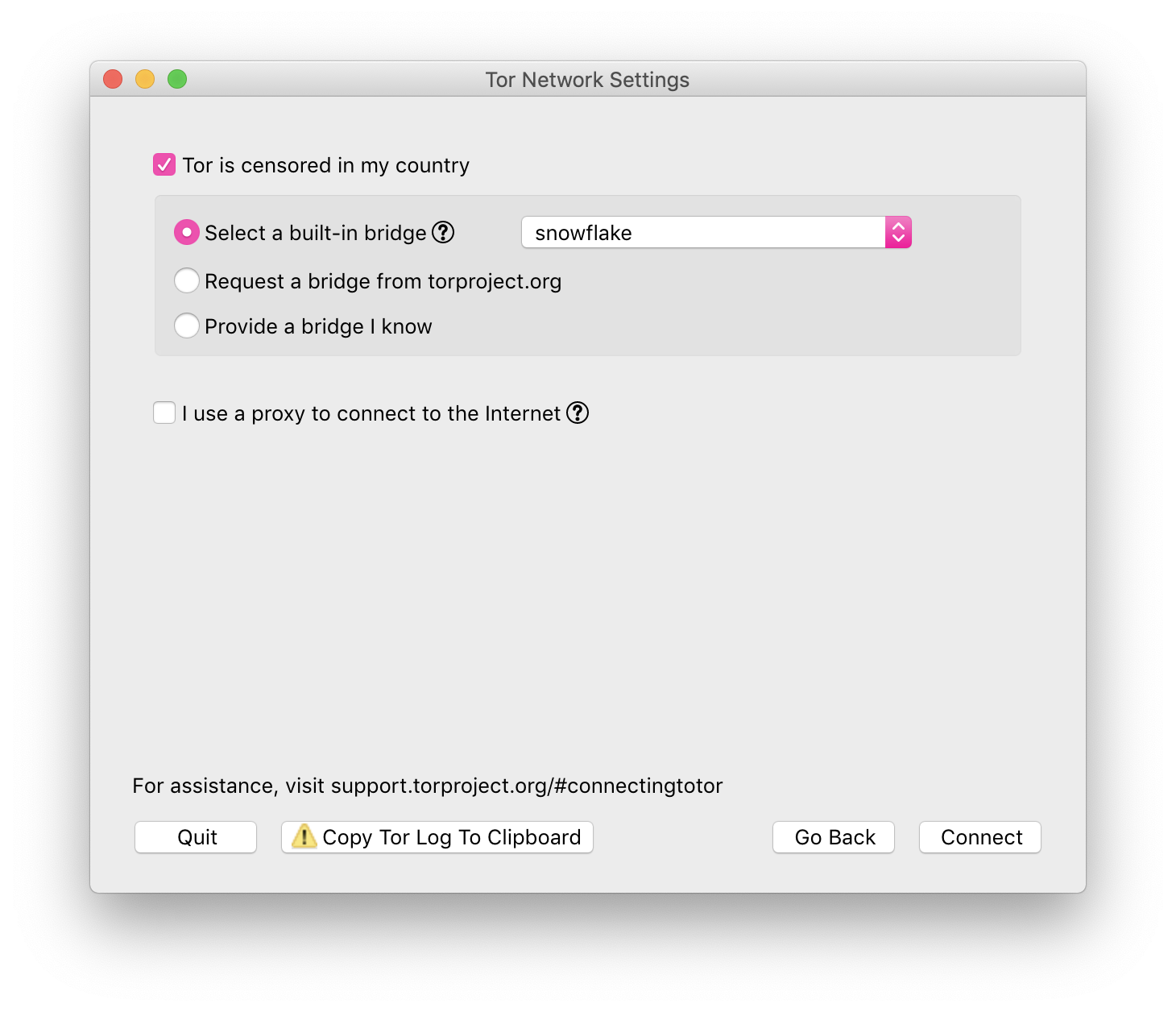
Snowflake – help vulnerable people (like censored or in war zones) access the internet

Posted by jpluimers on 2022/02/28

Via [Archive] Daniël Verlaan on Twitter: “Het is lief dat mensen iets willen doen, maar dit is even “effectief” als heel vaak op je F5-knop drukken. Als je zonder technische kennis mee wil helpen, draai een Tor Snowflake zodat Oekraïners en Russen toegang blijven houden tot een vrij internet: …” / Twitter:

[Wayback/Archive] Snowflake

Snowflake is a system to defeat internet censorship. People who are censored can use Snowflake to access the internet. Their connection goes through Snowflake proxies, which are run by volunteers. For more detailed information about how Snowflake works see our [Wayback/Wayback] documentation wiki.

Run a Proxy

If your internet access is not censored, you should consider installing the Snowflake extension to help users in censored networks. There is no need to worry about which websites people are accessing through your proxy. Their visible browsing IP address will match their Tor exit node, not yours.

If you would like to run a command-line version of the Snowflake proxy on your desktop or server, see our [Wayback/Archive] community documentation for running a standalone Snowflake proxy.

Use Snowflake

If your internet access is censored, you should download [Wayback/Archive] Tor Browser.

Tor Browser screenshot

–jeroen


Posted in Awareness, Power User, Privacy, Security | Leave a Comment »

Thinkpad max memory configurations for the models I own

Posted by jpluimers on 2022/02/28

Below are the maximum memory configurations for the Thinkpad models I own.

Note these re only 7-row keyboard configurations, the 6-row keyboards were always “meh”.

I used this command to get the CPU information:

wmic cpu get name

Memory speed

As mentioned in PC3-8500 or PC3-10600:

As PC3-10600 is getting increasingly difficult to acquire, PC3-12800 can be used instead. Using PC3-12800 may or may not increase the performance of your model, as some models may underclock it to their respective original DRAM speeds.

T510 – the midrange

Intel(R) Core(TM) i5 CPU       M 560  @ 2.67GHz

[Wayback] Category:T510 – ThinkWiki

You might think it would fit two 8GB modules and be upgradable to 16GB, but the chipset prevents it. Some of the W510 models seem to accept 8GB modules though:

W701 – the largest of the bunch

Intel(R) Core(TM) i7 CPU       Q 720  @ 1.60GHz

[Wayback] Category:W701 – ThinkWiki

  • 2, 3, 4 or 8GB PC3-8500 memory standard, upgradable to 16 GB

I actually still have 16GB in my version, see: ThinkPad W701: Win7 Ultimate x64 suddenly only saw 8GB RAM of 16GB (via: [H]ard|Forum).

Searching back my blog history, I did note that 32GB should fit: ThinkPad W701 with 32GB of memory via: forum.thinkpads.com • Newer 8G memory sticks in a W700, W701, W500, W510 ?

X201 – the smallest of the bunch

Intel(R) Core(TM) i7 CPU M 620 @ 2.67GHz

[Wayback] Category:X201 – ThinkWiki

Some seem to differ however, and got 16GB to work, but others don’t, as only the lower 8GB are accessible:

I might upgrade the W701, order 4*8GB modules, test some in the X201, then order more if it works.

Notes

Just in case I want to ever get a smaller Thinkpad with 7-row keyboard that allows 32-gigabytes of memory, the state as of 2019 is pretty accurate as no 7-row keyboards were manufacturerd after that (not even the horrendously expensive T25, which was a 2017 model [Wayback]/Archive.is] My ThinkPad T25 review : thinkpad):

[WaybackCurrent Thinkpad models that support 32 gb ram (even unofficially) – Thinkpads Forum (state in 2019)

If you really want to go the T25 way, you can modify it to put T480 hardware in it: [Wayback] Thinkpad T25 Gets Less Retro With Hardware Swap | Hackaday

–jeroen

Read the rest of this entry »

Posted in Power User, T510, ThinkPad, W701, X201 | Leave a Comment »

Not sure why: graph.windows.net is missing a security certificate retraction on some Windows machines?

Posted by jpluimers on 2022/02/28

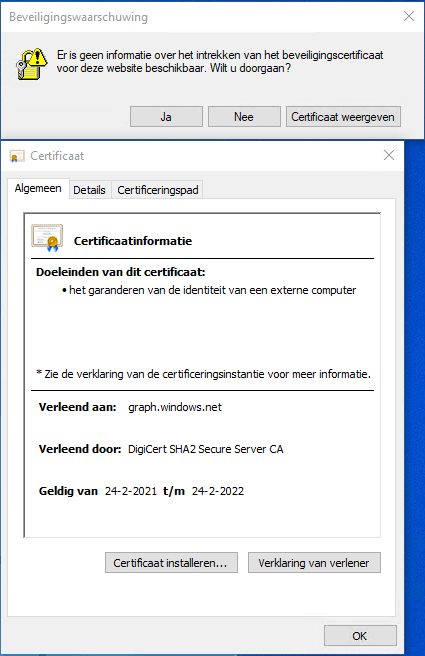
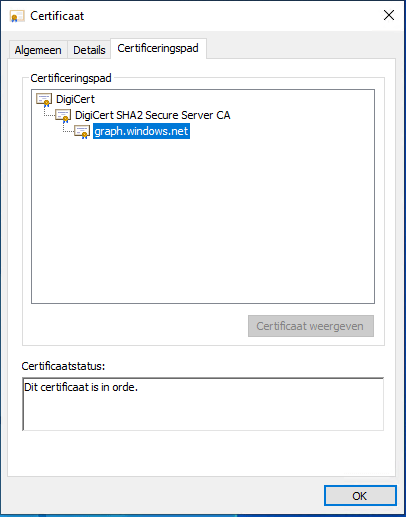
Got this on two Dutch Windows machines, not sure why yet:

Missing information on security certificate retraction

Missing information on security certificate retraction

Certificate path is OK

Certificate path is OK

–jeroen

Posted in Communications Development, Development, Encryption, Internet protocol suite, Power User, Security, TCP, TLS | Leave a Comment »

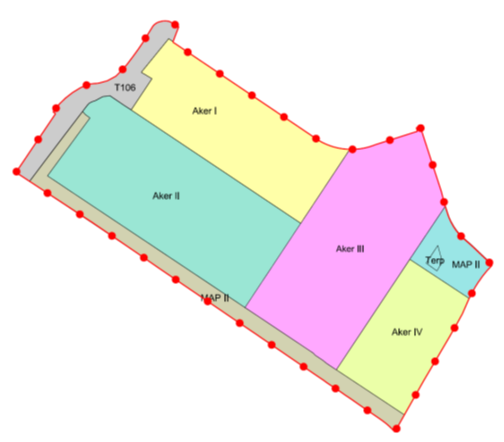
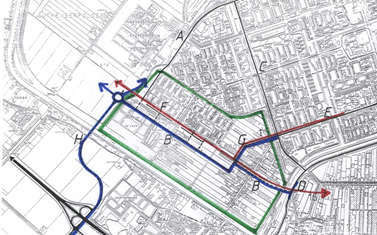
Bestemmingsplan De Aker: Toelichting

Posted by jpluimers on 2022/02/25

[Wayback] De Aker: Toelichting

[Wayback] PDF.

Found via [Wayback] “NL.IMRO.0363.F1312BPSTD-VO01”, archived version [Wayback] “NL.IMRO.0363.F1312BPSTD-OW01”.

Posted in LifeHacker, Power User | Leave a Comment »

Force downloading Windows 10 ISOs instead of Media Creation Tool

Posted by jpluimers on 2022/02/25

When downloading Windows 10 builds, I usually want them as ISO files because I test them out as Virtual Machines before running on real hardware.

Downloading can be done from [WayBack] www.microsoft.com/en-us/software-download/windows10, however what you get depends on what machine you start browsing.

The above WayBack link, because it got archived from a non-Windows machine redirects from https://web.archive.org/web/20210321163339/https://www.microsoft.com/en-us/software-download/windows10 to https://web.archive.org/web/20210321143203/https://www.microsoft.com/en-us/software-download/windows10ISO.

On Windows systems the redirect goes from https://web.archive.org/web/20210321143203/https://www.microsoft.com/en-us/software-download/windows10ISO to https://web.archive.org/web/20210321163339/https://www.microsoft.com/en-us/software-download/windows10

By default, when you are on a Windows machine, the download link only provides the Media Creation tool. This forces an extra step into getting the ISO file on the virtual machine host.

When downloading from a non-Windows machine, you get a possibility to download the ISO file directly after selecting which kind of build and language you need. This provides you with a time limited https link to download the ISO (in practice this seems to last at least an hour).

I didn’t dig into this before, but luckily others did, and the difference is as easy as changing the User-Agent in your browser, as these posts describe:

Luckily, since ESXi 6.7, VMware ESXi added https as protocol to wget, so now you can download the https link you get via the above trick without hassle.

Oh, this answers my question from a few years back too: How can I get Win10_1511_1_English_x64.iso or Win10_1511_1_EnglishInternational_x64.iso ?

jeroen

Posted in Chrome, ESXi6.7, Power User, Virtualization, VMware, VMware ESXi, Web Browsers, Windows, Windows 10 | Leave a Comment »

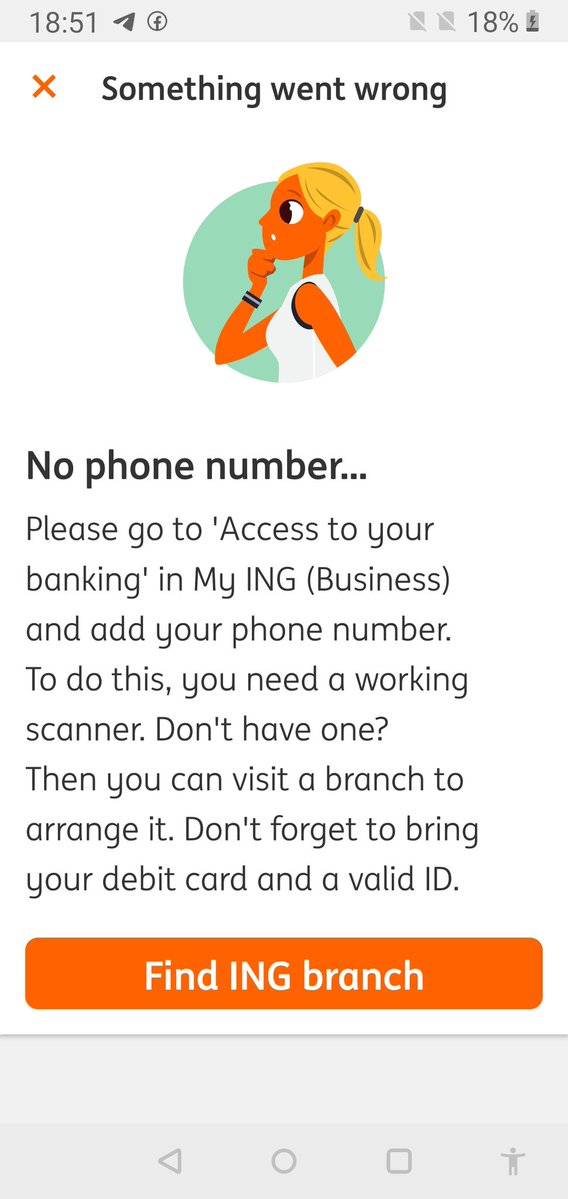
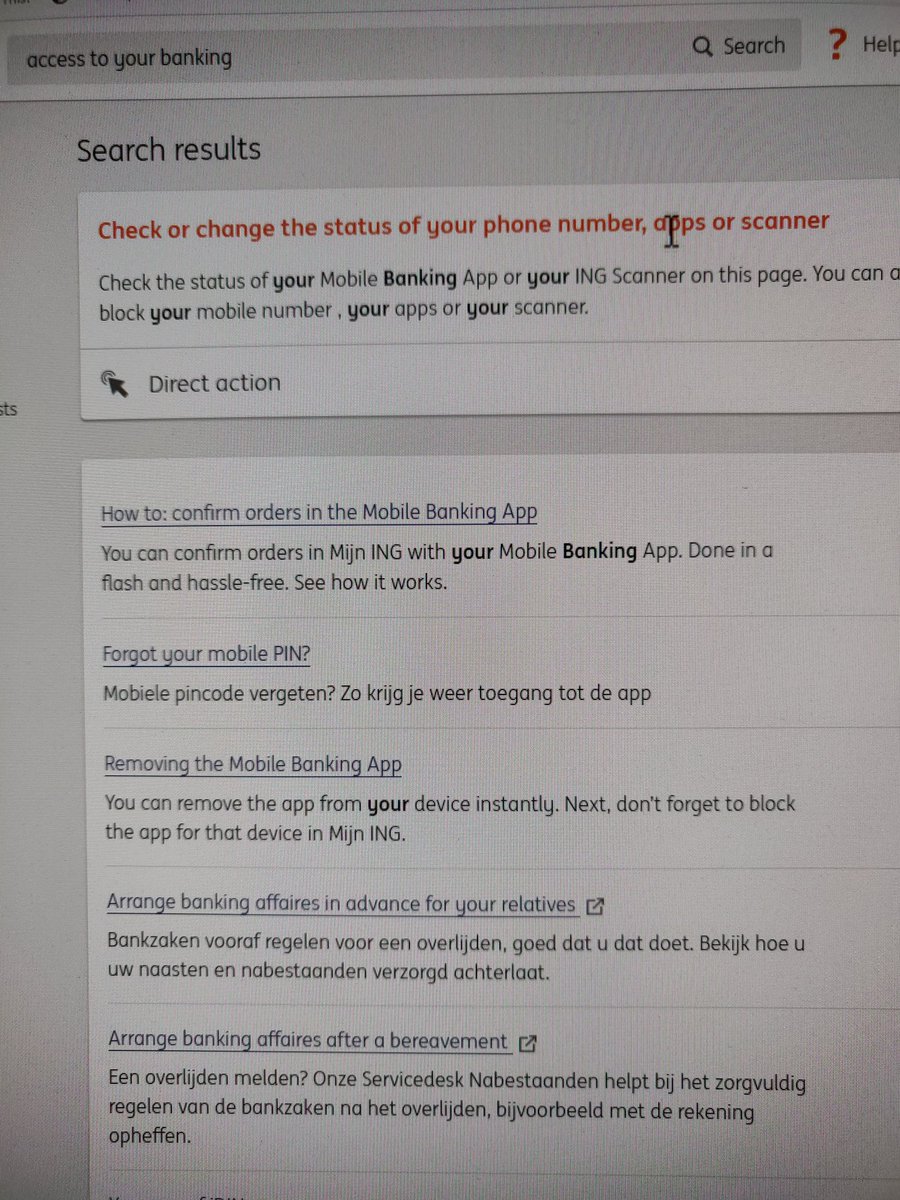
“access to your banking” in mijn ING is named differently from this phrase both in English and Dutch

Posted by jpluimers on 2022/02/25

The target URL is this one: https://mijn.ing.nl/banking/settings/security and titled as such in:

  • English: “Access to your banking”
  • Dutch: “Toegang tot je bankzaken”

The page title “Access to your banking” is not to be found when you search on the Mijn ING site no matter if you configured Engish or Dutch as your Mijn ING language.

[Archive.is] Jeroen Wiert Pluimers on Twitter: “Waar zit in de My ING omgeving van @ingnl “access to your banking”? Ook met de site in het Engels kan ik het niet terugvinden, maar 1 van de apps heeft het wel nodig.… https://t.co/GU3TXwMbjf”

–jeroen

Posted in LifeHacker, Power User | Leave a Comment »