The Wiert Corner – irregular stream of stuff

Jeroen W. Pluimers on .NET, C#, Delphi, databases, and personal interests

  • My badges

  • Twitter Updates

  • My Flickr Stream

  • Pages

  • All categories

  • Enter your email address to subscribe to this blog and receive notifications of new posts by email.

    Join 1,854 other subscribers

Some notes on dumping IceCast ICY streams to get meta-data

Posted by jpluimers on 2021/06/23

Some links I want to investigate further.

This is difference in the header meta data of an icecast URL, than in the stream data.

The header meta-data you get from this cURL command (via [WayBack] linux – Catch Metadata from Icecast-audio-stream – Super User):

# curl -H "Icy-MetaData: 1" -v "http://icecast.omroep.nl:80/radio2-bb-mp3" > /dev/null
  % Total    % Received % Xferd  Average Speed   Time    Time     Time  Current
                                 Dload  Upload   Total   Spent    Left  Speed
  0     0    0     0    0     0      0      0 --:--:-- --:--:-- --:--:--     0*   Trying 145.58.53.154...
* TCP_NODELAY set
* Connected to icecast.omroep.nl (145.58.53.154) port 80 (#0)
> GET /radio2-bb-mp3 HTTP/1.1
> Host: icecast.omroep.nl
> User-Agent: curl/7.54.0
> Accept: */*
> Icy-MetaData: 1
> 
* HTTP 1.0, assume close after body
< HTTP/1.0 200 OK
< Content-Type: audio/mpeg
< Date: Mon, 01 Jul 2019 06:46:33 GMT
< icy-br:192
< ice-audio-info: samplerate=48000;channels=2;bitrate=192
< icy-br:192
< icy-genre:Mixed
< icy-metadata:1
< icy-name:NPO Radio2
< icy-pub:0
< icy-url:http://www.radio2.nl
< Server: Icecast 2.4.0-kh10
< Cache-Control: no-cache, no-store
< Access-Control-Allow-Origin: *
< Access-Control-Allow-Headers: Origin, Accept, X-Requested-With, Content-Type
< Access-Control-Allow-Methods: GET, OPTIONS, HEAD
< Connection: Close
< Expires: Mon, 26 Jul 1997 05:00:00 GMT
< icy-metaint:16000
< 

The content meta-data you can for instance get with node.js in a call like [WayBack] https://colon.roderickgadellaa.com:8001/get/id3/?url=http%3A%2F%2Ficecast.omroep.nl%3A80%2Fradio2-bb-mp3:

{"ok":true,"code":200,"error":false,"data":{"headers":{"content-type":"audio/mpeg","date":"Sat, 29 Jun 2019 17:07:03 GMT","icy-br":"192, 192","ice-audio-info":"samplerate=48000;channels=2;bitrate=192","icy-genre":"Mixed","icy-metadata":"1","icy-name":"NPO Radio2","icy-pub":"0","icy-url":"http://www.radio2.nl","server":"Icecast 2.4.0-kh10","cache-control":"no-cache, no-store","access-control-allow-origin":"*","access-control-allow-headers":"Origin, Accept, X-Requested-With, Content-Type","access-control-allow-methods":"GET, OPTIONS, HEAD","connection":"Close","expires":"Mon, 26 Jul 1997 05:00:00 GMT","icy-metaint":"16000"},"metadata":{"StreamTitle":"AUDIOLINK-AUDIO-FTP-SERVER - +EJ+  Ons Uuropener"},"timestamp":1561828023103,"cacheValidUntil":1561828038103},"request":{"protocol":null,"slashes":null,"auth":null,"host":null,"port":null,"hostname":null,"hash":null,"search":"?url=http%3A%2F%2Ficecast.omroep.nl%3A80%2Fradio2-bb-mp3","query":{"url":"http://icecast.omroep.nl:80/radio2-bb-mp3"},"pathname":"/get/id3/","path":"/get/id3/?url=http%3A%2F%2Ficecast.omroep.nl%3A80%2Fradio2-bb-mp3","href":"/get/id3/?url=http%3A%2F%2Ficecast.omroep.nl%3A80%2Fradio2-bb-mp3"}}

This was at a time where the Dutch NPO Radio 2 had trouble with their ID3 service as the first part stopped refreshing for days: "metadata":{"StreamTitle":"AUDIOLINK-AUDIO-FTP-SERVER - +EJ+ Ons Uuropener"}

Some links that will help me eventually dump this from the command-line:

–jeroen

Posted in Development, IceCast, Media Streaming, Software Development | Leave a Comment »

Disable Filtered Gap – Scooter Forums

Posted by jpluimers on 2021/06/23

There is a short thread mentioning [WayBack] Disable Filtered Gap – Scooter Forums (Issues concerning Text Compare sessions.)

It is the feature that when you select “Diffs” or “Same” on the toolbar on menu in a “Text Compare” (or similar, like XML compare), you see only the differences (or equalities when you selected “Same”).

There also will be small plus signs (+) in the gutter with the hover text “Expand Filtered Gap” on it to expand that gap and show the equalities (or differences when you selected “Same”).

There are two problems that basically make this feature very hard to use, which both stem from the need to view context around a difference in order to understand the proper meaning of that difference:

  • you cannot expand or collaps the “Filtered Gap” by keyboard
  • the “Number of context lines” in the “Text editing” part of the “Options” is not adhered to

Too bad as this could have been such a useful feature.

–jeroen

Posted in Beyond Compare, Development, Power User, Software Development | Leave a Comment »

XMLDoc Delphi source code documentation generation – some links

Posted by jpluimers on 2021/06/23

There is very little information on how to use the XMLDoc documentation formatting in your Delphi source code.

So here are some links for me to get started:

XmlDoc comments can get verbose because of the lengthy XML syntax.

Hiding them in regions can help, for instance with the plugin at [WayBack] Fast-Forward »: XML Documentation in Delphi 2006.

I still should try NDoc – Wikipedia for post processing of the Delphi generated XML file, but since I almost exclusively use the internal IDE viewer, that is good enough for me now.

Syntax

Most of the above links talk about tooling, but little about syntax. Luckily, it is very similar to the C# XML Documentation syntax documented by Microsoft:

DevJet has a nice document describing all Delphi supported tags in [WayBack] Delphi-Documentation-Guidelines.pdf (via [WayBack] DevJet Software » Delphi Documentation Guidelines) including the tags mentioned in [WayBack] Dr.Bob Examines… #100: Generating Documentation.

For comparison:

One Delphi specific thing on the see tag.

The see tag accepted a syntax like UnitName|IdentifierName (see for instance [WayBack] How/under which circumstances does the tag in Delphi xml comments actually work? – Stack Overflow).

In Delphi 10.1 Berlin, sometimes that did not work and I had to use the UnitName.IdentifierName syntax.

The difference is how it is displayed: UnitName|IdentifierName shows as IdentifierName, whereas UnitName.IdentifierName is shown in full.

Sometimes one or the other is unclickable.

In the Delphi IDE, href references do not work

Similar to C# and the Visual Studio IDE, any href reference will not work in the IDE itself. See [WayBack] C# XML Documentation Website Link – Stack Overflow.

In Delphi, the same para element for paragraphs is used as in C#

Documented in the DevJet documentation, the para element works for paragraphs just like it does in the C# example at [WayBack] How to add a line break in C# .NET documentation – Stack Overflow.

Example

A few important tags:

   TParentedTest = class;
   IParentedTest = ISmartPointer<TParentedTest>;
   /// <summary>
   /// <para><see cref="Data.DataRecord|TJoinableDataRecord" /> that can be parented.</para>
   /// <para>The first time you obtain <see cref="UnitTest.Query.JoinHelper|TParentedTest.Parent" />, it will create one for you (so be careful not to recursively call <c>Parent</c>).</para>
   /// </summary>
   TParentedTest = class(TTest)
   strict private
     /// <summary>
     /// <para>Backing field of <see cref="UnitTest.Query.JoinHelper|TParentedTest.Parent" />.</para>
     /// <para>Referenced by <c>interface</c> <see cref="System|IInterface" /> instead of <c>class</c> <see cref="UnitTest.Query.JoinHelper|TParentedTest.Parent" /> as that prevents use-after-free access violations.</para>
     /// </summary>
     FParentInterface: IInterface;
   public
     class function CreateI(const Name: string): IParentedTest;
     /// <summary>
     /// <para>Ensures there is a parent by creating a new <see cref="UnitTest.Query.JoinHelper|TParentedTest" /> if there is none yet.that can be parented.</para>
     /// <para>Do not call recursively, as it will keep creating parents in an endless loop.</para>
     /// </summary>
     function Parent: TParentedTest;
     destructor Destroy; override;
   end;

–jeroen

Posted in Delphi, Development, Software Development | Leave a Comment »

File Line Count: “built-in” line count for Windows

Posted by jpluimers on 2021/06/22

Windows if full of undocumented gizmo’s, like find alternative for wc -l counting all lines in a file: [WayBack] File Line Count

Use FIND command to count file lines, store line count into a variable.

Description: Running the FIND command with option /v and empty search string will find all lines
Running the FIND command with option /c will output the line count only.
The FOR command with option /f will parse the output, the line count in this case, and the set command put the line number into the cnt variable.
Script:
1.
2.
3.
4.
set file=textfile.txt
set /a cnt=0
for /f %%a in ('type "%file%"^|find "" /v /c') do set /a cnt=%%a
echo %file% has %cnt% lines
Script Output:
 DOS Script Output
textfile.txt has 50 lines

[WayBack] Stupid command-line trick: Counting the number of lines in stdin | The Old New Thing

Windows doesn’t come with wc,
but there’s a sneaky way to count the number of lines anyway:

some-command-that-generates-output | find /c /v ""

It is a special quirk of the find command
that the null string is treated as never matching.
The /v flag reverses the sense of the test,
so now it matches everything.
And the /c flag returns the count.

The reason dates back to the original MS-DOS
version of find.exe,
which according to the comments appears to have been written
in 1982.
And back then, pretty much all of MS-DOS was written in assembly
language.

Via: batch file line count – Google Search and [WayBack] windows – How to count no of lines in text file and store the value into a variable using batch script? – Stack Overflow

–jeroen

Posted in Batch-Files, Development, Scripting, Software Development, Windows Development | Leave a Comment »

“Not having done docker, but having developed enough software to have the impression that as soon as things get hierarchical, things eventually end up in a mess. Somewhere down the road something won’t cope with depth/breadth/size and break badly.”

Posted by jpluimers on 2021/06/22

I originally posted this in a docker on docker thread, but I think it holds universally:

[WayBack] Jeroen Pluimers on Twitter: “Not having done docker, but having developed enough software to have the impression that as soon as things get hierarchical, things eventually end up in a mess. Somewhere down the road something won’t cope with depth/breadth/size and break badly.”

This despite the cool gif in the reply:

[WayBack] Duffie Cooley on Twitter: “… “

I found the below video files by searching for zzzz

Original thread start:

[WayBack] Duffie Cooley on Twitter: “When you hear Docker in Docker what do you think of? docker socket: Mounting in the underlying docker.sock and allowing a container to make new containers. kernel privs: Giving enough privs to a new container that it can make new containers cause it shares a kernel.”

–jeroen

Read the rest of this entry »

Posted in Algorithms, Cloud, Containers, Development, Docker, Infrastructure, Kubernetes (k8n), Software Development | Leave a Comment »

“Delphi” “Data provider or other service returned an E_FAIL status” “NVARCHAR” – Google Search

Posted by jpluimers on 2021/06/22

For my link archive: [Archive.is] “Delphi” “Data provider or other service returned an E_FAIL status” “NVARCHAR” – Google Search

In this case it was while reading data. Cause yet unknown, as over time the error disappeared before it could be investigated further.

My initial thoughts:

  • local field size too small for actual content
  • character set mapping issue for certain locales

I recommended checking with [WayBack/Archive.is] bitbucket.org/jeroenp/wiert.me/src/default/Native/Delphi/Library/RTL/i18n/FormatSettingsHelperUnit.pas to see which locale ID and name the process was running under.

Related (but not the cause as this occurred while writing data, not reading): [WayBack] sql server 2008 – Why am I getting Data provider or other service returned an E_FAIL status? SQL Native Client – Stack Overflow

–jeroen

Posted in Delphi, Development, Software Development | Leave a Comment »

Need to figure uit: MacOS High Sierra suddenly holding a key down does not produce an accented character any more

Posted by jpluimers on 2021/06/21

Logging on as a different user, holding a vowel key produces a small menu with accented characters.

Inspecting the keyboard preferences for both users did not show obvious differences.

On my list to figure out if it ever happens again.

These links might help me then:

This failed me on a few  occasions so far.

Sometimes a reboot is required. Sometimes quitting the most memory hungry applications, then restarting them (Chrome! Microsoft Remote Desktop!) re-enables it.

Related twitter thread below.

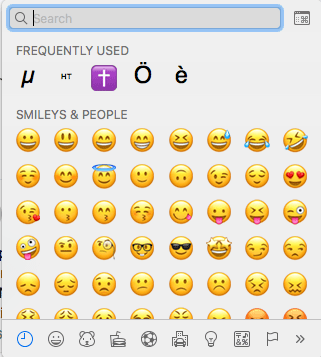
Learned new shortcut Command+Option+Space: shows the character viewer:

More of these at [WayBack] Mac keyboard shortcuts – Apple Support

There I learned about these Sleep, log out, and shut down shortcuts:

You might need to press and hold some of these shortcuts for slightly longer than other shortcuts. This helps you to avoid using them unintentionally.

  • Power button: Press to turn on your Mac or wake it from sleep. Press and hold for 1.5 seconds to put your Mac to sleep.* Continue holding to force your Mac to turn off.
  • Option–Command–Power button* or Option–Command–Media Eject : Put your Mac to sleep.
  • Control–Shift–Power button* or Control–Shift–Media Eject : Put your displays to sleep.
  • Control–Power button* or Control–Media Eject : Display a dialog asking whether you want to restart, sleep, or shut down.
  • Control–Command–Power button:* Force your Mac to restart, without prompting to save any open and unsaved documents.
  • Control–Command–Media Eject : Quit all apps, then restart your Mac. If any open documents have unsaved changes, you will be asked whether you want to save them.
  • Control–Option–Command–Power button* or Control–Option–Command–Media Eject : Quit all apps, then shut down your Mac. If any open documents have unsaved changes, you will be asked whether you want to save them.
  • Shift-Command-Q: Log out of your macOS user account. You will be asked to confirm. To log out immediately without confirming, press Option-Shift-Command-Q.

* Does not apply to the Touch ID sensor.

–jeroen

Read the rest of this entry »

Posted in Apple, Mac OS X / OS X / MacOS, macOS 10.12 Sierra, Power User | Leave a Comment »

VMware VMRC: connect to a remote console without the vSphere Client

Posted by jpluimers on 2021/06/21

Interesting tool: https://www.vmware.com/go/download-vmrc.

Back when scheduling this post in 2019, this was the most recent version: [WayBack] Download VMware vSphere: Download VMware Remote Console 10.0.4

From [WayBack] ovf – How to connect ESXi vm console from ESXi host console – Stack Overflow:

Example of vmrc.exe command :

"C:\Program Files (x86)\VMware\VMware Remote Console\vmrc.exe" vmrc://<ESXi host username>@<ESXi host IP>/?moid=<VM ID>

Basically it uses the vmrc scheme to start a connection to the remote screen for a specific MoRef ID. On ESXi, this is actually the VM ID that you get from vim-cmd vmsvc/getallvms. In that sense this is very similar to getting a single screenshot for the VM from the ESXi host by using the https://%5BHOST%5D:%5BPORT%5D/?id=%5BVM-MOREF%5D like described in ESXi and VMware Workstation: quick way of getting Console screenshots in PNG format; some URLs on your ESXi machine.


In MacOS, starting VMware Remote Console is slightly different as you have to start it through a URI using using the vmrc scheme from either a browser or with the open command on the console.

The reason is that there is no vmrc binary on MacOS.

  • [WayBack] Using VMware’s Standalone Remote Console for OS X with free ESXi | Der Flounder:

    vmrc://@[HOST]:[PORT]/?moid=[VM-MOREF]

    • HOST = the hostname or IP address of the ESXi server
    • PORT = the HTTPS port of the ESXi server, which is usually 443

    open 'vmrc://@server_name_here:port_number_here/?moid=vmid_number_here'

  • [WayBack] Standalone VMRC now available for Mac OS X:

    just provide the following URI which will prompt for your ESXi credentials

    vmrc://@[HOST]:[PORT]/?moid=[VM-MOREF]

    Once you have generated the VMRC URI, you MUST launch it through a web browser as that is how it is passed directly to the Standalone VMRC application. In my opinion, this is not ideal especially for customers who wish to automatically generate this as part of a VM provisioning workflow to their end users and not having to require a browser to launch the Standalone VMRC application. If you have some feedback on this, please do leave a comment.

    In the mean time, a quick workaround is to use the “open” command on Mac OS X along with the VMRC URI which will automatically load it into your default browser and launch the Standalone VMRC application for you.

    open 'vmrc://@192.168.1.60:443/?moid=vm-18'

On one of my test systems, for VMID 3 (see below), this comes down to this:

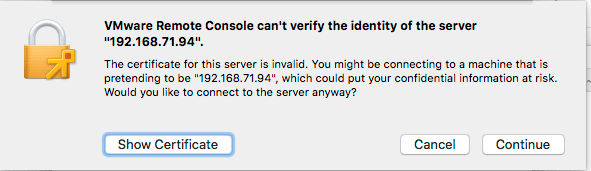
open 'vmrc://@192.168.71.94:443/?moid=3'

Note you have to accept the ESXi self generated TLS certificate once on MacOS:

After this, these processes were started (note there is no vmrc like on Windows):

± ps -ax | grep -i "\(vmware\|vmrc\)"
65239 ?? 0:04.15 /Applications/VMware Remote Console.app/Contents/MacOS/VMware Remote Console
65343 ?? 0:00.01 /Applications/VMware Remote Console.app/Contents/Library/services/VMRC Services 3 4
65360 ?? 0:00.16 /Applications/VMware Remote Console.app/Contents/Library/vmware-usbarbitrator
65363 ?? 0:00.01 /Applications/VMware Remote Console.app/Contents/Library/services/VMware USB Arbitrator Service 3 4
65393 ?? 0:01.29 /Applications/VMware Remote Console.app/Contents/Library/vmware-remotemks -@ vmdbPipeHandle=42; vm=_7FD2A461E8E0_3; gui=true -H 44 -R -P 2 -# product=256;name=VMware Remote Console;version=10.0.1;buildnumber=5898794;licensename=VMware Remote Console;licenseversion=10.0; -s libdir=/dev/null/Non-existing DEFAULT_LIBDIRECTORY
65872 ttys001 0:00.00 grep -i \(vmware\|vmrc\)

VM IDs (or VM-MOREFs)

You get the VM IDs using the vim-cmd vmsvc/getallvms command; they appear in the left column:

[root@ESXi-X9SRI-3F:/] vim-cmd vmsvc/getallvms
Vmid         Name                                 File                               Guest OS       Version   Annotation
1      Lampje             [EVO860_250GB] Lampje/Lampje.vmx                       opensuse64Guest    vmx-14              
3      X9SRI-3F-W10P-NL   [EVO860_250GB] X9SRI-3F-W10P-NL/X9SRI-3F-W10P-NL.vmx   windows9_64Guest   vmx-14    

Note that in practice, this is much harder so I wrote a script for that which you can find in VMware ESXi console: viewing all VMs, suspending and waking them up: part 1.

bundle files

I did not know about bundle files, but they seem to be sh scripts that precede a binary: [WayBack] What is a .bundle file and how do I run it? – Super User.

Inspecting such a files, shows it starts with this code:

#!/usr/bin/env bash
#
# VMware Installer Launcher
#
# This is the executable stub to check if the VMware Installer Service
# is installed and if so, launch it.  If it is not installed, the
# attached payload is extracted, the VMIS is installed, and the VMIS
# is launched to install the bundle as normal.

# Architecture this bundle was built for (x86 or x64)
ARCH=x64

if [ -z "$BASH" ]; then
   # $- expands to the current options so things like -x get passed through
   if [ ! -z "$-" ]; then
      opts="-$-"
   fi

   # dash flips out of $opts is quoted, so don't.
   exec /usr/bin/env bash $opts "$0" "$@"
   echo "Unable to restart with bash shell"
   exit 1
fi

–jeroen

Posted in Apple, ESXi6, ESXi6.5, ESXi6.7, Mac OS X / OS X / MacOS, macOS 10.12 Sierra, macOS 10.13 High Sierra, Power User, Virtualization, VMware, VMware ESXi, Windows, Windows 10, Windows 7, Windows 8, Windows 8.1 | Leave a Comment »

Some more G+ / Plexodus links

Posted by jpluimers on 2021/06/21

From a long time ago, in case I ever need them:

–jeroen

Posted in G+: GooglePlus, SocialMedia | Leave a Comment »

After the freenode to libera transition: openSUSE:IRC list – openSUSE Wiki

Posted by jpluimers on 2021/06/18

For my link archive: [Wayback] openSUSE:IRC list – openSUSE Wiki

–jeroen

Posted in *nix, Chat, IRC, Linux, openSuSE, Power User, SocialMedia, SuSE Linux | Leave a Comment »