The Wiert Corner – irregular stream of stuff

Jeroen W. Pluimers on .NET, C#, Delphi, databases, and personal interests

  • My badges

  • Twitter Updates

  • Pages

  • All categories

  • Enter your email address to subscribe to this blog and receive notifications of new posts by email.

    Join 1,854 other subscribers

Installing and updating Windows PowerShell – via Microsoft Docs

Posted by jpluimers on 2020/08/11

Since I keep forgetting that PowerShell is part of WMF (Windows Management Framework) and about the compatibility/installation matrix: [WayBack] Installing Windows PowerShell | Microsoft Docs:

The installation package for PowerShell comes inside a WMF installer. The version of the WMF installer matches the version of PowerShell; there’s no stand alone installer for Windows PowerShell.

If you need to update your existing version of PowerShell, in Windows, use the following table to locate the installer for the version of PowerShell you want to update to.

Windows PS 3.0 PS 4.0 PS 5.0 PS 5.1
Windows 10 (see Note1)
Windows Server 2016
installed
Windows 8.1
Windows Server 2012 R2
installed [WayBack] WMF 5.0 [WayBack] WMF 5.1
Windows 8
Windows Server 2012
installed [WayBack] WMF 4.0  [WayBack] WMF 5.0 [WayBack] WMF 5.1
Windows 7 SP1
Windows Server 2008 R2 SP1
[WayBack] WMF 3.0 [WayBack] WMF 4.0 [WayBack] WMF 5.0 [WayBack] WMF 5.1

To upgrade to WMF 5.0 from 4.0 you need to install .net 4.5 or later on your machine first. Then install WMF 5.0 RTM.

–jeroen

Posted in CommandLine, Development, PowerShell, PowerShell, Scripting, Software Development | Leave a Comment »

GitHub – blackrosezy/gui-inspect-tool: Gui Inspect tool for Windows

Posted by jpluimers on 2020/08/11

Old but useful: [WayBackGitHub – blackrosezy/gui-inspect-tool: Gui Inspect tool for Windows, a collection of Windows UI inspection tools:

  • AccEvent.exe
  • AccExplorer32.exe
  • Inspect.exe
  • SPYXX.EXE
  • swapy-ob-0.4.3.exe
  • UISpy.exe
  • ViewWizard.exe
  • WSEdit.EXE
  • swapy-ob-0.4.3.exe

–jeroen

Posted in Development, Software Development, Windows Development | Leave a Comment »

Stop Time Tracking, Start Value Tracking – Agility Scales

Posted by jpluimers on 2020/08/11

I need to give this some thought: [WayBack] Stop Time Tracking, Start Value Tracking – Agility Scales, via [WayBack] “Most people that I know would rather feel they are getting paid for value. But can we make that value measurable and visible? Let’s try!” – Marjan Venema – Google+.

Time tracking is a pain, but value tracking could be fun!

–jeroen

Posted in Agile, Development, Software Development | Leave a Comment »

VMware ESXi 6.5: “Failed – An error occurred during host configuration.” when starting the NTP service

Posted by jpluimers on 2020/08/10

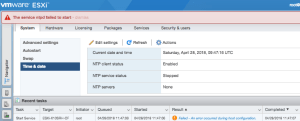
I tried repeating VMware KB: Configuring Network Time Protocol (NTP) on ESX/ESXi hosts using the vSphere Client in ESXi 6.5 using the web-client (the steps are very similar, see [WayBack] How to configure ESXi 6.5 Network Time Protocol (NTP) via Host Client? | ESX Virtualization).

It failed with the non-descriptive “Failed – An error occurred during host configuration.”:

Viewing the details isn’t of much help as you do not get extra information:

Read the rest of this entry »

Posted in ESXi6.5, Power User, Virtualization, VMware, VMware ESXi | Leave a Comment »

Remote access to the Embarcadero License Center via SSH tunnel – twm’s blog

Posted by jpluimers on 2020/08/10

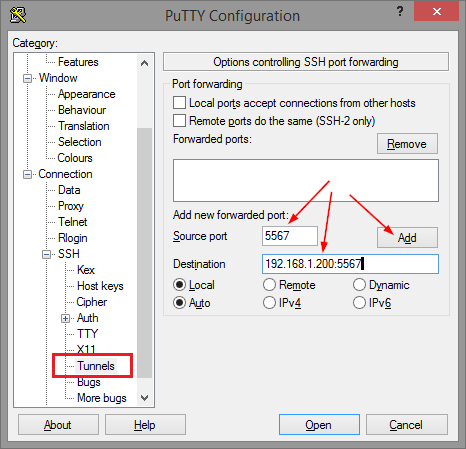
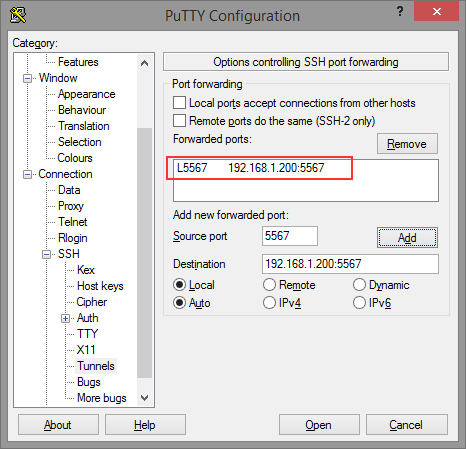
Thomas basically did all the research on the forwarding needed for ELC (formerly Belise/Elise), then showed the PuTTY equivalent to ssh user@remote -L5567:192.168.1.200:5567:

[WayBackRemote access to the Embarcadero License Center via SSH tunnel – twm’s blog

Via: [WayBack] Once you have set up an Embarcadero License Center (ELC) for your company (with network named user or concurrent licenses) you will need network access … – Thomas Mueller (dummzeuch) – Google+

Related: [WayBack] Introducing the Embarcadero License Center – ELC

–jeroen


Posted in *nix, Communications Development, Delphi, Development, Internet protocol suite, Licensing, Power User, Software Development, SSH, ssh/sshd | Leave a Comment »

On my research list: finding out how to prevent FortiClient to route all traffic over VPN

Posted by jpluimers on 2020/08/10

Links that will likely help me:

–jeroen

Read the rest of this entry »

Posted in FortiGate/FortiClient, Hardware, Internet, Network-and-equipment, Power User, routers, Security, VPN | Leave a Comment »

How-to Make Your Own 3D Printing Goo

Posted by jpluimers on 2020/08/07

Smart idea: [WayBack] How-to Make Your Own 3D Printing Goo.

It is a large (22g) Elmer’s glue stick dissolved into a cup of warm water.

After applying it with a paper towel, the 3D print sticks to the warm printing bed well, but comes off easily from a cold printing bed.

It is quite easy to make. 1 cup water and 1 large 22g Elmers glue stick. I put both in water and let sit thinking it would dissolve on its own. After several hours I got impatient and put it in the microwave and heated it.(45 seconds I think). That did the trick and was only left with a few big clumps that I broke apart with my fingers to finish the dissolving.

To apply I just dip a paper towel in the solution and wipe on the bed. It leaves an extremely light layer of glue on the bed that PLA sticks very well to. When the bed cools the parts have very light adhesion to the bed. If the bed is hot it takes some force to get off.

[WayBack] Elmer’s School Glue Naturals® 1 pack 22g Glue Stick | All Natural Glue

Via: [WayBack] Recipe to make goo for 3D printer bed.  – Jean-Luc Aufranc – Google+

–jeroen

Posted in 3D printing, Power User | Leave a Comment »

Working on High Quality Low Cost DIY 3D Scanning using Structured Light

Posted by jpluimers on 2020/08/07

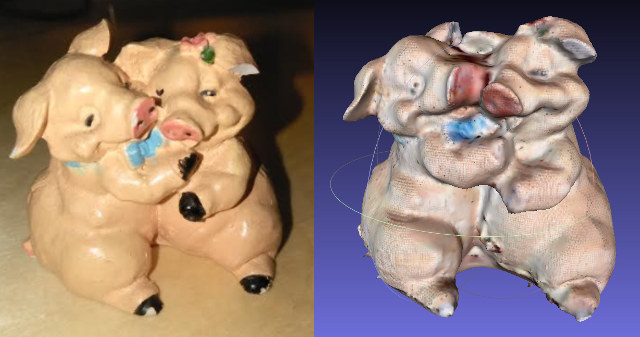
On my list of things to try: [WayBack] Working on High Quality Low Cost DIY 3D Scanning using Structured Light

Via: [WayBack] Karl has started looking into cheaper – yet accurate – DIY solutions for 3D scanning using structured light scanning… – Jean-Luc Aufranc – Google+

–jeroen

Posted in 3D printing, LifeHacker, Power User | Leave a Comment »

Friday Tip: create a permalink to a specific slide

Posted by jpluimers on 2020/08/07

[WayBackFriday Tip: create a permalink to a specific slide: just append / followed by the side number.

Same at [Archive.is] How to link to a specific slide on Slideshare – Quora

–jeroen

Read the rest of this entry »

Posted in LifeHacker, Power User | Leave a Comment »

How to rename git local & remote branches, and local & remote tags

Posted by jpluimers on 2020/08/06

Since I keep forgetting the difference and order between renaming branches and tags.

Note you need to repeat the origin steps for each remote!

[WayBack] How to rename git local and remote branches:

git branch -m old_branch new_branch # Rename branch locally
git push origin :old_branch # Delete the old branch
git push --set-upstream origin new_branch # Push the new branch, set local branch to track the new remote

Like tags below, be aware of the implications when renaming branches: if you pushed before other users already can have the old branch and have acted upon it.

[WayBack] git tag – How do you rename a Git tag? – Stack Overflow:

old^{}
git tag -d old
git push origin :refs/tags/old
git push origin refs/tags/new

Be aware, of the [WayBackimplications that a Git Tag change has to consumers of a package!

Note the first step is not just a plain git tag new old

The reason is that this will create a tag new pointing to the tag old, failing to point to the actual commit behind old. A more detailed explanation, including how to better handle renames, is at [WayBackgit tag – Why isn’t my tag listed when I checkout with Git GUI? – Stack Overflow

–jeroen

Posted in Development, DVCS - Distributed Version Control, git, Software Development, Source Code Management | Leave a Comment »