The Wiert Corner – irregular stream of stuff

Jeroen W. Pluimers on .NET, C#, Delphi, databases, and personal interests

  • My badges

  • Twitter Updates

  • Pages

  • All categories

  • Enter your email address to subscribe to this blog and receive notifications of new posts by email.

    Join 1,854 other subscribers

VDI driving me nuts

Posted by jpluimers on 2012/04/20

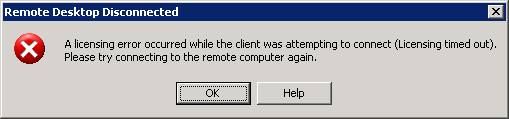
The VDI recently it is driving me nuts with sudden disconnects and messages like these after you have been connected for a couple of hours.

It all looks like there is some sort of Connectra thing in the middle that does deep packet inspection and randomly kicks out RDP or PCoIP sessions it doesn’t like, then doesn’t allow any new sessions to come in.

If I get a connection at all, now I always get a fresh VM, which – because they all are single core – take between 2 and 3 hours of getting below 100% CPU usage.

CcmExec.exeSMSCliUI.exe, and the svchost.exe instances for RpcSs and BITS hog the CPU scanning for updates and software installs for about about 25% of a working day.

Boy I wish there was something I could do about it.

---------------------------
Remote Desktop Disconnected
---------------------------
A licensing error occurred while the client was attempting to connect (Licensing timed out).
Please try connecting to the remote computer again.
---------------------------
OK Help
---------------------------

Read the rest of this entry »

Posted in Power User, Windows, Windows XP | Leave a Comment »

The Hitchhiker’s Guide to the Galaxy – Wikiquote

Posted by jpluimers on 2012/04/20

Found this out 9 days before my birthday: wikiquote.org: of course with the one of the most famous quotes from the Hitchhiker’s Guide to the Galazy:

almost, but not quite, entirely unlike tea

–jeroen (who won’t be 42 forever)

via: The Hitchhiker’s Guide to the Galaxy – Wikiquote.

Posted in About, LifeHacker, Personal, Power User | Leave a Comment »

.NET/C#: setting private fields and properties through reflection (via: .net – Is it possible to set private property via reflection – Stack Overflow)

Posted by jpluimers on 2012/04/19

The Stack Overflow question “Can I set a private property via reflection?” was answered “Yes, it is” with some good examples on how to set private fields and properties through reflection.

Recommended reading!

–jeroen

via .net – Is it possible to set private property via reflection – Stack Overflow.

Posted in .NET, C#, C# 2.0, C# 3.0, C# 4.0, Development, Software Development | Leave a Comment »

.NET/C#: Way overdue post – the syntax inside the Obsolete attribute; Looking for the new ConfigurationManager? (via: @ScottCate Blog Moved ….)

Posted by jpluimers on 2012/04/18

Everytime I get a warning like

Warning 1 'System.Configuration.ConfigurationSettings.AppSettings' is obsolete: 'This method is obsolete, it has been replaced by ConfigurationManager.AppSettings'

it reminds me I should have written a blog post about it, as the solution is a tiny bit more than just replacing System.Configuration.ConfigurationSettings.AppSettings by System.Configuration.ConfigurationManager.AppSettings.

Scott Gate wrote a nice post on his old blog about this (his new blog is awesome, he really should import his old posts into his new blog) that explains how to solve this well, so below is an elaboration on the how of the change, a tiny trick and a short series of steps to resolve this warning.

First of all, the above message means you are touching code that has been written in the .NET 1.x era, and the maintaining people (you! <g>) have been too lazy to solve the warning. That is bad, as your code should compile without warnings, and preferably without hints too. Read the rest of this entry »

Posted in .NET, C#, C# 2.0, C# 3.0, C# 4.0, Development, Software Development | Leave a Comment »

Migrating SQL Server 2000 ISQLW Utility to SQL Server 2008 R2 SSMS command-line parameters (SQL Query Analyzer; SQL Server Management Studio)

Posted by jpluimers on 2012/04/17

If you followed my blog, you probably already guessed that I’m assisting a client to prepare for a big SQL Server 2000 to SQL Server 2008 R2 migration. When not, you know now :)

I’m a fan of commandline, tools, and preconfigured settings. Which means that I’m in the midst of reconfiguring all my shortcuts to SQL Server 2000 tools to SQL Server 2008 equivalents.

When inspecting and changing LNK shortcut files, two tools are important:

  • dumplnk: dumps a shortcut lnk file from the commandline
  • shurtcut: creates a shortcut lnk file from the commandline

One of tools I many shortcuts for is the ISQLW aka SQL Query Analyzer, which I use far more than the SQL Server Enterprise Manager (more on SSEM in a future post).

Depending on the mode of authentication you use to connect to your SQL Server, there basically are two forms of shortcuts:

  • SQL Server Authentication (using SQL Server username and password):
    "C:\Program Files\Microsoft SQL Server\80\Tools\Binn\isqlw.exe" /S"servername[\instancename]" /U"username" /P"password"
  • Windows Authentication (using the credentials of the currently logged in windows user):
    "C:\Program Files\Microsoft SQL Server\80\Tools\Binn\isqlw.exe" /S"servername[\instancename]" /E

The former is less secure (so better to only store those shortcuts in a place that no other users can access).

From the ISQLW.exe syntax documentation:

Syntax

isqlw
[-?] |
[
[-S server_name[\instance_name]]
[-d database]
[-E] [-U user] [-P password]
[{-i input_file} {-o output_file} [-F {U|A|O}]]
[-f file_list]
[-C configuration_file]
[-D scripts_directory]
[-T template_directory]
]

The parameters /S, /U, /P and /E are very similar to the -S, -U, -P and -E ones from SSMS.exe (SQL Server Management Studio) with one distinction: there MUST be a space between each parameter and the value:

  • SQL Server Management Studio (using SQL Server username and password):
    "C:\Program Files\Microsoft SQL Server\100\Tools\Binn\VSShell\Common7\IDE\Ssms.exe" -S "servername[instancename]" -U "username" -P "password"
  • SQL ServerManagement Studio (using credentials for the currently logged in windows user):
    "C:\Program Files\Microsoft SQL Server\100\Tools\Binn\VSShell\Common7\IDE\Ssms.exe" -S "servername[instancename]" -E

Read the rest of this entry »

Posted in Batch-Files, Database Development, Development, Power User, Scripting, Software Development, SQL Server, SQL Server 2000, SQL Server 2005, SQL Server 2008, SQL Server 2008 R2, SQL Server 2012 | 5 Comments »

Please web-people, post screen shots as PNG, not JPEG!

Posted by jpluimers on 2012/04/16

Don’t post screen shots as low quality JPEG.

Use PNG, which results in smaller files and better looking images.

Not like ING did: no screen reader can help visually impaired, and it gives a very bad user experience to the rest of the world.

Low quality JPEG screen shot; someone at ING has been sleeping again.

–jeroen

Posted in LifeHacker, Power User, Usability, User Experience (ux) | 1 Comment »

MigrationWiz – Complete cloud-based mailbox migration solution for Microsoft Exchange Server, Microsoft Exchange Online , Office 365, Novell GroupWise, Lotus, Notes, Google Apps/Gmail, VMWare Zimbra, IMAP and POP systems

Posted by jpluimers on 2012/04/16

Something I might want to try soon:

Migrate mailboxes between Microsoft Exchange, Office 365, Novell GroupWise, Google Apps/Gmail, VMWare Zimbra, IMAP or POP systems.

Thanks Scott for mentioning this.

–jeroen

via: MigrationWiz – Complete cloud-based mailbox migration solution for Microsoft Exchange Server, Microsoft Exchange Online , Office 365, Novell GroupWise, Lotus, Notes, Google Apps/Gmail, VMWare Zimbra, IMAP and POP systems.

Posted in Power User | Leave a Comment »

Which “Posting categories” overview do you like most?

Posted by jpluimers on 2012/04/14

I’m experimenting with the Posting categories overview page as a prequel to a proper tag cloud (and a series of posts on how to get there).

Please let me know in the comments which of the below ones you like most:

  1. Left:
    HTML tree with post count per category
  2. Middle:
    HTML tree with font size indicating post count
  3. Right:
    HTML tree with post count per category and font size indicating post count

(For comparison, you need a big screen; the most popular choice will survive on the Posting categories page).

–jeroen

via: Posting categories « The Wiert Corner – irregular stream of Wiert stuff. Read the rest of this entry »

Posted in CSS, Development, HTML, Power User, SocialMedia, Software Development, Usability, User Experience (ux), Web Development, WordPress, WordPress | Leave a Comment »

Who has a Workaround for Windows XP “KB2509553 Setup Error: Setup cannot update your Windows XP files because the language installed on your system is different from the update language.”?

Posted by jpluimers on 2012/04/13

Recently I was at a site where the KB2509553 security update on Windows XP would not install because of this error, even after retrying a couple of times:

---------------------------
KB2509553 Setup Error
---------------------------
Setup cannot update your Windows XP files because the language

installed on your system is different from the update language.
---------------------------
OK
---------------------------

The error came from the Dutch version of Microsoft Update and the (also Dutch) Autoupdate inside Windows XP.

The solution that seemed easy didn’t work:

Manually download the Dutch version at the KB2509553 download page, and install that one.

Thanks Halima S for mentioning this on the Microsoft Answers site.

So: where should I start looking to get this security update installed?

–jeroen

Posted in Power User, Windows, Windows XP | Leave a Comment »

StdAux and StdPrn standard handles (was: The importance of error code backwards compatibility – The Old New Thing – Site Home – MSDN Blogs)

Posted by jpluimers on 2012/04/12

Coo, I never knew that MS-DOS had STDAUX and STDPRN, I only knew about PRN (I think it mapped to LPT1).

Don’t you love the old new thing :)

The standard MS-DOS file handles are as follows:

handle name meaning
0 stdin standard input
1 stdout standard output
2 stderr standard error
3 stdaux standard auxiliary (serial port)
4 stdprn standard printer

–jeroen

via: The importance of error code backwards compatibility – The Old New Thing – Site Home – MSDN Blogs.

Posted in Development, Power User, Software Development | Leave a Comment »