Posts Tagged ‘google’
Posted by jpluimers on 2013/01/19
I love Google:
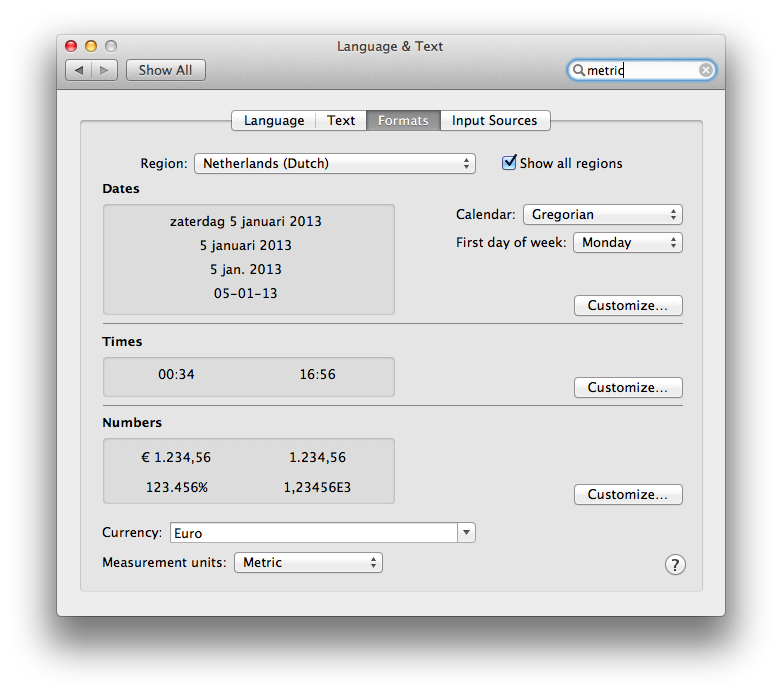
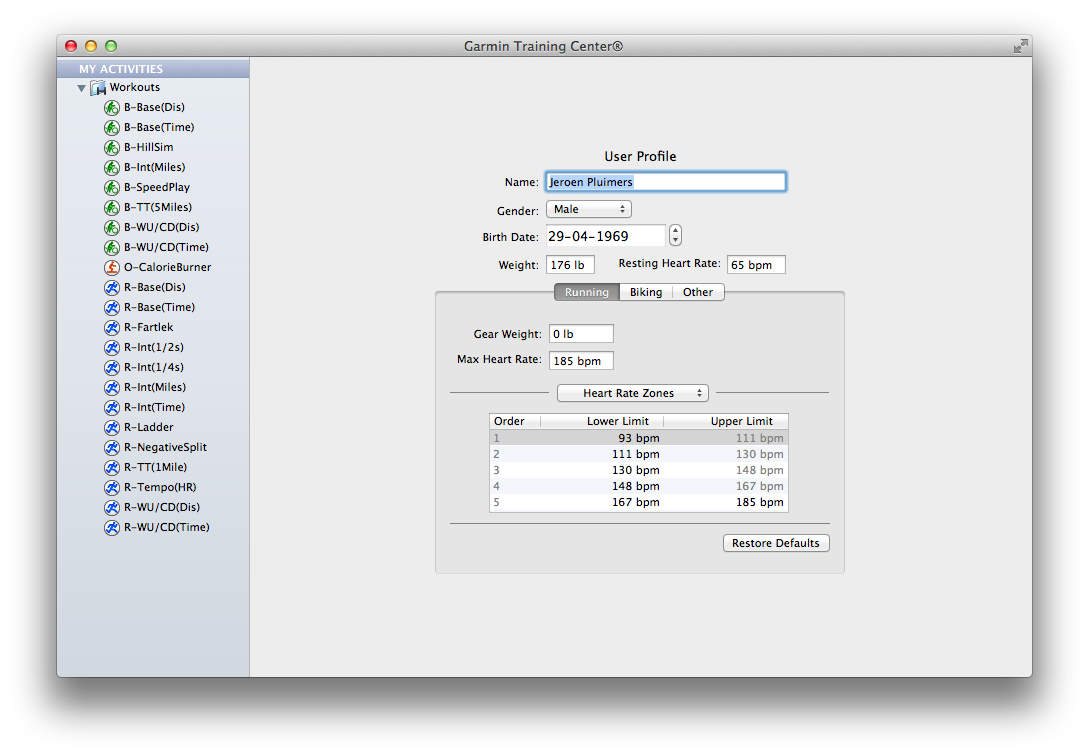
Especially since there is still software like Garmin Training Center for Mac on Mac OS X with – in the System Preferences – the Measurement Units set as Metric, insists on entering weight as lb, and workout distance in miles.
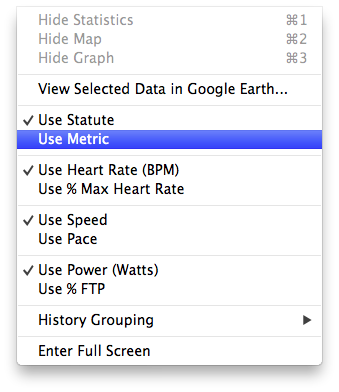
The reason is that Garmin Training Center on Mac OS X has its own “Measurement Units” settings. Where Mac OS lets the system wide setting be either “Metric” or ” US”, Garmin choose between “Metric” and “Statute” (the latter is default, not the OS X setting).
The problem is twofold:
Garmin has head offices and most of their customers outside the USA, so why insist on US units being default, and why not link the setting to the Mac OS X Preference?
UX #fail.
Oh BTW: if you connect your Garmin device, and GTC still indicates “no fitness device was found”, then use a different USB Cable and don’t connect it through a hub: the device is very picky on talking over USB (charging over USB works with virtually any USB cable).

Garmin Training Center on Mac OS X insists in imperial units, even though the system is configured as metric.

Garmin Training Center on Mac OS X has its own “Measurement Units” settings. Where Mac OS lets the system wide setting be either “Metric” or ” US”, Garmin choose between “Metric” and “Statute” (the latter is default, not the OS X setting).

Even after setting the Garmin Training Center to “Metric”, it still lists “Miles” in your workouts.
–jeroen
Posted in Google, GoogleSearch, Opinions, Power User, User Experience (ux) | Tagged: gadgets, garmin, google, imperial units, kg, mac os x, measurement units, metric, os x, software, system preferences, technology, workout | Leave a Comment »
Posted by jpluimers on 2013/01/05
A small quote from the very interesting TURKTRUST Incident Raises Renewed Questions About CA System | threatpost article:
“Subordinate certificates have long been identified as a point of weakness in the CA system. They are typically granted unconstrained power to issue certificates for any domain name. Thus, a leak of one subordinate certificate is seen as equivalent to a leak of authority equivalent to all CAs combined. Worse, subordinate certificates need not be explicitly trusted by the software that authenticates encrypted SSL connections typically your web browser. They inherit their trust from the explicitly trusted CAs that have been vetted by your browser vendor,” Steve Schultze, associate director of the Center for Information Technology Policy at Princeton University, wrote in an analysis of the TURKTRUST incident.
A CA (Certificate Authority) issues certificates, most of which are used for domain validation by web-browsers, email and applications. This allows you to make sure when you communicate with your bank (through a web browser or banking app on your phone) to verify the server of the bank is in fact the server of your bank. Or your email program really talks to the server of your email provider and not some intermediate that spoofs your mails.
If fraudulent certificates get issued for certain domains (sometimes specific like http://www.google.com, sometimes generic like *.yahoo.com, or *.*.com), then you cannot trust those domains any more, nor your communication with them. So communication with your bank could be intercepted and changed, thereby loosing money.
That’s exactly what happened in 2011 and late 2012:
The heart of the problem is twofold:
- if a CA somehow (by mistake, hacking or whatever) issues a rogue certificate, it takes a relatively long time to find out it is rogue. In the mean time, everyone trust the rogue certificate, and a lot of damage can be done.
- it takes a relatively long time for people to patch their systems making the window of opportunity even bigger (heck, I regularly see systems that have not been patched for months or years).
While a IETF proposal to log all intermediate and end-entity certificates tries to fix 1., make sure you fix 2. by keeping your systems patched.
–jeroen
via TURKTRUST Incident Raises Renewed Questions About CA System | threatpost.
Posted in Opinions | Tagged: browser vendor, ca certificate, ca certificates, certificate authority, domain validation, email provider, fake certificates, google, internet, software, ssl connections, technology, web browsers | Leave a Comment »
Posted by jpluimers on 2012/12/24
Just saw that Google Flights was introduce: for searching and booking flights online.
It needs some more work (see below), but it is a great start for a couple of reasons as compared to any of the competition I have seen:
- A much more intuitive and clutter-free user interface
- A blazingly fast response (SFO – AMS: response in about a second, all others took at least 10 seconds)
Try the user experience for yourself. A few things I liked:
- In addition to selecting preferred airlines, you can select preferred Airline Alliances
(they share miles anyway).
- Shows flight duration and allows you to sort on it
(ideal for business passengers)
- Shows if you can have WiFi
(for geeks like me)
- Uses hint-panes when you hoover the mouse over certain areas to fill in more detailed information
(like the airline that operates the flight, or the stops you make).
- Shows a graph with fare-rate over time
(so you can pick days with lowest fare more easily; the sweet spot for SFO-AMS seems to be 2-5 day trips that include a saturday/sunday night).
Some things they need to work on:
- You can search from USA to destinations outside USA, but not vice versa
(for instance, it finds SFO – AMS, but you are not allowed to enter AMS – SFO).
- You can enter IATA airport codes, but not ICAO ones (like EHAM)
- It is not included in the Google – Products list
(right now you can go from Flights to Web search, but not the other way around).
- It always starts with a departure in SFO
(it would make sense if you can select your faviourite departure airport; I live about 10 minutes from AMS / EHAM).
- It always starts with a departure date 16 days from now
(The last link is pun intended: it tests the Google search cache for refreshing pages that calculate information).
–jeroen
via: Flights from San Francisco – Google Search.
Posted in Google, GoogleFlights, Power User | Tagged: airline alliances, aviation, booking flights, business passengers, day trips, departure airport, departure date, eham, flight duration, google, google search, iata airport codes, lowest fare, preferred airline, preferred airlines, sweet spot, transportation, user interface | Leave a Comment »
Posted by jpluimers on 2012/12/18
As of December 3rd, 2012, a WordPress.com blog stat page (https://wordpress.com/#!/my-stats/) now shows unique visitors in addition to total views.
The hint for each bar even does the views per visitor math (seems to average around 1.25 views per visitor on this blog, will update this when a longer period has passed).
The Your Unique Visitors from the Blog at WordPress.com explains some more details.
–jeroen
Posted in Power User, SocialMedia, WordPress | Tagged: blogging, google, stat, technology, unique visitors, wordpress | Leave a Comment »
Posted by jpluimers on 2012/10/18
It seems quite a few people cannot access their GMail, but are able to access Plus, Contacts, Calendar, etc.
Only when accessing GMail, they get this:
| We’re sorry, but your Gmail account is temporarily unavailable. We apologize for the inconvenience and suggest trying again in a few minutes.If the issue persists, please visit the Gmail Help Center »Try Again Sign Out |
It happened to me about 90 minutes ago.
After doing the obvious (making sure I have a fresh browser without plugins, logged off the Google account, cleared cookies, restarted the browser, have Google send me a new 2 factor login code to my phone), I followed the GMail Help Center link, then filed a ticket at the please let us know link.
Hopefully this gets resolved soon…
–jeroen
Posted in GMail, Google, Power User | Tagged: error 500, gmail account, google, inconvenience, software, technology | Leave a Comment »
Posted by jpluimers on 2012/10/01
Because of a very busy project, I hadn’t watch the Icecast.org homepage for a while.
Well, this year they in fact did release some new versions that you’d think are purely maintenance releases but do have new stuff:
libShout 2.3.0 added WebM support, which is great, because it is a license free video format formerly known as VP-8 by On2/Google.
libShout 2.3.1 added Opus support, which is cool, because last month, IETF published it as a standard for use on the internet: RFC 6716 – Definition of the Opus Audio Codec.
Icecast 2.3.3 fixed quite a bit of security fixes, had some general bugfixes, allows for sources to be authenticated via URL (just like listeners can), and added support for VLCT playlists (that have much more meta information than M3U or PLS playlists).
(Hopefully Windows binaries get added soon).
Icecast 2.4 beta adds WebM and Opus support and a few bugfixes. Needs thorough testing though.
Ices 2.0.2 streams audio to Icecast, now supports RoarAudio and fixes a few bugs.
–jeroen
via: Icecast.org.
Posted in Media Streaming, Power User | Tagged: audio codec, bugs, google, internet rfc, listeners, m3u, maintenance releases, opus, playlists, pls, security fixes, software, streams, technology, webm | Leave a Comment »
Posted by jpluimers on 2012/09/30
Last week, Adobe launched the monospaced Open Source font [Wayback] Source Code Pro designed by [Wayback] Paul D. Hunt.
It is a follow-up of the (also designed by Paul) [Wayback] Source Sans Pro family of Open Source Fonts which got released early last month.
I did a quick look to see if it would get the same number of vertical lines as Lucida Console does at 8 points.
- Lucida Console: 50 lines
- Source Code Pro: 40 lines
Too bad, as the general font design is awesome.
One big missing thing is italic/oblique, which is often used in code editors. Hopefully a future version will include those.
For embedding source code examples in documentation, it is very legible, so I will keep it installed on my system.
You can try Source Code Pro yourself as well: it is available [Wayback] on SourceForge – that also hosts [Wayback] Open@Adobe – [Wayback] on GitHub, where you can fork it, as well as [Wayback] on Google Web Fonts, [Wayback] on typekit, and [Wayback] on WebINK.
–jeroen
via: [Wayback] Announcing Source Code Pro « Typblography.
Posted in Adobe Source Code Pro, Font, Lucida Console, Power User, Programmers Font, Typography | Tagged: adobe font, design, documentation, editors, font design, fonts, google, open source, software, sourceforge, technology, vertical lines, web fonts | 2 Comments »
Posted by jpluimers on 2012/09/24
Posted in Geeky, iOS, iPad, iPhone, iPod touch, LifeHacker, Opinions, Power User | Tagged: Apple, google, iOS6, Maps, technology | 1 Comment »
Posted by jpluimers on 2012/09/23
Frank Borland is back. You can meet him at Micro Focus now – they acquired Borland a while ago – where he relates to things from the past:
Frank Borland first appeared in advertisements and on the cover of the SideKick manual in 1984. Later on, Frank appeared in the first version of the Turbo Tutor manual.
He is talking about powerful and affordable, has Facebook as well as presence on LinkedIn, Twitter and Google+.
But I when I look at the MicroFocus product portfolio, I don’t see any that are both affordable and powerful.
Todays software days are different than 30 years ago, but I do agree with a couple of the points he made:
- Keep it open
- Don’t make it big, make it better
- Focus on the user experience
- Listen to the community
I don’t think you necessarily need to meet these two though:
- Meet every platform need
- Make it affordable
As those two tend to contradict each other.
What do you think?
–jeroen
via: » Frank’s Story Meet Frank Borland.
Posted in Agile, Delphi, Development, Opinions, Software Development, Testing, Unit Testing | Tagged: borland, business, computer, google, marketing, micro focus, product portfolio, technology, todays software, tutor, twitter | 21 Comments »
Posted by jpluimers on 2012/09/06
The problem with localized error messages often is that it is virtually impossible to find information about them.
For instance the below error got reported by a client for me to fix (click on the picture to get a larger version) has a few big problems:
 Read the rest of this entry »
Posted in Excel, Office, Power User, Windows | Tagged: ctrl c, english versions, error messages, file formats, google, message box, microsoft com downloads, microsoft office online, office excel, office microsoft, pleonasm, software, technology, zero results | 2 Comments »






 The Wiert Corner - irregular stream of stuff