The Wiert Corner – irregular stream of stuff

Jeroen W. Pluimers on .NET, C#, Delphi, databases, and personal interests

  • My badges

  • Twitter Updates

  • My Flickr Stream

  • Pages

  • All categories

  • Enter your email address to subscribe to this blog and receive notifications of new posts by email.

    Join 1,860 other subscribers

Archive for 2012

Cool app, wish I had known this 6+ months ago: AirDroid-Enjoy your Android Experience over the air

Posted by jpluimers on 2012/12/31

Boy, this free AirDroid App makes managing your Android so much more productive as you can do everything from the web-browser on your desktop.

The web-browser makes a secure connection to a small web-server on your Android device.

  • with full desktop screen resolution
  • upload files
  • send messages
  • install applications
  • manage contacts

Highly recommended!

–jeroen

via: AirDroid-Enjoy your Android Experience over the air.

Posted in Android Devices, Power User | Leave a Comment »

Getting localized translations of built-in Windows account names

Posted by jpluimers on 2012/12/31

A lot of scripts you find on the internet have hardcoded Windows account names or groups, for instance BUILTIN\Administrators

Those don’t work on many localized Windows versions, as part of the account names have been translated as well. Not only Administrators is translated, but BUILTIN can be translated too. Basically, expect everything in Windows to be translated as part of the localization process.

Some people keep translations lists, but that is not the real solution.

The real solution is that each such group, account or other identifier stems from a SID or Security ID.
Many of those SIDs are the same on any machine, or structured the same within a domain.
Microsoft has a list of these called Well-known security identifiers in Windows operating systems.

That list isn’t in a format most Windows tools use it, so I generated the list below that is more suitable.

The list below is based on a Windows 7 machine. Other versions or editions give slightly different results, but it is a good start.

At the bottom is the batch file that I used to generate this table. That file is adapted from the Microsoft list above.

The batch file depends on a few tools and tricks: Read the rest of this entry »

Posted in Batch-Files, Development, Power User, Scripting, Software Development, Windows, Windows 7, Windows 8, Windows Server 2000, Windows Server 2003, Windows Server 2003 R2, Windows Server 2008, Windows Server 2008 R2, Windows Vista, Windows XP | 1 Comment »

openSUSE 12.x: “A plain `halt` will not shutdown the system properly.”

Posted by jpluimers on 2012/12/30

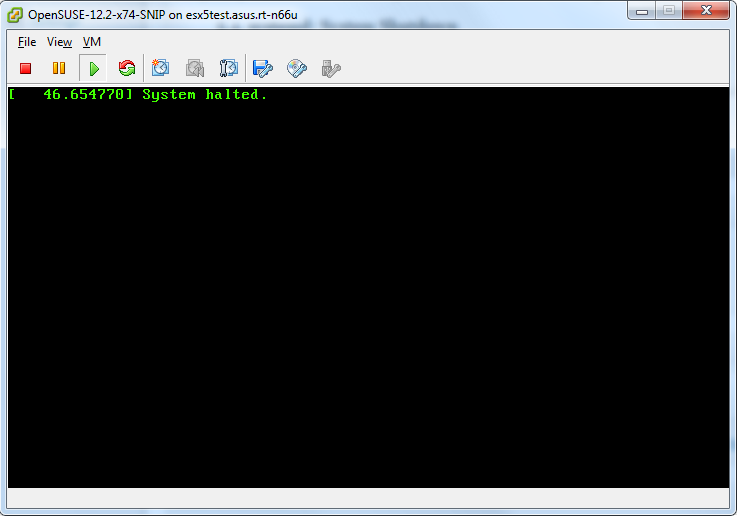
Just noticed that in openSUSE 12.x, A plain halt will not shutdown the system properly.
On my system, it would leave the screen as shown on the right:

Only halt -p works, none of the other hints in the shutdown does not power off thread work, nor the acpi=off or acpi=oldboot settings.

The odd thing: a plain reboot still works properly.

If someone knows a better workaround: please let me know in the comments.

I hope they will fix this in a future openSUSE version; at least for 12.1 they have a “CHECKIT” marker in the documentation, but it has disappeared as of the 2.3 docs, but still fails:

5.4. systemd: System Shutdown

CHECKIT for 12.3. Is this entry still required?

To halt and poweroff the system when using systemd, issue halt -p or shutdown -h now on the command-line or use the shutdown button provided by your desktop environment.

Note: A plain halt will not shutdown the system properly.

Luckily, my openSUSE is a VM, which I can reboot from the ESXi host.
On a physical system, you will end up without any option to resurrect the system.

Later

After installing antivir, a plain halt works sort of: it says it is halted, but ESXi still thinks it is not:

After installing antivir, a plain halt works.

After installing antivir, a plain halt appears to work, but it doesn’t.

ESXi is sure the system didn't actually power down.

ESXi is sure the system didn’t actually power down.

–jeroen

Posted in *nix, Linux, openSuSE, Power User, SuSE Linux | Tagged: , , , , , , , , , , , , , | 4 Comments »

Tyvek is not to be recycled with paper, and should be recycled with plastic

Posted by jpluimers on 2012/12/30

I see a lot of people throwing Tyvek envelopes and sheets in the recycled paper bins.

Don’t do that!

Since Tyvek is a plastic, you should recycle it as such: Read the rest of this entry »

Posted in LifeHacker, Power User | Tagged: , , , , | Leave a Comment »

WordPress.com silently fixed the “tab order broken” issue. Thanks!

Posted by jpluimers on 2012/12/29

WordPress.com silently restored the Please restore the tab order the way it worked 2 weeks ago problem.

I wished they’d send update notifications on those fixes (it seems the underlying ticket 21340 was fixed about 2 months ago in changeset 22250 when I was on a long holiday), so I’m glad to announce it works again.

Even better: you don’t need the tab key to go from “Edit” next to “Publish immediately” into the Month field:
When you press “Edit” the focus automagically shifts to the Month field.

Thanks!

–jeroen

Posted in SocialMedia, WordPress | Tagged: , , , , , | Leave a Comment »

Nice! @Flickr holiday gift: 3 months of Pro membership…

Posted by jpluimers on 2012/12/29

Just got my free Flickr holiday gift: 3 months of Pro membership.

If you have a free Flickr account, it will give you three months of Pro to try it.

Yay!

You have now activated your Flickr Holiday Gift.

We’ve extended your Flickr Pro subscription for an additional 3 months at no charge.

Your Pro Account expires on 16th December, 2013

–jeroen

Posted in About, Flickr, Personal, Power User, SocialMedia | Tagged: , , | Leave a Comment »

Excel Grid lines: How do you make Excel print those cell lines? – AfterDawn: Forums

Posted by jpluimers on 2012/12/28

One thing I always forget (especially since the UI in Office 2007 changed quite a bit, but the idea below gets me going).

I’m assuming you want to print the grid…

  1. File > Page Setup,
  2. then go to the Sheet tab.
  3. On that page, under Print, there’s a checkbox called “Gridlines”.

–jeroen

via How do you make Excel print those cell lines? – AfterDawn: Forums.

Posted in Excel, Office, Power User | Leave a Comment »

Wow, Comment SPAM is just like how politicians talk: use loads of sentences, but say nothing.

Posted by jpluimers on 2012/12/26

If recent comments like below are flagged automagically as SPAM, then any political info will get auto-flagged as SPAM too (:

There are actually loads of details like that
to take into consideration. That may be a nice point to convey up.
I offer the thoughts above as common inspiration but clearly
there are questions just like the one you deliver up where an important factor will likely be
working in sincere good faith. I don?t know if finest practices have
emerged around issues like that, but I am sure that your job is
clearly identified as a good game. Both boys and girls really feel the impact of
just a second’s pleasure, for the remainder of their lives.

–jeroen


Posted in Opinions | Tagged: | Leave a Comment »

.NET/C#: use Assembly.GetName() if you to access internal/private information from Assembly

Posted by jpluimers on 2012/12/26

There is a lot of information in Assembly that is either internal or private. Luckily you van get an AssemblyName instance through Assembly.GetName() or Assembly.GetName(Boolean) which has quite a few public members that get initialized while calling the internal AssemblyName.Init method.

This is the member mapping of AssemblyName members to Assembly members:

AssemblyName member Assembly member
Name GetSimpleName() *internal
GetPublicKey() GetPublicKey() *internal
GetPublicKeyToken() null
Version GetVersion() *internal
contains the AssemblyVersionAttribute of the assembly
CultureInfo GetLocale() *internal
HashAlgorithm GetHashAlgorithm() *private
VersionCompatibility AssemblyVersionCompatibility.SameMachine
CodeBase GetCodeBase(Bool) *internal
Flags GetFlags() | AssemblyNameFlags.PublicKey
KeyPair null
ProcessorArchitecture complex set of calls

–jeroen

via: Assembly.GetName Method (Boolean) (System.Reflection).

Posted in .NET, .NET 3.5, .NET 4.5, ASP.NET, C#, C# 1.0, C# 2.0, C# 3.0, C# 4.0, C# 5.0, Development, Software Development | Leave a Comment »

Re-adding a user to SQL Server 2000 and up when it was Orphaned

Posted by jpluimers on 2012/12/25

In SQL Server 2000 and up, the easiest way to re-add a user that got orphaned is with a script like below.

The script does not correct the SID, but in stead sets new permissions (in this case, db_datareader and db_datawriter). Most of the times that is not a problem.

The script uses these stored procedures:

  1. sp_dropuser – drops a user from the current database
  2. sp_droplogin – drops a login from the current server
  3. sp_addlogin – adds a login to the database server
  4. sp_adduser – adds a user to the current database (you can add both a SQL user – with name and password – and a Windows user)
  5. sp_addrolemember – adds a member to a certain role

More modern versions have alternatives to these stored procedures, but the stored procedures work with the widest ranges of SQL Server versions.

-- Execute this script as SA or DB Administrator

use MyDatabase -- the databae where you want the user to be re-added to

-- you cannot perform a 'use [MyDatabase]' without destroying the context (and declared variables)
-- http://stackoverflow.com/questions/9165513/sql-server-change-current-database-via-variable
-- it is possible with exec (@exec_stmt) (as sp_droplogin does it), but it is a bit cumbersome for a relatively simple script

declare @loginname sysname
declare @passwd sysname

set @loginname = 'MyUser'
set @passwd = 'MyPassword'

-- from current database
exec sp_dropuser @loginname

-- from server
exec sp_droplogin @loginname

-- to current server
exec sp_addlogin @loginname, @passwd

-- to current database
exec sp_adduser @loginname

-- roles to add the user to
exec sp_addrolemember db_datareader, @loginname
exec sp_addrolemember db_datawriter, @loginname

If the user didn’t exist in the database, or didn’t exist as a login on the server, you can get two errors like these: Read the rest of this entry »

Posted in Database Development, Development, SQL Server, SQL Server 2000, SQL Server 2005, SQL Server 2008, SQL Server 2008 R2, SQL Server 2012, SQL Server 7 | Leave a Comment »