


Often I want to execute a TF.exe from the console, but don’t have the Visual Studio environment variables setup. Most of the times I want to run TF.exe from the most current Visual Studio installation, hence this TF.bat file figures out the location of it, then runs with the parameters passed to TF.bat: Read the rest of this entry »
Archive for April, 2015
Find an installed tf.exe, then run it with the command-line parameters specified.
Posted by jpluimers on 2015/04/30

Posted in .NET, Development, Software Development, Visual Studio 11, Visual Studio 2005, Visual Studio 2008, Visual Studio 2010, Visual Studio 2013, Visual Studio 2014, Visual Studio and tools | 1 Comment »
The Clickjacking attack, X-Frame-Options
Posted by jpluimers on 2015/04/29
Front-end web development isn’t my core area of expertise, but every now and then I am slightly more than the usual spectator and do get involved.
This case it was about helping to prevent The Clickjacking attack by using the The X-Frame-Options response header from RFC 7034.
Lots of people seem to have questions about it: Highest Voted ‘x-frame-options’ Questions – Stack Overflow.
So, from The X-Frame-Options response header:
There are three possible values for X-Frame-Options:
DENY- The page cannot be displayed in a frame, regardless of the site attempting to do so.
SAMEORIGIN- The page can only be displayed in a frame on the same origin as the page itself.
ALLOW-FROM uri- The page can only be displayed in a frame on the specified origin.
–jeroen
via:
- The Clickjacking attack, X-Frame-Options | JavaScript Tutorial.
- The X-Frame-Options response header – HTTP | MDN.
- RFC 7034 – HTTP Header Field X-Frame-Options.
Share this:
Posted in Development, Software Development, Web Development | Leave a Comment »
Some interesting demographics on the G+ Delphi Developers community
Posted by jpluimers on 2015/04/28
Stefan Glienke started some interesting demographics polls on the G+ Delphi community.
Demographics are about group members that actually voted. Which might rule out Delphi programmers not writing English well.
Despite that, I think it actually tells a lot, especially when you read the comments as well.
And it made DavidI provide some background on the geographic distribution: Where in the world are programmers using Delphi? – Blogs.
–jeroen
Share this:
Posted in Delphi, Development, Software Development | 3 Comments »
CRC: The C Stands for Confusion (quotes from the Dr Dobb’s article)
Posted by jpluimers on 2015/04/28
The CRC algorithm isn’t hard, but choosing the right polynomial and parameters can be tricky especially since there are so many permutations to choose from and lots of libraries have made their own (often incompatible) choices.
A few quotes
Basics: Read the rest of this entry »
Share this:
Posted in Algorithms, Development, Software Development | Leave a Comment »
P2V of an existing XP machine to Hyper-V to have an emergency fallback when retiring old XP physical machines
Posted by jpluimers on 2015/04/27
Edit 20210727:
- A lot of the links below have died due to link rot (sometimes even the domains have gone), but most of the WayBack machine links marked [Wayback] still work.
- The same stop [Wayback] stop
0x0000007Bcan happen when converting a physical machine to VMware (I will schedule a separate post about this):Windows XP Virtual Machine failing with stop 0x0000007B
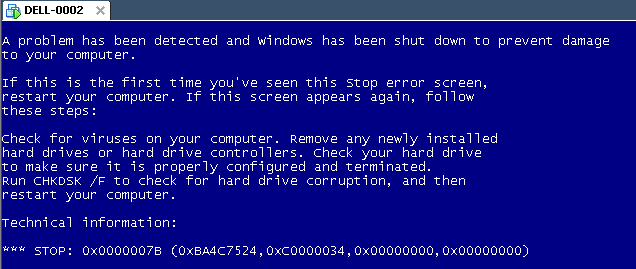
Steps:
- Put the SATA disk of the XP machine in a different one.
- Disk2Vhd on the new machine to create a VHDX of the XP hard disk.
- Install Hyper-V on the target Windows 8.1 machine (you need at least Pro for that).
- Setup the base VM directory.
- Setup a virtual network switch (decide if you want it to be internal, external or private, then bind it to a network adapter if needed).
- Add a new VM.
- Assign a new directory to it.
- Assign memory to it.
- Assign the virtual network switch to it.
- Save it.
- Edit the settings, then bind the DVD drive on the IDE controller 1 to C:\Windows\System32\vmguest.iso.
- Connect to the VM.
- Start it.
- If you get a stop
0x0000007B(usually because of SATA/AHCI/IDE or other MassStorage controller driver issues), then read [Wayback] Jon’s Project Blog » disk2vhd using [Wayback] UBCD for Windows to solve the issue as there is no BIOS screen in Hyper-V that allows you to switch from AHCI to SATA and back. - Note: you cannot perform UBCD4Win when you access the Hyper-V host through Microsoft Remote Desktop (the mouse will not work at all, and most keyboard shortcuts will not work either; [Wayback] Virtual Machine Connection Key Combinations with Hyper-V – Ben Armstrong – Site Home – MSDN Blogs does not apply).
- Boot.
- Register Windows (you might need to do extra work to go from OEM to Retail here).
- Remove hidden devices that are not used any more and their drivers.
- Setup a backup schedule.
Some links that helped me get at these steps:
- [Wayback] How to convert a Physical Machine to a Hyper-V Virtual Machine P2V | Xyfon Solutions Tech Tips.
- [Wayback] Disk2vhd.
- Remove hidden devices: [Wayback] Hyper-V P2V using Disk2vhd | The Full Circle.
- [Wayback] Jon’s Project Blog » disk2vhd: Migrating old XP+ computers to virtual machines.
- [Wayback] [SLV] Win2K BSOD 0X7B PCI\VEN_1002&DEV_4390&SUBSYS_B0021458 Page 1 – DriverPack Mass Storage – DriverPacks.net Forum.
- UBCD:
- [Wayback] Virtual Machine Connection Key Combinations with Hyper-V – Ben Armstrong – Site Home – MSDN Blogs.
- [Wayback] Using the Hyper-V Integration Components in WinPE – Mike’s Blog, or how I learned to love the virtual machine… – Site Home – MSDN Blogs.
- [Wayback] How to configure Hyper-V VM boot order – TechRepublic.
- Don’t try Kensho, as it is virtually impossible to get a VHDX for it: [Wayback?] Cannot download Kensho OVF Tool – Page 2 – Project Kensho – Discussions.
- [Wayback] How I fixed my 0x0000007B problem – Sysinternals Forums.
- [Wayback] P2V Migration Issues with Hyper-V: STOP: 0x0000007B – Code Break – Site Home – TechNet Blogs.
- [Wayback] Disk To VHD VM failed to boot error 0x000007B.
- [Wayback?] P2V – Converting your old machines, or: how to get rid of 0x0000007B | Nuvotex Geekhouse.
- [Wayback] How to get boot menu on Hyper-V VMs (you can’t).
- [Wayback] Hyper-V: P2V with Disk2VHD – TechNet Articles – United States English – TechNet Wiki.
- [Wayback] After installing Hyper-V Integration Services on the next reboot the VM displays BSOD 0x0000007B – Hyper-V notes from the field – Site Home – MSDN Blogs.
- [Wayback] Hyper-V backup software for Microsoft Hyper-V by Altaro.
- [Wayback] Using Disk2VHD for Hyper-V P2V Physical to Virtual Conversions.
- [Wayback] How to Change Windows XP Version Between Retail, OEM and Volume License Channel « My Digital Life.
- [Wayback] Creating a Windows XP OEM Virtual Machine | Rafik Wahba.
- [Wayback] How to Perform a Windows XP Repair Install.
- Converting OEM to Retail (note: you need the CD in the same language as your Windows installation): [Wayback] Repair Windows XP by Performing a Repair Install Part 1 of 2.
- This doesn’t work to upgrade OEM to Retail on Windows XP: [Wayback] Update your Windows product key – Microsoft Windows.
–jeroen
Share this:

Posted in BIOS, Boot, Hyper-V, Internet, link rot, Power User, Virtualization, Windows, Windows 8, Windows 8.1, Windows XP, WWW - the World Wide Web of information | Leave a Comment »
Building a better 3D printer (with software!) with OctoPrint’s Gina Häußge on the Hanselminutes Technology Podcast: Fresh Air for Developers
Posted by jpluimers on 2015/04/24
Interesting podcast:
Scott talks to Gina Häußge, creator of OctoPrint. In very short order OctoPrint has gone from a small side project to Gina’s full time open source job!
OctoPrint gives your 3D Printer:
- a camera,
- a print queue,
- visualizers,
- temperature control and
- much more!
Gina shares her journey in this Maker episode.
You can even request new features.
–jeroen
Share this:
Posted in 3D printing, Power User | Leave a Comment »
PowerShell reads: links to coverage of One-Liners about PowerShell features (using, language, etc)
Posted by jpluimers on 2015/04/23
Boy, I wish I had read these PowerShell articles earlier:
- PowerShell One-Liners: Help, Syntax, Display and Files.
- PowerShell One-Liners: Variables, Parameters, Properties, and Objects.
- PowerShell One-Liners: Collections, Hashtables, Arrays and Strings.
- PowerShell One-Liners: Accessing, Handling and Writing Data.
Besides being in depth, the articles also contain a ton of examples all in this form:
| Action | Command | Example |
| Basic help for x | Get-Help cmd (cmd is a full name) | help Get-ChildItem |
| Help in separate window | Show-Command cmd; then select the help icon | Show-Command Get-ChildItem |
–jeroen
Share this:
Posted in CommandLine, Development, PowerShell, Software Development | Leave a Comment »
Delphi XE8 things I learned from the second week of G+ reading
Posted by jpluimers on 2015/04/22
General XE8 news:
- Delphi Library Guidelines | The Art of Delphi Programming.
- DST issue when converting DateTime: Can someone point me to the problem? I have this code: var dt, dt2:….
- Delphi is not a cross-compiler, but a set of cross-compilers – Synopse.
- Delphi IDE Colorizer Now supports RAD Studio XE8 | The Road to Delphi.
- Castalia even breaking on code pasting: How can I disable Castalia in XE8?.
- Confusion about recharge and other subscriptions: Anyone here bought a license recharge for Delphi XE7? If so, any options from….
(on my opinion: when Embarcadero heavily discounts the current Delphi version, then you need to start thinking about your ordering/subscription; they do about 2 rounds per year on this). - There covariance and contravariance in Delphi? On the brittle built-in Generic Collections (Spring4D is much better) and the variance/covariance issues.
- The History of Castalia. Or how it filled the gap that CodeRush for Delphi left behind. (And is about as stable).
- JSON and REST issues: Delphi XE8 has a bug in tjson.ObjectToJsonObject ! same source in XE7 marshall….
- Delphi code of the day: function UTF8ToString(const S: array of Byte): string;….
Components/tools/libraries updated to XE8:
- Modelmaker Code Explorer 11.2.0 has XE8 support.
- Modelmaker 11.8.0 has XE8 support.
- Delphi Dev. Shell Tools Supports RAD Studio XE8.
- All the Mitov Software’s Delphi and C++ Builder libraries….
- The Mitov.Runtime library has been updated to support Delphi XE8….
- Delphi in disguise: Appmethod 1.16 Spring Release – Now Available! – Appmethod Blog.
- Livebindings alternative: The OpenWire has been updated to version 7.6 on Sourceforge.
- TMS Cloud Pack v2.9 ( http://www.tmssoftware.com/site/cloudpack.asp ) released….
- A new version of #UniDAC is available..
- The RAD Studio IDE plugin DDevExtensions 2.83 for XE8 is now available.
- MadExcept 4 for XE8 has been officially release and can be found at http://madshi.net/.
–jeroen
via:
Share this:
Posted in Castalia, Delphi, Delphi XE8, Development, Software Development | 1 Comment »
Coding Kata videos: Bowling game
Posted by jpluimers on 2015/04/22
A long and shorter while ago, I wrote about practicing your coding and test driven development skills:
- Cyber-Dojo: practice unit-tested programming in pairs/groups using Katas.
- RosettaCode: cool way to improve your coding skills.
Here are some Coding Kata videos of the Bowling Game Kata in various languages and environments. Some of them are dumb (no audio) just like good practice usually is. Note: it helps to know a bit about 10 Pin Bowling Scoring rules.
- Bowling Game – Ruby – YouTube.
- Bowling Game – Python – YouTube.
- Bowling Game – Java – YouTube.
- [TDD] Bowling Game Kata – YouTube (also Java).
- Bowling Game – C# – YouTube.
- Bowling game kata in Delphi and DUnit TDD – YouTube.
And since I want to learn Haskell and have done a lot of Tic-Tac-Toe demos inthe past:
For more background information:
–jeroen
Share this:
Posted in .NET, C#, C# 1.0, C# 2.0, C# 3.0, C# 4.0, C# 5.0, C# 6 (Roslyn), Development, Java, Python, RemObjects C#, Ruby, Software Development | Leave a Comment »
Delphi on Windows x64: solution when project compiles fine under IDE, but not using MSBuild
Posted by jpluimers on 2015/04/21
Especially when using Delphi 2007 on Windows x64 system (8.x, 7, Vista, 2012 Server, 2008 Server, …), the Delphi specific .Targets files used by msbuild are simply installed to the wrong location.
A better warning for this is in my BeSharp.net repository: Run-Dependend-rsvars-From-Path.bat thanks to David Millington who wrote this:
If you copy
- Borland.Common.Targets
- Borland.Cpp.Targets
- Borland.Delphi.Targets
- Borland.Group.Targets
from
- %windir%\Microsoft.NET\Framework\v2.0.50727
to
- %windir%\Microsoft.NET\Framework64\v2.0.50727
then building via the command line works.
The rsvars.bat file is correct.
Note that my batch file checks for all target file sets:
Delphi 2007:
set requiredTargets=Borland.Common.Targets Borland.Cpp.Targets Borland.Delphi.Targets Borland.Group.Targets
Delphi 2009 and up:
  set requiredTargets=CodeGear.Common.Targets CodeGear.Cpp.Targets CodeGear.Delphi.Targets CodeGear.Deployment.Targets CodeGear.Group.Targets CodeGear.Idl.Targets CodeGear.Profiles.Targets
  if %bdsVersion%==8 set requiredTargets=CodeGear.Common.Targets CodeGear.Cpp.Targets CodeGear.Delphi.Targets CodeGear.Group.Targets CodeGear.Idl.Targets
  if %bdsVersion%==13 set requiredTargets=CodeGear.Common.Targets CodeGear.Cpp.Targets CodeGear.Delphi.Targets CodeGear.Deployment.Targets CodeGear.Group.Targets CodeGear.Profiles.Targets
–jeroen
via [WayBack] QualityCentral: Project compiles fine under IDE, but not using MSBuild.
Share this:
Posted in Delphi, Delphi 2007, Delphi 2009, Delphi 2010, Delphi x64, Delphi XE, Delphi XE2, Delphi XE3, Delphi XE4, Delphi XE5, Delphi XE6, Delphi XE7, Development, QC, Software Development | 3 Comments »
 The Wiert Corner - irregular stream of stuff